Cashless Payment Costs and Fees for Small Shops (2026)
Cashless payment in Japan costs ¥0 to tens of thousands of yen upfront, with fees of 2-3.5%. Compare terminals, simulate fees on ¥1M sales, check payouts.
Cashless payment means accepting payment without cash — through credit cards, e-money, QR codes, contactless payment and similar methods. The short answer: for small businesses in Japan, upfront cost is typically ¥0 to a few tens of thousands of yen for hardware, and many services charge no monthly fee. The ongoing cost is the transaction fee, usually around 2% to 3.5% of the amount paid cashlessly (a rough guide as of 2026; actual terms vary by contract and payment method). Payout timing ranges from the next business day to about twice a month, and it matters for cash flow as much as the fee rate does. This article is written for non-IT owners and managers and covers the types of implementation, real fee simulations, easily overlooked costs and how to choose by industry.
All amounts and rates below are general ranges, not guarantees for any specific provider. Always confirm the latest terms on each provider's official website.
Types of cashless payment — four methods
Customers use roughly four kinds of cashless methods. Which ones you support determines the equipment you need and how fees work.
- Credit cards (Visa, Mastercard, JCB, etc.): The most widely used, and especially important for higher-priced businesses. Fees are typically around 3% or more as a guide.
- E-money (transit IC cards, iD, QUICPay, etc.): Suited to retail and food service with many small purchases. Fees range roughly from 2% to 3.5%, and transit IC cards can follow a separate fee structure.
- QR code payments (PayPay, d-barai, Rakuten Pay, etc.): Some setups need no terminal, only a displayed QR code. Fees are roughly in the 1.6% to 3.5% range.
- Contactless payment (cards and smartphones): Customers simply tap a card or phone, which speeds up checkout. It is effectively a type of card payment, and fees generally follow card rates.
Most payment services let you accept all of these with one terminal and one contract. However, rates can differ by method, so check a list of which methods you can accept and at what percentage.
In the past, the government ran point-reward programs for cashless payments, but those have ended. Today you should estimate your own fee burden against the customers you expect to attract, rather than assuming subsidies.
Comparing implementation types — features and cost ranges
There are four main ways to implement it. For small shops, smartphone/tablet-based services are often the first option considered.
- Smartphone/tablet-linked payment services: A small card reader connects to your phone or tablet. Low upfront cost and quick to start.
- Countertop payment terminals: A dedicated device placed beside the register. Connectivity tends to be stable and it suits shops with many checkouts, but there may be terminal or monthly fees.
- POS-integrated systems: Register and payment in one. Sales, inventory and accounting integration reduce manual work. Costs are higher, but errors drop. See POS register costs for details.
- Online payment (for e-commerce and booking sites): Used for prepayment and online sales. No in-store terminal is needed; often only a fee on sales applies, though some services also charge monthly.
| Type | Upfront cost (guide) | Monthly cost (guide) | Fee rate (guide) | Payout cycle (guide) |
|---|---|---|---|---|
| Smartphone/tablet-linked | About ¥0–20,000 (reader) | Mostly ¥0 | About 2.5–3.5% | Twice a month to next business day (fees may apply for faster payout) |
| Countertop terminal | About ¥0–50,000 (free rental available) | ¥0 to a few thousand yen | About 2.5–3.5% | About 2–6 times a month, or next business day |
| POS-integrated | ¥0 to several hundred thousand yen (incl. devices) | A few thousand to ¥10,000+ | About 2.5–3.5% (via POS vendor) | Varies by service |
| Online payment | ¥0 to tens of thousands (setup) | ¥0 to a few thousand yen | About 3.0–3.6% | Often 1–2 times a month |
This table is only a guide. Even when "no upfront cost" is advertised, you may need to buy a reader separately, or faster payouts may be a paid option. Before signing, compare the total: upfront cost + monthly fee + transaction fees + extras.
Real fee simulations — what you actually pay per month
The fee is calculated as payment amount x fee rate. That is, it applies only to the cashless portion, not total sales. Here we test three assumed rates: 2.5%, 3.25% and 3.5% (all hypothetical).
| Condition | Cashless amount | Fee at 2.5% | Fee at 3.25% | Fee at 3.5% |
|---|---|---|---|---|
| ¥500,000 sales, 30% cashless | ¥500,000 x 30% = ¥150,000 | ¥3,750 | ¥4,875 | ¥5,250 |
| ¥1M sales, 50% cashless | ¥1M x 50% = ¥500,000 | ¥12,500 | ¥16,250 | ¥17,500 |
| ¥3M sales, 60% cashless | ¥3M x 60% = ¥1.8M | ¥45,000 | ¥58,500 | ¥63,000 |
For example, with ¥1M in monthly sales, 50% cashless and a 3.25% rate, the fee is ¥500,000 x 3.25% = ¥16,250. Over a year, that is ¥16,250 x 12 = ¥195,000. Whether that feels expensive or like insurance against lost sales depends on your customers.
The key question is not how much the cashless ratio will rise, but how much revenue you lose without it. Shops with many tourists, younger customers or corporate clients lose visits if they accept cash only. Conversely, if your regulars pay in cash, the ratio may stay low and you may only add fee costs.
Also consider the effect on pricing. At roughly 3%, about ¥30 of every ¥1,000 sale goes to fees. In low-margin businesses this squeezes profit, so if you keep the same price for cash and cashless, you may need to review overall pricing.
Payout cycles and cash flow — as important as the fee
There is a gap between the day a customer pays and the day money reaches your account. A large gap affects purchases and payroll. Typical payout patterns:
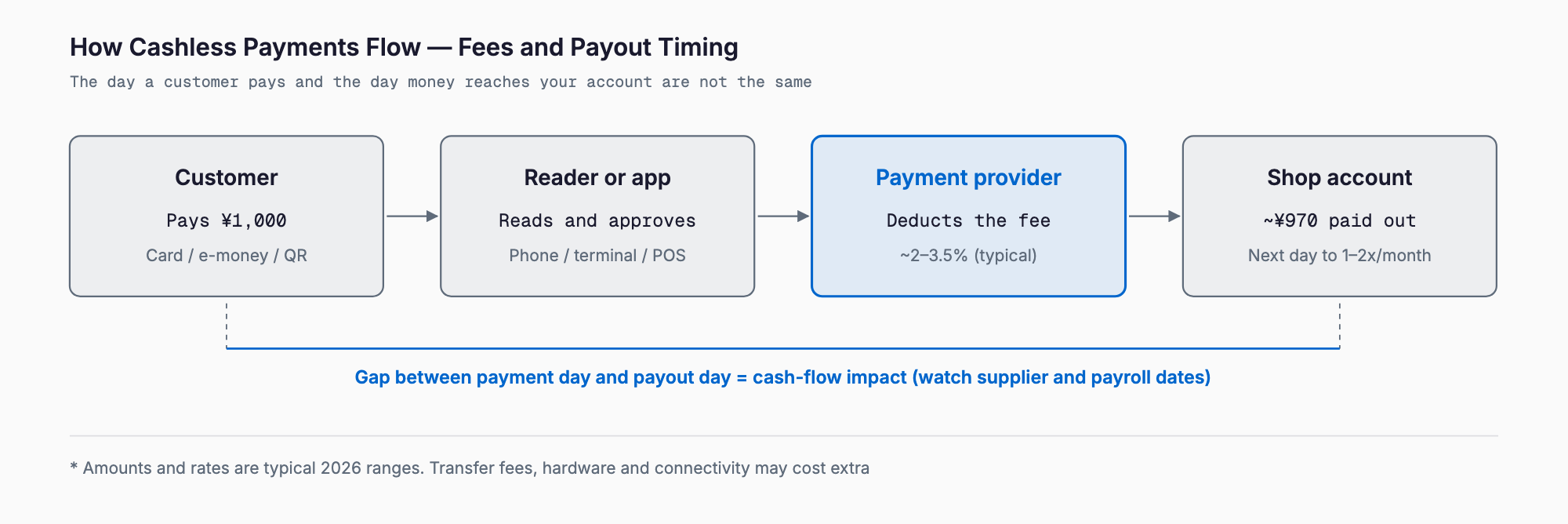
- Next business day (or fastest): Gentle on cash flow, but fees may be higher or transfer fees may apply.
- Twice-monthly closing and payout: Common for small shops. Sales early in the month can take up to about two weeks to arrive.
- Once or twice-monthly closing with next-month payment: Fees tend to be lower, but cash stays tied up, so be careful if your cash cushion is small.
Restaurants and retailers often pay suppliers in cash on a weekly basis, so slow payouts may require bridge funding. Some providers offer faster payouts for an extra fee. Before signing, check the number of days to payout, transfer fees and any minimum payout amount.
For accounting, the amount deposited equals sales minus fees, so you record gross sales and book the fee separately as a payment fee. Whether data can be imported into your accounting software automatically greatly affects daily bookkeeping effort. See also cloud accounting software costs.
Easily overlooked costs — six items to check before signing
People focus on fee rates and terminal prices, but peripheral costs often make the difference.
- Transfer fees: Some services charge a few hundred yen per payout, or waive it above a threshold.
- Terminal breakage, loss and replacement: Check the warranty and how quickly a replacement is shipped. If checkout stops, business stops.
- Communication costs: You need a mobile router, SIM or Wi-Fi. Unstable connections cause payment errors. A guide is a few hundred to a few thousand yen per month.
- Receipt paper and printer: Thermal paper rolls and a receipt printer cost money.
- Chargebacks (refund claims due to fraud, etc.): Fraudulent card use can reverse a sale. Check whether any protection applies.
- Integration fees with POS, booking systems and accounting software: Each integration can add a monthly fee. Restaurants may find restaurant reservation and POS integration helpful.
Keep Japan's invoice system (qualified invoices) in mind too. Cashless payment does not automatically make you compliant. You must separately confirm how to issue qualified receipts and link data to accounting. For the overall picture, see invoice system operations.
Choosing by industry — food service, retail, beauty, clinics
Priorities differ by industry. The following are general examples.
- Restaurants: Checkout speed at peak time matters most. Besides contactless and QR support, consider table-side payment and mobile ordering. Integration with reservation systems and POS makes closing easier.
- Retail: Many small purchases mean the rate difference for e-money and QR payments affects profit. POS-integrated systems including inventory are worth considering.
- Hair and beauty salons: Higher ticket sizes push up card usage. Check how prepayments and course tickets are handled, and whether booking and customer management are bundled.
- Clinics and chiropractic offices: Demand for cards is high for self-pay treatment. Insurance-covered portions may be excluded, so check coverage and how receipts and itemized statements are issued.
- On-site and visiting services: Smartphone-linked services that work at the customer's location fit well. Check connectivity and whether payment links can be sent.
Implementation steps — five steps
If this is your first time, five steps reduce the risk of failure.
- Step 1: Decide the goal and target customers: For example, "capture customers we lose due to cash-only" or "speed up checkout".
- Step 2: Narrow down the payment methods: You need not support everything at once. Start with what your customers use most.
- Step 3: Compare two or three services by total cost: Put upfront cost, monthly fee, fee rate, payout cycle and support in a table, and compare annual totals.
- Step 4: Screening and application: Identity documents and bank details are typically required. Screening can take days to weeks, so allow time.
- Step 5: Trial run and announcement: Run a small test payment and confirm the payout flow. Announce with in-store stickers and menu notices.
Selection checklist
- Can it accept all the methods you want (cards, e-money, QR, contactless)?
- Is the fee rate clear for each method, and are there caps or minimums?
- What is the total of upfront cost, monthly fee and terminal cost?
- How many days to payout, and are transfer fees charged?
- Is there replacement support and protection if a terminal breaks?
- Are connectivity costs (Wi-Fi or mobile) and stability adequate?
- Does it integrate with your existing register, booking system and accounting software?
- Can it issue invoice-compliant receipts and statements?
- Are there cancellation penalties or terminal return conditions?
- Do support hours match your business hours?
Frequently asked questions
What is the minimum cost to start cashless payments?
With a smartphone-linked service, you may start for a few thousand to around ¥20,000 for a reader, or even ¥0 in some cases. Conditions differ by service, so confirm current pricing on each provider's official site.
Is the fee charged on total sales?
No. It applies only to the amount paid cashlessly. If ¥500,000 of ¥1M in monthly sales is cashless, the fee is calculated on ¥500,000. At 3.25%, that is ¥16,250 per month as a guide.
Can I pass the fee on to customers as a surcharge?
Rules and contract terms on surcharges differ by service. Check your contract first, and if you set different prices for cash and cashless, display them clearly to customers.
Can a small sole-proprietor shop pass screening?
Many services accept sole proprietors. Identity documents, business details and bank information are generally required. Criteria differ by provider, so check the official site.
Can I use several services at once?
You can, but it adds devices, dashboards, payout reconciliation and bookkeeping work. Starting with one provider and adding others when needed is more realistic.
Summary
Cashless payment is easy to start with low upfront cost, but ongoing fees and payout timing affect your business. As a guide, fees are about 2% to 3.5% and upfront costs mostly range from ¥0 to a few tens of thousands of yen. When comparing, judge by the annual total — not only the fee rate, but also days to payout, transfer fees, connectivity, breakage support and integration with accounting and POS. Start with the methods your customers use most, and confirm the flow in a trial run to greatly reduce the risk of failure. All figures here are rough guides as of 2026; always confirm the latest terms on each provider's official site before signing.
Related free tools (no sign-up, instant results)
Feel free to contact us
Contact Us