Purchasing Management System Costs and How to Choose One
A cost guide to purchasing systems for SMEs: cloud SaaS, ERP modules and custom builds compared, plus signs your spreadsheet ordering is breaking down.
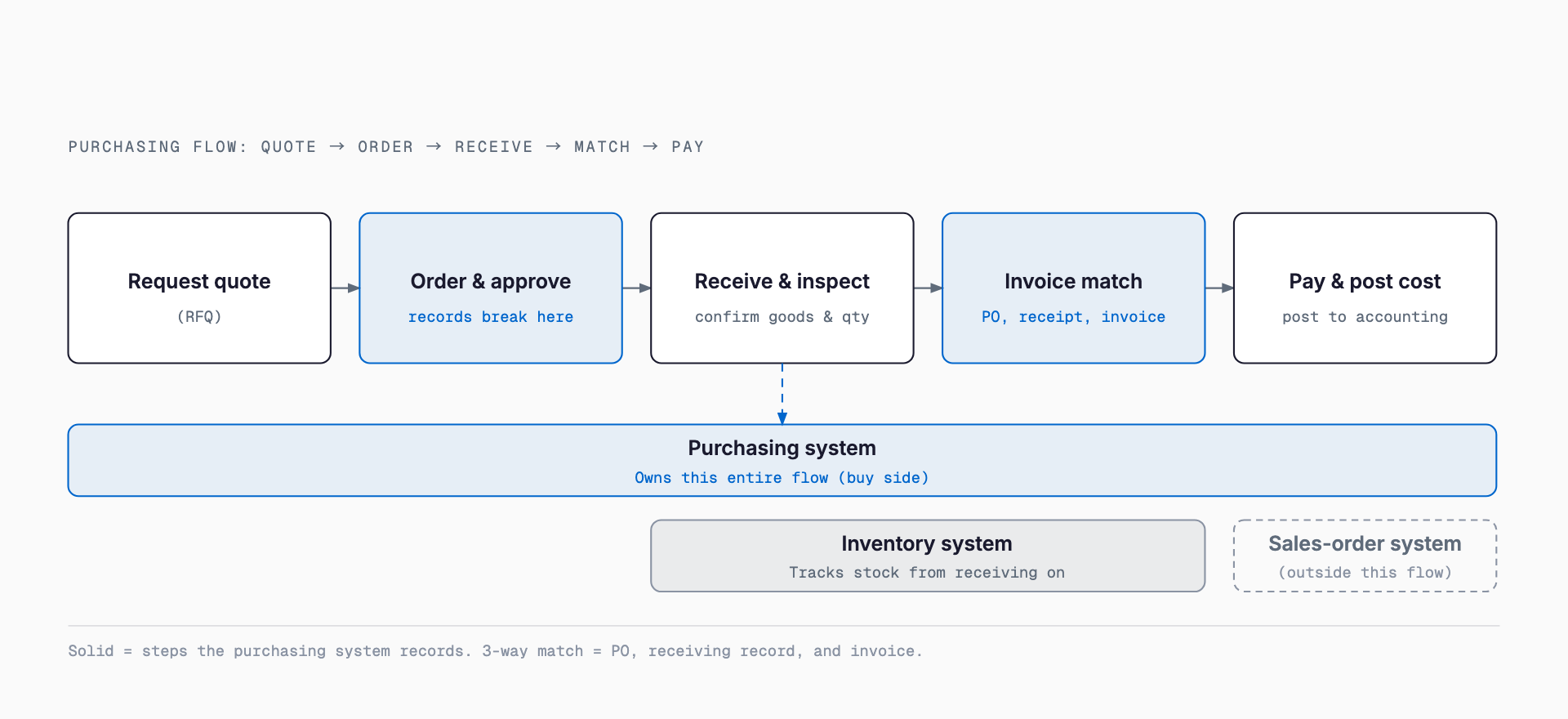
A purchasing management system is a single system for handling the entire process of buying goods and services — supplier ordering, requests for quotation, receiving and inspection, and invoice matching. Many small and midsize businesses have long run this process on spreadsheets, paper purchase orders, phone calls, and faxes, but as the number of suppliers and items grows, problems such as missed orders, inconsistent unit prices, and approvals that depend on one person become harder to ignore. This article organizes the difference between a purchasing management system and an order management system or an inventory management system, typical cost ranges, and how to think about choosing the right approach for your company.
How It Differs from Order Management and Inventory Systems
| Category | Whose perspective | Main role |
|---|---|---|
| Purchasing management system | Your company as the buyer | Supplier ordering, RFQs, receiving, and payment management |
| Order management system | Your company as the seller | Accepting customer orders, shipping instructions, and recording sales |
| Inventory management system | Physical stock levels | Stock quantities, storage locations, and inbound/outbound history |
Signs That Spreadsheets and Paper Purchase Orders No Longer Work
Purchase orders are scattered across spreadsheet files and paper copies, making it impossible to see at a glance who ordered what and when
Unit prices for the same item vary by staff member or supplier, with no clear explanation for the differences
Records of competitive quotes exist only in individual staff members' emails or notes, so the basis for comparison cannot be traced later
Matching received quantities against invoices takes up a significant block of time every month-end
Order approvals are completed verbally or with a stamp alone, leaving no record of who approved what and when
Supplier contact details and trading terms are kept in an individual staff member's spreadsheet or business cards, making handover difficult when someone changes roles or leaves
Main Features
The features a purchasing management system offers vary by product, but the core functions are broadly the same. Companies that already run a core business system or ERP often consider adding a purchasing module at the same time they undertake an ERP renewal.
| Feature | Overview |
|---|---|
| Request for quotation (RFQ) | Send quote requests to multiple suppliers at once and compare terms |
| Purchase order issuance | Automatically generate and send purchase orders from approved order details |
| Approval workflow | Set approval routes based on amount or item, and keep a record of approvals |
| Receiving and inspection | Record delivered quantities and quality, and match them against the original order |
| Invoice matching (3-way match) | Cross-check the purchase order, receiving record, and invoice to detect discrepancies |
| Supplier master and pricing | Centrally manage supplier information and the price history of each item |
Typical Cost Ranges
Costs for a purchasing management system vary significantly depending on whether you use a cloud SaaS product, add a purchasing module to an ERP, or build a system tailored to your own operations. For a broader view of system development costs, see the guide to system development cost ranges. The figures below are only rough guides — actual costs vary with the number of suppliers involved and the scope of integration.
| Approach | Typical initial cost | Typical monthly/maintenance cost |
|---|---|---|
| Cloud purchasing management SaaS | Roughly ¥0–300,000 | Roughly ¥15,000–100,000 per month |
| Purchasing module in an ERP/core system | Roughly ¥3 million–15 million | Maintenance typically around 15–20% of initial cost per year |
| Custom development (including integration with existing systems) | Roughly ¥2 million–8 million | Varies depending on the maintenance and operating structure |
Factors That Push Costs Higher
The supplier master is managed separately across multiple sites or departments, requiring effort to de-duplicate and consolidate it
The scope of integration with existing accounting or production management systems is broad, requiring custom interface development
Operations span multiple locations, currencies, or languages, which standard features alone cannot handle
Approval hierarchies differ by division or site, requiring a more complex approval route design
EDI (electronic data interchange) with trading partners is required, requiring individual connection development
Pre-Implementation Checklist
Organizing the reality of your own purchasing operations before starting product selection makes it easier to avoid choosing a product with far more functionality than you need. If cost accuracy is a priority, it is also worth checking whether integration with a job costing system is needed.
How many purchase orders are placed per year, and what is the total value?
How many suppliers do you work with, and how many of them are ordered from regularly?
Who approves orders, and how is approval authority divided by amount?
Which existing systems, such as accounting or production management, need to be integrated?
Are there any documents that must be kept on paper, such as those required by law?
Common Pitfalls
The most common pitfall is trying to roll the system out company-wide, across every department and item, all at once. When the go-live date arrives before the supplier master is properly cleaned up and approval routes have been agreed on, the front line becomes confused and the system often ends up unused.
Another common pattern is that, even though the system is technically ready to handle orders, staff go back to the spreadsheets or paper forms they are used to. This is often caused by an interface that is too complicated, or a workflow that does not match how the business actually operates — usually a sign that the pre-implementation review of business processes was not thorough enough.
It is also common to go live while putting off cleanup of the supplier and item masters. Without clean master data, launching a new system does not resolve inconsistent pricing or duplicate entries, making it hard to feel the benefits of the implementation.
How to Roll It Out
Take stock of current purchasing operations and visualize order volume, supplier count, and approval flow
Narrow down the target items or departments and start with an area where the impact of change is small
Run a small-scale trial first to check usability and how exceptions are handled in practice
Once operations stabilize, expand the scope and extend integration with surrounding systems such as accounting
How large does a company need to be before it needs a purchasing management system?
There is no fixed threshold in terms of employee count, but many companies start to feel the limits of spreadsheets or paper once monthly order volume reaches several dozen and more than one person is involved in placing orders.
Should we choose a cloud SaaS product or a purchasing module within an ERP?
If you do not have an existing core system and simply want to make purchasing more efficient, a cloud SaaS product is usually easier to evaluate first. If you already use an ERP and want to manage purchasing together with accounting and inventory, a purchasing module within that ERP becomes a reasonable option.
How long does implementation typically take?
A cloud SaaS product can often go live within a few weeks to a few months, but a purchasing module in an ERP or a custom-built system can take six months or longer, depending on requirements definition and the scope of integration with existing systems.
Do small companies need a purchasing management system too?
While the number of suppliers and orders is small, managing purchasing in a spreadsheet is often sufficient. That said, if you expect the number of suppliers or items to grow, organizing your order data early makes it much easier to migrate to a system later on.
Related free tools (no sign-up, instant results)
Feel free to contact us
Contact Us