Cloudflare Stack Guide: Next.js, D1, Better Auth, Stripe, R2
A developer's guide to the Cloudflare stack: Next.js, D1, Better Auth, Stripe, R2, and Workers. Covers architecture, pricing, D1 vs Supabase, and deployment.
What Is the Cloudflare Stack
This article covers the "Cloudflare stack": client and API built with Next.js, database on Cloudflare D1, authentication via Better Auth, payments via Stripe, storage on Cloudflare R2, and hosting on Cloudflare Workers. It suits developers who want to launch a solo project or a small-to-midsize SaaS with minimal infrastructure management and a serverless pricing model. We'll walk through the role of each layer, rough pricing, and the deployment steps.
Overall Architecture
The center of this stack is a single Cloudflare Worker. The Next.js App Router frontend and the API endpoints built as Route Handlers live in the same Worker, and Better Auth's authentication logic is also mounted inside that app as Route Handlers. The database (Cloudflare D1), object storage (Cloudflare R2), and the KV used for page caching are all called directly from the Worker through "bindings" with no network hop involved. Payments are the one piece handled by an external SaaS, Stripe: subscription creation, updates, and cancellation are brokered by Better Auth's Stripe plugin, and state stays in sync as Stripe's webhook calls back to /api/auth/stripe/webhook. In short, the overall picture is simple: the frontend, API, and auth are self-contained inside the Worker, and only payments loop back from outside. How far this "put everything on Cloudflare" approach actually holds up is examined in our review of the viral debate over deploying everything to Cloudflare, which is worth reading alongside this guide.
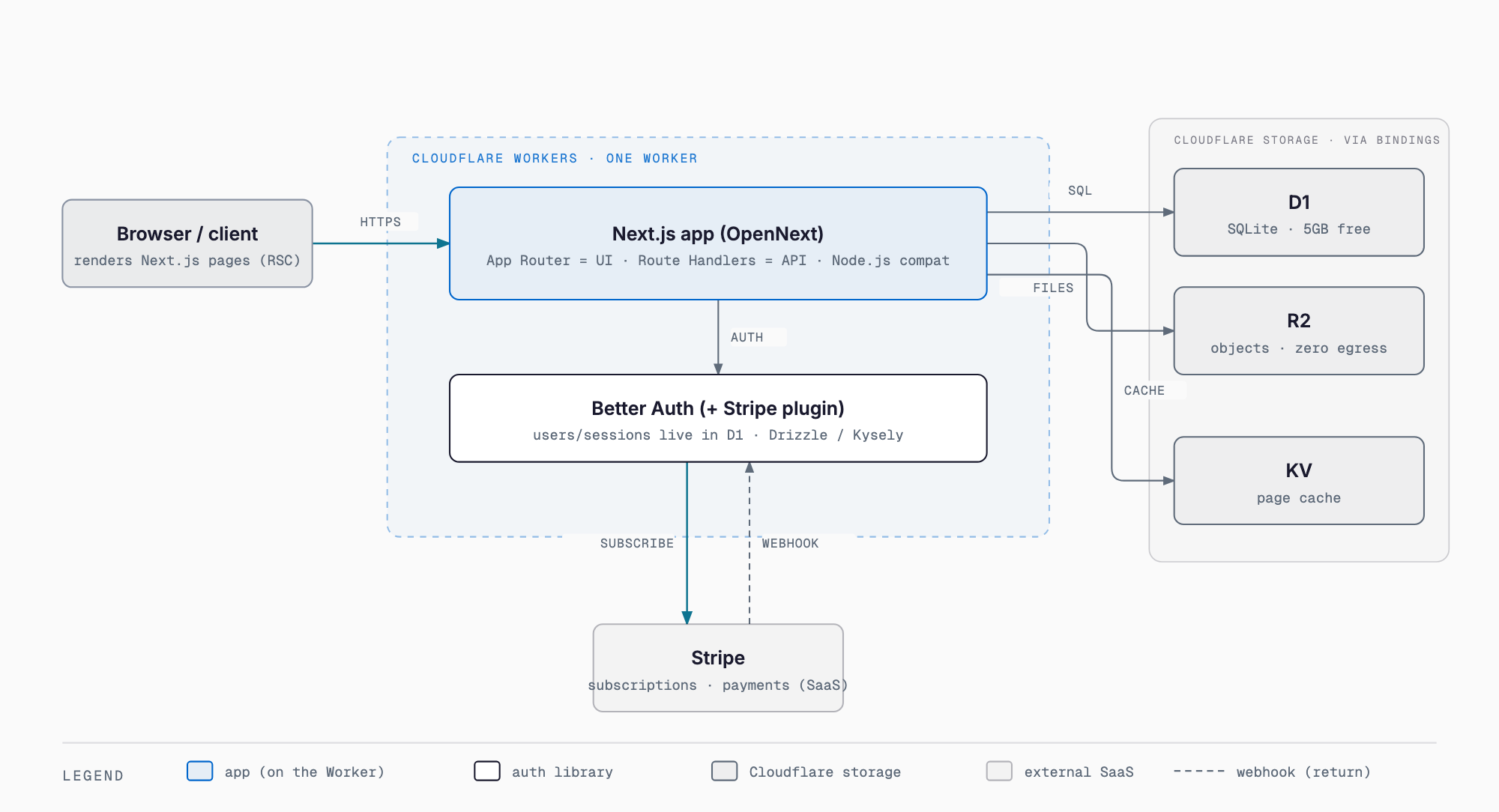
Client and Backend: Next.js on Cloudflare Workers
The official way to run Next.js on Cloudflare Workers is OpenNext's Cloudflare adapter, @opennextjs/cloudflare. It reached 1.0 GA in February 2026, supporting every minor and patch version of Next.js 16 along with the latest minor versions of 15 and 14 (support for the 14 line is scheduled to end in Q1 2026). The app runs on the Node.js runtime rather than the Edge Runtime, so it can use the Node.js APIs the Workers runtime provides. Enabling it requires the nodejs_compat compatibility flag and a compatibility_date of 2024-09-23 or later. Worker script size is capped: 3 MiB on the Free plan and 10 MiB on Paid. The adapter uses KV for the page cache, and falls back to R2 for static assets that exceed KV's 25 MiB value limit. A major benefit of this setup is that the frontend (App Router / React Server Components) and the API (Route Handlers) live in the same Next.js app, i.e. the same Worker; if you'd rather split the API out into a separate framework such as Hono, see our guide to building APIs with Hono and Cloudflare Workers. Current support status is kept up to date in the official OpenNext documentation. A new project can be created with the following command.
npm create cloudflare@latest my-app -- --framework=nextDeployment is as simple as running npx wrangler deploy (or the project's own deploy script).
Database: Cloudflare D1
Cloudflare D1 is a serverless, SQLite-based database. It's called directly from Workers through a "binding," so there's no network hop. Reads are handled near the edge, while writes are consolidated at a single primary. It's typically accessed through an ORM such as Drizzle ORM or Kysely (via the D1Dialect). Each database has a storage cap of 10GB. Pricing differs substantially between the Free plan and Workers Paid.
| Plan | Row reads | Row writes | Storage | Overage / notes |
|---|---|---|---|---|
| Free | 5M/day | 100K/day | 5GB total | Queries error once the limit is hit (resets daily at UTC 0:00) |
| Workers Paid | 25B/month included | 50M/month included | 5GB included | $0.001/1M rows read, $1.00/1M rows written, $0.75/GB-month storage |
There's no data transfer charge; billing is based purely on usage. Full pricing details are on Cloudflare's official D1 pricing page.
D1 vs Supabase: Which One to Choose
Cloudflare D1 is often compared to Supabase. Supabase is a full "backend platform" built around a managed PostgreSQL database, bundling auth, storage, realtime features, Edge Functions, and vector search, and it runs as an instance (plus read replicas as needed) in a specific region. D1, by contrast, is a lightweight database with SQLite semantics, built natively into Workers, and well suited to read-heavy workloads served globally with a simple schema. As a rule of thumb: if the database is central to your product and you need joins, RLS (row-level security) policies, extensions, or realtime subscriptions, Supabase fits. If your workload is read-heavy, you want everything to stay inside Workers, and you're optimizing for minimal cost at small-to-midsize scale, D1 fits.
| Aspect | Cloudflare D1 | Supabase |
|---|---|---|
| DB engine | SQLite | PostgreSQL |
| Deployment | Bound directly into Workers | Managed instance in a specific region |
| Bundled features | Combined with KV and R2 as needed | Auth, storage, realtime, Edge Functions, vector search built in |
| Best fit | Read-heavy, Workers-native, small-to-midsize | DB-centric apps needing joins/RLS/extensions/realtime |
| Limit | 10GB per database | Depends on the region's instance spec |
Authentication: Better Auth
Better Auth is a self-hosted, TypeScript authentication framework. There's no dedicated D1 adapter, so you connect through the Drizzle adapter or through Kysely's D1Dialect.
drizzleAdapter(db, { provider: "sqlite" })It's plugin-based, with 15+ plugins covering admin functionality, API keys, two-factor auth, organizations/RBAC, and more. The 1.4-1.5 releases added an OAuth 2.1 provider, stateless sessions, JWT key rotation, SCIM, and stronger Stripe subscription controls. It can be mounted on Route Handlers in either Hono or Next.js, and there's also a community-maintained better-auth-cloudflare package.
Payments: Stripe
Payments are wired in through Better Auth's Stripe plugin. Start with the following install command.
npm install @better-auth/stripe stripe@^22.0.0With this plugin, Better Auth can handle automatic Stripe customer creation on signup, subscription plan/price management, creation, updates, and cancellation, signature-verified webhook processing, trials and multiple plans, and team (seat-based) billing. Setup means registering the plugin server-side with stripeClient and stripeWebhookSecret, adding the stripeClient plugin on the client, running npx auth migrate to create the tables, and registering https://<domain>/api/auth/stripe/webhook as the webhook URL in the Stripe dashboard. Full plugin details are documented in Better Auth's official Stripe plugin docs.
Storage: Cloudflare R2
Cloudflare R2 is an S3-compatible object store whose biggest feature is free egress. The free tier covers 10GB of storage, 1M/month Class A operations (writes and listings), and 10M/month Class B operations (reads). Beyond that, it's $0.015/GB-month for storage, $4.50/1M for Class A operations, and $0.36/1M for Class B operations. It can be read from and written to directly from Workers via bindings, and an S3-compatible API is also available for existing S3 tooling.
Hosting: Cloudflare Workers
Cloudflare Workers, the hosting layer for the whole app, also has Free and Paid plans. There's no charge for data transfer or bandwidth, and static asset delivery is free and unlimited.
| Plan | Requests | CPU time | Price |
|---|---|---|---|
| Free | 100K/day | 10ms per invocation | Free |
| Paid | 10M/month included ($0.30/1M overage) | 30M CPU-ms/month included ($0.02/1M CPU-ms overage) | From $5/month |
The maximum execution time for a single invocation is 5 minutes.
Rough Monthly Cost
- Solo/prototype stage: staying within the Workers Free, D1 Free, and R2 free tiers can keep this effectively free
- Small SaaS in production: Workers Paid's $5/month-plus becomes the base, with D1 and R2 usage charges layered on top (roughly $5-plus usage-based costs)
- Stripe's payment processing fees are separate, charged per transaction
Path to Deployment
- Create the Next.js project with npm create cloudflare@latest
- Add bindings such as d1_databases and r2_buckets to the wrangler configuration
- Run migrations against D1 to apply the schema
- Deploy the Worker with npx wrangler deploy
Good Fit vs Poor Fit
This stack fits solo projects and MVPs, read-heavy workloads, and cases where minimizing infrastructure cost matters most. It's a poor fit for heavy relational processing with complex joins, requirements that mandate RLS (row-level security), databases that need to exceed 10GB, and long-running batch jobs over 5 minutes.
FAQ
Can I start for free?
Combining the Workers Free, D1 Free, and R2 free tiers, you can run a solo project or prototype effectively for free. Note that the D1 Free plan caps you at 5M row reads and 100K row writes per day, and queries error once you hit that limit.
Should I choose Supabase or D1?
If the database is central to your product and you need joins, RLS, extensions, or realtime features, Supabase fits better. If your workload is read-heavy, you want to stay entirely inside Workers, and you're optimizing cost at small-to-midsize scale, D1 fits better.
How is this different from deploying to Vercel?
Cloudflare Workers caps script size (3 MiB Free / 10 MiB Paid) and requires the nodejs_compat compatibility flag to use Node.js APIs. In exchange, there's no data transfer or bandwidth billing, and the Paid plan starts at a flat $5/month.
What about latency from Japan?
D1 reads are handled near the edge, so reads from Japan tend to be fast under this setup. Writes, however, are consolidated at a single primary, so write latency depends on where that primary is located.
Summary
The Cloudflare stack combining Next.js, D1, Better Auth, Stripe, R2, and Workers has a simple overall shape: the frontend, API, and auth live together in a single Worker, the database and storage are bound directly to it, and only payments are delegated to the external Stripe service. Pricing is usage-based by default, making it a way to launch anything from a solo project to a small SaaS while keeping infrastructure overhead low.
Related free tools (no sign-up, instant results)
Feel free to contact us
Contact Us