Contract Management System (CLM) Costs for SMBs
A contract management system (CLM) tracks storage and renewal deadlines, unlike e-signature tools. Cloud plans cost ¥0-50K/mo; custom builds start near ¥1M.
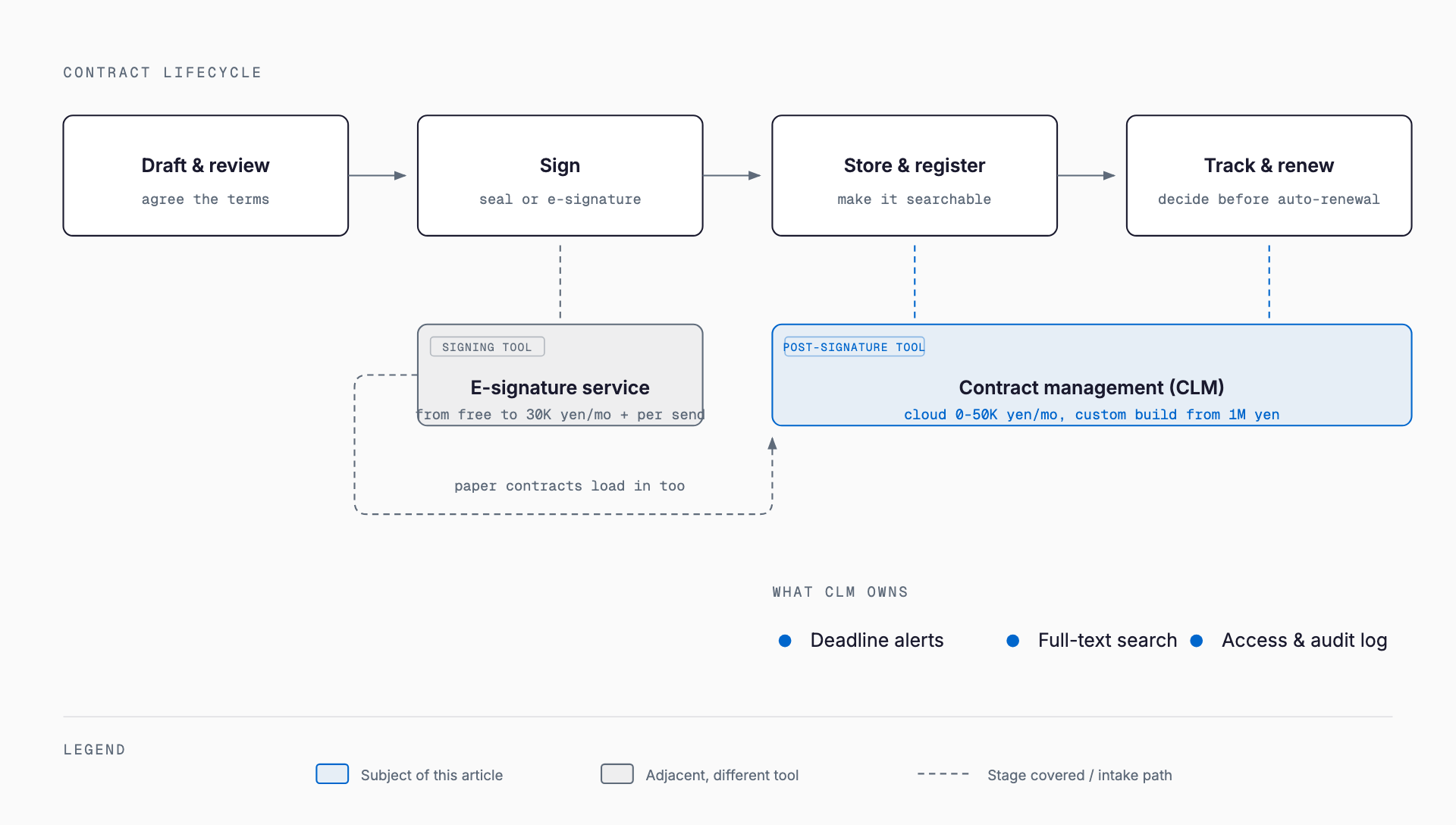
A contract management system (CLM: Contract Lifecycle Management) centralizes contract storage, search, and deadline tracking to prevent missed renewals and lost originals. Cloud-based off-the-shelf plans typically run a few thousand yen to the low tens of thousands of yen per month; a custom-built system usually starts in the low millions of yen. Keep those two numbers in mind as you decide which fits your company.
It's worth clarifying the difference from e-signature services first. E-signature tools are for *executing* a contract — replacing a physical stamp with an electronic signature to finalize agreement. A contract management system is for *managing contracts after they're signed*. The two are adjacent but distinct, and a paper contract can still be registered in a contract management system. In fact, companies that still sign mostly on paper often benefit from organizing the management side first, without changing how contracts get signed.
Why companies need contract management
Companies where contract handling depends on individual memory tend to run into three problems. First, missed renewals — an auto-renewal clause goes unnoticed and a company keeps paying for a service it no longer needs, or a contract it does need gets accidentally terminated. Second, lost originals — after a staff transfer or resignation, nobody can locate a given contract, and the company can't respond quickly to an audit or a counterparty's inquiry. Third, over-reliance on one person, where contract terms and special clauses exist only in someone's memory or inbox, with no way to hand that knowledge to the organization. All three tend to surface once contract volume passes a few dozen.
Typical costs — what you pay for
Cost varies by more than an order of magnitude depending on whether you use an off-the-shelf cloud product or build a custom system. There's often an additional one-time cost for digitizing existing paper contracts.
| Approach | Typical cost | What it covers |
|---|---|---|
| Cloud off-the-shelf (small) | ¥0–¥10,000s/month | Up to ~100 contracts, basic deadline alerts and search |
| Cloud off-the-shelf (mid-size) | ¥20,000–¥50,000s/month | Several hundred contracts, workflow integration, access controls |
| Custom build | ¥1M–¥3M+ initial, plus monthly maintenance | Designed around your own workflows and system integrations |
| Digitizing paper contracts | A few hundred yen/document, or ¥100,000s+ for scanning services | Scanning, OCR, and entering metadata (counterparty, amount, renewal date) |
One easy detail to overlook: contract count and storage limits. Cheaper plans cap the number of contracts or file volume, and exceeding the cap forces an upgrade. Many off-the-shelf plans also include only a few user seats, so adding view-only access for an owner or accounting staff can trigger extra fees. Counting your current contract volume and the number of people who need access before signing up will sharpen your estimate.
Feature checklist
- Deadline alerts: Can notifications fire at multiple intervals per contract type (e.g., 90 days and 30 days before renewal or termination deadlines)?
- Full-text search: Can you search not just contract titles but the body text and special clauses?
- Access controls: Can view, edit, and download permissions be set by department or role?
- Customizable fields: Can you register your own categories — contract amount, auto-renewal status, contract type?
- Linking to originals: Does it integrate with e-signature or accounting systems to pull in signed documents and payment data?
- Audit logs: Is there a record of who viewed or changed what, and when?
- Bulk import: Can existing paper contracts or an Excel ledger be imported in one batch?
Choosing between off-the-shelf and custom
For companies with a few hundred contracts or fewer and no unusually complex industry-specific approval flow, starting with a cloud off-the-shelf product is the practical choice — it's low-cost, can be running within weeks, and functional gaps can usually be closed by upgrading plans. Companies with thousands of contracts, a real business need to integrate with core systems like sales or accounting, or industry-specific contract types (construction subcontracts, lease renewals) are better candidates for a custom build or an enterprise CLM product. For guidance on where that line sits, see the build-vs-buy discussion in system development cost guide.
For a company with a few dozen employees, a reasonable first step is registering 50–100 existing contracts in a free trial and checking how well search and alerts hold up before committing to a paid plan.
Rollout steps and common mistakes
1. Inventory existing contracts: Collect contracts from every department and list counterparty, amount, term, and auto-renewal status
2. Decide what to migrate first: Don't import everything at once — prioritize high-value contracts and ones with auto-renewal clauses
3. Set alert rules up front: Decide who receives notifications and who has authority to approve or decline a renewal
4. Assign a data-entry owner: Inconsistent field entry across staff degrades searchability, so document the entry rules
5. Run paper and system in parallel for a period: Keep paper originals on hand right after migration while you verify the system's data is accurate
A common mistake is treating registration as the finish line and never deciding the deadline-management rules — an alert that fires with nobody assigned to act on it just delays the scramble to the last minute. Another is confusing this with a general document management system and dumping contracts into a generic file tool with no renewal-alert function. A contract isn't just a document to be stored — deadline tracking is the whole point.
Do I need both a contract management system and an e-signature service?
Not necessarily at the same time. Paper contracts can be registered into a contract management system, so you can organize the management side first and consider digitizing signatures later. If you adopt both, choosing tools that integrate with each other avoids double data entry when a contract is signed.
Why isn't an Excel contract ledger good enough?
Excel can work while volume is low, but problems tend to appear as contract count grows: renewal alerts can't be automated, simultaneous edits by multiple people create version conflicts, and files get lost on a shared drive. Many companies start considering a dedicated system once they pass 50–100 contracts.
Do small companies really need a contract management system?
With around 20–30 contracts and a single, stable point of contact, an Excel ledger with periodic review can work for a while. But a company running on a single 'one-person IT' staffer faces higher risk of losing that knowledge when that person moves on or leaves, which makes earlier system adoption worthwhile.
How long does implementation take?
For a cloud off-the-shelf product, going from signup to active use typically takes a few days to two weeks. Migrating all existing paper contracts is a separate effort that can take weeks to months depending on volume — a practical approach is registering new contracts first and migrating past ones by priority in parallel.
Related free tools (no sign-up, instant results)
Feel free to contact us
Contact Us