Corgi: An Agent Terminal Multiplexer for Claude Code, Codex, Pi and OpenCode
Install, Usage, and How It Compares to Herdr, tmux and hrdx (2026)
Corgi is an MIT-licensed terminal multiplexer that runs Claude Code, Codex, Pi and OpenCode in panes with status tracking. Install, usage, vs herdr/tmux/hrdx. Updated Oct 2026.
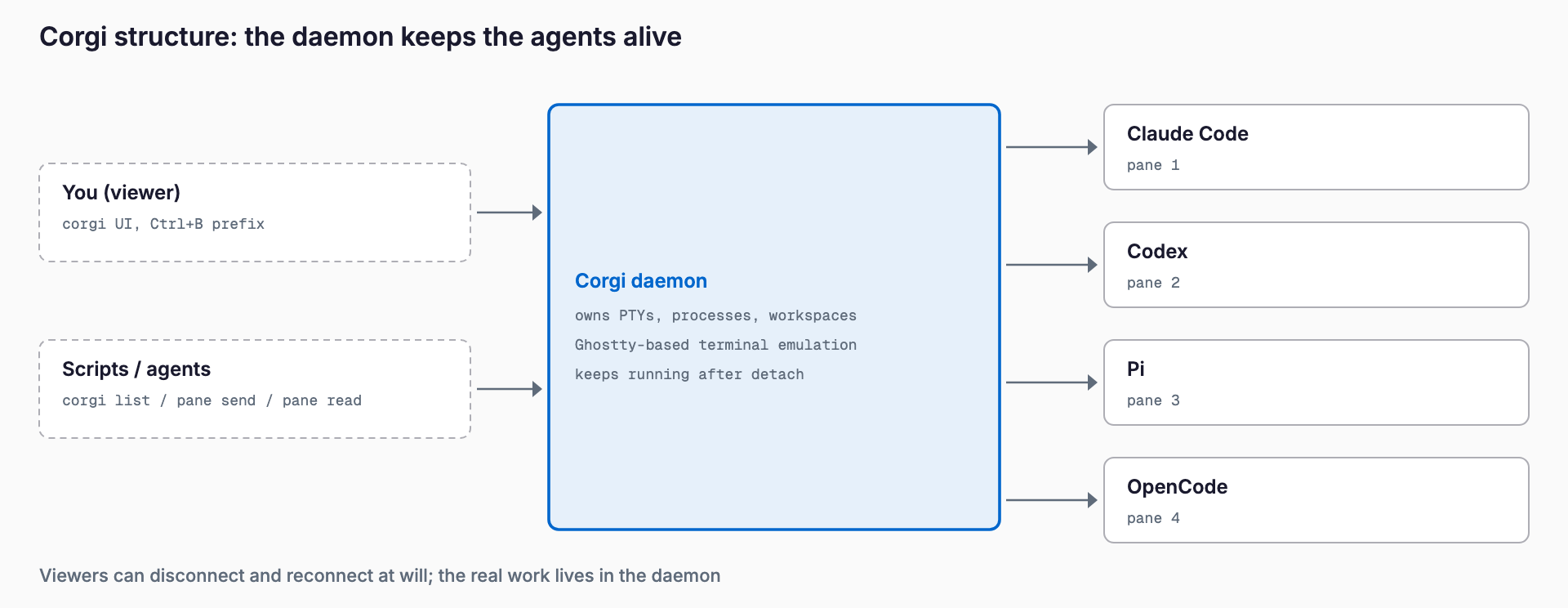
Corgi is an agent-oriented terminal multiplexer that runs AI coding agents such as Claude Code, Codex, Pi and OpenCode side by side in terminal panes and shows which ones are working and which are waiting for you. Like tmux, detaching does not stop your processes, and a CLI lets scripts drive every pane. It is aimed at developers who run several agents at once; the verdict is that it is a promising newcomer for anyone who likes the herdr workflow, but it is a very young project.
It appeared on Hacker News in late October 2026 as "Show HN: Corgi, a helpful {agent, terminal} multiplexer" and had 137 points and 46 comments when we checked. The author says it is heavily inspired by herdr, and several commenters were weighing a switch from herdr. This article sticks to what the official README, website, HACKING.md and the HN thread confirm (as of October 2026).
What is Corgi?
Corgi is an open-source terminal multiplexer and agent manager at tals/corgi on GitHub. The README describes it as a multiplexer-style terminal agent manager, heavily inspired by herdr and powered by Ghostty. The website calls it a terminal multiplexer for humans (and agents).
| Item | Details |
|---|---|
| Repository | github.com/tals/corgi |
| Website | corgi.computer |
| License | MIT (notification sounds from herdr are Apache 2.0) |
| Language | TypeScript (run with Bun) plus a Zig native layer, per HACKING.md |
| Terminal emulation | Ghostty-based ("powered by Ghostty" per the README) |
| Supported OS | macOS (Apple Silicon), Linux (amd64); the website also lists WSL |
| Supported agents | Claude Code, Codex, Pi, OpenCode |
| Price | Not stated on the site (MIT-licensed open source) |
| Maturity | No releases listed; about 150 stars and 635 commits as of October 2026 (young project) |
Some third-party posts give a different language or license; this article uses what the repository states (MIT, TypeScript plus Zig).
What can it do?
| Feature | Details |
|---|---|
| Agent status at a glance | Markers for working, needs you, finished and idle |
| Persistence and detach | Processes keep running after detach; run corgi again to reconnect |
| Unified launcher | Start Claude Code, Codex, Pi or OpenCode, or resume existing sessions, from a new tab |
| F1 catch-up | Jump to unread agent activity and see what happened |
| Change overview | One scrollable view of every file an agent touched |
| Worktrees | Git worktree support for parallel work |
| Usage visibility | top for where tokens went, plus per-workspace CPU, memory and GPU stats |
| Terminal niceties | Click-to-copy links, inline images, image paste (also over SSH; the site says Ghostty Nightly is required), undo closed tabs (Ctrl-Shift-T) |
| Scripting | The corgi CLI creates tabs and panes and sends or reads pane text; corgi --skill teaches agents how to drive it |
Feature support varies by agent. Corgi adds hooks to Claude Code and Codex settings, installs an extension for Pi, and needs no setup for OpenCode. Codex requires you to trust the hooks once in /hooks.
Install and pricing
The official install is a one-liner for macOS (Apple Silicon) and Linux (amd64); the website also lists WSL. No pricing is given, and the project is MIT-licensed.
curl -fsSL https://corgi.computer/install.sh | bashTo uninstall, pass uninstall to the same script.
curl -fsSL https://corgi.computer/install.sh | bash -s uninstallBecause this is a curl | bash install, read the script before running it. The HN thread debated exactly this; the author said the installer is sandboxed but the app binary itself runs unsandboxed, and that supply-chain risk is the bigger concern. Homebrew is available through a tap for now, as the project has not yet met the bar for homebrew-core.
Quick start
- Run corgi in your project directory and pick a shortcut preset on first launch (the default prefix is Ctrl+B; press the prefix then ? for the shortcut menu)
- Click New in the agent list to start Claude Code, Codex, Pi or OpenCode
- Click an agent or pane to focus it; press F1 to jump to unread activity
- Choose Detach to leave while work continues, then run corgi again to reconnect
For scripting, get IDs from corgi list; current refers to the pane the command runs in. Output is text by default and JSON with --json.
corgi list
corgi tab new --workspace 1 --command 'bun run dev'
corgi pane split current --right --command codex
corgi pane send 3 'run the tests' --enter
corgi pane read 3 --lines 50
How it differs from existing tools
| Tool | Role | Language / license | Agent status | Scripting | Notes |
|---|---|---|---|---|---|
| Corgi | Agent-oriented multiplexer | TypeScript (Bun) + Zig, MIT | Yes (working / needs you / done) | corgi CLI, --skill | Very new; Windows via WSL for now |
| Herdr | Corgi's inspiration; agent-oriented multiplexer | Rust, Apache 2.0 (per its README) | Yes (working / blocked / idle) | CLI and socket API | Established, with plugins and SSH; the Corgi author says Corgi migrates herdr workspaces |
| tmux | General-purpose multiplexer | C, ISC | No | tmux commands | Mature and stable; agent status is DIY |
| hrdx | Lightweight Go multiplexer (Show HN, Aug 2026) | Go, MIT | Yes (spinner etc.) | JSON socket API | Supports Codex, Claude Code, pi, zot; has a Windows installer |
| Hunk | Terminal diff viewer | Not a multiplexer | n/a | n/a | Often used alongside herdr; a different job (reviewing diffs) |
| Orca / Mosaic | GUI-side alternatives for parallel agents | n/a | Yes | n/a | For people who prefer a GUI over the terminal |
As a rule of thumb: if you are happy with herdr there is little reason to move, and Corgi is for people who want a similar feel plus an activity feed, token usage and image paste. Pick tmux for proven stability, hrdx if you prefer a lightweight Go tool, Hunk when diff review is the main need, and Orca or Mosaic if you would rather manage parallel agents in a GUI.
Caveats and poor fits
- It is a young project and the GitHub releases section is empty. Some HN commenters questioned announcing something only weeks old; try it on a small scale before relying on it
- Supported OS is macOS (Apple Silicon) and Linux (amd64). Windows is WSL2 only for now, with native support planned, according to the author
- No native remote connection to multiple machines yet (planned), which may bother people used to herdr over SSH
- HN users reported repaint flicker, a less polished light theme, concerns about very large TypeScript files, and a plugin system less mature than Pi's
- Feature support differs per agent, Codex needs a manual hook trust, and only four agents are supported
- Mind the curl | bash install and the unsandboxed app binary (the author also mentions supply-chain risk)
- Name collision: commenters noted a YC company with the same name; search for tals/corgi specifically
Related reading: Herdr explained (Corgi's inspiration), Hunk explained (often paired with herdr), the GUI options Mosaic and Orca, and the Pi coding agent, one of the agents Corgi supports.
FAQ
What is Corgi?
A terminal multiplexer and agent manager that runs AI coding agents such as Claude Code, Codex, Pi and OpenCode in panes, shows their status, keeps processes alive after detach and can be driven from a CLI.
What license and language does it use?
The repository states the MIT license (notification sounds from herdr are Apache 2.0). It is mostly TypeScript run with Bun, with a Zig native layer. Trust the repository over third-party posts that say otherwise.
Does it work on Windows or WSL?
The website lists macOS, Linux and WSL. The README names macOS (Apple Silicon) and Linux (amd64), and the author said on HN that Windows works only via WSL2 for now, with native support planned.
How is it different from herdr?
Corgi says it is heavily inspired by herdr, so the feel is similar. It adds an activity feed, F1 jump to unread agents, token usage views and image paste, but herdr is older and more widely used, and currently looks ahead on remote access and plugins.
Can it replace tmux?
For running several agents, its status display and launcher are handier, but it does not replace tmux's generality, stability or reach. Using each where it fits is the realistic approach.
Does it cost anything?
No pricing is listed and it is released as MIT-licensed open source. The agents you launch inside it, such as Claude Code or Codex, have their own costs.
Related free tools (no sign-up, instant results)
Feel free to contact us
Contact Us