Cue AI (cueai.app) Explained: A Personal AI Planner That Turns What's in Your Head into a Daily Plan
Features, Pricing, How It Differs from Manus's Cue, and Caveats
Cue AI (cueai.app) is ANUTECH's AI planner, not Manus's Cue. Free to $9.99/$24.99 a month; plans save only once approved. No Japanese UI. Pricing, data use.
Cue AI (cueai.app) is a personal AI planner app from ANUTECH PTY LTD of Australia. You throw it a text or voice brain dump, and it reads your existing tasks, calendar, and routines to draft a one-day plan with times and durations. It runs on Web, iPhone, iPad, Android, Mac, Windows, and Apple Watch. Essential is free, Plus is $9.99 monthly, and Pro is $24.99 monthly (annual: $99.99 and $199.99). It is approval-based: a plan is not saved until you accept it. The app UI comes in 10 languages, and Japanese is not among them.
This article is based on the official site, the pricing page, the About page, the privacy policy, the store listings, and an official hands-on blog post, all as of October 14, 2026. Where the official sources are silent, we write 'not stated officially.' This is a different product from Cue, the personal agent app Manus announced on September 28, 2026, made by a different company. We covered the Manus one in the Manus Studio article.
What Is Cue AI? Sorting Out the Several Products Called 'Cue'
Several products use the name Cue, and they are easy to confuse in search. Here is how they differ.
| Name | Provider | What it is |
|---|---|---|
| Cue AI (cueai.app) | ANUTECH PTY LTD | The subject of this article. A personal AI planner/assistant app |
| Manus's Cue (Cue by Manus) | Manus | A personal agent app announced on September 28, 2026. Not the same as Cue AI |
| Cue: AI Note Taker & Recorder | Not checked for this article | A meeting-notes app |
| withcue.ai | Not checked for this article | A meeting copilot |
The official site headlines read "One AI assistant for work, study and family life" and "AI Planner, Notes & Tasks for Work and Life." The About page describes the team as "a small team building software we use ourselves every day." The basics are as follows.
| Item | Details |
|---|---|
| Name | Cue AI (listed as "Cue: Personal AI Assistant" on the App Store and Google Play) |
| Developer | ANUTECH PTY LTD (Australia) |
| Type | Personal AI planner/assistant (tasks, calendar, notes, routines) |
| Devices | Web (app.cueai.app), iPhone, iPad, Android, Mac, Windows, Apple Watch, and supported wearables. One account across devices |
| UI languages | 10 languages (English, Arabic, Danish, Dutch, French, German, Norwegian, Portuguese, Spanish, Swedish). Japanese is not included |
| Current version | 1.7.0 (2026-10-05, per the App Store) |
| Price range | Free (Essential) to $24.99 monthly (Pro), in US dollars |
| Web version | app.cueai.app (stated on the About page) |
| First release | 2025-02-23 on the App Store (then listed as "CueAI: Planner, Tasks & Habits," per search results) |
How It Works: Read, Draft, You Approve
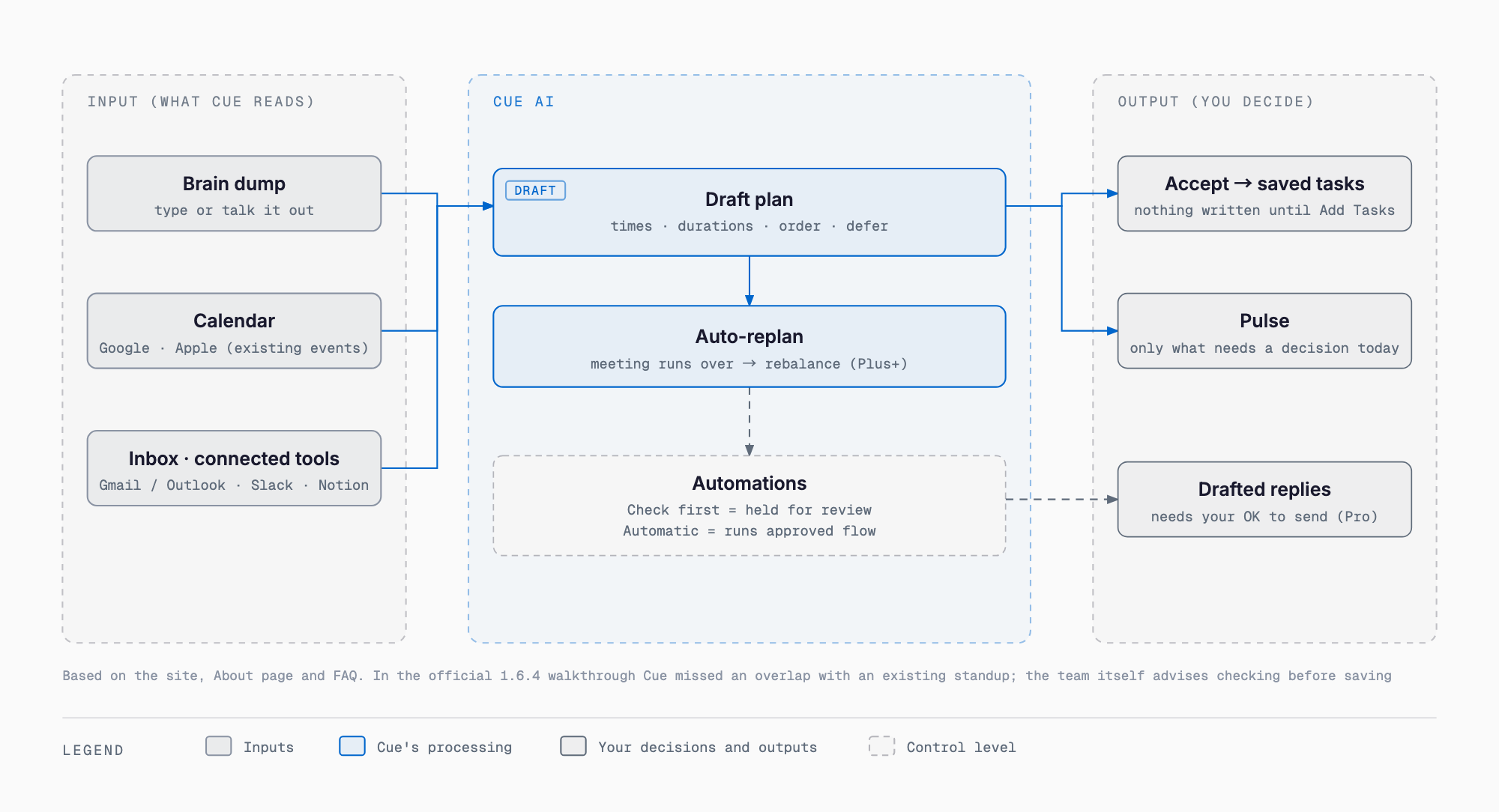
According to the About page, Cue AI reads your existing tasks, calendar, and routines and turns your input into a plan with times, durations, and an order. The page says "the proposal is a draft: you accept it before anything is written to your list," so nothing reaches your task list until you accept it. About also states that it distinguishes between a proposal, a saved task, and an action taken outside the app, and that drafting an email is not the same as sending it. The official homepage section "A DAY WITH CUE" lays out a day like this.
| Time | Feature | Plan | What it does |
|---|---|---|---|
| 6:45 | Automations (morning brief) | Plus | Overnight, reads your calendar, tasks, and inbox and leaves a short brief in Pulse before you wake |
| — | Pulse | Free | A screen that ranks what needs a decision today and sets the rest aside until needed |
| 10:00 | Planning (focus time) | Free | Reads your calendar first and places deep work in the gaps that are actually open |
| 12:15 | Notes | Free | Record or type a meeting, and decisions and follow-ups appear alongside as tasks |
| 1:30 | Goals | Plus | Breaks a big goal such as "run a 10K" into steps and places them in open time |
| 3:15 | Auto-replan | Plus | If a meeting runs long, redistributes the rest of the day and shows what moved |
| 5:00 | Inbox Autopilot | Pro | Drafts follow-ups across Gmail / Outlook and turns emails into tasks. The official wording is "Nothing sends without your OK" |
| 8:30 | Routines | Free | An evening routine that returns automatically each day, with a shorter version for tired days |
According to the official site, Automations are recurring jobs you give Cue AI (briefs, reviews, monitors, and connected workflows). They run on a schedule and return results to Pulse. They are separate from Inbox Autopilot, and the number that can run at once is 3 on Plus and 10 on Pro. What it can read: calendar, tasks, notes, web sources, and connected tools. The official site lists 11 integrations (Gmail, Outlook, Google Calendar, Apple Calendar, Slack, Google Chat, Notion, Linear, Todoist, Zoom, Reminders). How outward actions are handled depends on each Automation's control level: per the official FAQ, Check first holds outward actions for your review, and Automatic runs the whole approved workflow.
What the Official Walkthrough Showed: Strengths and Misses
The official blog test (2026-09-09, a hands-on post by the Cue AI team itself) used Cue AI 1.6.4 in an iPhone simulator with an internal demo profile. The post states that paid-plan limits and results were not tested. The input was a bullet-style brain dump: a client proposal due Friday (pricing section and summary unfinished), a fixed 2:30 PM physiotherapy appointment (20 minutes each way), a car registration deadline, a call to a plumber, an email, a run, a flight to Lisbon, and five hours of focus time. What worked:
- It proposed 9 timed items (pricing section 90 minutes, summary 60, email 30, call 15, and so on; the durations are Cue AI's estimates)
- It automatically added a 20-minute "leave" block before the physiotherapy appointment
- Nothing was saved until "Add Tasks" was tapped (Auto off), and no email was sent and no flight was booked
The post itself states that three points needed correction.
- It also put the flight booking on the next day, and the user had to say "move it to Saturday" to fix it
- Thursday totaled 5 hours 50 minutes, and the results do not show how "five hours of focus" was interpreted
- After saving, a 9:00 to 10:30 work block overlapped an existing 9:30 stand-up. Cue AI showed "Tasks overlap," but why it missed the conflict is unknown
The blog itself lists cautions: AI estimates and priorities need human review, do not assume the connected calendar was consulted, and the proposed plan and the saved task list are separate stages. The approval step is what lets you catch such misses before anything is saved.
Pricing: Essential (Free), Plus, and Pro
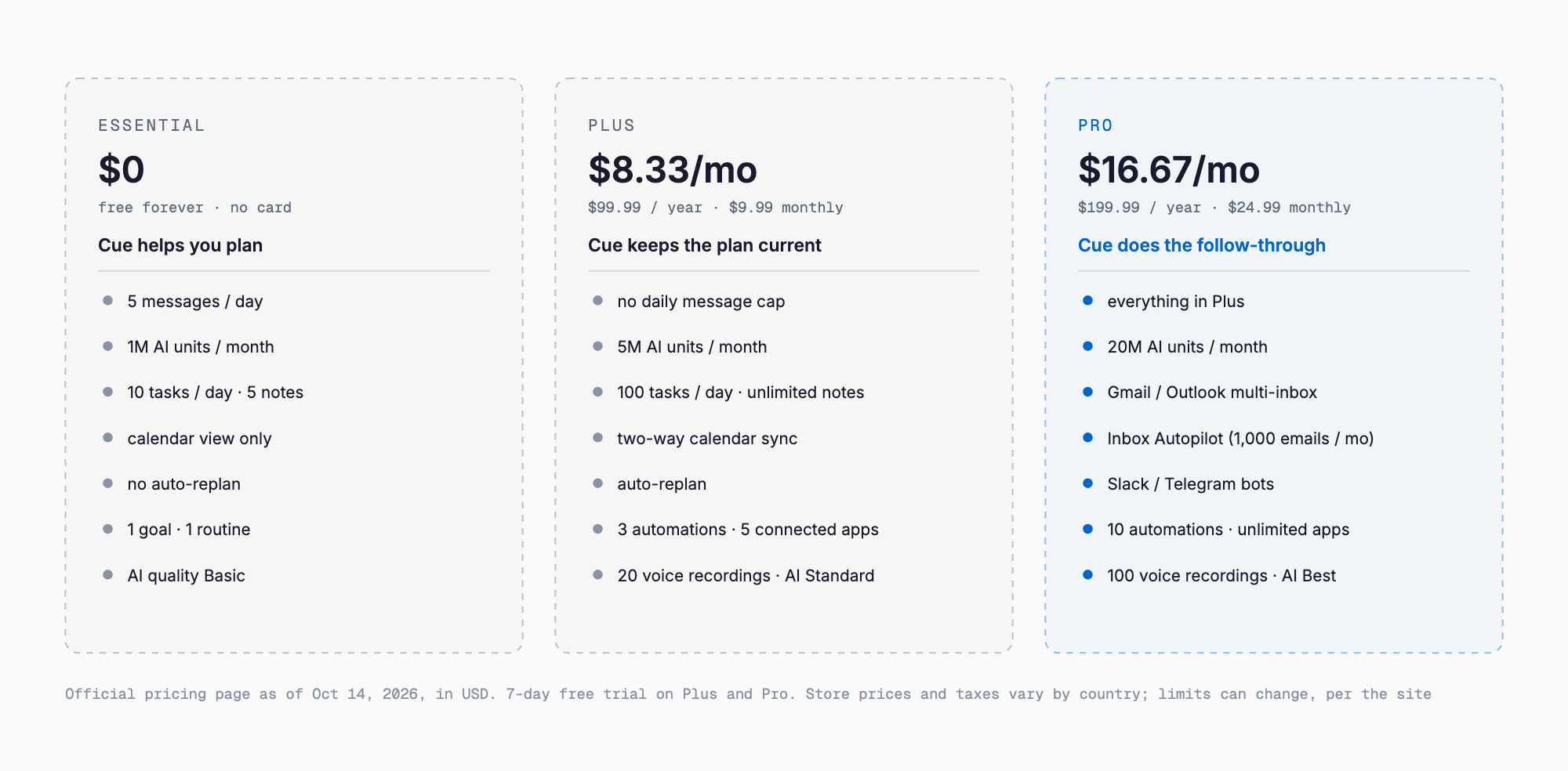
The pricing page is in US dollars with annual billing shown by default (store regional prices and taxes differ). Plus is $8.33 per month on annual billing ($99.99 a year) or $9.99 monthly. Pro is $16.67 per month on annual billing ($199.99 a year) or $24.99 monthly. Essential is free forever with no card required. Paid plans have a 7-day free trial (for Plus, where the store offers one). AI work is metered in usage units rather than per message, and shown under Settings → AI usage in the app. The main differences:
| Item | Essential | Plus | Pro |
|---|---|---|---|
| Price | $0 (free forever) | $8.33/month (annual $99.99), or $9.99 monthly | $16.67/month (annual $199.99), or $24.99 monthly |
| Assistant messages | 5 per day | No daily limit | No daily limit |
| Monthly AI usage | 1,000,000 units | 5,000,000 units | 20,000,000 units |
| Tasks | 10 per day | 100 per day | 100 per day |
| Calendar sync | View only | Two-way | Two-way |
| Auto-replan | No | Yes | Yes |
| Automations (concurrent) | Not listed in the pricing table | 3 | 10 |
| Voice recording | No | 20 per month, 600 minutes, up to 60 minutes each | 100 per month, 3,000 minutes, up to 180 minutes each |
| Email inbox | No | No | Gmail and Outlook (multiple inboxes) |
| Inbox Autopilot | No | No | Yes (1,000 emails scanned per month) |
| Messaging bots | No | No | Slack and Telegram |
| Connected apps | None | 5 | No set limit |
| AI model quality | Basic | Standard | Best |
The in-app purchase names on the App Store are Plus Plan (Monthly) $9.99, Plus Plan (Annual) $99.99, Professional Plan (Monthly) $24.99, and Professional Plan (Annual) $199.99. The pricing page has a heading for family and team plans, but their contents and prices are not stated officially. The official note says "No set limit" means no individual cap, and that plan limits may change as the product changes.
Devices and Store Listings
| Item | App Store | Google Play |
|---|---|---|
| Listed name | Cue: Personal AI Assistant (subtitle "One Assistant for Work & Life") | Cue: Personal AI Assistant |
| Seller | ANUTECH PTY LTD | ANUTECH PTY LTD |
| Version / updated | 1.7.0 (October 5) | Updated 2026-10-05 |
| Size | 99.3MB | Not stated officially (not checked for this article) |
| Supported OS | iOS 15.0+ / iPadOS 15.0+ / macOS 12.0+ / visionOS 1.0+ / watchOS 10.0+ | Android 8 or later, per the official Android page |
| Age rating | 9+ (Health or Wellness Topics) | 3+ |
| Ratings / downloads | Not enough ratings to show a summary | 1K+ downloads |
| Data collection | Data linked to you: contact info (email, name). Data not linked to you: approximate location | No data shared with third parties. Data that may be collected: personal info, calendar, app activity. Encrypted in transit; deletion requests supported |
The App Store's 1.7.0 release notes include Cue Inbox for Pro (a dedicated address that turns forwarded or CC'd emails into tasks, events, and replies). Mac and Windows have official pages (Mac and Windows), but the distribution method (store or direct download) and file size are not stated officially. For Mac, the App Store compatibility listing says macOS 12.0 or later. Apple Watch requires watchOS 10.0 or later. The UI covers the 10 languages above without Japanese, and how well Japanese input works is not stated officially, so you would need to try it yourself.
Data Handling: Gemini, Baseten and Groq Process It, Firestore Stores It
According to the privacy policy (last updated 2026-10-09), the operator is Anutech Pty Ltd (registered in Australia), reachable at privacy@cueai.app. No street address is given. The key points:
- AI processing subprocessors: Google Gemini API (some features), Baseten Model APIs (some inference paths; the zero-data-retention policy has exceptions), and GroqCloud (when the route selects Groq). The choice varies by feature and current routing
- OpenAI and Anthropic: not listed as subprocessors. They are involved only if the user connects ChatGPT / Codex / Claude, under their own terms
- Training use: the policy states Google user data is not used to train general AI/ML models. However, the purposes list includes "Improve our AI models and service quality," and whether non-Google data is used for training is not stated officially
- Storage: Google Cloud Firestore. The region is not stated officially. Transfers outside the EEA rely on standard contractual clauses
- Retention: raw health samples stay on the device only and are deleted automatically after 90 days. Health event summaries are kept in the cloud for 12 months. Tasks, notes, journals, and AI chat history are kept until the account is deleted
- Deletion: request it in the app under Settings → Account → Delete Account, or by email. It is processed within 45 days (up to 90), and backups are erased within 6 months. JSON export is available
- Google integration scopes: calendar view, create, edit, and delete. Gmail uses gmail.modify (read, compose, send, organize), but the policy says it does not auto-send, auto-delete, or permanently delete without in-app confirmation
The policy also says the ChatGPT, Codex, and Claude integrations do not cover clinical or health connections, bank connections, or payments. For uses involving customer information or internal documents, decide up front which data may go in. We cover how to draw that line in what to delegate to AI and what not to. Even for personal scheduling, connecting a calendar or email means other people's information enters the processing path, which is worth keeping in mind.
Who It Suits, and Who It Doesn't
| Suits | Does not suit |
|---|---|
| People who want to dump to-dos as bullets and get a timed plan back | People who need a Japanese UI (the UI has 10 languages, none Japanese) |
| People who want to review a proposed plan before saving it (approval-based) | People who want guaranteed Japanese input quality up front (not stated officially) |
| People who want calendar, tasks, notes, and routines in one place | People who want to leave replanning entirely to the AI when meetings run long (an overlap was missed in the test) |
| People who want to start free (Essential) and consider Plus / Pro only if needed | People who need Mac / Windows distribution method and size settled before adopting (not stated officially) |
| People who want to pick up requests and follow-ups from Gmail, Slack, and similar tools | People who need shared family or team plans (not stated officially) |
In positioning, it is a different line from always-on personal agents on phones and Macs (see our articles on Meta Muse and OpenAI dots): Cue AI is a planner app centered on building a day's plan and approving it. For team project management, see our project management tool comparison, and for AI inside notes and documents, our Notion AI and NotebookLM comparison. For other vendors' specs and prices, check each official site and each article.
FAQ
Is it free to use?
According to the official pricing page, the Essential plan is free forever with no card required. It allows 5 assistant messages per day, 10 tasks per day, 1,000,000 units of AI usage per month, and view-only calendar sync. Plus ($9.99 monthly) and Pro ($24.99 monthly) are paid, with a 7-day free trial (for Plus, where the store offers one).
Is it the same as Manus's Cue?
No, it is a different product. Cue AI (cueai.app) is a personal AI planner from ANUTECH PTY LTD, and both the developer and the product differ from Cue, the personal agent app Manus announced on September 28, 2026. Other products share the name too, such as Cue: AI Note Taker & Recorder and withcue.ai.
Can I use it in Japanese?
The app UI is available in 10 languages (English, Arabic, Danish, Dutch, French, German, Norwegian, Portuguese, Spanish, Swedish), and Japanese is not among them. How well Japanese input works is not stated officially.
Will it send emails on its own?
By the official description, by default work in connected tools is only prepared for your review. Inbox Autopilot is worded "Nothing sends without your OK," and the privacy policy says it does not auto-send, auto-delete, or permanently delete without in-app confirmation. However, choosing Automatic as an Automation's control level runs the whole approved workflow, so check your settings.
Does it work on Mac and Windows?
The official site has a Mac page and a Windows page, and there is also a web version (app.cueai.app). For Mac, the App Store compatibility listing says macOS 12.0 or later. The distribution method and file size of the Mac / Windows versions are not stated officially.
Where is my data processed?
According to the privacy policy, AI processing is handled by Google Gemini API, Baseten Model APIs, and GroqCloud, and which one is used varies by feature and current routing. Data is stored in Google Cloud Firestore, and the region is not stated officially. OpenAI and Anthropic are involved only if the user connects ChatGPT / Codex / Claude.
Can I cancel and delete my data?
Data deletion can be requested in the app under Settings → Account → Delete Account, or by email, and is processed within 45 days (up to 90). Backups are erased within 6 months, and JSON export is available. The steps for canceling a paid plan are not covered in the sources used for this article and are not stated officially.
Sources
Feel free to contact us
Contact Us