What Is DeepInfer? DeepSeek's Inference Engine
Setup, vs vLLM
DeepInfer is DeepSeek's Apache 2.0 inference engine (Oct 2026): V4.1-Flash on SM100 GPUs and Ascend 950 only. Requirements, setup, and differences from vLLM.
DeepInfer is an open-source (Apache License 2.0) large-scale inference framework released by DeepSeek, described as the engine that powers its production services. It targets engineers who run DeepSeek-V4.1-Flash on multi-GPU servers built on NVIDIA Blackwell datacenter GPUs (SM100) or Huawei Ascend 950 NPUs, not people with a single desktop GPU. It appeared on GitHub in October 2026 and reached the top of Hacker News with 2,251 points.
The release covers offline (batch) inference only, and the only supported model is DeepSeek-V4.1-Flash. For the model's memory needs, see our DeepSeek V4.1 Flash requirements guide. This article sticks to what the GitHub README confirms: features, requirements, the shortest setup, how it differs from vLLM and others, and what is not included.
Bottom Line: A Reference Implementation, Not a Hobbyist vLLM Replacement
DeepInfer is not a tool like Ollama or llama.cpp that you run casually on a home GPU or Mac. The README's target is multi-GPU SM100 or Ascend 950 setups, and its benchmarks were measured with 4 SM100 GPUs for prefill and 64 for decode inside a single scale-up domain. What it does offer is readable code for the optimizations DeepSeek has refined in production: custom kernels, MoE parallelism, speculative decoding, and more.
- Good fit: engineers running DeepSeek-V4.1-Flash on a large GPU cluster, or studying inference-stack design
- Poor fit: individuals who want local LLMs on an RTX 5090 or a Mac. Stay with vLLM, SGLang, or llama.cpp
- Watch for: this is offline inference only. Serving and KV-cache pieces are not published (see below)
What Is DeepInfer? Official Positioning and Background
The README calls DeepInfer the high-performance inference framework that powers DeepSeek's large-scale production services. This release covers offline inference. The license is Apache License 2.0. At the time of checking, the main branch had only 4 commits and the README gave no release date, so treat it as a very early release.
On its origins, the README says it was built primarily on vLLM, with additional inspiration from SGLang and TensorRT-LLM. It is not a from-scratch rival but an existing engine's ideas pushed further to fit DeepSeek's model design. The only supported model today is DeepSeek-V4.1-Flash. For the model announcement see the V4.1-Flash release overview, and for the wider family see the DeepSeek V4 requirements and pricing guide.
What It Can Do: Main Features
Here are the features listed in the README, grouped by role, with a one-line explanation of each.
- Dedicated kernels: FlashMLA, DeepGEMM, DeepEP, TileKernels, DeepSelect, plus custom TileLang kernels
- Attention DP / balanced CP: attention runs with data parallelism (DP) or context parallelism (CP) to split long contexts
- MoE EP and EPLB: experts are spread across GPUs (EP) and load imbalance is smoothed (EPLB). The default is 32 redundant experts, changeable with DEEPINFER_OVERRIDE_NUM_EXTRA_EXPERTS
- Speculative decoding: DSpark and confidence-scheduled verification. Enable with DEEPINFER_ENABLE_MTP_VARLEN=1; the maximum draft length is DEEPINFER_USE_NEXTN_DECODE (default 5)
- SWA bounded replay: limits recomputation for sliding-window attention, set with DEEPINFER_YOCO_PREFILL_TRUNCATION_MODE=compact and DEEPINFER_YOCO_PREFILL_KEEP_TOKENS=140
- Async scheduling: on by default
- Batch-invariant inference: DEEPINFER_BATCH_INVARIANT=1. The same input gives the same output regardless of what else is batched with it (NVIDIA only)
- Deterministic sampling: batch invariant=1, MTP_VARLEN=0, and a fixed seq_seed in SamplingParams (NVIDIA only)
- Structured outputs: regex, JSON Schema, or EBNF constraints via so_args on SamplingParams
According to reports, DSpark-style speculative decoding is claimed to speed up inference by up to roughly 85%. That figure comes from secondary coverage, not the README. The README itself shows no numeric comparison against vLLM or SGLang, only Pareto charts.
Requirements
| Item | Requirement |
|---|---|
| OS | Linux |
| Compiler | GCC 13.0 or newer |
| Python | 3.12 |
| NVIDIA | SM100 GPUs (Blackwell datacenter class, e.g. B200 / GB200), CUDA 13 |
| Ascend | Huawei Ascend 950 NPU, CANN 9.2 |
| Supported model | DeepSeek-V4.1-Flash only |
| Default checkpoint | deepseek-ai/DeepSeek-V4.1-Flash-1017 (downloaded to the Hugging Face cache on first run) |
| License | Apache License 2.0 |
The easy-to-miss point is that consumer GPUs such as the RTX 4090/5090, and Apple Silicon, are not in the requirements. The README names only SM100 and Ascend 950. The official weights are also around 510GB, which no single GPU can hold. See the requirements guide for the memory details.
Installation
Setup is short: create an empty Python 3.12 environment, set the accelerator type with an environment variable, and run the build script.
# Create and activate an empty Python 3.12 environment first
export DEEPINFER_ACCELERATOR=nvidia   # or: ascend
./build.sh
By default the weights, deepseek-ai/DeepSeek-V4.1-Flash-1017, are downloaded to the Hugging Face cache on the first run. If you already have a local copy, point to it with DEEPINFER_HF_MODEL_DIR=/path. Use --model_name to override the checkpoint. Since the download is on the order of 510GB, check your disk and bandwidth first.
Quick Start
The offline inference example is examples/offline_inference.py. The parallelism flags decide how GPUs are used.
# Expert parallel 8
python examples/offline_inference.py --ep 8

# EP 2 x data parallel 8
python examples/offline_inference.py --ep 2 --dp 8

# EP 2 x context parallel 8
python examples/offline_inference.py --ep 2 --cp 8

# Check structured output
python examples/offline_inference.py --check_structured_output
To measure performance, use examples/benchmark.py. The defaults are decode_num_requests=64, context_length=32768, prefill_batch_size=32768, and nextn=5. A sweep script is included for parameter scans.
python examples/benchmark.py

# Example decode sweep
bash examples/sweep/run_sweep.sh decode ce-128k 131072 3 0.75
These steps restate the commands in the README and examples; we have not run them on real hardware. When you try it, follow the latest README in the repository.
EP, DP, and CP Explained Simply
The commands show three similar flags: --ep, --dp, and --cp. Roughly:
| Flag | Full name | What it splits | Analogy |
|---|---|---|---|
| --ep | Expert Parallel | MoE experts across GPUs | Putting specialist teams in different rooms |
| --dp | Data Parallel | Requests across GPUs | Opening more service counters |
| --cp | Context Parallel | A long context across GPUs | Several people reading one long document together |
An MoE model has a huge total parameter count but uses only a few experts per token, so spreading experts over many GPUs (EP) is the core idea. The README notes that --cp must divide ep_size, and ep_size equals WORLD_SIZE times the number of visible GPUs. That is why a combination such as --ep 2 --cp 8 appears in the examples (our reading of the README, not a configuration we verified).
Expert usage is uneven, so redundant experts (default 32) and load balancing (EPLB) are used to smooth it. This kind of tuning is what decides the economics of a production service.
DeepInfer vs vLLM, SGLang, TensorRT-LLM, and llama.cpp/Ollama
Putting it beside the established engines clarifies its role. The table below is based on the README and the general positioning of each tool. It is not a speed ranking, because DeepInfer publishes no numeric comparison.
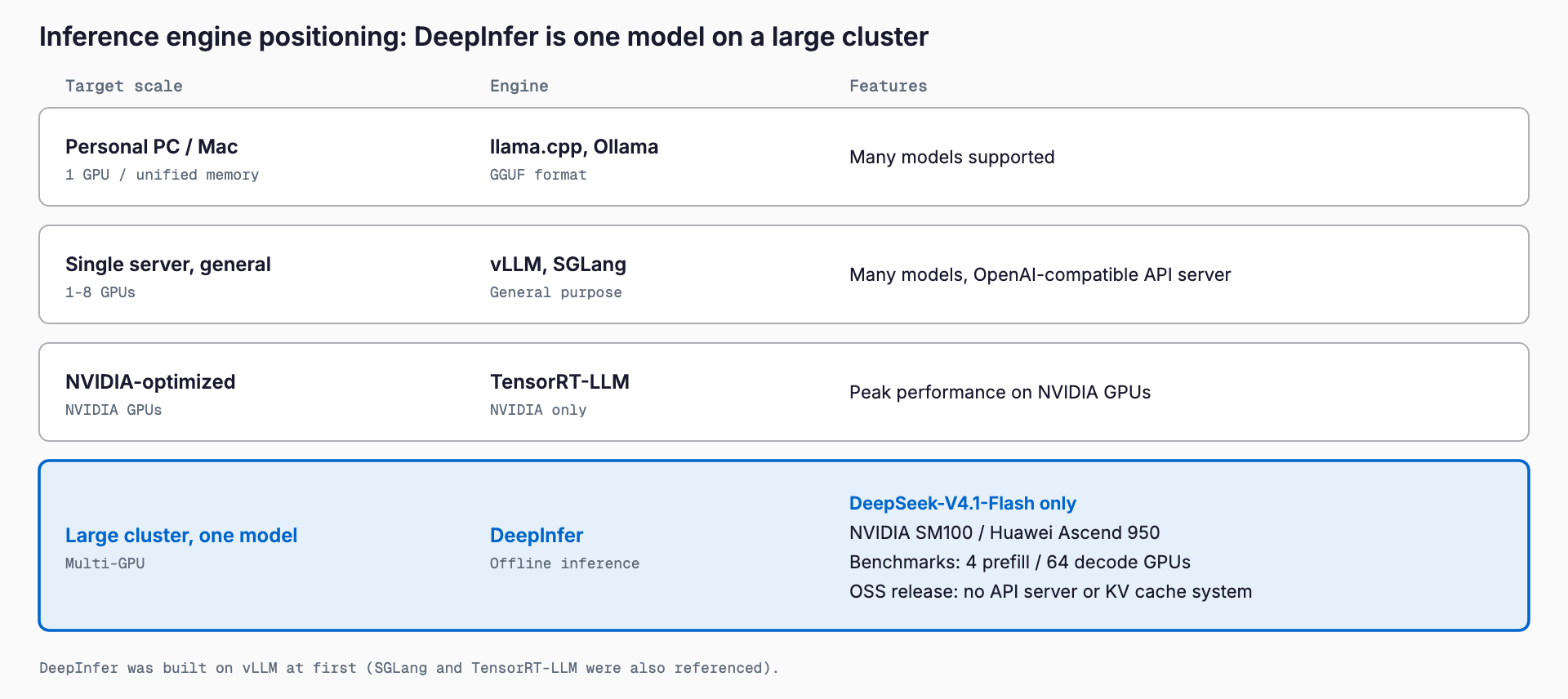
| Tool | Main target | Models | Hardware | Best for |
|---|---|---|---|---|
| DeepInfer | Large-scale DeepSeek-V4.1-Flash serving and research | V4.1-Flash only | SM100 GPUs, Ascend 950 | Large multi-GPU offline inference, learning DeepSeek's optimizations |
| vLLM | General high-throughput inference server | Many models | Wide GPU support | The standard way to host your own LLM API |
| SGLang | General high-performance serving | Many models | Wide GPU support | Structured output and fast serving |
| TensorRT-LLM | Optimized inference on NVIDIA GPUs | Major models | NVIDIA GPUs | Squeezing performance on NVIDIA |
| llama.cpp / Ollama | Local execution | Many GGUF models | CPU, common GPUs, Apple Silicon | Running models easily on a PC or Mac |
Because DeepInfer grew out of vLLM, the philosophy is close, but its scope is narrowed to running DeepSeek-V4.1-Flash as fast as possible on the newest specific hardware. Switching between many models or calling an OpenAI-compatible API from an app are things vLLM and SGLang provide as a baseline.
What Is Not Included, and Limits
The README explicitly lists what the open-source release leaves out. Know these before planning a deployment.
- KV cache system: not included
- Prefill/Decode disaggregation (including VE): not included
- Load balancing across DP replicas: not included
- Server: the README documents no OpenAI-compatible server or API (this release is offline inference)
- Models: DeepSeek-V4.1-Flash only
- Hardware: SM100 GPUs and Ascend 950 only; batch-invariant inference and deterministic sampling are NVIDIA only
- Maturity: few commits and no release date, so very early
In other words, the whole production stack has not been opened; the inference core came first. What DeepSeek will add later is unknown.
Who Should Use It, and What About Personal GPUs and Macs?
The people for whom trying DeepInfer now makes sense are teams with access to B200-class SM100 GPUs or Ascend 950, and researchers or developers who want to study DeepSeek's MoE optimizations.
If you want to know whether DeepSeek-V4.1-Flash runs on your RTX 5090 or Mac, check the memory first. The official weights are about 510GB and a 4-bit class quantization is about 430GB, so you need something like 8x H200 or a 512GB-class unified-memory Mac. Details are in the DeepSeek V4.1 Flash requirements guide. For setups below that scale, running smaller models on vLLM, SGLang, llama.cpp, or Ollama is more realistic.
For engineers, the value falls into learning and practical sides.
- As learning material: you can read the kernels and parallelism that make DeepSeek's MoE fast
- For reproducibility: batch-invariant inference and deterministic sampling are published as implementations, useful when you need the same input to give the same output in evaluations and regression tests
- Looking ahead: if serving and KV-cache pieces arrive, self-hosting options could widen (not published today)
FAQ
What is DeepInfer?
An Apache License 2.0 open-source inference framework released by DeepSeek. It is described as the engine behind its large-scale production services, and this release covers offline inference. The only supported model is DeepSeek-V4.1-Flash.
Does it run on an RTX 5090 or a Mac?
The README targets NVIDIA SM100 GPUs (B200, GB200, etc.) and Huawei Ascend 950 NPUs. RTX 5090 and Apple Silicon are not listed, and the official weights are about 510GB, which a single GPU cannot hold. For personal setups, vLLM, SGLang, llama.cpp, or Ollama are more realistic.
Can it replace vLLM?
Not as a general replacement. DeepInfer is specific to DeepSeek-V4.1-Flash and limited hardware. For many models or an API server, vLLM and SGLang fit better. The README gives no numeric comparison with vLLM.
Can I use it commercially?
The DeepInfer code is released under Apache License 2.0, so commercial use is possible within that license's terms. Model weights carry their own license, so check the terms of the model you use as well.
Is there an OpenAI-compatible API server?
The README documents no OpenAI-compatible server or API. This release is offline inference, and the KV cache system, Prefill/Decode disaggregation, and load balancing across DP replicas are not included.
Can it run models other than DeepSeek-V4.1-Flash?
The README lists only DeepSeek-V4.1-Flash. The default checkpoint is deepseek-ai/DeepSeek-V4.1-Flash-1017 and --model_name can override it, but operation with other models is not documented.
Feel free to contact us
Contact Us