Equipment Maintenance System (CMMS) Cost Guide for SMBs (202
6)
CMMS costs range from a few hundred yen per asset monthly for cloud tools to millions of yen for custom IoT builds, with cost drivers and a manager checklist.
An equipment maintenance system, often called a CMMS (Computerized Maintenance Management System), centralizes an equipment registry, inspection scheduling, failure history, and parts inventory to digitize maintenance work that used to run on paper or Excel. Typical 2026 costs run 1,000-5,000 yen per asset per month for cloud SaaS, 300,000-2,000,000 yen upfront for packaged on-premise software, 500,000-4,000,000 yen for a kintone-style low-code build, and 5,000,000 yen or more for full custom development. Factories and buildings that still run paper inspection sheets often struggle with missed entries, failure history that only lives in one technician's memory, and manually tracking statutory inspection due dates. This guide breaks down CMMS costs and how to choose the right approach for a non-technical decision maker. Since this is also a capital-investment decision, it helps to review it alongside the cost range for production management systems.
What Is an Equipment Maintenance System?
A CMMS is not just a tool for logging inspection results. It typically combines an equipment registry tracking model, install date, and manufacturer for each asset; schedule management that builds daily, monthly, and annual inspection plans; inspection recording via smartphone or tablet using QR codes or NFC tags so technicians can pull up a record on the shop floor; a trouble-history log that accumulates repair records, response time, and replaced parts; predictive (or preventive) maintenance that uses IoT sensors to continuously monitor vibration, temperature, and run time to catch early signs of failure; parts inventory management tracking stock and reorder points; and statutory inspection management for legally mandated cycles such as fire and electrical equipment. Not every feature is needed from day one — simply digitizing a paper inspection sheet already reduces missed entries and improves searchability.
Cost Ranges by Approach
| Approach | Overview | Typical initial cost | Typical monthly cost |
|---|---|---|---|
| 1. Cloud SaaS (per-asset billing) | Contract an inspection/maintenance SaaS and run it on standard features | 0-200,000 yen | A few hundred to a few thousand yen per asset |
| 2. Packaged software (on-premise) | Deploy an industry maintenance package on your own server | 300,000-2,000,000 yen | 100,000-200,000 yen/year in maintenance |
| 3. Low-code customization (e.g. kintone) | Build inspection and history tracking on a no-code/low-code platform | 500,000-4,000,000 yen | 20,000-150,000 yen for platform fees and maintenance |
| 4. Full custom development (with IoT sensors) | Built with a unique predictive-maintenance engine integrated with IoT sensors | 5,000,000-20,000,000 yen, sometimes more | Maintenance around 10-15% of initial cost per year, plus sensor connectivity fees |
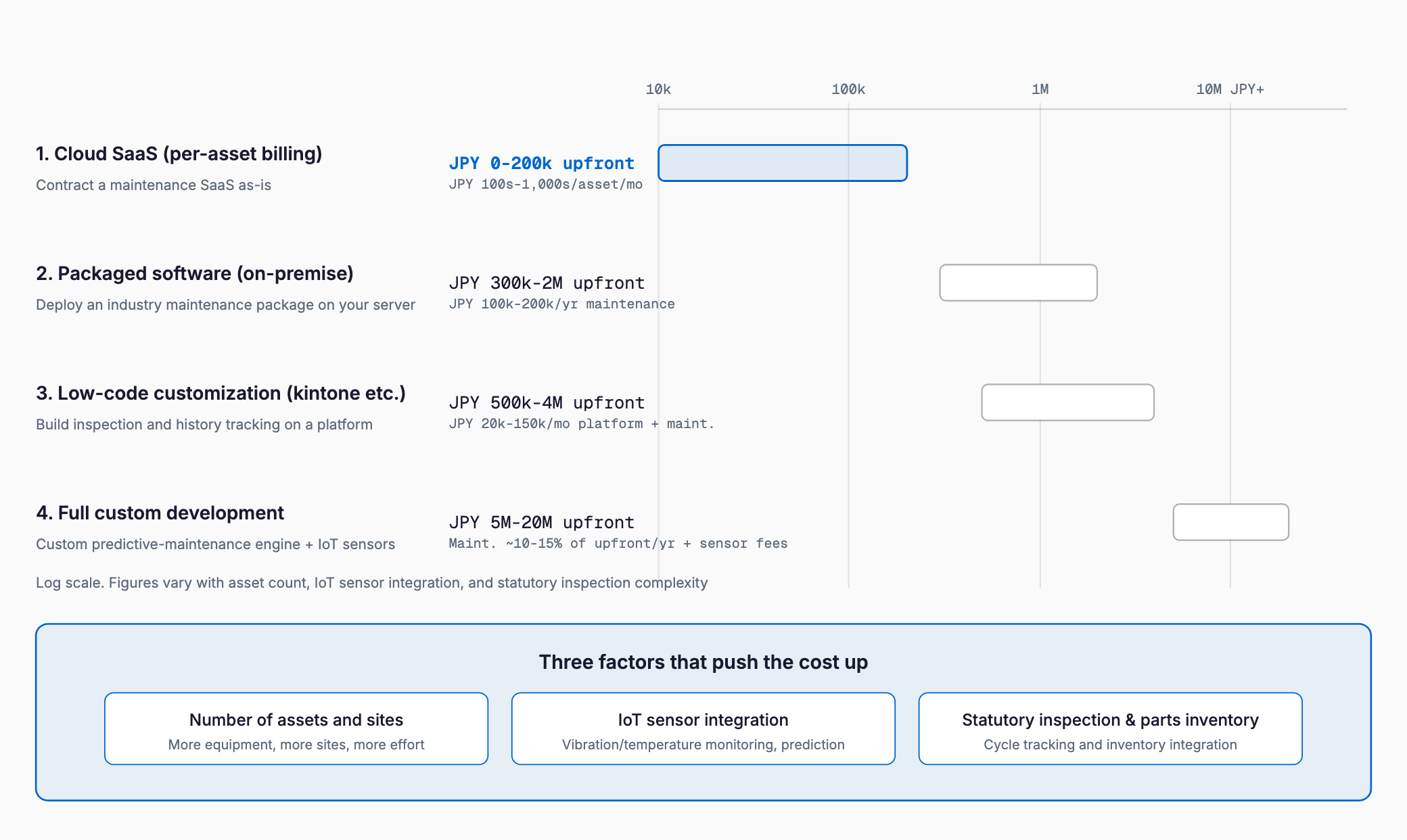
If the asset count is small and the goal is simply replacing a paper inspection sheet with smartphone entry, cloud SaaS is usually sufficient. The more you rely on IoT-sensor predictive maintenance or need to manage equipment across multiple sites, the more customization or custom development becomes necessary.
What Drives the Cost
- Number of assets and sites: More equipment across more locations increases master-data design and migration effort
- IoT sensor integration: Continuously monitoring vibration, temperature, and run time for predictive maintenance adds hardware, connectivity, and data-analysis development costs
- Number of inspection items and forms: More equipment-type-specific checklists add work
- Scope of parts inventory and ordering integration: Managing spare-parts stock and linking to a procurement system adds effort
- Complexity of statutory inspection management: Tracking different legally mandated cycles and paperwork for fire, electrical, and elevator equipment increases design effort
- Integration with existing core systems: Connecting to a production management system or asset registry adds effort per connected system
Industry-Specific Considerations
Requirements for equipment maintenance systems differ by industry. In manufacturing, unplanned downtime directly hits revenue, so predictive maintenance demand is high, and many companies want to track equipment uptime alongside a production management system as part of manufacturing production system adoption. In building and facility management, statutory inspections span HVAC, elevators, and fire equipment, so automatic alerts for inspection due dates and managing report formats matter most. Food factories often need tamper-resistant temperature logging for refrigeration and freezer equipment to support HACCP compliance, making sensor-based automatic logging an effective option. Logistics warehouses need to inspect forklifts and conveyor equipment while also wanting a unified view of equipment status across multiple sites. Mapping which features are essential for your industry before comparing products helps avoid choosing something with the wrong fit.
Migrating from Paper and Excel
1. Inventory the equipment registry, inspection sheets, and failure history currently kept on paper or in Excel, and decide the scope to digitize
2. Issue a QR code or NFC tag for each asset so technicians can pull up its inspection record from wherever it sits on the floor
3. Register inspection items and cycles in the system, and start with a pilot (PoC) covering a subset of equipment and one site
4. Adjust inspection items and alert settings based on the input burden and gaps found during the pilot
5. Roll out to all equipment and sites, phasing out paper inspection sheets step by step
6. Use the accumulated data to review which equipment fails most often and adjust parts-replacement cycles as an ongoing operating cycle
Checklist Before Choosing a System
- How are inspections and maintenance records currently kept (paper, Excel), and how many assets and sites are involved?
- Is IoT-sensor predictive maintenance required, and if so, for which equipment and measurements (vibration, temperature, run time)?
- Does the system need to manage statutory inspections (fire, electrical, elevator, etc.)?
- Should parts inventory and ordering be managed inside the system, or integrated with an existing inventory system?
- What is the IT comfort level of on-site inspection staff, and can they use a smartphone or tablet?
- What is the scope of integration with existing systems such as production management or an asset registry?
- If there are multiple sites, is a unified view of equipment status across locations needed?
- Does the system need to support offline entry for sites with unreliable connectivity, such as basements or outdoor areas?
Common Failure Patterns
A few patterns recur in CMMS rollouts. First, choosing a tool based only on digitizing inspection records, then trying to add IoT sensor integration or statutory inspection management later, only to find the platform cannot support them and having to re-select. It helps to anticipate future needs during the initial comparison. Second, neglecting to explain the change to on-site inspection staff, whose resistance to smartphone entry leaves paper and the system running in parallel indefinitely — this matters especially at sites with many veteran workers, where ease of use should be a top selection criterion. Third, underestimating the effort of migrating past failure history and the equipment registry, leading to complaints that past repair records cannot be found right after go-live. Fourth, evaluating the system in isolation from quality management system plans, which scatters inspection data and quality data across separate systems and forces costly integration work later.
Choosing Between SaaS and Custom Development
| Factor | Cloud SaaS fits when | Customization or custom development fits when |
|---|---|---|
| Predictive maintenance | No sensor integration needed, or simple run-time tracking suffices | Advanced predictive maintenance using multiple sensors (vibration, temperature) is required |
| Statutory inspections | Standard built-in alerts suffice | Industry-specific complex cycles and formats must be supported |
| System integration | No integration needed, or standard APIs suffice | Tight coupling with production or asset management systems is required |
| Sites and asset count | Single site, a few dozen assets | Multiple sites, hundreds of assets |
| Budget | Want to keep it to tens of thousands of yen a month | Can allocate millions of yen upfront |
Using Subsidies
Introducing an equipment maintenance system may qualify for Japan's IT Introduction Subsidy (IT導入補助金), which supports adopting IT tools, or the Monozukuri Subsidy (ものづくり補助金), which supports capital investment that improves productivity. Eligible tools, expense categories, and applicant requirements change every fiscal year, so always check the latest official application guidelines before applying, and consult a chamber of commerce or a certified support organization if needed to confirm eligibility.
Frequently Asked Questions
How much better is a CMMS compared to managing inspections in Excel?
Expected benefits include fewer missed inspection entries, faster search of failure history, and fewer missed statutory inspections. Factories and buildings with a large number of assets tend to see the biggest reduction in management effort from being able to view inspection status at a glance.
What does it typically cost to build a CMMS on kintone?
A simple inspection-recording and basic failure-history setup typically costs 500,000-1,500,000 yen, while adding IoT sensor integration and parts inventory management typically runs 1,500,000-4,000,000 yen. Costs vary with requirements, so get an individual quote to confirm.
Is IoT-sensor predictive maintenance always necessary?
It is valuable for critical equipment where downtime directly affects revenue or safety, but it does not need to be applied to every asset. A practical approach is to pilot predictive maintenance on a small number of high-priority assets first, then expand coverage based on the results.
How long does implementation usually take?
For a cloud SaaS, selection through a pilot on a subset of equipment typically takes one to two months. A full rollout across all sites or integration with IoT sensors typically takes a few months, and full custom development typically takes six months to a year.
Summary
Equipment maintenance system costs range from a few hundred yen a month per asset for cloud SaaS to several million yen or more for custom development with IoT-sensor predictive maintenance and multi-site management, with the right choice depending heavily on the approach. A practical way to control cost is to first map out your asset count, number of sites, need for predictive maintenance, and the complexity of statutory inspection management, confirm what standard features already cover, and limit customization or development to the gaps that remain.
Related free tools (no sign-up, instant results)
Feel free to contact us
Contact Us