Three.js r186: Native Gaussian Splatting, Setup & Limits
Three.js r186 adds GaussianSplat, a built-in mesh rendered via WebGPURenderer with GPU depth sorting. Covers setup, minimal code, and Spark 2.0 differences.
What GaussianSplat in Three.js r186 Is
Three.js r186 is a major update that brings Gaussian Splatting in as a first-class renderer feature. The implementation merged into the dev branch on August 10, 2026, and shipped as r186 in September. The lead developer was Ben Houston of Threekit, with the merge handled by maintainer Mugen87. Before r186, using Gaussian Splatting in Three.js meant pulling in a third-party library such as mkkellogg/GaussianSplats3D; now a single built-in mesh class, GaussianSplat, covers it. For background on Three.js fundamentals and the WebGPU/TSL transition, see our earlier Three.js 2026 Complete Guide.
What the GaussianSplat Class Can Do
GaussianSplat (renamed from GaussianSplatMesh during development) lives at three/addons/objects/GaussianSplat.js and behaves like any other built-in mesh type — that is the key win.
- Raycasting support — click detection and mouse interaction work out of the box
- Per-mesh frustum culling — off-screen splats are automatically excluded from rendering
- Bounding box computation — a foundation for scene management and future LOD logic
- View-dependent Spherical Harmonics, reproducing shading and reflections that change with viewing angle
Installation and Requirements
Install via npm. Three.js's npm version numbers track the r-release number directly, so r186 maps to 0.186.0.
npm install three@0.186.0The critical requirement: GaussianSplat only works with WebGPURenderer — it is not supported on the classic WebGLRenderer. Imports also change: use three/webgpu instead of plain three, and three/tsl for TSL.
import * as THREE from 'three/webgpu';Note that WebGPURenderer's WebGL2 fallback backend, used when WebGPU is unavailable, falls back to a plain JavaScript sort instead of GPU compute for depth sorting. The extra footprint is small — about 7KB on top of base Three.js for the SPZLoader plus the renderer additions.
Usage — the Shortest Path
The simplest route is loading the compact .spz format (from Niantic/Scaniverse) with SPZLoader — small file sizes, and the officially recommended path.
import * as THREE from 'three/webgpu';
import { SPZLoader } from 'three/addons/loaders/SPZLoader.js';
import { GaussianSplat } from 'three/addons/objects/GaussianSplat.js';

const splatGeometry = await new SPZLoader().loadAsync('model.spz');
const splats = new GaussianSplat(splatGeometry);
scene.add(splats);
For maximum interoperability, .ply is the most widely produced format across Gaussian Splatting tools, loaded via GaussianSplatPLYLoader.
import { GaussianSplatPLYLoader } from 'three/addons/loaders/GaussianSplatPLYLoader.js';

const splatGeometry = await new GaussianSplatPLYLoader().loadAsync('point_cloud.ply');
scene.add(new GaussianSplat(splatGeometry));
To fold splats into a glTF/glb pipeline, register GLTFGaussianSplatLoaderExtension, which implements the KHR_gaussian_splatting extension, on your GLTFLoader.
import { GLTFGaussianSplatLoaderExtension } from 'three/addons/loaders/GLTFGaussianSplatLoaderExtension.js';

loader.register((parser) => new GLTFGaussianSplatLoaderExtension(parser));
Legacy formats are also supported for migration: .ksplat (KSPLATLoader, from the legacy GaussianSplats3D) and .splat (SPLATLoader, from antimatter15).
How It Works — GPU Depth Sorting
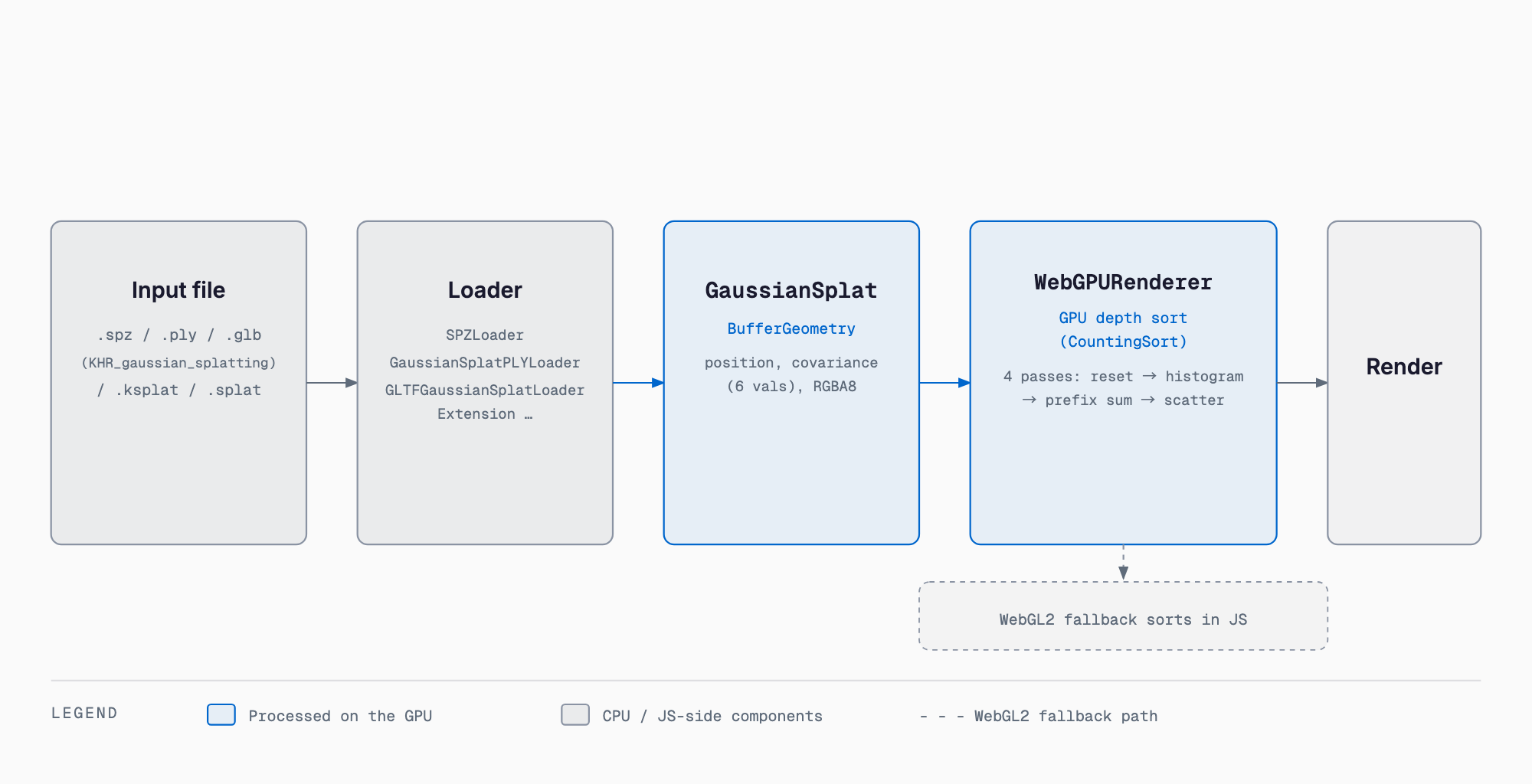
Gaussian Splatting only renders correctly if splats are alpha-blended back-to-front from the camera's viewpoint, so per-frame depth sorting is unavoidable. r186's GaussianSplat renders via a TSL-based NodeMaterial, and sorting runs through a reusable CountingSort class built from four TSL compute passes — reset, histogram, prefix sum, and scatter — with a default of 4096 bins. Crucially, only an index array (one uint per splat) gets sorted rather than the splat data itself, and re-sorting only triggers once the camera moves past a distance threshold, avoiding wasted work on static views.
On the geometry side, each splat carries the usual BufferGeometry position attribute plus a 6-float covariance attribute (the upper triangle of a symmetric 3x3 matrix) and RGBA8-packed color.
How It Compares to Existing Libraries
Before r186, the practical option for Gaussian Splatting in Three.js was pulling in mkkellogg/GaussianSplats3D as a third-party dependency. Native r186 support replaces that dependency for the basic case — a single captured object or a room-scale scene. For large scenes, Spark 2.0, from the World Labs ecosystem, is the stronger choice, with LOD splat trees, virtual paging, and its own .RAD format.
| Library | Role | Large-scene support | Dependency |
|---|---|---|---|
| Three.js r186 GaussianSplat (native) | Standard built-in feature | Not supported (no LoD/streaming) | Three.js core only, requires WebGPURenderer |
| mkkellogg/GaussianSplats3D | Main pre-r186 option | Limited | Third-party library |
| Spark 2.0 | Built for large scenes | LOD trees, virtual paging | Separate ecosystem (World Labs) |
Limitations and Caveats
- Designed for a single captured object or room-scale scene, not a city block
- No LoD (level of detail), no streaming, no spatial segmentation
- Does not use WebAssembly or Web Workers
- No glTF export capability
- No editor integration yet
- Requires WebGPURenderer, so WebGL-only projects need extra migration work
Other Changes in r186
r186 ships several other notable changes beyond Gaussian Splatting.
- New SunLight class with cascaded shadow maps (2 cascades by default)
- Added Object3D.dispose() and Object3D.intersectsFrustum()
- Retroreflectivity material support
- Order Independent Transparency via OITPassNode
- Voxel cone tracing for diffuse global illumination
- compileComputeAsync() for WebGPU
- Breaking changes: CommonJS builds are deprecated, minified builds removed, and the Source class is renamed to TextureSource
FAQ
Does GaussianSplat work with WebGLRenderer?
No. GaussianSplat is a WebGPURenderer-only feature, requiring imports from three/webgpu and three/tsl. It does run under the WebGL2 fallback backend, but in that case sorting falls back to plain JavaScript instead of GPU compute.
Which file format should I use?
.spz (via SPZLoader) is recommended for the smallest file sizes. .ply is the most widely produced format for interoperability, loaded with GaussianSplatPLYLoader. For a glTF pipeline, use GLTFGaussianSplatLoaderExtension, which implements the KHR_gaussian_splatting extension.
Do I need to migrate away from GaussianSplats3D?
For basic use — a single object or room-scale scene — switching to r186's native GaussianSplat removes a third-party dependency. For large scenes needing LoD or streaming, an ecosystem built for that, like Spark 2.0, is the better fit.
Can this handle city-scale scenes?
That is not the intended use case. r186's GaussianSplat targets a single captured object or room-scale scene, with no LoD, spatial segmentation, or streaming, so it is not suited to city-block-scale spaces.
Can I use captures from a phone scanning app directly?
Yes — if a phone-based capture app such as Scaniverse exports to .spz or .ply, those files load directly through SPZLoader or GaussianSplatPLYLoader.
Summary
Three.js r186 makes Gaussian Splatting a built-in mesh type, GaussianSplat, that supports raycasting, frustum culling, and view-dependent shading without a third-party dependency. The one hard requirement is WebGPURenderer, but multiple formats — SPZ, PLY, glTF — are supported, and GPU-compute depth sorting keeps performance practical. For a single object or room-scale scene, native GaussianSplat is the sensible first choice; for large-scale scenes, a dedicated ecosystem such as Spark 2.0 remains the better tool.
Feel free to contact us
Contact Us