Generative AI Employee Training Costs for SMBs (2026)
Generative AI training costs for SMBs: free courses from 0 yen, e-learning from 1,000 yen monthly, workshops from 100,000 yen, plus hidden costs and tips.
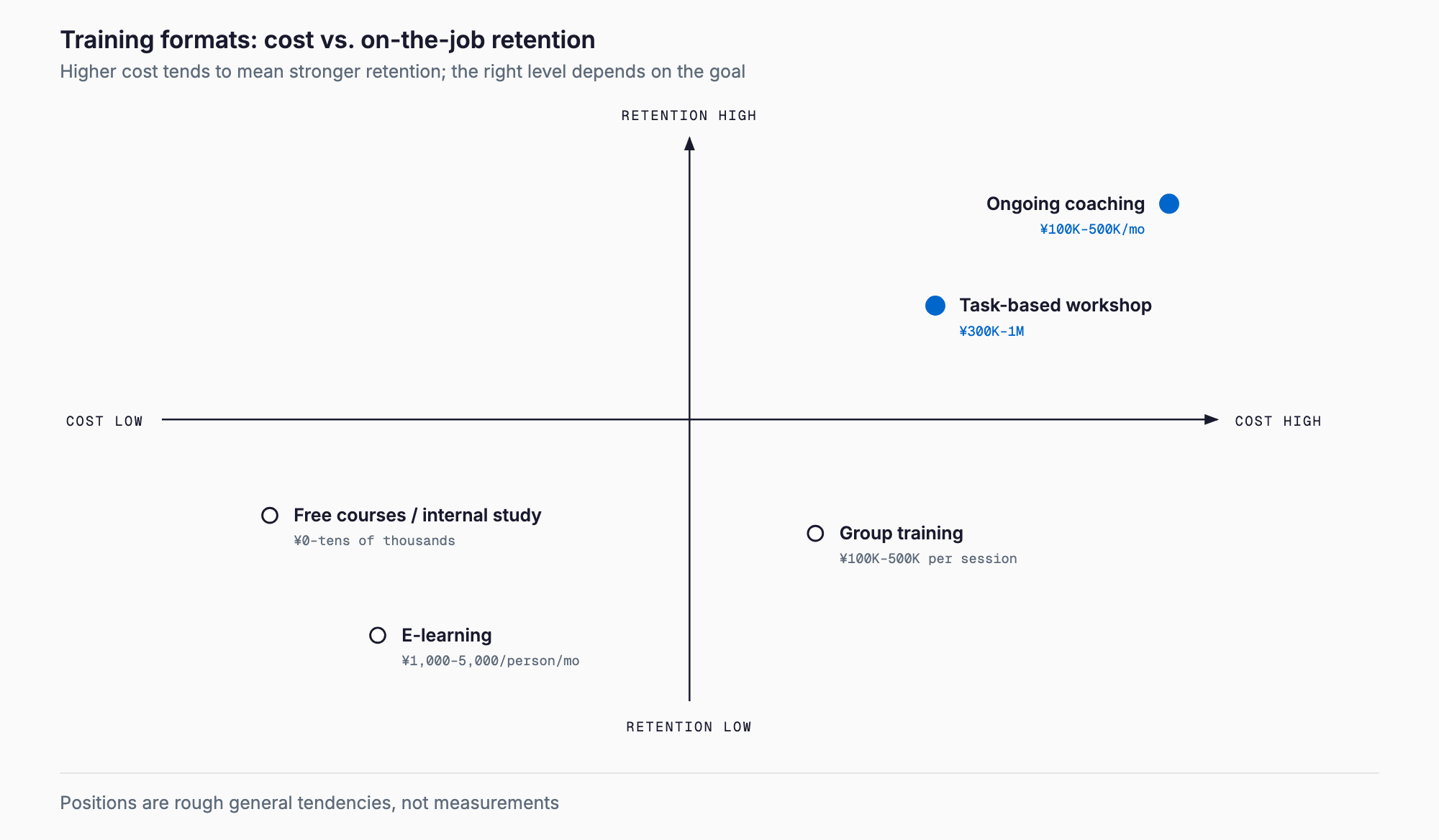
Generative AI employee training is education that helps staff use tools such as ChatGPT, Claude, Gemini, and Copilot safely and productively at work, and its cost varies widely by format. As a rough guide, free vendor courses or in-house study sessions cost from 0 yen to a few tens of thousands of yen, e-learning costs about 1,000 to 5,000 yen per person per month, a half-day to one-day group session with an outside instructor costs about 100,000 to 500,000 yen per session, a workshop using your own work materials costs about 300,000 to 1,000,000 yen, and a multi-month hands-on support program costs about 100,000 to 500,000 yen per month. These are general market estimates as of 2026, not quotes or guarantees. Tool licenses for business plans usually cost a few thousand yen per user per month on top of that. In practice, the labor cost of attendees' time and the loss from training that is never put into use tend to matter more than the training fee itself. This article explains costs by training type, hidden costs, how to choose by company size, what to cover, common failure patterns, and how to measure results, in plain terms for non-IT staff. For the overall adoption process, see also the SMB AI adoption guide.
Cost ranges by type of training
Generative AI training falls into five main formats. The table below shows rough price ranges commonly seen in the market; actual amounts vary with the instructor, headcount, number of days, and degree of customization.
| Type | What it covers | Estimated cost |
|---|---|---|
| Free / low cost | Free vendor courses, books, in-house study sessions | 0 yen to a few tens of thousands of yen |
| E-learning / video courses | Self-paced video lessons on the basics | About 1,000-5,000 yen per person per month, or a few tens of thousands of yen per year |
| Group session with an outside instructor | Half to one day of lectures and exercises, basics to use cases | About 100,000-500,000 yen per session |
| Task-specific workshop | Hands-on practice with your own work materials | About 300,000-1,000,000 yen |
| Hands-on support (multi-month) | Months of Q&A, shared examples, and training an in-house lead | About 100,000-500,000 yen per month |
| (Separate) Tool licenses | Business plans for ChatGPT, Claude, Gemini, Copilot, etc. | A few thousand yen per user per month; varies by plan, so check each vendor's official site for current pricing |
Free and low-cost learning is plenty for building basic knowledge. However, you must work out how to apply it to your own work, and the burden tends to fall on one or two promoters. E-learning gets cheaper per person as headcount grows and can be taken anytime, anywhere. For cost guidance on learning management as well, see e-learning and LMS costs. Group sessions suit getting everyone to the same baseline on the same day, but a one-off session rarely sticks. Workshops and hands-on support cost more, but make it easier to reach actual use in daily work.
Hidden costs that are easy to miss
If you build a budget only from the figure on the training quote, unexpected expenses appear later. These four are especially easy to overlook.
- Attendees' working hours: If 20 people attend a half-day session, that is 80 person-hours of labor. At 3,000 yen per hour, that is about 240,000 yen, which can rival the instructor's fee
- Tool licenses: If staff will use AI in daily work after training, you need business plans. Paid per person on an ongoing basis, the annual total can exceed the training fee
- Setting internal rules: Deciding what may and may not be entered, and the approval process, takes staff effort
- Follow-up after training: A question channel, sharing of internal success stories, and periodic review. Without these, usage fades within months
How to write internal rules is covered in creating company rules for ChatGPT. Setting minimum rules before training lets you reflect them in the course content.
Choosing by company size and maturity
What fits depends less on headcount than on how many people actually use generative AI today. Use the table below as a starting point.
| Size / situation | Suitable format | Approach |
|---|---|---|
| 10 people or fewer | Free courses plus in-house study sessions; e-learning if needed | The owner and one or two people use it heavily first and share wins. Outside training is often unnecessary |
| 10-50 people | E-learning plus a half-day group session, or a task-specific workshop | Align everyone on the basics while creating use cases for each department |
| Over 50 people | Task-specific workshops plus hands-on support; train in-house leads | Many departments and uneven adoption. Roll out around a promotion lead and internal rules |
| Almost no one uses it yet | Free courses plus a small pilot | Do not start with company-wide training; test on a small scale and confirm results first |
| Some already use it | Task-specific workshop | Using early adopters' examples as material keeps cost down and stays close to real work |
Checklist of what training should cover
Whichever format you choose, confirm that the following are included. The first two in particular are essential for every employee.
- Preventing information leaks and what must never be entered (customers' personal data, partners' confidential information, unpublished financials, etc.)
- Internal rules (permitted tools, approval flow, response to violations)
- Prompt basics (how to convey purpose, background, conditions, and output format)
- Application to your own work (practice with real tasks such as meeting minutes, email, document drafting, and inquiry handling)
- Handling hallucinations (plausible-sounding errors) and how to verify outputs
- Copyright, portrait rights, and other cautions when using generated content
Common failure patterns
Companies that spend on training but see no results tend to share the same failure patterns.
- Ending with a one-off lecture: People enjoy the talk and return to old habits the following week. Practice and review opportunities are needed
- Training before tools are in place: Without an account they can use, learners cannot try things in real work
- Content far from your own work: Only generic examples, so people cannot see how to use it in their jobs
- Starting without rules: With no line drawn on prohibited inputs, the risk remains
- No measurement of results: You cannot tell what changed, so next budget decisions are guesswork
- No promotion lead: With no one to answer questions or collect success stories, use does not spread
What to check when requesting quotes
Even under the same label of generative AI training, what is provided differs greatly from one provider to another. When comparing quotes, check not only the price but also what is included. For example, the value of the same amount changes depending on whether it covers only the instructor's fee or also advance interviews, material preparation, a practice environment on the day, and Q&A after training. It is also worth confirming surcharges when headcount grows, price differences between online and in-person delivery, and whether recordings may be reused internally.
- Whether they will use your own work materials and cases (or only generic content)
- Whether post-training Q&A or follow-up meetings are included, and for how long
- The attendee cap and the charge for extra participants
- Whether materials and recordings may be used internally on an ongoing basis
- Whether the tools covered (ChatGPT, Claude, Gemini, Copilot, etc.) match what you plan to use
- Whether information leak prevention and internal rules are part of the course
A suggested way to start
If this is your first training, it is safer to proceed in stages rather than ordering a large company-wide program at once. First, the owner and a few people learn the basics from free courses or books and draft internal rules. Next, contract business plans for a small group and try them in real work for one to two months to see which tasks benefit. Based on those results, choose company-wide e-learning or a group session and, if needed, task-specific workshops. Starting small makes it easier to tailor the content to your actual situation, and the money spent on outside training is less likely to be wasted.
Measuring results and payback period
The effect of training is easiest to judge by converting it to money: time saved multiplied by hourly cost. For example, suppose 20 people each save 5 hours of work per month. At 3,000 yen per hour, that is 20 people x 5 hours x 3,000 yen = 300,000 yen of value per month. If you combine a workshop costing 600,000 yen with tool licenses (say 100,000 yen per month for 20 people), the initial training cost is recovered in roughly two months of benefit, after which the difference between the benefit and the license cost remains. These figures are only a hypothetical example, but substituting your own headcount, hourly cost, and expected time saved gives you a basis for the budget decision.
In reality, freed-up time may simply go to other work and not translate directly into revenue or less overtime. So decide in advance which tasks you will shorten by how many hours, and re-measure actual working time one to three months after training. It also helps to read this alongside the approach in the SMB AI adoption guide.
Possible use of subsidies
Employee education costs may be partly eligible under programs such as the Ministry of Health, Labour and Welfare's Human Resources Development Support Subsidy, in courses related to reskilling. However, the requirements, including eligible training, eligible expenses, application deadlines, and whether a prior plan must be filed, are revised every fiscal year. Always check the latest official information and consult your local Labour Bureau if anything is unclear. There are cases where it turns out you cannot apply after you have already signed a training contract, so check before you apply for the course. An overview of schemes that may be usable for AI is in the guide to AI subsidies and grants.
Making the training stick
Whether the training cost is recovered is largely decided in the months after training. To make it stick, first set up a chat channel where people share questions and success stories about generative AI. Simply seeing a prompt someone used at work, or a case where time was cut, makes it easier for others to copy. Next, hold a short sharing session of about 30 minutes once a month and discuss failures as well as successes. In addition, for frequently performed tasks (summarizing meeting minutes, drafting email, drafting replies to inquiries), keep reusable prompt templates in-house so that newly hired staff can start at the same level. These small steps cost almost nothing extra and are the most realistic way to make the effect of training last.
Frequently asked questions
Does a company with fewer than 10 employees need outside training?
Not necessarily. Free official courses and in-house study sessions, plus e-learning if needed, are often enough. Having the owner or a lead person use it heavily first, create wins, and share them is usually more cost-effective.
Should we contract the tools before training?
Yes, it is best to have usable accounts ready at or just before the training. If people cannot try things in their own work right after learning, the content is less likely to stick. Check each vendor's official site for current pricing and features of the plan you choose.
Which is better, e-learning or a group session?
It depends on the goal. E-learning is a low-cost way to align everyone on the basics, while group sessions and workshops suit applying it to your own work and asking questions. Many companies combine both.
How soon can the effect of training be measured?
A guideline is one to three months after training, comparing working time on the targeted tasks with the time before. If you decide in advance which tasks to shorten by how many hours, you can convert time saved multiplied by hourly cost into money and estimate the payback period.
Related free tools (no sign-up, instant results)
Feel free to contact us
Contact Us