Index-Translate Requirements: VRAM & GPU for 2B/9B/35B
Index-Translate needs about 2GB VRAM (2B), 6GB (9B) or 21GB (35B-A3B) at 4-bit. bilibili's 150-language models: GPU, Mac, CPU specs and setup. Oct 2026.
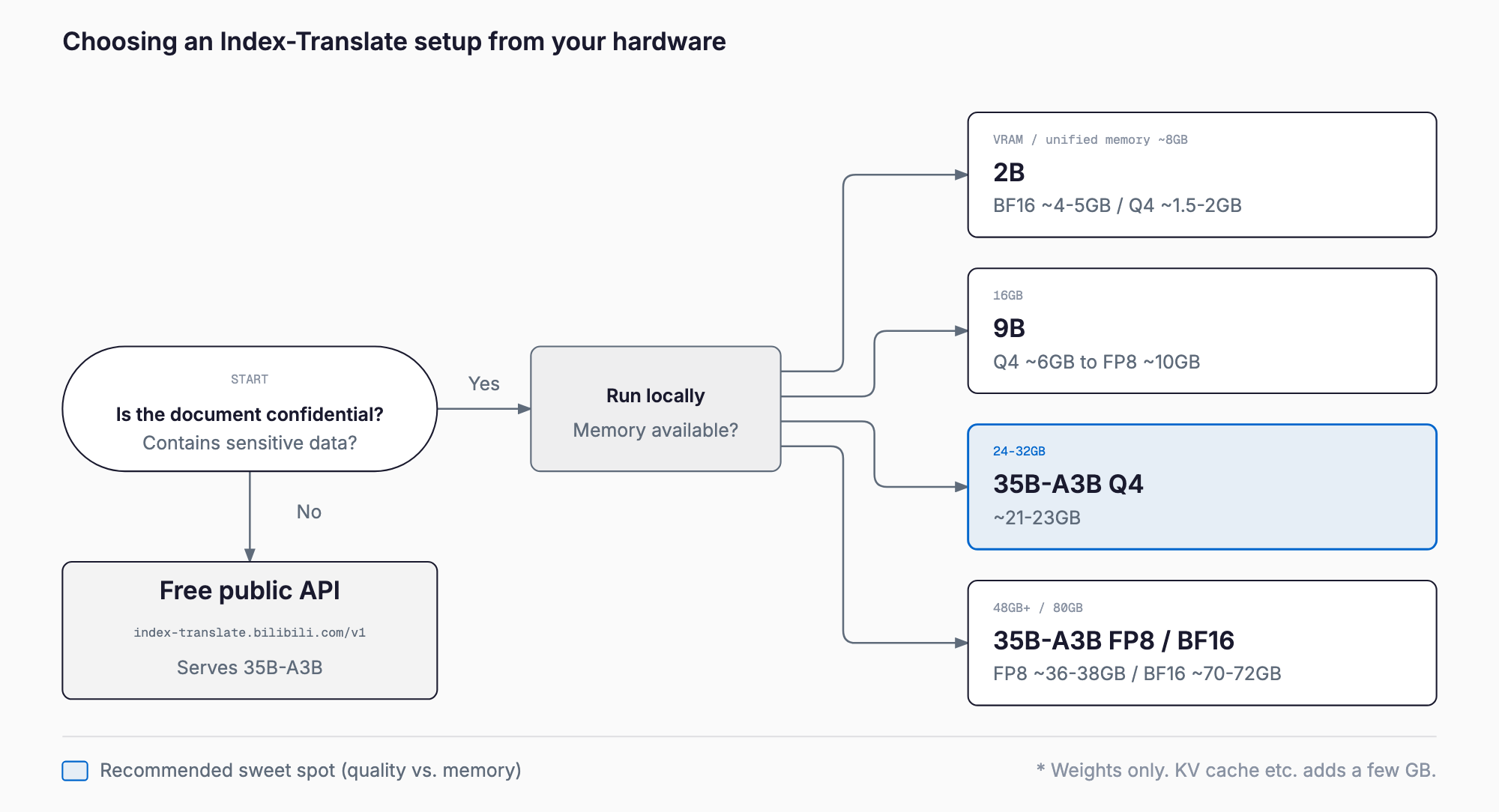
Index-Translate (bilibili / IndexTeam) is a family of open-weight translation models built on Qwen3.5 and covering 150 languages. As a rough guide it needs about 2–5GB for the 2B model, 6–19GB for the 9B, and 21–72GB for the 35B-A3B, depending on quantization. The 2B runs on an 8GB GPU, a Mac, or even a CPU, the 9B is practical on a 16GB GPU, and the 35B-A3B fits a 24–32GB GPU or a Mac with 32GB+ memory at 4-bit. It is released under Apache 2.0, so commercial use is allowed (as of October 2026).
This article covers the requirements table, memory estimates per quantization (GGUF/FP8/NVFP4), how to run it on NVIDIA GPUs, Apple Silicon and CPUs, the benchmarks, a vLLM how-to, and a comparison with other translation options. For the basics of running a model locally, see the Qwen3.5 9B local setup guide. Note that the memory figures are our own estimates computed from weight sizes, not official measurements.
Requirements at a glance
| Item | 2B | 9B | 35B-A3B (preview) |
|---|---|---|---|
| Architecture | Dense | Dense | MoE (35B total / 3B active) |
| BF16 | ~4–5GB | ~18–19GB | ~70–72GB |
| FP8 | ~2.5GB | ~10GB | ~36–38GB |
| 4-bit (GGUF Q4_K_M) | ~1.5–2GB | ~6GB | ~21–23GB |
| Fits on | 8GB GPU / 8GB Mac / CPU | 16GB GPU (Q4–Q8) / 16GB Mac (Q4) | 24–32GB GPU (Q4) / 48GB-class (FP8) / 80GB (BF16) |
| Context length | 32,768 | 32,768 | up to 262,144 (recommended serve setting: 32,768) |
| License | Apache 2.0 | Apache 2.0 | Apache 2.0 |
The table shows estimates for weights only. In practice the KV cache and runtime overhead add a few GB, and more as the context grows. Adding roughly 2–4GB to the numbers above is a sensible margin.
To check quickly whether a given GPU or Mac can run a model, the VRAM Calculator (free, no sign-up) estimates the VRAM you need once you pick a model, quantization, and context length. Index-Translate 2B, 9B and 35B-A3B are in its model list.
What is Index-Translate? bilibili's 150-language translation family
Index-Translate is a translation-focused open-weight model family released by the Index LLM team (IndexTeam) at video platform bilibili. It is built on Qwen3.5 and comes in three sizes: 2B, 9B and 35B-A3B. The code is at bilibili/Index-Translate on GitHub, and the weights are on Hugging Face (IndexTeam/Index-Translate-35B-A3B-preview, IndexTeam/Index-Translate-9B, IndexTeam/Index-Translate-2B) and ModelScope.
The release sequence was as follows. On September 30, 2026 the text-translation weights (2B, 9B and the 35B-A3B preview) went out. On October 3 official quantized builds were added: GGUF for llama.cpp, plus FP8 W8A8 and NVFP4 W4A4 for vLLM. NVFP4 targets Blackwell GPUs. On October 4 a free OpenAI-compatible public API (https://index-translate.bilibili.com/v1, serving the 35B-A3B) and the benchmark datasets were released.
It supports text translation across 150 languages, Japanese included. Its other distinguishing feature is instruction-following translation: you can specify hard constraints (glossary and terminology enforcement, format preservation) and soft constraints (tone, domain disambiguation, length) in the prompt. The family also includes Index-Echo (speech translation, S2TT/S2ST, between Chinese and English/Japanese/Spanish), Index-Homura and Index-NativeLong (full-document translation), but this article focuses on the three text models.
Model-by-model details
Index-Translate-2B: the lightweight option that runs anywhere
At 4–5GB in BF16 and around 2GB at 4-bit, it runs on an 8GB GPU, an 8GB Mac, or even a CPU alone. The trade-off is quality: its WMT26 judge score is 60.26, nearly 15 points below the 9B's 75.35. Think of it as a model for on-device use, embedded scenarios, or fast first-pass drafts.
Index-Translate-9B: the practical mid-size on a 16GB GPU
The 9B needs about 18–19GB in BF16, about 10GB in FP8, and about 6GB at Q4_K_M. An RTX 4060 Ti 16GB or RTX 5060 Ti 16GB handles Q4–Q8 comfortably. An RTX 4090/5090 (24/32GB) can hold BF16, but long contexts squeeze the KV cache, so FP8 is safer. On a Mac, 16GB with Q4 is the realistic floor. As the benchmarks below show, it is nearly level with the 35B-A3B on FLORES, which makes it very cost-effective.
Index-Translate-35B-A3B (preview): large-model quality at small-model compute
It is an MoE with about 35B total parameters (the Hugging Face card lists about 36B) and only about 3B active at inference. BF16 weights are about 70–72GB, requiring an 80GB H100/A100 or a Mac with 96–128GB. FP8 is about 36–38GB and runs on an RTX 6000 Ada (48GB) or two 24GB cards. The 4-bit GGUF is about 21–23GB and fits an RTX 4090/5090 or a Mac with 32GB+.
The advantage of MoE is that you need the memory for the full model, but each token costs only about 3B parameters of compute. That helps keep tokens per second up even when part of the model is offloaded to CPU memory, compared with a dense model of the same size. As the name says, this is a preview release, so weights and performance may change in the final version. Maximum position embeddings are 262,144, but the recommended serve setting is --max-model-len 32768, and evaluation used 16,384.
Quantization: GGUF / FP8 / NVFP4
| Format | Main use | Notes |
|---|---|---|
| BF16 (original) | 80GB-class GPUs, vLLM | Highest accuracy. 70GB+ for the 35B-A3B |
| GGUF (Q4_K_M etc.) | llama.cpp, Mac, CPU/GPU mixed | Smallest size, easy offloading |
| FP8 W8A8 | vLLM, Ada/Hopper or newer GPUs | About half of BF16 with little quality loss |
| NVFP4 W4A4 | vLLM, Blackwell GPUs | Among the smallest 4-bit options; requires Blackwell |
The official quantized builds were added on October 3, so there is no need to make GGUF files yourself. As a rule of thumb: GGUF for a single GPU with limited VRAM, FP8 for a vLLM server, and NVFP4 for Blackwell hardware (RTX 50 series, B200 and so on). Because a single wrong word stands out in translation, check on your own languages and style whether 4-bit is good enough. For differences between llama.cpp, vLLM and others, see the local LLM inference engine comparison.
Running on Apple Silicon
Macs use unified memory, so the memory available to the GPU effectively sets the model ceiling. Because the OS and apps take a share, plan on roughly 70–80% of installed memory. A 16GB Mac runs the 9B at Q4 (about 6GB) comfortably, and the 2B runs on any Mac. With 32GB or more, the 35B-A3B at Q4 (about 21–23GB) is feasible, and 96–128GB opens up BF16 (about 70–72GB). Since the MoE computes only 3B parameters per token, speed drops less on a Mac than you might expect. Besides llama.cpp, GGUF-capable tools such as LM Studio and Ollama work too (see Ollama vs LM Studio).
NVIDIA GPU guide
| GPU (VRAM) | 2B | 9B | 35B-A3B |
|---|---|---|---|
| 8GB class (RTX 4060 etc.) | BF16 OK | Q4 at the limit | No (needs offload) |
| 16GB class (RTX 4060 Ti 16GB / 5060 Ti 16GB) | Plenty | Q4–Q8 | Q4 + CPU offload |
| 24GB (RTX 4090) | Plenty | BF16 tight / FP8 OK | Q4 (~21–23GB, tight for long text) |
| 32GB (RTX 5090) | Plenty | BF16 OK | Q4 (comfortable) |
| 48GB class (RTX 6000 Ada, 2×24GB) | Plenty | Plenty | FP8 |
| 80GB (H100/A100) | Plenty | Plenty | BF16 |
These are estimates covering weights plus KV cache, and you should leave headroom if you plan to use the full 32,768-token context. Translation is often done paragraph by paragraph, so many real workloads never need a long context.
CPU-only setups
The 4-bit 2B runs under llama.cpp on an ordinary laptop with no GPU. The 9B is about 6GB, so it works on a CPU machine with 16GB of RAM, though slowly. The 35B-A3B is about 21–23GB at 4-bit and needs 32GB+ of RAM, but because it is an MoE with 3B active, it tends to reach more realistic CPU speeds than a dense model of the same size. If the model does not fit in VRAM, putting some layers on the GPU and the rest on the CPU is also effective.
Example budget configurations
- Existing PC or Mac: the 2B at 4-bit. Works with 8GB of memory; good for drafts and light translation
- A PC with a 16GB GPU, or a 16GB Mac: the 9B at Q4–Q8. The best balance
- RTX 4090/5090, or a Mac with 32GB+: the 35B-A3B as 4-bit GGUF. Quality-focused local operation
- Business server (48GB-class GPU): the 35B-A3B in FP8 served with vLLM, shared by several users
- 80GB GPU (H100/A100): the 35B-A3B in BF16, for accuracy-first evaluation
Benchmarks: official numbers and comparisons
The numbers below come from the Hugging Face model card and the repository, and are vendor-reported by bilibili. As of this writing we have not confirmed independent reproductions.
| Metric | 35B-A3B (preview) | 9B | 2B |
|---|---|---|---|
| FLORES (COMET-22) | 0.8794 | 0.8789 | 0.8655 |
| WMT26 (judge, out of 100) | 76.76 | 75.35 | 60.26 |
| instTrans Quality | 0.6901 | 0.6771 | 0.5391 |
| instTrans IFscore | 0.8336 | 0.8209 | 0.7569 |
| MEME | 0.7405 | 0.7387 | 0.6443 |
| Low-resource FLORES (COMET-22) | 0.8168 | — | — |
| Off-target rate (low-resource) | 2.4% | — | — |
Among the comparisons the repository reports, GPT-5.6-Sol scores 89.10 on WMT26, well above the 35B-A3B's 76.76. In overall translation quality, the top closed model still has a clear lead. On MEME (internet slang and cultural expressions), however, the 35B-A3B scores 0.7405 against GPT-5.6-Sol's 0.7194. The repo also reports Hy-MT2-7B at 0.8747 on FLORES, DeepSeek-V4.1-Flash at 0.6068 on instTrans Quality, and Gemini 3.5 Flash at 0.6374 on IFscore, so Index-Translate's constraint-following is ahead of those comparison points.
Two takeaways. First, the 9B is nearly level with the 35B-A3B on FLORES and MEME and only about 1.4 points behind on WMT26, which makes it the better value. Second, the 2B falls well behind, so it is hard to recommend where quality matters.
How to use it: serving with vLLM
The recommended inference settings are greedy decoding (temperature 0), max_tokens of 1,024 by default, and thinking disabled. Here is an example vLLM launch.
pip install -U vllm

vllm serve IndexTeam/Index-Translate-35B-A3B-preview \
  --served-model-name IndexTeam/Index-Translate-35B-A3B-preview \
  --host 127.0.0.1 --port 8000 \
  --max-model-len 32768
Once running, you can call it from any OpenAI-compatible client. To turn thinking off, pass enable_thinking=False in chat_template_kwargs via extra_body.
from openai import OpenAI

client = OpenAI(base_url="http://127.0.0.1:8000/v1", api_key="EMPTY")

prompt = (
    "请将以下日语文本翻译为英语,直接输出翻译结果,不要进行任何解释。\n"
    "本製品は防水仕様ですが、水没には対応していません。"
)

resp = client.chat.completions.create(
    model="IndexTeam/Index-Translate-35B-A3B-preview",
    messages=[{"role": "user", "content": prompt}],
    temperature=0,
    max_tokens=1024,
    extra_body={"chat_template_kwargs": {"enable_thinking": False}},
)
print(resp.choices[0].message.content)
You can also use the CLI that ships with the repository.
python inference/llm/translate.py "本製品は防水仕様です。" --target en \
  --model IndexTeam/Index-Translate-35B-A3B-preview
Prompt format (Chinese template)
The official prompt template is written in Chinese. Standard translation uses the following form, with language names in {source} and {target} and the source text in {text}.
请将以下{source}文本翻译为{target},直接输出翻译结果,不要进行任何解释。
{text}
To add constraints such as glossaries or formatting, use the 【源文】 / 【约束要求】 format and list hard constraints as numbered 【硬性要求】 items. The following is a skeleton to show the layout; replace the constraint wording to suit your use.
【源文】
{text}

【约束要求】
【硬性要求】
1. {constraint_1}
2. {constraint_2}
请将以上源文翻译为{target}。
Notes on the free public API
Since October 4, a free OpenAI-compatible API has been available at https://index-translate.bilibili.com/v1 (serving the 35B-A3B). You can try it just by changing the client's base_url. However, details such as rate limits and terms of use are not documented in detail at this time. How text sent to a public endpoint is handled is not guaranteed, so do not send confidential documents or personal data; for those, run the model locally.
Comparison with other translation options
| Option | Open weights | Local / offline | Glossary constraints | Cost |
|---|---|---|---|---|
| Index-Translate | Yes (Apache 2.0) | Yes | Via prompt (hard / soft constraints) | Your own GPU and power; the public API is free |
| DeepL API | No (closed SaaS) | No | Glossary feature | Usage-based (depends on plan) |
| Google Cloud Translation | No | No | Glossary feature | Per-character usage pricing |
| General LLM APIs such as GPT-5.6-Sol | No | No | Via prompt | Per-token usage pricing |
| Tencent Hy-MT2-7B | Yes | Yes | Model-dependent | Your own GPU and power |
How to choose: if you need the highest quality and confidentiality is not an issue, a top-tier API such as GPT-5.6-Sol has the edge (89.10 on WMT26). Index-Translate fits when drafts cannot leave your network, when API costs balloon at volume, or when you need terminology enforced strictly. DeepL and Google are strong on steady production quality and easy-to-manage features such as glossaries.
Troubleshooting
- Out of memory (OOM): lower --max-model-len (32768 to 16384), switch to an FP8 or GGUF build, or use a model of 9B or smaller. Adjusting gpu-memory-utilization in vLLM can also help
- Chinese leaks into the output: the template is in Chinese, so always fill in {target} and name the target language explicitly, such as English or Japanese. Off-target output (text in an unintended language) is reported at 2.4% for low-resource directions, so adding a language-detection check afterward is reassuring
- Long reasoning text or slow responses: always pass enable_thinking=False, and use temperature 0 (greedy decoding)
- Multiple constraints are not respected: the model card itself notes that combined constraints and low-resource directions are harder. Reduce the number of constraints, or add a script that verifies terminology after translation
- Quality is lower than expected: keep in mind that this is a preview and that the 2B drops off sharply, and try 9B or larger
Summary
Index-Translate is an Apache 2.0, 150-language translation model family, and the 2B to 35B-A3B range lets you match the model to your hardware. The 9B runs on a 16GB GPU with strong quality, and the 35B-A3B runs on a 24–32GB GPU at 4-bit. It does not reach GPT-5.6-Sol's quality ceiling, but its value lies in constraint-aware translation of terminology and format, and in handling confidential documents locally. A good first step is to test a quantized 9B on your own text.
FAQ
How much memory do I need at minimum to run Index-Translate?
The 4-bit GGUF of the 2B has about 1.5–2GB of weights and runs on an 8GB PC or Mac, or even on a CPU alone. This is a weights-only estimate; the KV cache and overhead add a few GB.
Does the 35B-A3B run on an RTX 4090 (24GB)?
The 4-bit GGUF (about 21–23GB) fits, but with little headroom and it gets tight on long contexts. Because the MoE computes only 3B parameters per token, speed holds up well, and offloading what does not fit in VRAM to the CPU is also an option.
Can I use it for Japanese translation?
Japanese is among the 150 supported languages. The prompt template is in Chinese, though, so name the target language explicitly in {target} and check that no other language leaks into the output.
Can I use it commercially?
It is released under Apache 2.0, which allows commercial use. Still, check the license notices in each repository, including the Qwen3.5 base, before you deploy.
Is it safe to send confidential documents to the public API?
We do not recommend it. Rate limits, terms and data handling are not documented in detail, so process confidential documents and personal data with a locally run model.
Related free tools (no sign-up, instant results)
Feel free to contact us
Contact Us