FTP/SFTP on Google Cloud: 4 Setups Without a Managed Service
Google Cloud has no native managed FTP/SFTP service. Four setups fill the gap: Compute Engine with gcsfuse, SFTPGo, third-party tools, or removing the server.
Conclusion: Google Cloud Has No Official FTP/SFTP Service
Google Cloud has no native, managed FTP/SFTP/FTPS service comparable to AWS's AWS Transfer Family. There's no official service called "Cloud FTP" either. So if you need to receive or send files over FTP or SFTP with a trading partner, you have to combine Google Cloud's standard building blocks yourself, bring in a third-party product, or redesign the workflow so an FTP server isn't needed at all.
In practice, the realistic options fall into four patterns: (1) a self-managed setup with an FTP/SFTP server on Compute Engine and gcsfuse, (2) the open-source SFTPGo server, (3) a Marketplace gateway product or SaaS managed SFTP service, and (4) removing the FTP server altogether and replacing it with a scheduled workflow. The rest of this article walks through how each one works and where it fits.
The Go-To Setup: Compute Engine + gcsfuse + Cloud Storage
The most common approach is to run FTP/SFTP server software on a Compute Engine VM and mount a Cloud Storage bucket as a filesystem using gcsfuse. gcsfuse is Google's official FUSE implementation, and it lets a Cloud Storage bucket be mounted on the OS as if it were a local directory. When a trading partner connects over SFTP or FTPS and uploads a file, the server software simply writes it into the mounted directory, and the underlying object automatically lands in the Cloud Storage bucket.
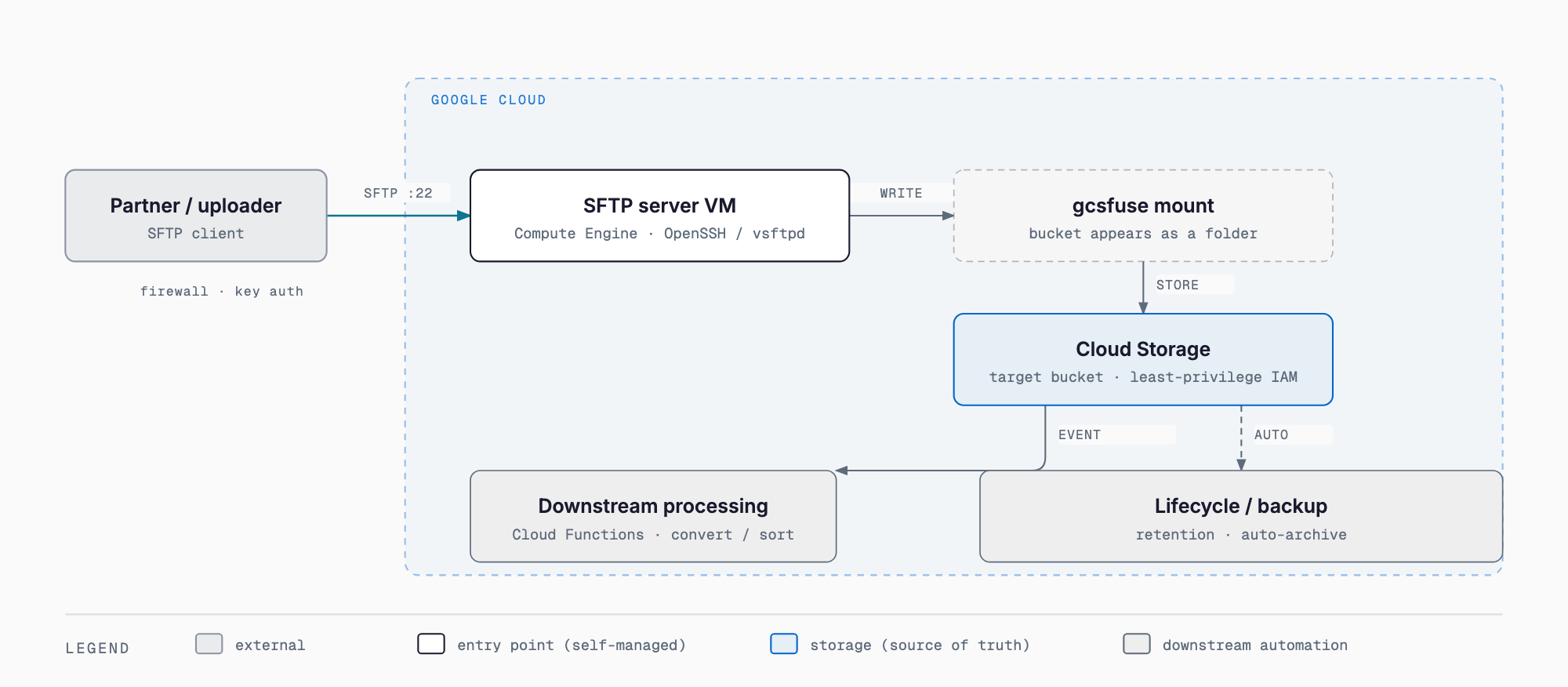
For the server software itself, SFTP can run on the SSH daemon's SFTP subsystem that ships with the VM's OS, while FTP/FTPS typically needs a separate package such as vsftpd. The basic flow is: trading partner → SFTP/FTPS (Compute Engine, port 22 or 21/990) → gcsfuse mount → Cloud Storage bucket → downstream conversion, sorting, and backup processing. Once a file lands in the bucket, it's easy to hook into Cloud Storage features such as Cloud Functions triggers or lifecycle rules.
One caveat: gcsfuse is not a fully POSIX-compliant filesystem. Permission changes, symbolic links, and concurrent writes from multiple clients don't behave exactly like a local disk. If your workload involves many small files at high frequency, or requires strict file locking, check gcsfuse's constraints beforehand.
Comparing the Four Setup Patterns
Putting the above together, the four setup patterns compare as follows. Which one fits best depends on how much you want to prioritize ease of setup versus low operational burden, and on whether the partner specifically requires FTP, FTPS, or SFTP.
| Setup | Overview | Setup effort | Operational effort | Best fit |
|---|---|---|---|---|
| A. Compute Engine + gcsfuse | Run an FTP/SFTP server on a VM, mount GCS with gcsfuse | Medium (OS, server software, gcsfuse configuration) | Medium–high (OS patching, key management, monitoring are self-managed) | Need a flexible setup close to existing FTP operations |
| B. SFTPGo | OSS SFTP/FTPS/WebDAV server with GCS as a direct storage backend | Medium (app setup and config file) | Medium (virtual users and quotas managed within the app) | Want to centrally manage accounts for multiple partners |
| C. Marketplace product / SaaS | Use a gateway product or SaaS managed SFTP service | Low–medium (mostly contracting and configuration) | Low (vendor handles maintenance) | Want to avoid self-managed operations, need to start quickly |
| D. Remove the FTP server | Replace it with a workflow or script that fetches/sends files | Low–medium (depends on existing scheduled processing) | Low (no server running continuously) | One-way scheduled transfers or simple file sharing are enough |
Option B: SFTPGo with Cloud Storage as a Direct Backend
SFTPGo is an open-source SFTP/FTPS/WebDAV server written in Go, and one of its defining features is that it can use Cloud Storage directly as a storage backend instead of only local disk. You can run it on a small Compute Engine VM, or containerize it and run it at small scale on something like Cloud Run. Because virtual user creation, per-user directory permissions, and storage quotas are all managed within the application itself, it's a good fit when you want to issue and manage a separate account for each trading partner. Being open source, there's no license fee, but deployment, updates, and incident response are still your own responsibility.
Option C: Marketplace Products and SaaS
If you'd rather avoid building and maintaining a server yourself, third-party products are another option. On GCP Marketplace, gateway-style FTP/SFTP server products backed by Cloud Storage are available, including Thorn Technologies' SFTP Gateway and FileMage Gateway. These are typically deployed as a VM image and configured through a GUI. There are also SaaS-style managed SFTP services backed by Cloud Storage, such as SFTPCloud and Couchdrop. Pricing differs by product, so you'll need to estimate cost individually based on your own transfer volume and number of users.
Option D: Removing the FTP Server Entirely
Depending on the use case, not running an always-on FTP/SFTP server at all can make operations simpler. This is especially true for one-way scheduled transfers or simple file handoffs, where the following alternatives work well.
- Cloud Composer (Apache Airflow) SFTPToGCSOperator: an official provider operator that lets you build a workflow to periodically fetch files from a partner's SFTP server and transfer them into Cloud Storage
- Cloud Functions + Cloud Scheduler: a setup where a script runs on a fixed schedule to fetch from, or send to, a partner's server
- Cloud Storage signed URLs: for simple file sharing, issuing a time-limited URL so the other party can upload or download directly is sometimes all you need
Security and Operational Considerations
Regardless of which setup you choose, there are some common points worth keeping in mind.
- Plain FTP (port 21, unencrypted) is no longer recommended; plan around SFTP (port 22) or FTPS instead
- With a self-managed Compute Engine setup, firewall rules, a static IP, key-based authentication (preferred over password authentication), and OS/server software patching all become your own responsibility
- On the Cloud Storage side, enforce least privilege with service accounts and IAM; consider separating the bucket or prefix each partner can access
- Because gcsfuse is not fully POSIX-compliant, check its constraints around permissions and concurrent writes beforehand
- Cost varies significantly by setup. Compute Engine + gcsfuse or SFTPGo are centered on a small VM (roughly e2-micro to e2-small class) plus Cloud Storage storage costs, and often land from a few hundred to a few thousand yen per month depending on scale; SaaS options are typically billed monthly, and serverless setups are typically billed only for execution — treat these as rough guides that vary by configuration and volume
Comparing with AWS: The Existence of Transfer Family
AWS offers AWS Transfer Family, a managed service for SFTP/FTPS/FTP that can use S3 as its backend. Google Cloud has no native equivalent, so if a project's top priority is having a managed FTP/SFTP endpoint out of the box, choosing AWS on that basis alone is a reasonable call. On the other hand, if the rest of your infrastructure already runs on Google Cloud, or integration with Cloud Storage and other Google Cloud services matters more, building the endpoint on Google Cloud with one of the four setups above tends to keep the overall infrastructure simpler. A multi-cloud approach — keeping everything else on Google Cloud but placing just the FTP endpoint on AWS — is also an option, so it's worth comparing neutrally based on what you actually need to prioritize.
What This Means for Small and Midsize Businesses
Industries like printing (file submission), EDI, and media delivery still commonly require FTP or SFTP because a trading partner mandates it. When you can't unilaterally change the protocol, a practical compromise is to keep the FTP/SFTP endpoint as-is while moving the storage destination to a cloud object store. Once a received file lands in Cloud Storage, it becomes much easier to connect downstream processing — conversion, sorting, backup, and lifecycle management such as automatic deletion after a set period or moving to lower-cost storage tiers — into the cloud's native tooling. It's a way of turning a legacy protocol that persists for a partner's sake into a trigger for downstream automation.
FAQ
Does Google Cloud have an official FTP/SFTP service?
No. Google Cloud has no native managed FTP/SFTP service equivalent to AWS's AWS Transfer Family. You need to choose from four setups: Compute Engine + gcsfuse, SFTPGo, a third-party product/SaaS, or removing the FTP server entirely.
Which setup is easiest to get started with?
If you want to avoid self-managed operations, a Marketplace product or SaaS managed SFTP service gets you running fastest. If you're already comfortable operating on Google Cloud, Compute Engine + gcsfuse is the most common approach and easiest to find information about.
Is it fine to keep using plain FTP (port 21, unencrypted)?
It's not recommended. Because the connection isn't encrypted, the standard approach today is to build around SFTP (port 22) or FTPS instead.
Which is better suited, AWS or Google Cloud?
If having a managed FTP/SFTP endpoint out of the box is the top priority, AWS has an advantage through AWS Transfer Family. If your infrastructure is already centered on Google Cloud, or Cloud Storage integration matters more, building the endpoint on Google Cloud with one of the four setups above tends to keep things simpler overall.
Summary
Google Cloud has no native managed FTP/SFTP service. If a trading partner requires an FTP/SFTP endpoint, you'll choose among four options based on your own operational capacity and requirements: a self-managed Compute Engine + gcsfuse setup, adopting SFTPGo, using a Marketplace product or SaaS, or removing the FTP server entirely in favor of a workflow. For a deeper comparison, see S3 vs. R2 vs. Azure Blob vs. GCS: Object Storage Compared, and for the fundamentals of Google Cloud in general, see A Google Cloud Primer for Small and Midsize Businesses. For gcsfuse details, refer to the official documentation, and for SFTPGo, see its GitHub repository.
Related free tools (no sign-up, instant results)
Feel free to contact us
Contact Us