Cloud Accounting Software Cost Guide: freee vs Money Forward
A 2026 cost guide to freee, Money Forward, and Yayoi accounting: plan pricing, cloud vs installed software, working with your accountant, and hidden costs.
For freee Accounting, Money Forward Cloud Accounting, and Yayoi Online, the entry-level plan for sole proprietors or very small companies runs roughly ¥2,000+ per month, and a plan built for multiple users at a small corporation typically starts in the ¥4,000+ range (based on each vendor's published pricing as of August 2026; actual cost varies by annual vs. monthly billing, user count, and plan tier). A sole proprietor or a newly incorporated small business can usually get by on the cheapest plan, while a company with more employees, higher transaction volume, or more integrations needs to plan around a higher tier and connections to adjacent systems. This guide walks through pricing and how to choose, based on publicly available information as of August 2026.
Installed software vs. cloud accounting
Yayoi offers both a desktop version you install on a PC — Yayoi Accounting Standard/Professional — and a browser-based cloud version, Yayoi Online. Desktop software typically avoids ongoing license fees once purchased, but it's harder to access from multiple locations or devices at once, and it tends to have weaker cloud features such as automatically importing bank and credit card statements. Cloud accounting comes with an ongoing monthly fee, but tax and regulatory changes tend to roll out through automatic updates, and your bookkeeper and tax accountant can view the same data in real time. As we cover in our plain-language guide to Japan's Electronic Books Preservation Act, companies are increasingly expected to keep digital records searchable, which is one more reason cloud accounting is the practical default for anyone choosing software today.
Pricing for three major products (as of August 2026)
The figures below are rough estimates based on each vendor's published plan structure. Actual pricing varies by annual vs. monthly billing, whether you're a corporation or sole proprietor, and ongoing promotions, so always check each vendor's official site for current plans before signing a contract.
| Product | Best for | Roughly per month | Notes |
|---|---|---|---|
| freee Accounting | Sole proprietors up to higher-tier corporate plans | From roughly ¥2,000; higher corporate tiers from roughly ¥10,000 | Strong automatic import and suggested categorization from bank and card feeds, designed to be usable without deep bookkeeping knowledge |
| Money Forward Cloud Accounting | Sole proprietors up to higher-tier corporate plans | From roughly ¥2,000; higher corporate tiers from roughly ¥10,000 | Pricing assumes you'll also connect its sibling products for invoicing, expenses, and payroll |
| Yayoi Online | Sole proprietors through corporate plans | Self-service plan free; supported plans from roughly ¥2,000 | Long track record with tax accounting firms, so your existing accountant is more likely to already support it |
Working with your tax accountant
Accounting software isn't just a tool for the owner or bookkeeper — your tax accountant works in it too, so it's worth deciding on a product together rather than picking one on your own first. Most accounting firms build their workflow around one or two products, and in practice each firm tends to have real strengths and weaknesses across freee, Money Forward, and Yayoi. If you already have a tax accountant, ask them which software they support before you sign a contract. Switching to a product your accountant doesn't normally work with, based purely on your own preference, can create friction at year-end closing and filing — extra conversion work and extra checking on both sides. If you're choosing accounting software and a tax accountant at the same time, doing both searches together lets you match them up from the start. It's also worth confirming upfront how you'll share journal data — co-editing in the cloud, or exporting and importing files. Some accounting firms also bundle discounted software pricing with their bookkeeping or monthly review services, so the combined total can end up cheaper than contracting for the software on its own — it's worth asking your accountant, or a firm you're evaluating, for a quote before you sign anything separately.
Costs beyond the accounting software itself
Budgeting around the accounting software's monthly fee alone can leave you surprised by costs that show up once you're actually running it. The most common of these come from adjacent workflows — invoicing, expense reports, and payroll. You can often cover these within the same vendor's product family as add-on modules, but if you're already using separate systems for any of them, check in advance whether they can connect to your accounting software via API or CSV import. If you're evaluating a separate invoicing system, see our guide to invoicing system development costs; for expense reports, see expense report system costs; and if you're overhauling payroll as part of the same project, see payroll and HR system costs. Moving from paper ledgers or spreadsheets to cloud accounting also means entering or importing historical data. If you can't do that in-house, factor in the cost of outsourcing the migration to your accounting firm or a bookkeeping service — typically somewhere from several tens of thousands to over a hundred thousand yen, depending on scale and how much historical data there is — so you're not caught off guard after signing up.
How to decide
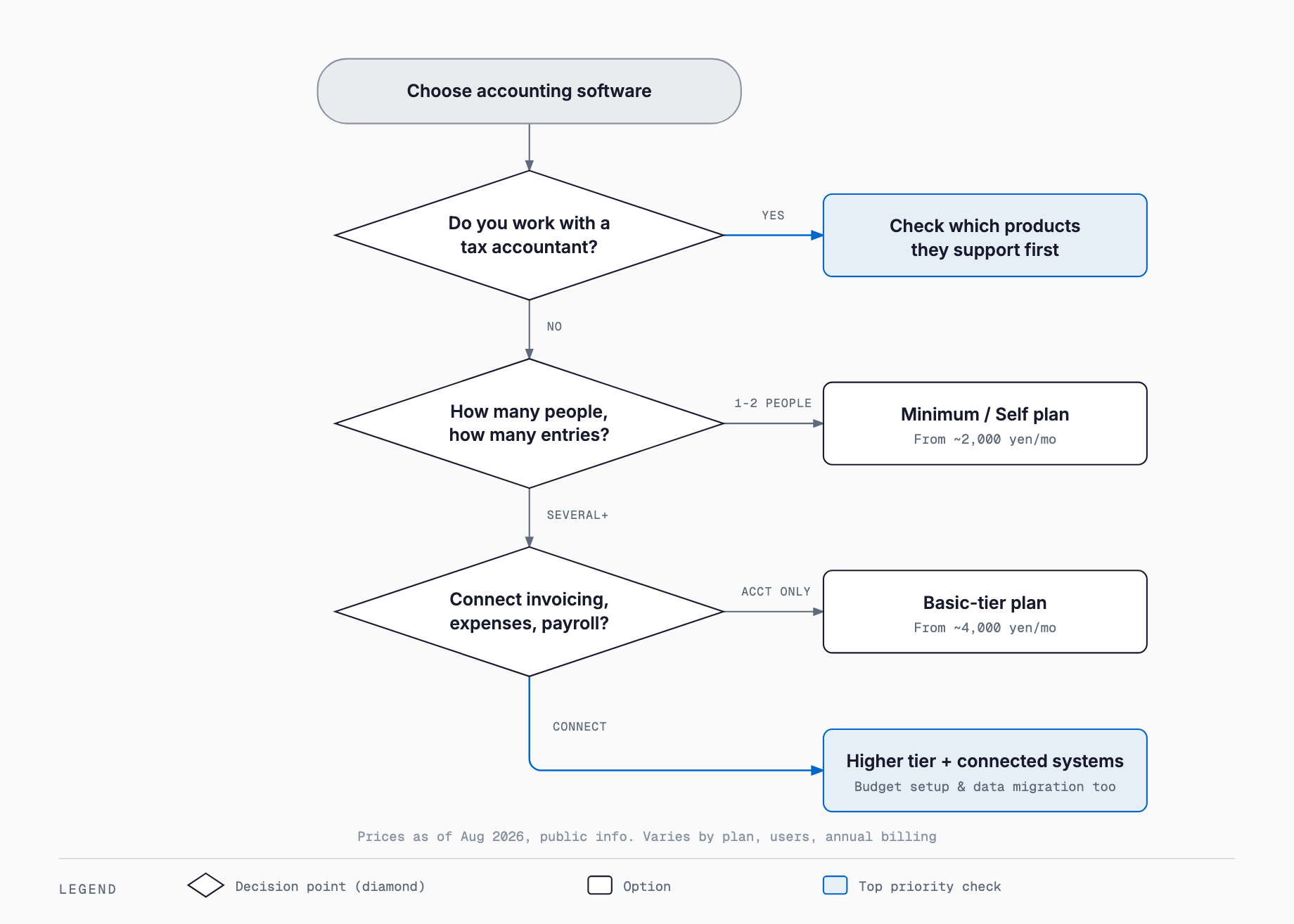
Does your current tax accountant (or one you're about to hire) already support the software?
Does it cover enough financial institutions for automatic bank and credit card import?
Does it handle invoice-system compliance and document retention under the Electronic Books Preservation Act out of the box?
How will it connect to adjacent systems you may want later, such as invoicing, expenses, or payroll?
Do multiple people — bookkeeper, owner, tax accountant — need simultaneous access?
Do you need to migrate historical accounting data, and how much of that entry and import work can you handle in-house?
Have you tested the actual journal-entry workflow during a free plan or trial?
Common failure patterns
One common failure is letting day-to-day journal entries slide, so several months of unclassified transactions pile up by month-end or right before closing. Even with automatic bank feed import turned on, someone still has to review and confirm each imported line as an actual journal entry — leave that undone, and most of the benefit of automation disappears. A second common pattern is running the new software alongside existing paper slips or spreadsheet ledgers, so the same transaction gets entered twice. Setting a clear cutover date and actually retiring the old process afterward avoids this. A third issue shows up around access control: when multiple people use the cloud accounting tool, some companies give everyone the same full permissions as the owner, meaning anyone can edit or delete past journal entries. Splitting access into view, entry, and approval roles by person helps prevent mistakes and misuse. Finally, some companies pick software without consulting their tax accountant at all, only to discover at filing time that it doesn't match what the accountant normally works with — confirming this before signing is worth the extra step.
Frequently asked questions
Do sole proprietors need a corporate-tier plan?
No. freee, Money Forward, and Yayoi all offer entry-level plans built for sole proprietors, covering both white and blue return filings. It's enough to move to a corporate plan once you actually incorporate or your business grows into that scale.
Is invoice-system and Electronic Books Preservation Act compliance handled automatically?
All three major products offer features supporting Japan's invoice system and Electronic Books Preservation Act, either standard or as add-ons, but the exact scope and workflow differ between them. Before signing up, confirm with the vendor's site or your tax accountant that it covers the specific document retention and invoice-number handling your business needs.
Can we switch accounting software later?
Yes, but exporting and re-importing historical journal entries and vendor master data takes real effort, so most companies avoid switching mid-fiscal-year and instead time it around the start of a new fiscal period. Talk to your tax accountant before switching and agree on a migration schedule together.
Can we run entirely on a free plan?
A sole proprietor with low transaction volume can sometimes get by on a free or self-service plan, but most products cap free tiers by transaction count or limit support. As your business grows and transaction volume increases, you'll likely need to move to a paid plan.
Is it cheaper to outsource bookkeeping to a tax accountant or run cloud accounting in-house?
When transaction volume is low, outsourcing bookkeeping can work out cheaper. As volume grows, running cloud accounting in-house and limiting your tax accountant's role to review and filing tends to keep total cost lower. The right call depends on your transaction volume and how much staff time you can allocate.
Related free tools (no sign-up, instant results)
Feel free to contact us
Contact Us