What Is GPT Image 2.5? Flare vs Sunburst, API Pricing, and P
er-Image Cost
A guide to GPT Image 2.5 (ChatGPT Images 2.5), released by OpenAI on September 8, 2026. Covers the difference between the fast Flare model and the precision-focused Sunburst model, official API token pricing, estimated per-image cost, and how it compares to Gemini 3 Pro Image and Midjourney.
What Is GPT Image 2.5? The Short Answer
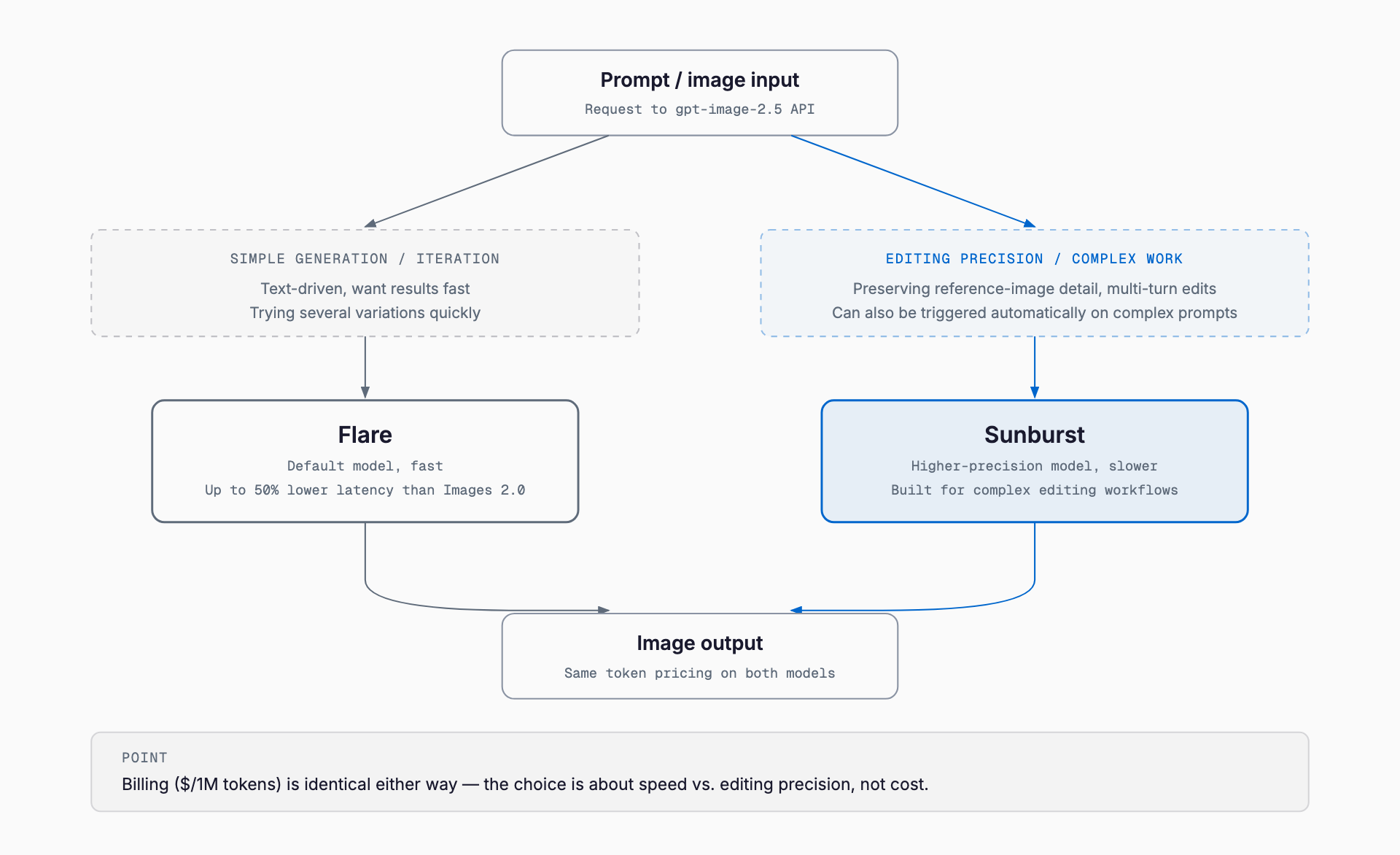
GPT Image 2.5 (ChatGPT Images 2.5) is the image generation model OpenAI announced on September 8, 2026. The API offers two variants: the fast default model gpt-image-2.5-flare, and gpt-image-2.5-sunburst, built for editing precision. According to OpenAI's official announcement, generation latency is up to 50% lower than the previous Images 2.0 model. API token pricing is $5.00/1M for text input ($1.25/1M cached), $8.00/1M for image input ($2.00/1M cached), and $30.00/1M for image output — and, per OpenAI's official pricing page, this is identical to the pricing of the previous gpt-image-2 model (more on that below).
Release Overview
On September 8, 2026, OpenAI announced that ChatGPT Images 2.5 was rolling out to all ChatGPT, ChatGPT Work, and Codex tiers. At the same time, it published two API model IDs: gpt-image-2.5-flare and gpt-image-2.5-sunburst. The official announcement's headline changes are: sharper detail, more natural lighting and texture, better preservation of people and products in reference photos, more reliable editing across long back-and-forth sessions, and generation up to 50% faster than Images 2.0.
Flare vs. Sunburst
OpenAI's official documentation frames the choice this way: "Choose Sunburst for workflows where editing precision matters most, and Flare for fast, high-quality everyday image generation." Flare is the default model, well suited to text-driven, simple generation and iterating through several variations quickly. Sunburst shines when preserving detail in a reference image or handling precise, multi-turn edits, though it takes longer to generate than Flare. Both models share the same six quality tiers — low, medium, high, xhigh, max, and auto — with xhigh and max newly introduced in this release.
API Pricing — Token Rates Are Unchanged from the Previous Model
Checking OpenAI's official pricing page (developers.openai.com/api/docs/pricing) shows that the standard rates for both gpt-image-2.5-flare and gpt-image-2.5-sunburst are $5.00/1M for text input, $8.00/1M for image input ($2.00/1M cached), and $30.00/1M for image output — figures that exactly match the older gpt-image-2 model. In other words, GPT Image 2.5 is an update that improves quality and speed at the same price point, not a price increase over the previous model. OpenAI's own Developer Community announcement also states explicitly that "the API is the same token pricing as gpt-image-2." Since image models don't produce text output, there is no charge for text output tokens.
| Item | Standard rate | Batch API rate |
|---|---|---|
| Text input | $5.00 / 1M tokens | $2.50 / 1M tokens |
| Text input (cached) | $1.25 / 1M tokens | Not published |
| Image input | $8.00 / 1M tokens | $4.00 / 1M tokens |
| Image input (cached) | $2.00 / 1M tokens | $1.00 / 1M tokens |
| Image output | $30.00 / 1M tokens | $15.00 / 1M tokens |
The Batch API rates shown in OpenAI's documentation are published only for the older gpt-image-2 model; as of this writing (September 14, 2026) we could not confirm separately listed batch rates for the gpt-image-2.5 family. Given that standard pricing is identical across models, batch rates are likely to match as well, but check OpenAI's official documentation before relying on this for production billing.
How Per-Image Cost Is Actually Determined
Image API billing isn't a flat per-image fee — it's the sum of three token categories (text input, image input, and image output) each multiplied by its rate. Prompt text (text input) usually runs to a few hundred tokens at most, so its contribution is minor. Image input only applies when you pass a reference image for editing. The bulk of the cost comes from image output tokens, which increase as the quality setting rises from low to max. OpenAI has not published an official table of output token counts per quality level, so the figures below are third-party estimates and may not match actual usage.
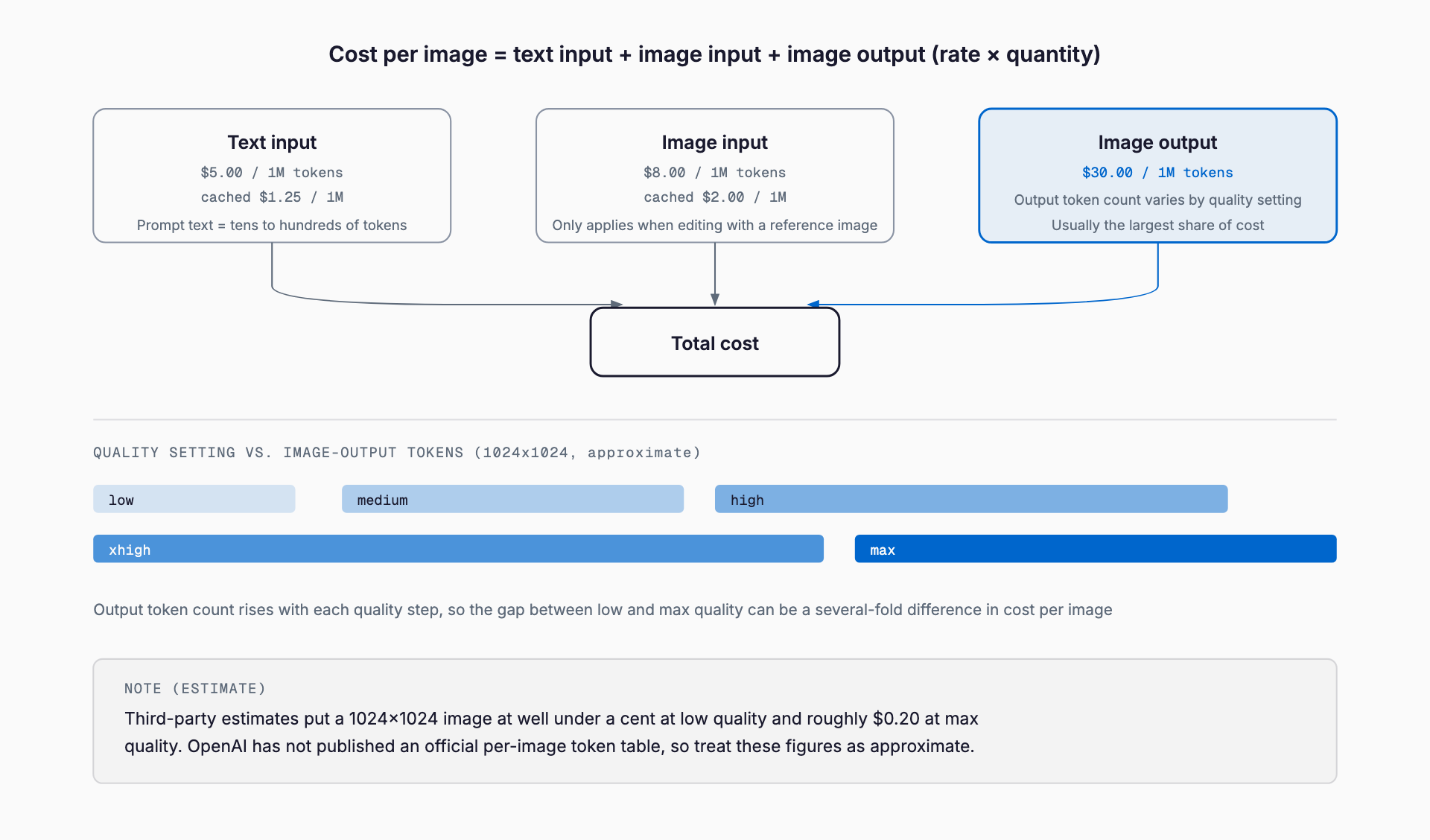
- Low quality, 1024x1024: third-party estimates put this under a cent (around $0.006 in one report)
- Medium to high quality: reportedly a few cents
- Max quality: third-party estimates cite roughly $0.2 per image
- All of the above are estimates, not an official OpenAI per-image cost table
In practice, the cost-efficient pattern is to iterate quickly on drafts and multiple variations using low-to-medium quality Flare, then finish only the final deliverable at xhigh or max quality with Sunburst. The most reliable way to know your exact cost per quality tier is to generate a handful of test images and check the token counts in the API response's usage field.
How to Use It via the API
The API call pattern itself is unchanged from the older gpt-image-2 model — the same image generation and image editing endpoints. Set the model ID to gpt-image-2.5-flare or gpt-image-2.5-sunburst, and choose low through max or auto via the quality parameter. Both models also support inpainting for edits.
from openai import OpenAI
client = OpenAI()

# Draft quickly and cheaply with Flare
result = client.images.generate(
    model="gpt-image-2.5-flare",
    prompt="A simple line-art style office icon",
    quality="medium",
    size="1024x1024",
)

# Final, precision edit with Sunburst at high quality
result = client.images.edit(
    model="gpt-image-2.5-sunburst",
    image=open("reference.png", "rb"),
    prompt="Change the background from an office to a cafe, keep the person's expression unchanged",
    quality="xhigh",
)

# Check token usage from the response
print(result.usage)
How It Differs from Existing Tools and Models
The major alternatives to OpenAI's GPT Image line are Google's Gemini 3 Pro Image (commonly called Nano Banana Pro) and the subscription-based Midjourney. Since each uses a different billing model, comparing them requires looking beyond raw numbers to whether it's usage-based (tokens), per-image, or a flat subscription.
| Tool | Billing model | Approx. cost (1 image, standard quality) | Speed vs. quality options | Key strength |
|---|---|---|---|---|
| GPT Image 2.5 Flare | API usage-based (tokens) | Well under a cent to a few cents (varies by quality, estimated) | Flare = speed / Sunburst = precision | Available in both ChatGPT and API; faster at the same price as gpt-image-2 |
| GPT Image 2.5 Sunburst | API usage-based (tokens) | A few cents to roughly $0.2 (estimated, at max quality) | Same as above | Strong at multi-turn edits and preserving reference-image detail |
| Gemini 3 Pro Image (Nano Banana Pro) | API usage-based (flat rate per image) | A few cents at standard resolution, reportedly around $0.24 at 4K output | Price scales with resolution | Supports 4K output, tight Google ecosystem integration |
| Midjourney | Monthly subscription (GPU-time based) | Roughly a few cents per image in Fast mode by some estimates; Relax mode adds no extra charge | Fast = paid speed / Relax = free but slower | Strong community and stylistic range |
GPT Image 2.5 and Gemini 3 Pro Image are both usage-based, whether by token or per-image, but Gemini's pricing splits clearly by output resolution. Midjourney's model — a flat monthly subscription plus GPU-time consumption — works on a different premise than usage-based APIs, and for business use cases with high, predictable generation volumes, a usage-based API often makes budgeting easier.
Practical Use Cases for SMEs
For high-volume, repetitive needs like website hero images, banners, or illustrations for internal documents, Flare's low-cost, fast generation is a good fit. For cases where an original image's details need to be preserved while editing a specific part — a brand logo or product photo in an ad creative, for instance — Sunburst's editing precision pays off. Because billing is usage-based, estimating expected monthly image volume and quality tier in advance helps avoid unexpected cost overruns.
Caveats and Limitations
The per-image cost figures in this article are estimates based on multiple third-party sources, since OpenAI has not published an official table of output token counts per quality setting. Actual billed amounts also vary with prompt length and the size or aspect ratio of the generated image, so before relying on this in production, it's worth generating a small test batch and checking the usage field in the API response to budget from real numbers. The batch API rates for the gpt-image-2.5 family also aren't separately documented as of this writing, so whether they match the standard API is something to confirm against future official updates.
FAQ
When was GPT Image 2.5 announced?
OpenAI announced it as ChatGPT Images 2.5 on September 8, 2026, rolling out across all ChatGPT, ChatGPT Work, and Codex tiers, alongside two API models: gpt-image-2.5-flare and gpt-image-2.5-sunburst.
Is Flare or Sunburst cheaper?
Per OpenAI's official pricing page, both models share identical token rates: $5.00/1M text input, $8.00/1M image input, $30.00/1M image output. There is no price difference — the choice is about speed (Flare) versus editing precision (Sunburst), not cost.
Is GPT Image 2.5 more expensive than GPT Image 2?
No. According to OpenAI's official pricing page, the standard token rates for gpt-image-2.5-flare and gpt-image-2.5-sunburst exactly match gpt-image-2 — this is not a price increase. Some third-party blogs describe it as '2x the price of GPT Image 2,' but that does not match OpenAI's official documentation as of this writing, so this article uses the official figures.
What is the exact cost per image?
OpenAI has not published an official output-token count per quality setting. Third-party estimates put a 1024x1024 low-quality image under a cent and a max-quality image at roughly $0.2, but these are estimates. To know your exact cost, generate a test image and check the usage field in the API response.
Is it cheaper than Gemini's Nano Banana Pro or Midjourney?
Direct comparison is difficult because the billing models differ. GPT Image 2.5 and Gemini 3 Pro Image are both usage-based (tokens or per image), while Midjourney combines a flat monthly subscription with GPU-time consumption. At standard resolution and quality, all three often land in the range of a few cents per image.
Feel free to contact us
Contact Us