How to Switch Website Vendors
Steps, Costs, and a Handover Checklist for Domain, Server, WordPress, and Accounts (For Small Businesses)
A neutral guide to switching website vendors: who owns your domain and accounts, a handover checklist, cancellation order, typical costs, and email risks.
The first thing to check when switching website vendors is who each asset is registered to: the domain, the server, the WordPress admin account, and the analytics and business accounts. If these are in your company's name, switching is usually straightforward. If they are in the vendor's name, you need to move the ownership first. The basic order is to obtain the data, build the new environment, switch the DNS, and only then cancel the old contracts. Giving notice too early can take down the site or the email. This article lays out typical situations, ownership checks, a handover checklist, the steps, rough costs, and common problems from a neutral standpoint.
Typical Situations That Lead to Switching
The reasons for wanting to change website vendors are fairly consistent. None of them is unusual, and they tend to arise naturally as a business changes or staff turn over.
- Hard to reach: replies are slow, the contact person left, or the contact details are no longer valid
- High or opaque maintenance fees: you pay every month but cannot tell what is being done
- Slow updates: swapping text or a photo takes weeks, and even small edits need a new quote
- An outdated site: not mobile-friendly, or WordPress and plugins have gone without updates for a long time
- Changing needs: you now need booking, hiring pages, e-commerce, or multiple languages that the current vendor does not handle well
Switching does not have to mean cutting off the relationship abruptly. Some companies first explain their concerns and see whether things can improve. Even so, it is wise to find out early what you actually hold in case you do move.
First Check: Whose Name Is It In?
A website is not just its visual design. It is a combination of a domain, a server, a CMS such as WordPress, analytics tools, and email, and each has its own contract holder or administrator. How hard a switch will be depends largely on who that is.
The domain registrant
The domain is the address of your site, such as example.com. What matters is not who gets the invoice but who is listed as the registrant. When a vendor registers a domain on your behalf, the registrant is sometimes the vendor or an individual staff member. In that case, whether the domain can be transferred or renewed depends on the vendor's cooperation. You can check this through a WHOIS lookup suited to your domain type, or by logging in to the registrar's control panel. For how to read domain and server contracts, including costs, see Domain and Server Costs and Contract Ownership.
The server contract holder
The server is where your site's data lives. In some cases the vendor runs its own server and hosts several clients' sites together. Then your site has to be extracted and handed over, so you need to agree on how the data will be delivered. If you hold the hosting contract yourself, the question is whether you control the login details for the control panel.
The WordPress or CMS administrator account
If your site runs on WordPress, check whether your company has an account with administrator rights. It is not unusual for the vendor to hold the only administrator account while the client has only an editor role. Without administrator rights you cannot export data or review plugins, which hampers the handover. For WordPress-specific risks, see The Risks of Neglecting WordPress Maintenance.
Analytics, search, and business accounts, plus email
Google Analytics, Google Search Console, Google Business Profile, and advertising accounts are sometimes created under the vendor's Google account. These hold accumulated visitor data and search history, so it is better to hold ownership yourself, not just view-only access, before you move. You should also check where your custom-domain email (such as info@example.com) runs. If it depends on the old server, mail may stop arriving when the DNS is switched.
Handover Checklist
The table below lists what to confirm when switching. Filling in whether each item is in your name and what you need to request gives you a clear overall picture.
| Item | What to confirm | If it is in the vendor's name |
|---|---|---|
| Domain | Registrant, admin contact, renewal date, registrar | Ask for a registrant change or transfer (auth code) |
| Nameservers / DNS | Where DNS is managed, the MX settings for email | Get the full record list |
| Server | Contract holder, plan, term, control panel login | Ask for the full data set and sign a new contract in your name |
| WordPress / CMS | Whether you have an admin account, version, plugin list, theme | Ask for admin rights or a backup of the data |
| Site data | Files, database, original images | Ask for a backup, ideally more than one generation |
| Google Analytics | Who owns the property | Ask to be added as an administrator |
| Search Console | How ownership is verified, verified users | Add your account as an owner |
| Google Business Profile | Who is the owner | Request a transfer of ownership |
| Custom-domain email | Which server runs it, list of mailboxes | Rebuild on the new environment and decide how to migrate old mail |
| SSL certificate | Who issued it and how it renews | Reissue on the new environment |
| External services | Booking, forms, payments, maps, chat | Check the contract holder and change it to your company |
| Contracts and quotes | Cancellation terms, minimum term, copyright ownership | Obtain copies and confirm unclear points in writing |
The Steps for Switching
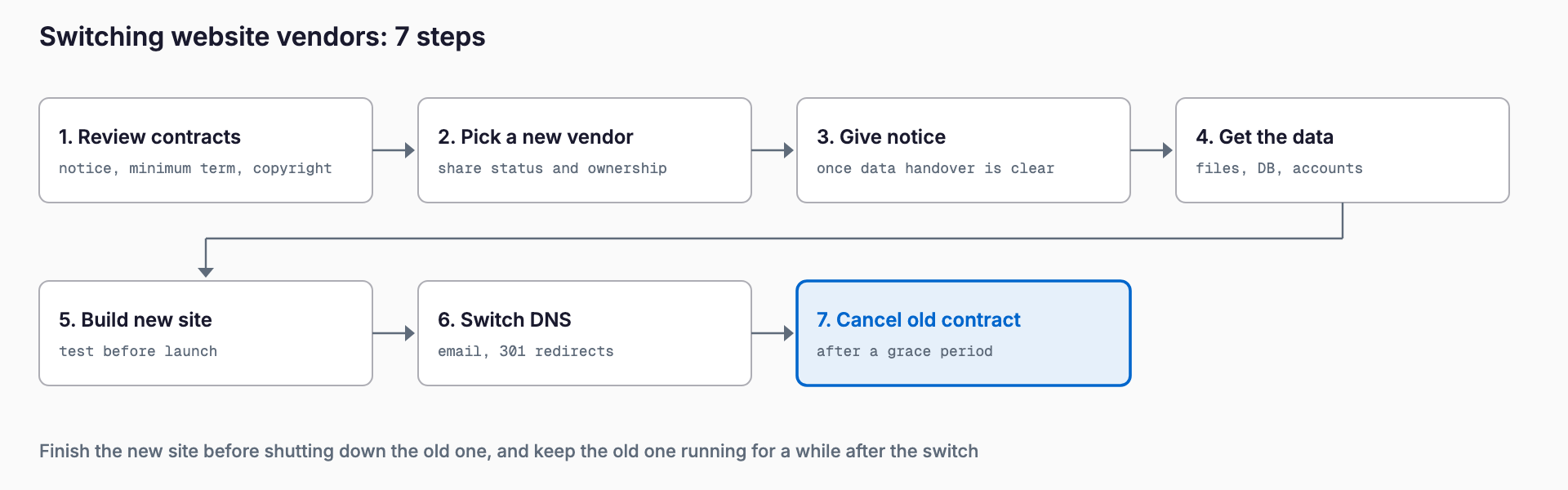
The basic flow is as follows. The key points are to finish the new environment before you shut down the old one, and to keep the old one around for a while after the switch.
Step 1: Read the contracts
Start by reading the production contract, the maintenance contract, and any quotes. There are three main things to look for. The first is the cancellation terms: how many months in advance notice is required, and whether it must be in writing. The second is the minimum contract period: whether leaving early triggers a penalty or payment for the remaining term. The third is copyright ownership: whether the deliverables belong to you or stay with the vendor. If you cannot find the contract, ask the vendor for a copy rather than guessing from old emails and invoices. How contract terms are interpreted, and whether a penalty is enforceable, depends on the circumstances, so consult a lawyer or other professional if it is unclear.
Step 2: Choose the new vendor and share the current situation
Before engaging a new vendor, share the situation you organized in the checklist and ask for a quote covering the handover work. Comparing several companies makes differences in scope and price easier to see. For switching on the system development side, see A Guide to Switching Development Vendors, which is useful if you also run business systems besides the website.
Step 3: Give notice once the data retrieval is on track
The timing of the cancellation notice needs care. You want to avoid a situation where the relationship sours after notice and the data is delayed. As a guide, work backward from the notice deadline in the contract, and give formal notice after the data request and schedule have been agreed. If the deadline is close, you can state your intention to cancel in writing first, so the contract does not renew automatically, and ask for handover cooperation separately.
Step 4: Obtain the data
Collect the site files and database, the original images, and for WordPress, information on the theme and plugins. You can ask the vendor, or, if you have administrator rights, take a backup yourself with a plugin. Also record the list of current URLs and the page structure, because you will need it later for 301 redirects.
Step 5: Build the new environment and test before going live
Recreate the site on the new server and check it in a test environment before it goes live at the real URL. Verify the layout, form submissions, phone links, tracking tags, and images. If you are moving email too, create the mailboxes on the new environment at this stage.
Step 6: Switch the DNS
The DNS switch changes where your site is displayed from and where email is delivered. Shortening the DNS TTL (roughly how long the old information is cached) beforehand makes the change propagate faster. List in advance which records will change, such as the site records and the MX records for email, and which will stay. Many companies choose a night or a holiday when inquiries are fewer.
Step 7: Verify, keep the old environment for a while, then cancel
After the switch, check that the site displays correctly, forms work, email is sent and received, Google Analytics is recording, and Search Console looks normal. If everything is fine, cancel the old server and maintenance contract. Canceling immediately leaves no way back if you missed something, so keeping the old environment for about a month is a safer approach. If the server's renewal date is near, plan backward so that it does not overlap.
Cost Guide
Switching costs vary widely with the size of the site, how well the current situation is documented, and the scope you request. The figures below are general market ranges, not guarantees, and you should confirm the actual amounts in a quote.
| Work | Typical cost range | Notes |
|---|---|---|
| Domain transfer (changing registrar) | A few thousand yen to about 10,000 yen | Transfer and renewal fees may apply separately |
| Changing the domain registrant | Free to a few thousand yen | Procedure and fees differ by registrar |
| Migrating a WordPress site | About 30,000 to 150,000 yen | Depends on page count, customization, and email migration |
| 301 redirects and SEO checks | About 10,000 to 100,000 yen | Depends on how many page URLs change |
| Rebuilding the email setup | About 10,000 to 50,000 yen | Depends on mailbox count and migration of old mail |
| New server and maintenance, monthly | A few thousand yen to about 30,000 yen | Varies widely with scope of maintenance |
| Handover cooperation from the old vendor | Free to tens of thousands of yen | May be charged if the contract does not provide for it |
Moving a site as it is generally costs less than rebuilding it. The comparison is not clear-cut, though. A new corporate site for a small business commonly runs from several hundred thousand yen to somewhat over a million yen. If the current site is built on an outdated structure that is painful to modify, redesigning the design and CMS at the same time can make more sense in the long run. For maintenance pricing, see Website Maintenance Costs.
| Aspect | Move as is | Rebuild |
|---|---|---|
| Initial cost | Relatively low | Larger, depending on scale |
| Duration | Days to a few weeks | Roughly 1 to 3 months |
| SEO impact | Small if URLs are kept | Needs care when URLs or structure change |
| Best when | There are no major complaints about design or function | The structure is outdated or the business has changed |
| Caution | Old plugins and technology carry over | Needs a migration plan on top of build costs |
Common Problems and How to Handle Them
The domain is in the vendor's name
This is one of the most common problems. If the vendor is the registrant, first ask the vendor to change the registrant or help with a transfer. Requirements differ by domain type, including how the authorization code is obtained, how a registrant change is approved, and restrictions on transfers for a period after registration. Confirm with the registrar early. If talks go nowhere or the vendor is unreachable, options include consulting a lawyer or using the dispute resolution body for your domain type.
A subscription plan leaves the copyright and data with the vendor
In subscription-style website plans with low upfront costs, the contract may leave the rights to the design and data with the vendor, so you may not be able to take the site with you when you cancel. In that case, moving usually means rebuilding the site from scratch. Rights to materials you supplied yourself, such as photos and text, can sometimes be handled separately. Check what the contract says and understand how much you can take with you in advance. This is covered in more detail in The Contract Trap in Subscription Websites.
Email stops working
If the MX records that control email delivery are not carried over when the DNS is switched, inquiries stop arriving, and it can take a while to notice, which may cost business. Build the new email setup before the switch, and always test sending and receiving afterward. Let staff know in advance if their mail client settings will need to change.
Search rankings drop
If URLs change when the site is rebuilt, pages that used to appear in search results may no longer be found, and rankings and traffic can fall. The standard countermeasure is to set up 301 redirects that permanently forward old URLs to new ones. Also submit the new sitemap in Search Console and keep watching search performance after the switch. Moving a site without changing URLs reduces this effect. Ranking changes have many causes, however, and redirects alone do not guarantee that rankings are preserved.
Checklist for Non-Technical Staff
Even without technical knowledge, working through the items below shows how ready you are to switch.
- I confirmed that the domain registrant is our company or its representative
- I checked the cancellation terms and minimum contract period
- I confirmed in the contract who owns the copyright to the site
- I checked who holds the server contract and when it renews
- We have our own administrator account for WordPress or the CMS
- I checked who owns Google Analytics, Search Console, and Business Profile
- I confirmed where our custom-domain email is hosted
- I shared the current situation and our wishes with the new vendor in writing
- I set a date for the data backup to be provided
- I set the notice deadline and the date we will give notice
- I planned to keep the old environment for about a month after the switch
- I decided who inside the company will confirm that inquiry emails still arrive
Frequently Asked Questions
If I tell my vendor I am switching, could they refuse to hand over the data?
In practice, delays or requests for payment do happen. Check whether the contract provides for delivery of the data, and keep your requests in writing or email. If you cannot get cooperation, consulting a lawyer or other professional is an option. Avoiding emotional confrontation and stating the request and the deadline clearly is the realistic approach.
Can I move a domain registered in my vendor's name to my own company?
In many cases, yes, through a registrant change or a transfer to another registrar. Conditions differ by registrar, and the cooperation of the current registrant or administrator is often needed. Mechanisms and restrictions vary by domain type, so the usual route is to read the registrar's guidance first and then ask the vendor to cooperate.
How long does switching take?
It depends on the size and situation, but moving a site as it is typically takes a few weeks including preparation. A rebuild often takes one to three months. Plan backward from the contract's notice deadline, the server renewal date, and the time a domain transfer takes.
Will I pay a penalty if I cancel a maintenance contract midway?
That depends on the contract. If there is a minimum term, canceling early may require payment for the remaining period or a penalty. Check the wording and ask the vendor in writing about anything unclear. If you need a legal judgment, such as whether a penalty clause is enforceable, consult a professional.
Will my search rankings always fall after switching?
Not necessarily. If you move the site without changing URLs, the effect can be kept small. If URLs change, setting up 301 redirects and monitoring search performance afterward is important. Temporary fluctuations can occur, so it helps to watch Search Console for the first few weeks after the switch.
Summary
Three points help you avoid major trouble when switching vendors: confirm ownership, read the contracts, and switch only after the new environment is complete while keeping the old one for a while. Even if some domains or accounts are not in your name, checking early leaves you with options. A good place to start is to use the checklist to take stock of who holds what and what the contracts say.
Related free tools (no sign-up, instant results)
Feel free to contact us
Contact Us