Inquiry Management System Costs for SMBs (2026)
An inquiry management system centralizes email, phone, form, and chat inquiries. SaaS usually costs ¥0 to ¥20K per user monthly; custom builds start near ¥2M.
An inquiry management system typically costs ¥0-20K per user per month for a cloud SaaS plan, while a fully custom-built system usually starts around ¥2M for initial development. Keep those two numbers in mind as you weigh your inquiry volume and workflow against which approach fits.
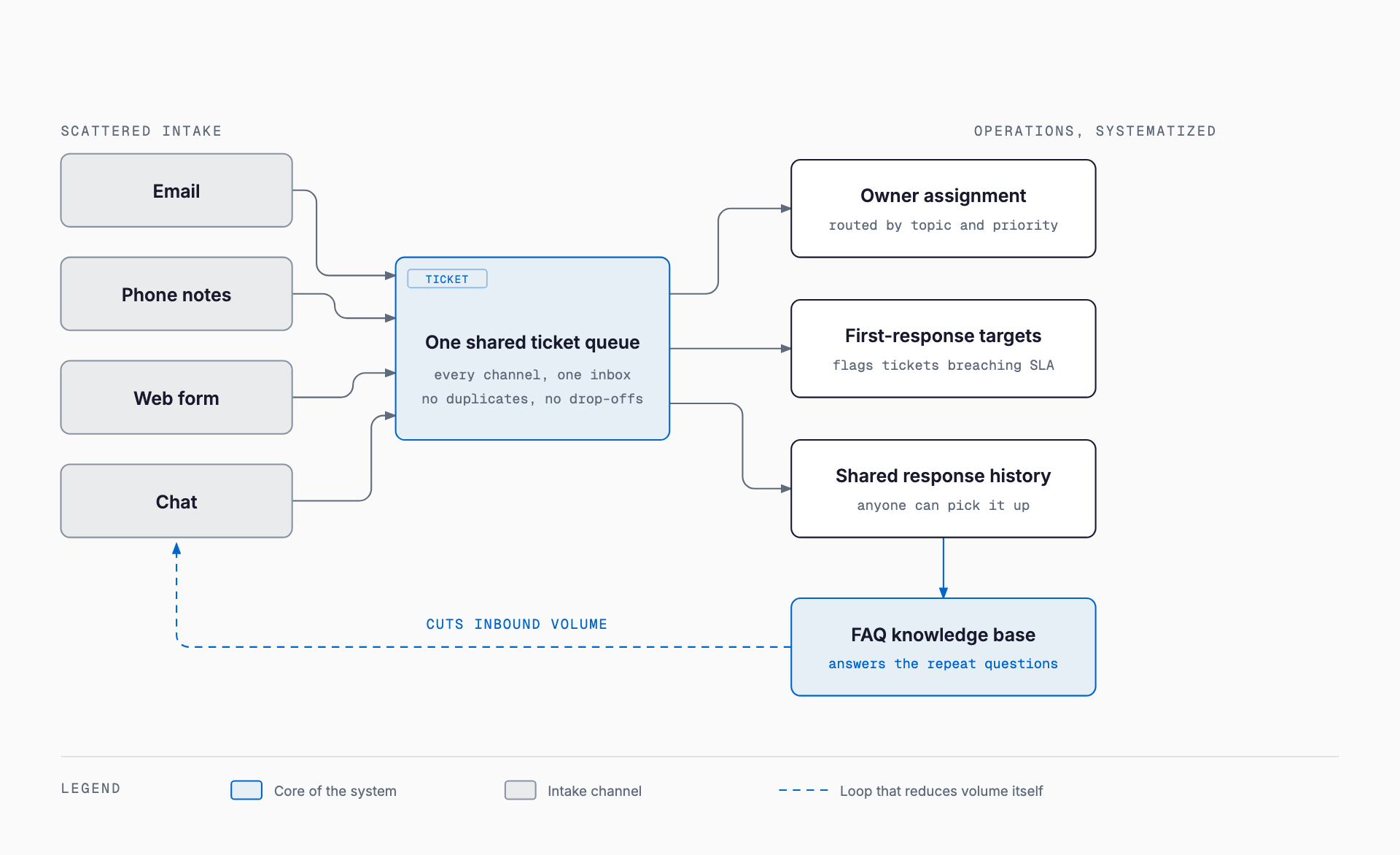
Companies whose inquiries arrive scattered across email, phone notes, CRM records, web forms, and chat tend to see the same problems: dropped follow-ups and workload piling onto whichever staff member happens to answer first. An inquiry management system (also called a helpdesk or customer support ticketing tool) consolidates these scattered channels into a single inbox and makes response status visible.
What problem it solves
The system's role breaks down into four parts. First, centralizing inquiries — email, phone notes, web forms, and chat all land in a single ticket view instead of scattered mailboxes. Second, assigning ownership — tickets route to the right person or team automatically or manually based on content and priority, preventing duplicate replies or ones that fall through the cracks. Third, recording response history — a log of who replied when means a colleague can pick up a ticket even if the original owner is out. Fourth, managing SLAs (first-response time) — you set a target time for the first reply after an inquiry comes in, and the system flags tickets at risk of missing it. Many products also turn recurring questions into an FAQ knowledge base, reducing inquiry volume over time. For automating first-response with AI, see AI in customer support.
Typical costs — what you pay for
Cost varies by more than an order of magnitude depending on SaaS user count, feature tier, and whether custom development is involved. It helps to separate one-time setup cost from the ongoing monthly cost.
| Approach | Initial cost | Monthly cost | What it covers |
|---|---|---|---|
| SaaS (entry plan) | ¥0-tens of thousands | ¥0-3,000/user/month | Basic ticketing and simple FAQ, limited channel support |
| SaaS (standard-upper plan) | ¥0-¥100,000s (incl. setup support) | ¥5,000-20,000+/user/month | SLA tracking, auto-routing, multi-channel integration, reporting |
| Mid-size customization (SaaS + integrations) | ¥500,000-¥1.5M | Base SaaS fee + ¥10,000s maintenance | API integration with existing core systems or CRM, custom screens and reports |
| Full custom build | ¥2M-¥5M+ initial | ¥100,000+/month maintenance | Designed around your own workflows, approval flows, and system integrations |
One easy detail to overlook: per-seat pricing adds up. Most SaaS plans charge per staff member with reply access, so granting access to sales or field staff beyond the core support team can push costs higher than expected. Some products offer a cheaper view-only seat for people who only need to check status, so pinning down exactly how many people will actually answer tickets before signing up keeps costs in check.
When SaaS is enough vs. when you need custom development
- SaaS is usually enough when: inquiry channels are a typical mix of email, web forms, and chat, with no unusually complex industry-specific approval process
- SaaS is usually enough when: the support team is a handful to a dozen or so people, with relatively simple ticket-routing rules
- SaaS is usually enough when: integration with core internal systems isn't required, or the vendor's standard integrations cover it
- Custom development is worth considering when: inquiries need to pull in related contract data, product data, or repair history tightly integrated with internal core systems
- Custom development is worth considering when: an industry-specific first-response process (e.g., medical device incident reports, financial complaint handling) doesn't fit an off-the-shelf screen design
- Custom development is worth considering when: inquiry volume reaches thousands per month, where per-seat SaaS pricing ends up costing more overall
- Custom development is worth considering when: you want ticket data unified in a single database with your existing CRM
If you're unsure, the build-vs-buy framework in system development cost guide is a useful reference. For most SMBs, a practical approach is running a free SaaS trial for a few weeks and deciding on a plan or custom build based on actual staff count and ticket volume.
Common failure patterns
Companies that struggle with inquiry management tools tend to hit a few recurring issues. First, adopting the tool without setting operating rules — without clear routing rules, inquiries keep piling on the same one or two staff members regardless of what the software allows. Second, falling back to email anyway — external correspondence continues over email as before, and re-entering it into the system becomes a chore that eventually gets skipped. Since most tools can turn incoming email directly into tickets, setting up email forwarding at the start of rollout matters. Third, building an FAQ and never updating it — as products change or new services launch, a stale FAQ ends up giving customers outdated answers. Fourth, setting SLA targets that don't match reality — an unreachable first-response target leaves warning flags permanently lit, and the whole SLA feature gets ignored.
Pre-implementation checklist
- Have you listed every current inquiry channel (email, phone, form, chat, social media)?
- Have you counted monthly inquiry volume and how many staff currently handle it?
- Have you separated how many people will actually reply to tickets from how many only need to view status?
- Have you identified what data, if any, needs to link to your existing core systems or CRM?
- Can you set a realistic first-response (SLA) target based on current staffing?
- Have you agreed on routing rules in advance (by content, priority, or assigned owner)?
- Have you assigned who owns the FAQ and how often it gets updated?
- Does your migration plan include forwarding existing email addresses into the new system?
- Have you set aside a few weeks on a free trial to test real-world operation before committing?
- Have you estimated total per-seat cost based on actual reply-staff headcount before signing?
How is an inquiry management system different from a CRM?
A CRM's main purpose is managing customer profiles and sales or deal history, while an inquiry management system's main purpose is tracking the status and correspondence of individual, day-to-day inquiries (tickets). The two are often integrated so staff can see a customer's transaction history while handling a ticket.
Is it worth adopting for a very small team?
With just one or two staff and low inquiry volume, a shared mailbox and a simple set of rules can work for a while. But that setup risks losing response history if a staff member is out or leaves, so many companies start looking at entry-level SaaS plans once monthly inquiries pass a few dozen.
Do we need a chatbot or AI auto-response as a separate tool?
Most inquiry management systems include FAQ integration or chatbot features as standard or as an add-on. A practical sequence is to centralize human-handled responses first, then consider automating answers to recurring, templated questions once you see the pattern in inquiry content.
How long does implementation take?
For a SaaS plan, going from signup to active use typically takes a few days to two weeks. Factoring in email-forwarding setup, routing rules, and initial FAQ content, it's realistic to expect one to two months before operations stabilize.
What if inquiries come in through multiple departments or locations?
A common setup keeps a separate inbox (queue) per department or location while managing everything in one system. Without agreeing on handoff rules across departments in advance, inquiries tend to get passed around without resolution, so it's worth settling routing rules across departments during the pre-implementation checklist stage.
Related free tools (no sign-up, instant results)
Feel free to contact us
Contact Us