Job Costing System Costs for Manufacturing & Construction
A cost guide to job costing systems for SMB manufacturers and contractors unsure which jobs are profitable, covering pricing from cloud tools to ERP modules.
Accounting software tells you the company's monthly sales and profit, but it rarely answers a more specific question many SMBs struggle with: which job was actually unprofitable, or which product has thin margins. That's because accounting software is built to produce company-wide financial statements, not to accumulate cost by individual job or product. A job costing system allocates material costs, labor, subcontracting fees, and overhead to units such as jobs, products, or process steps, making individual profitability visible in something close to real time. Related topics worth checking are production management system costs and core system / ERP renewal costs, while general pricing across business systems including job costing is covered in system development cost guide. This article focuses specifically on job costing systems, covering typical costs, how to choose by industry, and common pitfalls.
How it differs from accounting software and sales management systems
Job costing systems overlap functionally with accounting and sales management software, so it helps to clarify the distinct roles before adopting one.
| Category | Main purpose | Unit of aggregation | Update timing |
|---|---|---|---|
| Accounting software | Financial accounting for closing and tax filing | Account / department | After monthly close |
| Sales management system | Managing orders, sales, and invoicing | Customer / order | Per order or shipment |
| Job costing system | Profitability by job or product | Job / product / process / labor hours | Daily to weekly, depending on operations |
Industry patterns for job costing
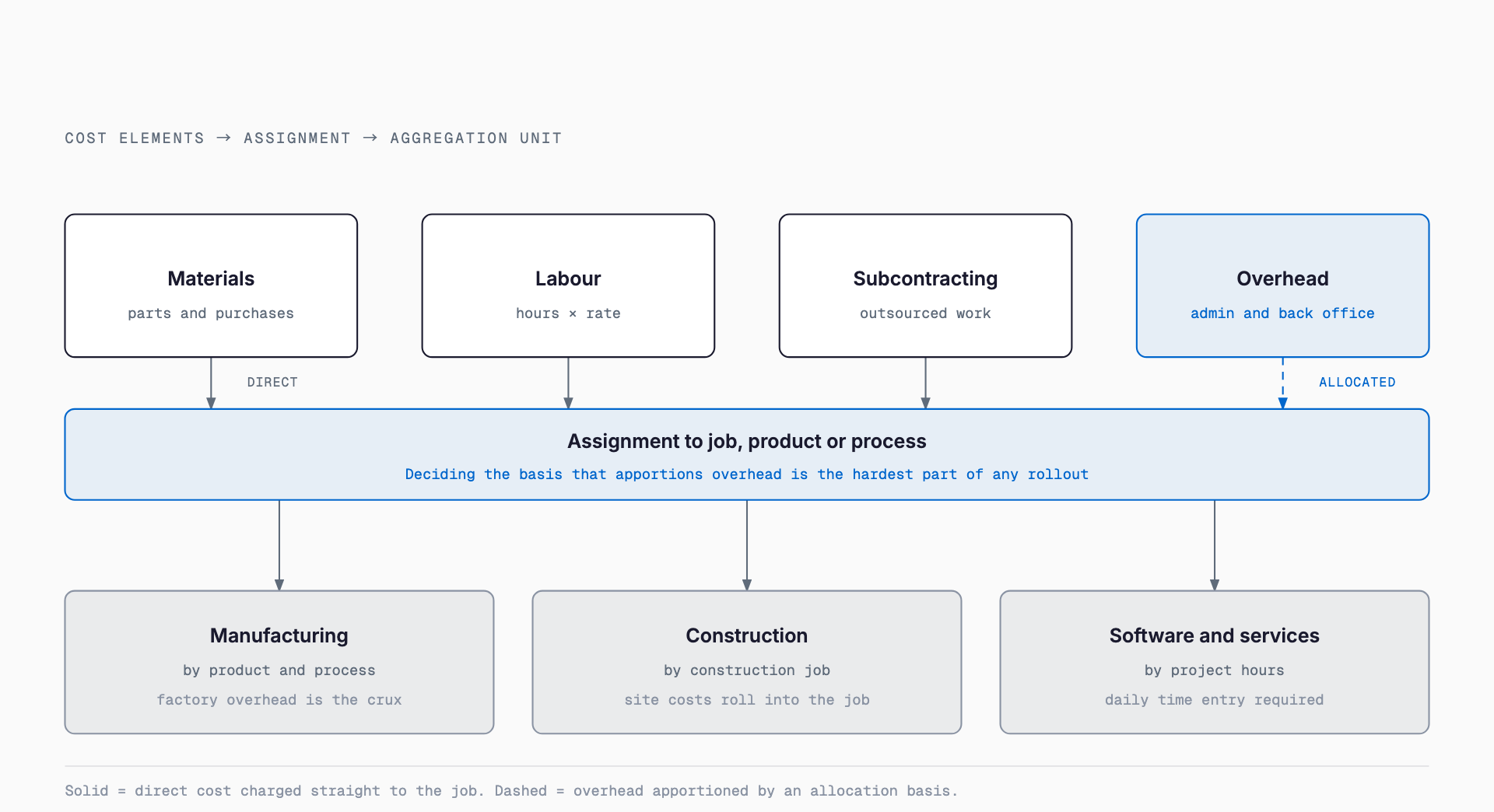
The unit used to accumulate cost differs significantly by industry. The typical patterns are as follows.
| Industry | Costing pattern | Main cost elements |
|---|---|---|
| Manufacturing | By product and process step | Materials, labor by process, allocated manufacturing overhead |
| Construction | By project (job cost ledger) | Materials, labor, subcontracting, site expenses aggregated per project |
| Contract development / services | By project, based on labor hours | Personnel cost (hours x rate), subcontracting, expenses aggregated per project |
Typical implementation costs
Costs vary widely depending on the delivery format. The figures below are general benchmarks for Japanese SMBs and will move up or down depending on company size, the number of integrations, and the scope of customization.
| Delivery format | Typical setup cost | Typical monthly cost | Best fit |
|---|---|---|---|
| Cloud (general-purpose) | JPY 200,000-1,000,000 | JPY 20,000-100,000 | Small to mid-size companies starting with standard features |
| Industry-specific package | JPY 1,000,000-5,000,000 | JPY 30,000-150,000 | Companies with industry-specific costing rules |
| ERP job costing module | JPY 3,000,000-15,000,000 | Maintenance fees often apply separately | Mid-size companies integrating sales, inventory, and accounting |
| Full custom build | JPY 5,000,000-20,000,000 | Maintenance quoted separately | Companies with unique costing logic no package can handle |
Hidden costs beyond the system itself
- Designing costing rules: defining overhead allocation bases and labor rates often requires an outside specialist, adding cost
- Operational load of hours entry: training and building habits for on-site staff to log hours daily
- Master data setup: internal effort to build product, process, and cost-rate master data at the outset
- Integration development with existing systems: connecting to accounting or sales management software often requires separate integration development
- Ongoing review cost: allocation rules and rates need periodic review as the business changes
Pre-adoption checklist
- Is the unit for accumulating cost clear (job, product, process, or department)?
- Has the method for entering labor hours been decided (daily reports, time cards, or system entry)?
- Is there an allocation rule for overhead (head-office expenses, admin staff labor), and who will design it if not?
- What accounting or sales management software is currently in use, and can it be integrated?
- Is cost currently closed monthly, or tracked inconsistently?
- Is there a structure for on-site staff (factory, job site, dev team) to cooperate with data entry?
- How much real-time visibility is actually needed (daily vs. monthly is sufficient)?
- Does the budget account for integration and master-data setup costs beyond setup and monthly fees?
Common failure patterns
- Adopting a system without deciding allocation rules first, causing confusion over overhead allocation once it's live
- Labor-hour entry never becomes habitual on-site, leaving cost data too inaccurate to be useful
- Numbers from the job costing system don't reconcile with accounting figures, wasting time explaining discrepancies in management meetings
- Demanding excessive real-time accuracy inflates system requirements, blowing out cost and schedule
- Choosing a generic package without accounting for industry-specific costing rules (e.g., handling of costs on uncompleted construction contracts)
Implementation steps and timeline
| Step | Main activities | Typical duration |
|---|---|---|
| Current-state review and requirements | Define costing unit, allocation rules, and hours entry method | 2 weeks to 1 month |
| System selection | Compare cloud, package, ERP, or custom build; select vendor | 1-2 months |
| Master data setup and configuration | Set up product, process, and rate masters; configure allocation rules | 1-2 months |
| Pilot run | Run on a subset of jobs or departments to validate accuracy | 1-2 months |
| Full rollout and operation | Company-wide rollout, staff training, ongoing review process | Ongoing |
Frequently asked questions
What company size should consider adopting a job costing system?
There's no strict threshold, but a common trigger is when the number of jobs or products grows to the point where rough, lump-sum accounting no longer reveals true profitability. Many companies start small with a general-purpose cloud tool and later move to an industry-specific package or ERP module as needed.
When should a company move from spreadsheet-based costing to a system?
A good signal is when updating and aggregating spreadsheets takes too long as job and product counts grow, or when simultaneous edits by multiple people start causing errors. Systematizing hours entry along with costing often reduces the burden of aggregation itself.
Do we need both a job costing system and accounting software?
In most cases, yes. Accounting software handles financial accounting for closing and tax filing, while a job costing system handles profitability by job or product - the roles are distinct. Data integration between the two is preferable to reduce duplicate entry.
How long does implementation typically take?
For a general-purpose cloud tool, roughly 2-4 months from requirements to go-live is typical. Industry-specific packages or ERP costing modules typically take around six months, and full custom builds around a year. Master data setup and allocation-rule design tend to take the most time.
What should we do if costing accuracy doesn't add up after go-live?
In most cases the cause lies in the allocation rule design or how hours entry is operated. Start by checking whether the overhead allocation basis reflects reality and whether on-site hours entry is being done correctly, then revise the rules as needed.
Related free tools (no sign-up, instant results)
Feel free to contact us
Contact Us