LiteLLM 1.107.0 Compromised on PyPI and Docker
How to Check Exposure and Respond to the Credential Stealer and Backdoor
LiteLLM 1.107.0 was backdoored on PyPI and Docker with a credential stealer. How to check exposure, isolate hosts, rotate credentials and prevent repeats.
On October 21, 2026 (UTC), LiteLLM version 1.107.0, the LLM gateway and SDK, was tampered with on PyPI and on Docker (Docker Hub and GHCR), and a credential stealer plus a backdoor were injected. Anyone who installed the 1.107.0 wheel or ran the affected container images is exposed. Check right now whether litellm==1.107.0 or the affected Docker tags are in use; if they are, isolate the environment without running Python again, then revoke and reissue every credential it could reach.
This article is based on what was public as of October 22, 2026: research posts from SafeDep, StepSecurity, JFrog, Endor Labs, Socket and Chainguard, plus the title of LiteLLM's GitHub issue. We could not read the body of BerriAI's own detailed incident report at the time of writing. Where a point is not confirmed officially we say so, and where sources disagree we say that too. The situation is still developing, so figures and times may be updated.
What happened in three lines
- What: the PyPI artifacts and container images of LiteLLM 1.107.0 contained malicious files that are not present in the source repository
- How it runs: it executes every time Python starts, even if litellm is never imported, and sends SSH keys, cloud credentials, AI tool tokens and more to an external server in encrypted form
- What to do: check whether 1.107.0 was used; if so, isolate, rebuild and rotate all credentials. The latest known-good version is 1.106.2, and you should not go back to 1.107.0
Affected and safe versions
The sources largely agree on scope, with one difference in how they treat the sdist (source distribution). SafeDep lists the sdist as affected. StepSecurity, JFrog, Endor Labs, Socket and Chainguard say the sdist does not contain the payload files but does carry the tampered build setting. Real harm comes from the wheels and the container images, so in practice check those first.
| Target | Status | Notes |
|---|---|---|
PyPI litellm==1.107.0 wheels (7) | Malicious | macOS (x86_64, arm64), manylinux/musllinux (x86_64, aarch64), Windows amd64 |
PyPI litellm==1.107.0 sdist | Sources differ | No payload files, but pyproject.toml has the tampered setting (most sources). Removed from PyPI |
Docker v1.107.0 (Docker Hub and GHCR: litellm, litellm-database, litellm-non_root) | Malicious | Reported by several sources; the list of image variants differs by source |
Docker latest / main-latest / main-stable | Malicious (about 3 hours) | Pointed to the bad image from roughly 11:46 to 14:20 UTC; now replaced or removed |
litellm==1.106.2 | Safe | Recommended by several vendors as the last good release |
1.107.0rc1 / 1.107.0rc2 | Safe | Inspected and reported clean (StepSecurity, Chainguard) |
litellm-proxy-extras 0.4.110 / litellm-enterprise 0.1.78 | Safe | Reported clean |
The important point is that the source at the v1.107.0 tag on GitHub is clean. Code review or a diff of the tag would not find the problem; only the artifacts on PyPI and Docker were poisoned. It is a textbook case of why reading the source does not make a release safe.
Timeline
All times are October 21, 2026 UTC unless noted; JST is UTC+9, so the 11:39 UTC PyPI upload is 20:39 JST. Sources differ by minutes to tens of minutes, so the table lists the main events with notes.
| Time (UTC) | Event | Source / note |
|---|---|---|
| Oct 13 | Look-alike domain litellm.dev registered | StepSecurity; preparation began days earlier |
| 09:48-10:46 | Malicious commits land in the look-alike repo Berri-AI/litellm (the real one is BerriAI/litellm) | StepSecurity lists 10 commits from 08:56 to 10:46; Endor Labs lists 09:48 and a Dockerfile change at 10:46 |
| 10:08 | Branch protection overridden and the release workflow altered | SafeDep; not found at the same time in other sources |
| 10:51-11:06 | Container build runs from the look-alike repo's commit | Endor Labs, Socket; provenance records owner Berri-AI |
| 11:39-11:40 | Seven malicious wheels uploaded to PyPI | SafeDep, Endor Labs, Chainguard |
| 11:46-11:48 | Malicious container image pushed and floating tags repointed | SafeDep says 11:46, StepSecurity 11:48 |
| 11:46-11:55 | Vendor scanners flag it | Socket after about 7 minutes, Chainguard after about 16 |
| 12:06 | Compromise reported in GitHub issue #47826 | StepSecurity; the title notes PyPI and Docker removal |
| 13:23 | PyPI removes (quarantines) 1.107.0 | SafeDep, StepSecurity |
| 14:20-14:32 | Docker tags removed or repointed to clean images | SafeDep says 14:20; StepSecurity gives 14:32 for image removal |
| Oct 22 | LiteLLM says the incident is contained and publishes an update | Per JFrog; details not verified |
Exposure on PyPI lasted about an hour and 45 minutes (11:39 to 13:23 UTC) and on the floating Docker tags about three hours. That sounds short, but Chainguard notes LiteLLM has over 100 million downloads a month and more than 2,000 dependent packages. A CI that always fetches the latest version, or a deployment that restarts containers on latest, could easily have pulled it in that window.
How the attack works: why it runs without an import
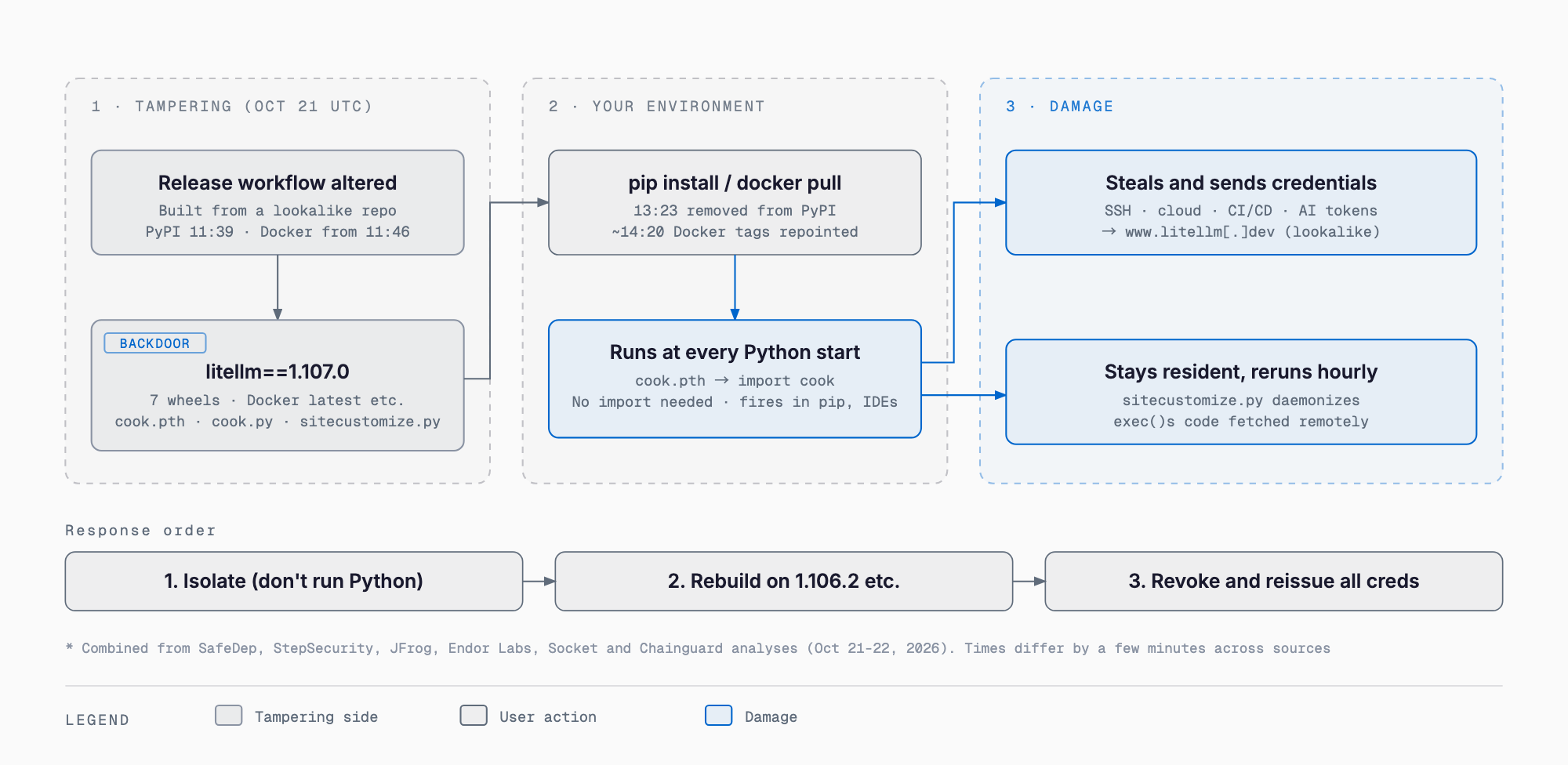
The entry point is a single line, data = "cook", added under [tool.maturin] in the sdist's pyproject.toml. It makes the contents of a cook/ directory land in the root of site-packages when the wheel is installed. As a result, three files sit in Python's normal search path, separate from the litellm package itself.
- cook.pth (12 bytes): contains only import cook; it is the instruction to load cook.py
- cook.py (about 22 KB per RECORD): a credential stealer of about 61 KB hidden with Base64 and zlib (called privcollect)
- sitecustomize.py (25,509 bytes): the backdoor (a remote code loader) plus a fallback copy of the stealer
The key is how Python starts up. At startup it scans .pth files in site-packages and executes lines beginning with import. It also imports a module named sitecustomize automatically if one exists. So the malicious code runs whenever any Python process starts in that environment, even if litellm is never imported. That includes pip, an IDE language server, a test runner, or an unrelated script. Even if you think LiteLLM is not used on a server, it fires if it is installed in the same virtual environment.
A note on the delivery path. The container build provenance recorded not the legitimate BerriAI/litellm but the hyphenated look-alike Berri-AI/litellm as the owner. According to StepSecurity, the attacker's commits were made through GitHub's web editor, so they carry a Verified badge that proves nothing about who wrote them. The look-alike repo now returns 404. How the real release workflow came to use it, however, is explained differently by different sources.
- SafeDep reports LiteLLM's account that the attacker likely obtained GitHub CLI credentials of three developers from logs of an internet-exposed internal deployment, bypassed branch protection, and passed the approval gate with a second developer's credential
- Socket and Endor Labs say they could not establish how the override was authorized or whether credentials were compromised
- StepSecurity says BerriAI is still investigating how the release was published
- JFrog says the root cause (build, CI or publishing) is unknown
This stays unsettled until BerriAI publishes a formal post-mortem. In this article we treat it as under investigation, with differing explanations.
What the payload does: steal, send, stay
Stage 1 (stealing). cook.py runs 16 collection modules on a background thread and sets the environment variable PRIVCOLLECT_ACTIVE=1 to avoid duplicate runs. The results are put into JSON, encrypted with AES-256-CBC, the key is wrapped with an embedded RSA-4096 public key (OAEP), and the tar.gz is sent by HTTP POST to http://www.litellm[.]dev/healthcheck with an X-Token header and up to four retries. The domain is a look-alike of the real litellm.ai, and the traffic is plain, unencrypted HTTP.
When the upload returns HTTP 200, it creates the marker /tmp/.pc_once_72129118c59f5636c0bb and does not run again. The flip side is that a missing marker is not proof of a clean host. If the upload fails, if the container is rebuilt, or if the path does not resolve on Windows, no marker remains and collection is attempted again each time Python starts.
Stage 2 (persistence). sitecustomize.py takes a lock at /tmp/remote_code_loader.lock, forks, detaches with setsid() (stdio to /dev/null, working directory /). Every hour it reads a hostname from domain.txt in the GitHub repo letters9813/pythonclient-test, reruns the stealer, and downloads Python from http://<hostname>/codepy and runs it with exec() with no signature or integrity check. In other words, it is a path for the attacker to push arbitrary code later.
However, Stage 2 was reported to be disarmed, at least when observed. domain.txt was empty (0 bytes), and SafeDep saw the GitHub account letters9813 return 404 and could not recover the attacker's server address. Past values were localhost:18909 and test.test.com:18909, which are not established as production servers. Two cautions apply. First, stopping the loader does not stop Stage 1 (via cook.pth). Second, as StepSecurity points out, infected hosts keep polling a URL tied to a deleted username, so if a third party re-registers that name and recreates the file, they could run code on infected hosts. This is no reason to leave an infected host in place.
Behavior differs by platform. On Windows, fcntl and os.fork are unavailable, so the backdoor loader fails silently, but the stealer still runs. On macOS, per Socket's analysis, the LiteLLM database module fails on a typical setup and Chromium passwords are not recovered in plaintext, but the browser database files are still copied and the other modules apply.
What gets stolen
The scope is wide. On a developer workstation, a CI runner or a LiteLLM proxy server, everything that Python process could read is a target. The main items are as follows.
- Keys: SSH private keys, GPG private keys, TLS private keys, .pem/.key/.p12/.pfx files
- Cloud and containers: AWS, Azure and Google Cloud credentials, Kubernetes configs and service account tokens, Docker and Swarm secrets, GitHub CLI credentials
- Cloud metadata: temporary credentials via IMDS (169.254.169.254) and the ECS, GCP and Azure metadata services; AWS keys are also validated with GetCallerIdentity
- CI and infrastructure: secrets for GitLab Runner, Jenkins, Vault, Terraform and Packer, and /run/secrets
- Packages and Git: .git-credentials, .npmrc, .pypirc, .netrc, .env files
- AI tools: configuration and tokens for Claude, Cursor, Copilot, Codex, Gemini, Windsurf, Kiro, Zed, Continue, Hugging Face and others (for example ~/.claude/.credentials.json and ~/.codex/auth.json)
- Browsers: Chromium-family and Firefox passwords, cookies and history
- History and environment: shell history, database client history, and environment variables of its own process and, on Linux, every readable process (/proc/<pid>/environ)
- LiteLLM proxy: if DATABASE_URL is set, it dumps LiteLLM_CredentialsTable and LiteLLM_ProxyModelTable, which hold the LLM provider API keys used by every team behind the proxy
LiteLLM is often used as a gateway that consolidates keys for multiple LLM providers, so one compromised proxy can leak the keys for every provider behind it (OpenAI, Anthropic, Google and others) at once. The fact that AI tool tokens are targeted means that even when LiteLLM runs only on a developer's laptop, the damage can spread to cloud and internal systems. For how agent-based development is operated, our guide to Claude Code and the Agent SDK may also help.
How to check your exposure
The first rule is do not run Python or pip in a suspect environment. Every interpreter start, including pip show and pip uninstall, fires cook.pth and retries the theft. Chainguard, JFrog and Endor Labs advise inspecting with shell tools that do not use the interpreter. None of the commands below use Python. On Linux or macOS, ideally run them from a separate investigation machine with the target mounted read-only.
# 1. Does any dependency file mention 1.107.0? (at the repo root)
grep -rnE 'litellm.{0,6}1\.107\.0' requirements*.txt pyproject.toml poetry.lock uv.lock Pipfile.lock 2>/dev/null

# 2. Installed metadata (no Python needed)
find / -xdev -type d -name 'litellm-1.107.0*' 2>/dev/null

# 3. The three malicious files under site-packages
find / -xdev -type f \( -name cook.pth -o -name cook.py \) -path '*site-packages*' 2>/dev/null
find / -xdev -type f -name sitecustomize.py -path '*site-packages*' 2>/dev/null

# 4. Compare hashes of what you found (sitecustomize.py can be legitimate)
sha256sum <found files>
# cook.pth 7f191632e7320705d154b85204f1ae546b543acbd7e8861229b76f5042b92bdb
# cook.py  9dd0a3926f96a37eb86cf1ee2310d9be93139cc4ebef3ef9e2efe9531390be25
# sitecustomize.py 34bef04fe88ac9d0aae0475630b1738681d15b94f233ac8aa46eacf5968305fa
# (Windows variants have different hashes because of line endings; see the vendor posts)

# 5. Traces of execution (marker, lock, temp files)
ls -la /tmp/.pc_once_72129118c59f5636c0bb /tmp/remote_code_loader.lock /tmp/.pc_sq_* /tmp/.pc_e_* 2>/dev/null

# 6. A resident backdoor (process holding the lock)
lsof /tmp/remote_code_loader.lock 2>/dev/null
ps -eo pid,ppid,sid,tty,args | awk '$2==1 && /python/'

# 7. Processes with PRIVCOLLECT_ACTIVE=1 in their environment (Linux)
grep -l 'PRIVCOLLECT_ACTIVE=1' /proc/[0-9]*/environ 2>/dev/null

# 8. Leftover 1.107.0 in pip / uv caches
find ~/.cache/pip ~/.cache/uv -iname '*litellm-1.107.0*' 2>/dev/null

# 9. Docker: digests of local images and running containers
docker images --digests | grep -i litellm
docker ps --format '{{.ID}} {{.Image}}' | grep -i litellm
docker inspect --format '{{.Image}} {{join .RepoDigests " "}}' <image>
# Digests of the malicious image
# index: sha256:1bbcb1443bc962e45f5aad53fe3d2c30600e0379715fb6c664cdd3ac126c339e
# amd64: sha256:bd1aeee419ea36da9aa2b657288da4101887be468f020ac63d22ba6ed84a3ea5
# arm64: sha256:56b74573eed6e4aafe4b50603dbe7853e0345f188c8e44a09f1098caf1f4bcdf

# 10. Kubernetes: image IDs of running pods
kubectl get pods -A -o jsonpath='{range .items[*]}{.metadata.namespace}{" "}{.metadata.name}{" "}{.status.containerStatuses[*].imageID}{"\n"}{end}' | grep -iE 'litellm|1bbcb144|bd1aeee4|56b74573'
The digests above were published by Chainguard and StepSecurity; the litellm-database and litellm-non_root images have different digests (listed in Chainguard's post). Always compare full hashes. In network logs, look for traffic to www.litellm.dev, access to raw.githubusercontent.com/letters9813/, and requests whose path ends in /codepy. Even one request to /codepy suggests Stage 2 code may actually have run, which raises the severity. Blocking all of GitHub would hurt operations, so scope the block to that repository path.
No marker does not mean safe. As noted, failed uploads and rebuilt containers leave none. Once you confirm that 1.107.0 was installed and run, treat the host as infected. Review CI logs and caches from October 21, and for setups that start containers from floating tags such as latest, check the digest of the image pulled that day.
If you were infected: isolate, rebuild, rotate everything
Order matters. If you rotate credentials first while the infected environment remains, the new credentials get stolen too. Proceed in this order.
1. Isolate: cut the host, container or CI runner off from the network. If possible, preserve the disk or container for investigation, and save DNS, proxy, EDR and cloud audit logs
2. Stop persistence: kill the process holding /tmp/remote_code_loader.lock and any Python process whose parent is PID 1 and whose working directory is /
3. Delete files by hand: remove cook.pth, cook.py, their __pycache__ entries, the marker (/tmp/.pc_once_...) and the lock from the shell. Do not use pip uninstall, which starts Python and re-fires the hook and also relies on RECORD. sitecustomize.py also exists legitimately in some environments, so check its contents or hash before deleting (removing a distribution-supplied one can cause other problems)
4. Rebuild: where possible, rebuild the environment, image or host from verified artifacts rather than cleaning in place. Install litellm==1.106.2 (or a version you verified) with the hash pinning described below. Also purge 1.107.0 from internal mirrors, proxies and registries, and block fetching it
5. Rotate every credential: always from a clean, separate machine. See the list below
6. Look for abuse: in cloud, repository, registry and identity audit logs since October 21 (UTC), look for unfamiliar API calls, newly created keys or tokens, and role changes
7. Block egress: block litellm.dev (www.litellm.dev) at DNS or egress, and add requests to /codepy to your detections
Assume that anything that process might have read is in scope for rotation. Removing the package does not bring back information that has already been sent. At a minimum, review the following.
- Cloud keys and roles (AWS, Azure, Google Cloud), instance roles, Kubernetes and Vault tokens
- SSH, GPG and TLS keys (including revoking and reissuing public-side authorized_keys and certificates)
- Personal access tokens for GitHub, GitLab and similar, deploy keys, and registry tokens (PyPI, npm, Docker)
- CI/CD secrets, .env values, and anything kept in environment variables
- Tokens and sessions for AI tools such as Claude, Cursor, Copilot and Codex
- Passwords saved in browsers, and logged-in sessions
- For LiteLLM proxies: the master key, the salt key, virtual keys, every provider API key in LiteLLM_CredentialsTable and LiteLLM_ProxyModelTable, and the database credentials in DATABASE_URL
One caution: changing LITELLM_SALT_KEY on a LiteLLM proxy makes keys already stored encrypted in the database undecryptable. Check the LiteLLM documentation for the procedure and budget time to re-register keys.
Prevention: pin, delay and contain from today
Two lessons stand out: artifacts can be poisoned even when the source is right, and a single install can leak every credential. Here are the organizational measures, roughly in order of effect.
- Pin versions and hashes: stop using ranges like litellm>=1.100; pin with == and install with hashes. Generate requirements with pip-compile --generate-hashes and install with pip install --require-hashes -r requirements.txt. With uv, commit uv.lock and use uv sync --frozen. Hash pinning detects a swapped artifact under the same version number (though updating after a new release still needs separate review, as in this case)
- Pin Docker images by digest, not tag: floating tags such as latest and main-stable change under you, as here. Reference image: ghcr.io/berriai/litellm@sha256:<verified digest> and update only after a person checks
- Delay adoption of new versions by a few days: the malicious release was live on PyPI for about an hour and 45 minutes. A policy of waiting 3 to 7 days after release lets most detections and removals finish first. exclude-newer in uv, minimumReleaseAge in Renovate and cooldown in Dependabot can do this
- Restrict CI egress: block outbound traffic from build and test jobs to anything outside an allowlist. This theft was an HTTP POST to www.litellm.dev, so an allowlist would have made the upload fail. Tools such as StepSecurity's Harden-Runner can baseline traffic
- Minimize CI secrets: do not place production cloud keys or publishing tokens in test and build environments. Move to short-lived OIDC tokens and give secrets only to the jobs that need them
- Watch startup hooks: alert when a third-party wheel adds a new .pth file or sitecustomize.py. Chainguard also suggests alerting on new data entries in build config ([tool.maturin], [tool.setuptools])
- Separate developer machines from production: run LiteLLM proxies in a least-privilege environment, apart from machines that hold AI tool tokens and personal SSH keys
- For maintainers who publish packages: use PyPI Trusted Publishing (OIDC) to remove long-lived tokens and pin which repository and workflow may publish. Restrict release workflows to approved repositories and reviewed commits, and compare published artifacts against the source you reviewed
Delaying dependency updates has a cost: security fixes arrive later. Some fixes must be applied at once, like the unauthenticated PHP RCE disclosed around the same time. Treat critical vulnerability fixes as an exception and keep two lanes: routine updates are delayed, urgent fixes are applied immediately. For a broader look at AI infrastructure, our explainer on Stripe's acquisition of OpenRouter covers developments around LLM gateways.
Comparison with the March incident
This is the second LiteLLM compromise in 2026, and JFrog's post is titled Hijacked Again. In March, versions 1.82.7 and 1.82.8 were tampered with. JFrog says the two incidents should be treated as separate campaigns and checked against their own IoCs.
| Aspect | March 2026 (1.82.7 / 1.82.8) | October 2026 (1.107.0) |
|---|---|---|
| Entry path | A malicious, unpinned Trivy 0.69.4 in CI leaked publishing credentials, which were then used to publish (JFrog) | Unknown; whether injection happened at build or publish time is under investigation. Builds from the look-alike repo Berri-AI/litellm are confirmed |
| Source code | No verifiable source (Chainguard) | GitHub tag and source are clean; malice exists only in wheels and images |
| Startup mechanism | Different from the March case (JFrog) | Python startup hooks via cook.pth and sitecustomize.py |
| Persistence | Backdoor and spread to Kubernetes nodes (JFrog) | Hourly remote code loader (drop point: domain.txt on GitHub) |
| Exfiltration domain | models.litellm.cloud | www.litellm.dev |
| Attribution | Attributed to TeamPCP | No evidence linking them so far (JFrog, Chainguard) |
| Distribution | PyPI | PyPI, Docker Hub and GHCR |
The shared lesson is that popular open-source AI infrastructure has become a treasure trove of credentials for attackers. Even after rotating maintainer accounts, a malicious version reached the same distribution channels by a different path this time. Users cannot assume the distribution source is safe; they need a design that limits damage through pinning, delay and isolation. Likewise, for readiness against serious OS-level flaws, the approach to patching and shrinking the attack surface in our note on Linux kernel Copy Fail mitigations is a useful reference.
FAQ
Am I affected on a server where I do not use litellm?
If 1.107.0 is installed in the same Python environment (virtual environment or container), the malicious code runs whenever Python starts there, even if litellm is never imported. Conversely, environments that never had 1.107.0, or use only 1.106.2 or earlier, are not affected within the reported scope. It can also arrive as an indirect dependency, so check both lockfiles and site-packages.
I installed 1.107.0 but removed it right away. Am I still safe?
Not necessarily. If Python started even once after installation, the stealer may have run. Uninstalling with pip itself starts Python, so it may have fired during removal too. Judge by whether it ran, not how long it was installed, and rotate credentials if you cannot rule out execution.
If there is no marker file, can I assume the theft did not succeed?
No. The marker is created only after an upload returns HTTP 200. If the upload failed, the container was rebuilt, or the path did not resolve on Windows, the stealer may have run without leaving a marker. A missing marker is not evidence of a clean host; use the fact that 1.107.0 ran as your criterion.
PyPI and Docker removed it, so can new harm still occur?
The risk of fresh installs has dropped, but environments that already pulled it remain affected. If 1.107.0 survives in internal mirrors, proxies, CI caches or container registries, it can come back from there. Infected hosts keep running the stealer, and the backdoor loader polls an external source every hour. The pointer is reported empty for now, but that is no reason to leave an infected host in place.
I found a sitecustomize.py. Can I delete it right away?
No. Some environments legitimately ship a sitecustomize.py through the distribution or internal configuration. First check its contents, or compare its SHA-256 with the published malicious hash. If it sits in site-packages alongside cook.pth and matches the hash, it is the malicious file; a non-matching one is most likely legitimate.
What is the most effective way to prevent this kind of attack?
There is no single fix; it is a combination. The four highest-priority measures are pinning dependencies by version and hash, pinning Docker images by digest, delaying adoption of new releases by a few days, and using an allowlist for CI outbound traffic. Beyond that, keeping production keys off developer machines and CI limits the damage if a compromise does happen.
Related free tools (no sign-up, instant results)
Feel free to contact us
Contact Us