NAS & File Server Costs for SMBs: Pricing and How to Choose
A small NAS costs about 100,000 yen; a server build runs 300,000-1.5M yen. Covers NAS vs server vs cloud costs, replacement timing, and failures to avoid.
The cost of introducing or replacing a NAS (network-attached storage) or file server typically runs 50,000 to 150,000 yen for a small NAS unit with hard drives, 200,000 to 500,000 yen for a business-grade NAS, and 500,000 to 1.5 million yen for a full Windows Server file server build. For offices with fewer users, moving to cloud storage is also an option, usually costing a few thousand to tens of thousands of yen per month as a subscription. This guide compares the three main options — NAS, Windows file servers, and cloud storage — breaks down the cost components, explains when to plan a replacement, and covers common failure patterns and a pre-order checklist.
NAS vs. Windows File Server vs. Cloud Storage
There are broadly three ways for a company to share files internally: a dedicated appliance called a NAS, a general-purpose server such as Windows Server configured to share files, or cloud storage services like SharePoint (part of Microsoft 365), Google Drive, or Box accessed over the internet. None is universally correct — the right choice depends on headcount, number of offices, the volume of data handled, and existing contracts.
| Option | Best fit | Typical initial cost | Operational notes |
|---|---|---|---|
| NAS | 10–50 employees handling large local files (drawings, video, CAD, etc.) | 50,000–500,000 yen | On-premises hardware; fast, but needs plans for power outages, failure, and theft |
| Windows file server | Companies needing Active Directory permission management or system integration | 500,000–1.5 million yen | Flexible but requires IT expertise to build and maintain, including OS end-of-support tracking |
| Cloud storage | Remote work, multiple offices, or companies that prefer not to run their own server | Little to no upfront cost (monthly billing) | Strong on automatic backup and remote access, but recurring monthly fees |
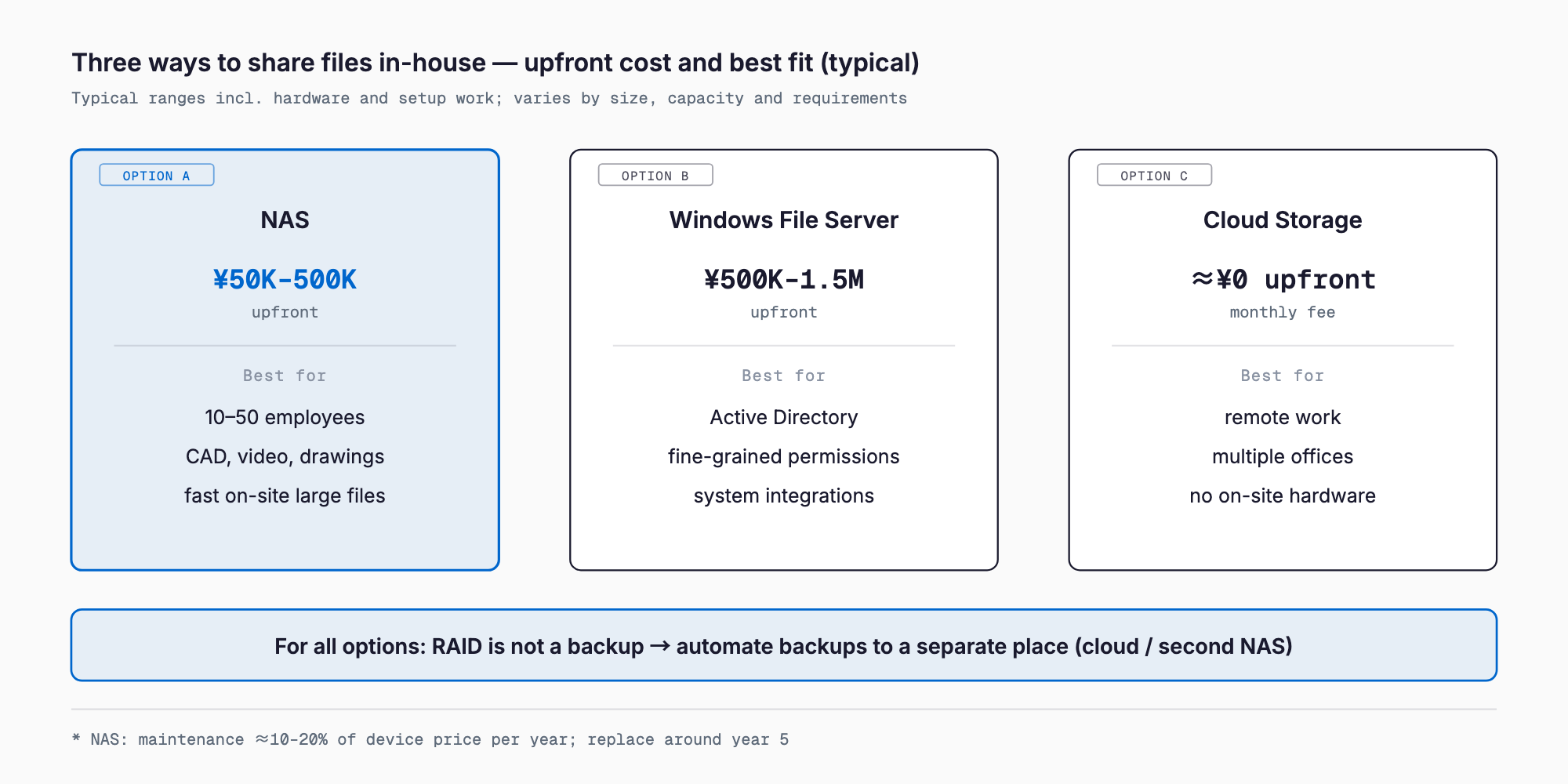
With the rise of remote work, more SMBs are choosing to use SharePoint in place of a traditional file server. That said, businesses that routinely handle large video or CAD files, or whose existing systems assume an on-premises file server, still find NAS or Windows file servers the more practical choice. Rather than forcing a full move to the cloud, many companies run both in parallel, matching the tool to the department and the type of data.
NAS Cost Breakdown
NAS costs come from a combination of the unit itself, the hard drives (HDDs), RAID configuration, a UPS (uninterruptible power supply), setup work, backup configuration, and a maintenance contract. Prices and reliability vary significantly between consumer-grade and business-grade products, so it helps to start with the overall price range.
| Item | Description | Estimated cost |
|---|---|---|
| NAS unit (2–4 bay, small scale) | Entry- to mid-tier models from Synology, QNAP, etc. | 30,000–100,000 yen |
| NAS unit (business grade, expandable) | 5+ bays, redundant power supply, etc. | 150,000–400,000 yen |
| HDDs (NAS-rated, per drive) | NAS-specific high-durability drives (4–8TB range) | 15,000–40,000 yen × number of drives |
| RAID setup and initial configuration | Building RAID 1/5/6, shared folders, permissions | 30,000–100,000 yen |
| UPS (uninterruptible power supply) | Essential for safe shutdown during power outages | 10,000–50,000 yen |
| Backup configuration | Automated backup to cloud or a second NAS | 30,000–150,000 yen |
| Annual maintenance contract | Fault response, monitoring, phone support, etc. | 10–20% of unit price per year |
One easily overlooked cost is the HDDs. Budgeting based on the NAS unit price alone is risky — most setups need two to four drives (more for larger RAID configurations), which can push the total to 1.5–2 times the unit price. When comparing quotes, always confirm whether the price includes drives or is for the enclosure alone.
Windows File Server Build Cost Breakdown
A Windows Server-based file server offers more flexibility than a NAS, but at a higher cost and with greater technical demands. On top of the server hardware, you need Windows Server licensing, client access licenses (CALs), and configuration work.
- Server hardware (business-grade physical server): roughly 150,000–400,000 yen
- Windows Server license: roughly 80,000–150,000 yen (varies by edition)
- Client access licenses (CALs): a few thousand yen per user or device
- Active Directory and permission design, shared folder setup: 150,000–400,000 yen
- Backup and redundancy configuration: 100,000–300,000 yen
- Maintenance and monitoring contract: roughly 200,000–500,000 yen per year (varies by scope)
An increasingly common alternative is building a virtual server on a cloud platform such as Azure rather than owning physical hardware. This lowers upfront costs but adds an ongoing monthly usage fee. Whether on-premises or cloud comes out cheaper in total depends on how long you plan to use it and whether you have in-house IT staff, so a simple side-by-side comparison can be misleading.
Cloud Storage Cost Considerations
SharePoint (bundled with plans like Microsoft 365 Business Standard), Google Drive (bundled with Google Workspace), and Box require almost no upfront hardware investment, typically costing 1,000–3,000 yen per user per month. Plans scale up or down easily as headcount changes, and the risk of data loss from disaster or hardware failure is generally lower than with a self-managed NAS.
That said, businesses that constantly exchange large files — design drawings, video assets, CAD files — can run into sync speed or capacity limits with cloud storage. For companies already subscribed to Microsoft 365 or Google Workspace, using the cloud in place of a file server instead of buying an additional NAS can also reduce total cost. Start by checking how much storage is already included in your existing plan.
When to Plan a Replacement
As a general guideline, a NAS or file server unit lasts about 5 years, and its internal HDDs about 3–5 years. These are only rough benchmarks — actual lifespan varies with usage hours, temperature, and vibration — but the following are signs it's time to consider a replacement.
- About 5 years have passed since purchase, or the manufacturer's warranty or support has ended
- A drive in the RAID array is showing warnings, or one has already been replaced
- OS or firmware updates are no longer being released
- You notice unusual noise, excessive heat, or slower access speeds
- Headcount or data volume has grown and capacity or speed can no longer keep up with the business
HDDs are consumable parts, and assuming "it's still running, so it's fine" is a risky bet. If multiple drives in the same RAID array were purchased around the same time, one failure often signals that the others are close behind. It's better to plan a replacement proactively than to face an emergency file recovery after data loss.
Common Failure Patterns
The following failures come up repeatedly around NAS and file server operations. In every case, the issue isn't the hardware purchase itself but the lack of operating rules to go with it.
- Mistaking RAID for a backup: RAID protects against a single drive failure, improving availability, but it is not a backup. It offers no protection against accidental deletion, ransomware, or a fire or flood — a separate copy in the cloud or a dedicated backup/DR setup is still required
- Ransomware encrypting the entire shared folder: Because NAS shared folders are accessible from multiple devices, infection on a single endpoint frequently spreads to encrypt everything in the shared folder. On top of basic ransomware countermeasures, you need offline, version-controlled backups
- The system became a black box after the responsible employee left: If only one person knows the NAS admin password and configuration, their departure can leave the company unable to make changes or respond to trouble. Admin credentials and a configuration diagram should be shared across multiple people or managed at the company level
- Running out of capacity without warning halted operations: Without capacity monitoring, some companies discover a "cannot save" error only when it's already blocking work. Set up capacity alerts and check usage roughly once a quarter
- Skipping a UPS led to data corruption during a power outage: A forced shutdown from a power outage can corrupt HDDs or RAID metadata. A UPS, costing only tens of thousands of yen, is cheap insurance against this
Pre-Order Checklist
Before requesting quotes from vendors, or selecting a product in-house, confirm at least the following.
- Was required capacity calculated with 3–5 years of expected growth in mind?
- Does the quote clearly state whether it covers the unit alone or the unit plus drives and setup work?
- Is the RAID level (1/5/6, etc.) designed separately from the backup plan, not treated as the same thing?
- Does the backup destination include the cloud or a physically separate location, not just another folder on the same NAS?
- Does the quote include a UPS (uninterruptible power supply)?
- Is the scope of the maintenance contract clear (response time for failures, availability of a loaner unit, phone support)?
- Is admin access and password management shared across multiple people or a department, not one individual?
- Are backups version-controlled (immutable or offline) as a ransomware countermeasure?
- Do you know when the manufacturer's warranty or support ends, and is the next replacement already on the calendar?
- Has migrating to or combining with cloud storage been compared as an option?
FAQ
Should we choose a NAS or a Windows file server?
For a company of a few dozen employees that doesn't need fine-grained Active Directory permission management, a NAS is often the more cost-effective choice. If your existing systems already assume Active Directory, or you need complex permission structures or system integration, a Windows file server is a better fit. If both feel like overkill, it's worth comparing a move to cloud storage as well.
If we fully migrate to cloud storage, can we get rid of our NAS entirely?
Many companies can, but businesses that routinely handle large files, or offices with unstable network connections, may find cloud-only storage frustratingly slow. A safer approach is to migrate a subset of departments or data types to the cloud first, confirm there's no disruption to operations, and then decide on a full migration.
If we have RAID set up, do we still need backups?
Yes. RAID keeps data accessible when a single drive fails, but it cannot protect against accidental deletion, ransomware, or events like fire or flood that take out the whole array. You still need regular backups to the cloud or an offsite location, separate from your RAID configuration.
How often should HDDs be replaced?
Roughly every 3–5 years is a common guideline, though actual lifespan depends on usage hours and the operating environment. Check the drive health status (S.M.A.R.T. data) regularly through the NAS admin console, and plan a replacement proactively when warnings appear or as the warranty period nears its end.
If we only have one IT staff member, how much should we handle ourselves?
Day-to-day setup and operations can often be handled in-house, but relying on a single person for failure response is risky. At minimum, share admin credentials and a configuration diagram across multiple people or the company as a whole, and have a maintenance contract in place so you can call in outside support for serious failures.
Summary
NAS and file server costs typically run 50,000–150,000 yen for a small NAS, 200,000–500,000 yen for a business-grade NAS, and 500,000 yen to 1.5 million yen for a full Windows Server build. Choose the approach — including migrating to or combining with cloud storage — based on headcount, data volume, and number of offices. Treat RAID and backup as separate concerns, and budget for a UPS, a maintenance contract, and shared administrative access to avoid regret later.
Related free tools (no sign-up, instant results)
Feel free to contact us
Contact Us