No-Code/Low-Code for SMBs: Costs, Limits, Outsourcing
No-code and low-code tools let non-engineers build apps fast. This guide covers SMB fit, 2026 cost ranges, key pitfalls, and in-house vs outsourcing choices.
No-code and low-code development let people build business apps and simple systems by writing little or no programming code, which means a small or midsize business (SMB) without dedicated engineers can build in-house systems for tens of thousands of yen when the task fits well. However, not every task is a good fit: workflows that require deep integration with core systems, large-volume data processing, or complex permission structures still hit real limits. This guide lays out typical cost ranges for popular tools, where no-code and low-code work well and where they don't, commonly overlooked pitfalls, and how to decide between DIY, in-house builds, and outsourcing — written for owners and staff with no development background.
No-code vs. low-code: what's the difference
No-code development lets you assemble an app by dragging and dropping components on screen, requiring essentially no programming knowledge. Low-code development builds screens and logic the same visual way for the most part, but lets you add small amounts of code for complex branching or integrations with outside systems — offering more flexibility than no-code at the cost of needing some IT literacy. In practice, SMBs tend to use no-code for simple internal tasks like approval forms, and low-code when the task involves exchanging data with another system.
Popular tools and typical cost ranges
Pricing for no-code and low-code tools usually falls into one or more of three models: a flat monthly fee, per-user (per-seat) billing, or tiered feature plans. The figures below reflect general market ranges as of 2026, not a quote for any specific project — actual pricing depends on the plan, number of users, and how much customization is needed, so always check each vendor's current pricing page.
| Tool type | Example | Typical use | Setup cost (indicative) | Monthly cost (indicative) |
|---|---|---|---|---|
| Business app builder | kintone | Case/inventory tracking, internal approval workflows | ¥0 (setup may involve internal or contracted time) | Roughly ¥1,500+ per user/month (seat-based) |
| Low-code business platform | Microsoft Power Apps | Apps and approval flows integrated with Microsoft 365 | ¥0 (sometimes bundled with Microsoft 365) | Roughly ¥1,000–¥5,000 per user/month, plan-dependent |
| Spreadsheet-derived app builder | Google AppSheet | Simple field-record and lightweight data apps built on spreadsheets | ¥0 | Roughly ¥500–¥1,500 per user/month; a free tier exists |
| Database + UI builder | Airtable | Customer lists, project tracking, light CRM | ¥0 | Roughly ¥1,000–¥3,000 per user/month; a free tier exists |
A common pattern is that setup costs stay near zero to a few hundred dollars, while the monthly cost scales with "number of users × per-seat price." That's affordable for a handful of people, but once you roll a tool out company-wide to 50 or 100 users, the annual total can approach what you'd pay to maintain a packaged software system. Estimate your expected user count and compare tools on an annual-total basis before committing.
Where it fits — and where it doesn't
No-code and low-code shine when business rules are relatively simple and the data involved stays inside the company. They're a poorer fit for anything meant for public-facing use, or that needs to handle large data volumes, high performance, or intricate permission structures. A rough guide:
| Category | Examples |
|---|---|
| Good fit | Internal approval workflows (expense claims, requests for approval); equipment or inventory ledgers; daily reports and inspection logs; simple CRM for customer or deal lists; small internal or external sign-up forms |
| Poor fit | Work needing deep integration with core business systems such as accounting or sales management; processing tens of thousands of records a day; workflows with complex, role-based view/edit permissions; public services meant for tens of thousands of external users; workloads that demand millisecond-level response times |
A simple rule of thumb: if a task has been limping along on Excel or a spreadsheet, it's usually a good candidate for no-code or low-code. If a task is already too big or complex for a spreadsheet to handle, it's often better to go straight to scratch development or a packaged system rather than force it into a no-code tool first.
Limits and pitfalls
- "Shadow apps": An app only its creator understands becomes a black box the moment that person moves teams or leaves. Set a rule that at least one other person can view and edit every app
- Per-user pricing adds up: The per-seat price looks small, but rolling out company-wide often costs more annually than expected. It's safer to start with a limited department and user count, then expand based on measured results
- Vendor lock-in and data portability: Confirm before signing up whether you can cleanly export accumulated data (e.g., as CSV) if you switch tools later — some services make this difficult or lose formatting on export
- Performance limits: Some tools slow down or time out as record counts or concurrent users grow. It's worth testing at the scale you expect to reach, not just your starting scale
- The customization ceiling: Needing "just one more" custom behavior often runs past what the tool's standard features support, forcing a rebuild in scratch code. If requirements look likely to grow complex, it pays to assess this risk early
How to choose: DIY, in-house, or outsource
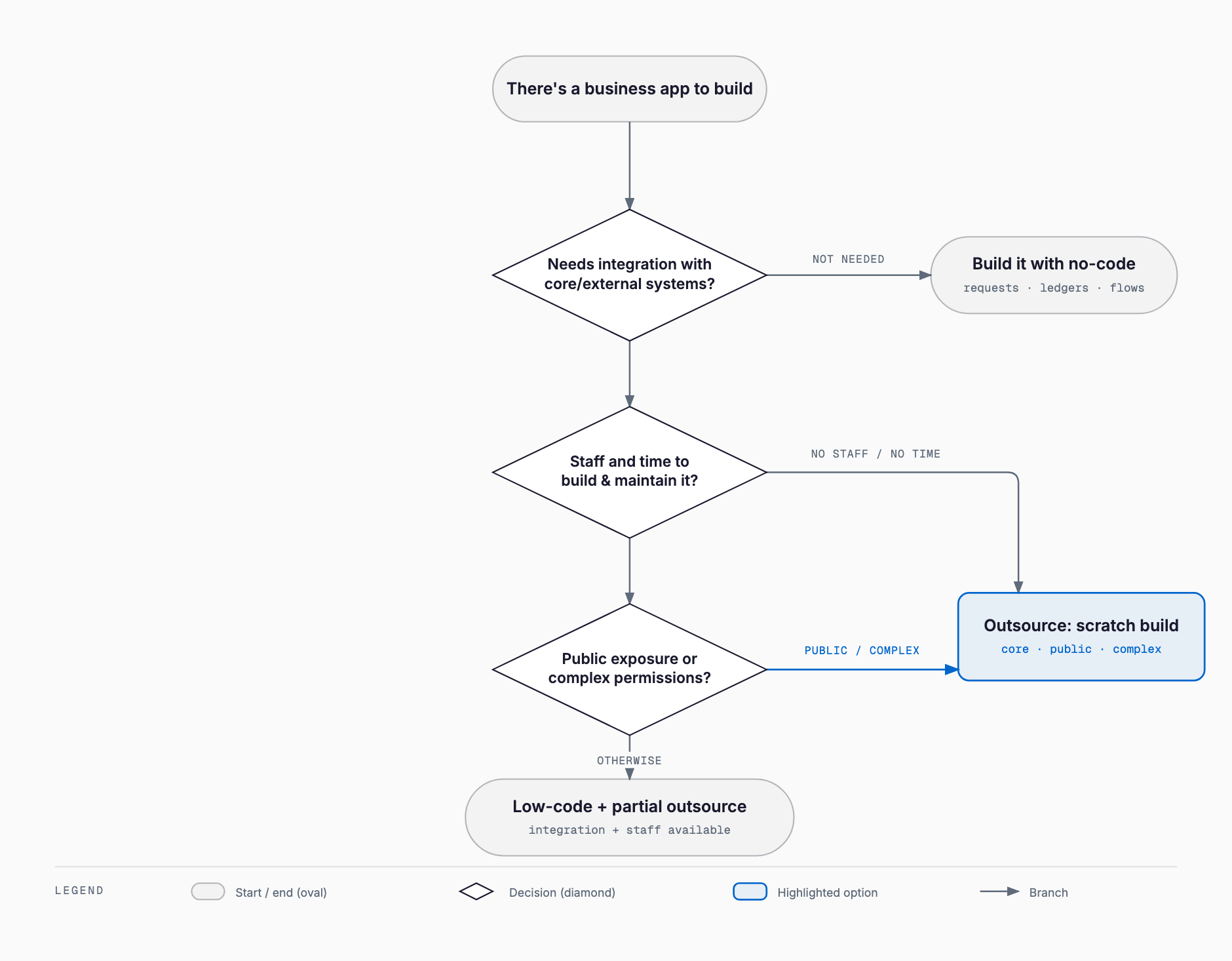
Before adopting a no-code or low-code tool, decide up front who will build it, who will use it, and who will maintain it — settling this early avoids most of the confusion that follows. Use this checklist to gauge which direction fits your organization:
- Does the task stay entirely internal, with no external-facing requirement? → If yes, in-house no-code is a good candidate
- Will the user base stay around 10–20 people, with no near-term plan to scale to hundreds? → If yes, in-house no-code is a good candidate
- Is there at least one more person besides the creator who understands the app, or could be trained to? → If no (only one person understands it), the shadow-app risk is high
- Does the task require deep integration with an existing core system or accounting software? → If yes, consider low-code with outside technical support, or outsourcing the build
- Is usage or data volume likely to grow substantially over time? → If yes, plan early for a move to scratch development or a packaged system
- Does your team already have someone with solid IT literacy, or would you need outside hands-on support? → If not, look at real-world cases like kintone's customization limits to judge whether outside support is warranted
If the underlying goal is simply automating repetitive manual work rather than building a new app, RPA-based process automation may be the better fit. "Building an app" and "automating a task" solve different problems, so clarify which one you actually need before picking a tool.
A 3-year total cost of ownership (TCO) comparison
Because no-code tools have low setup costs, it's easy to underestimate their total cost over a 3- to 5-year horizon — in some cases the total can approach or even exceed scratch development. The table below is an illustrative 3-year TCO estimate for a 30-user rollout; actual figures vary widely by tool and requirements.
| Approach | Setup cost | Monthly cost (30 users) | 3-year total (indicative) | Notes |
|---|---|---|---|---|
| No-code tool | ¥0–¥100K | ¥30K–¥90K (¥1K–¥3K per user × 30) | Roughly ¥1.1M–¥3.4M | Total scales roughly linearly with user count |
| Low-code + outside build support | ¥300K–¥1.5M | ¥30K–¥100K + support fees | Roughly ¥1.4M–¥5.1M | Assumes outsourced initial build, then in-house operation |
| Scratch development (outsourced) | ¥1.5M–¥8M | Maintenance at roughly 10–15% of setup cost per year | Roughly ¥2M–¥11.5M | Maintenance estimated as an annual rate on setup cost; well-defined requirements help contain the total |
While user counts and requirements stay small, a no-code tool usually keeps the lowest total cost. But once usage grows past a few dozen users with a long expected lifespan, front-loading the investment into scratch development or a packaged system can come out ahead over a 3- to 5-year horizon. Compare options on total cost over your expected usage period, not just the monthly sticker price.
Pre-adoption checklist
- Have you clearly articulated the business problem and the expected benefit (time saved, fewer errors, etc.)?
- Have you confirmed the task matches the "good fit" profile — internal, rule-based, and simple?
- Have you estimated expected user count and the resulting annual cost at that scale?
- Have you confirmed the service supports clean data export (e.g., CSV)?
- Can more than one person understand and maintain the app, rather than relying on a single creator?
- Have you mapped out whether integration with existing accounting or core systems is required?
- Have you tested real-world usability and performance with a free plan or trial?
- Have you compared this option against alternatives (outsourcing, packaged software) on a roughly 3-year TCO basis?
Is no-code/low-code a good fit for small and midsize businesses?
For simple, internally contained tasks — approval workflows, ledgers, light CRM — it's a strong low-cost option for building in-house. It's a poorer fit for work requiring deep integration with core systems, large data volumes, or complex permissions, so assessing the specific task matters more than the category.
How much does low-code development typically cost?
Most tools carry a setup cost from ¥0 to a few hundred thousand yen, with monthly costs typically ¥1,000–¥3,000 per user (indicative 2026 market ranges, not a quote). Since the monthly total scales with user count, it's worth estimating the annual total based on your expected user base.
What are the main limitations of no-code tools?
Common limitations include 'shadow apps' that only the original creator understands, rising totals from per-user pricing, difficulty exporting data due to vendor lock-in, performance degradation under heavy data or concurrent use, and an inability to customize past the tool's built-in feature set.
Should we choose no-code or outsource the development?
For simple, internal tasks with few users, building in-house with no-code tools tends to work well. For deep core-system integration, complex business logic, or anticipated large-scale growth, outsourcing from the start usually avoids costly rework later. A hybrid approach — building simple parts in-house and getting outside help for complex parts — is also common.
Can a no-code app later be migrated to scratch development?
If the tool supports clean data export (e.g., CSV), migrating your business data to a scratch-built or packaged system is generally feasible. However, the workflow logic and app design usually need to be rebuilt from scratch, so it's best to plan the migration before usage scales up dramatically.
Summary
No-code and low-code development are a strong low-cost option for SMBs when the task is simple and stays inside the company, but they hit real limits with core-system integration, large data volumes, and complex permissions. Setup costs look small, but per-user pricing can make the total balloon, and pitfalls like shadow apps and vendor lock-in are easy to overlook. Estimate a roughly 3-year total cost of ownership based on expected users and usage period, build the good-fit tasks in-house, and route the poor-fit tasks to outsourced system development — using the pre-adoption checklist above to make that call with confidence.
Related free tools (no sign-up, instant results)
Feel free to contact us
Contact Us