Office Network & Wi-Fi Setup Costs: A 2026 Budget Guide
Office network and Wi-Fi setup costs about ¥300K–600K for 10 people, ¥800K–1.5M for 30. Cost breakdown, router risks, wired vs. Wi-Fi, and a quote checklist.
Setting up an office network and Wi-Fi when you move or expand typically costs ¥300,000–600,000 for a 10-person office and ¥800,000–1,500,000 for a 30-person office. The total depends heavily on line installation, the number of access points (APs, the devices that broadcast Wi-Fi), and whether cabling work is needed. This guide breaks down where the money goes and what to check in a vendor quote.
Cost Breakdown at a Glance
Start by understanding where costs come from. The ranges below are general guidelines — actual costs vary by building conditions.
| Item | Cost range | Notes |
|---|---|---|
| Internet line installation | ¥30,000–100,000 | New fiber drop; cheaper if conduit already exists |
| Router / firewall | ¥50,000–300,000 | Business-grade equipment |
| Wireless access point (AP) | ¥30,000–80,000 each | PoE-capable, business-grade recommended; count depends on floor area |
| PoE switch | ¥30,000–150,000 | Also powers APs, multifunction printers, security cameras |
| LAN cabling work | ¥5,000–15,000 per port | Ceiling or in-wall runs cost more |
| Design & configuration | ¥100,000–400,000 | Network segmentation, VPN setup, etc. |
| Monthly maintenance & monitoring | ¥20,000–80,000/month | Incident response, remote monitoring |
Total Cost by Office Size
Actual totals vary widely by headcount and number of sites. Use these as rough benchmarks.
- 10-person office: ¥300,000–600,000 (2–3 APs, simple wired setup)
- 30-person office: ¥800,000–1,500,000 (4–8 APs, includes segmentation and VPN)
- 50-person office: ¥1,500,000–3,000,000 (8–15 APs, server-room-level equipment)
- Multiple sites (HQ + branches): Add ¥200,000–500,000 per site for site-to-site VPN and unified monitoring
For a deeper walkthrough of initial setup planning, see our network setup guide for small businesses. For overall budgeting, see how to plan an IT budget.
What Happens If You Just Use a Consumer Router
Many business owners assume a retail Wi-Fi router is "good enough." In practice, this causes several common problems.
- Low simultaneous connection limits mean the network gets unstable as headcount grows
- Weak signal range leaves conference rooms and far corners without coverage
- Firmware (the device's core software) rarely gets updated, leaving vulnerabilities unpatched
- No support line to call when something breaks, so diagnosis takes longer
- No separation for guest Wi-Fi, exposing internal data to visitors' devices
Our guide to optimizing office Wi-Fi covers the basic design choices that avoid these issues.
Wired vs. Wi-Fi: How to Decide
It's tempting to think "go all-wireless and skip the cabling cost," but a mix of wired and Wi-Fi, used where each fits best, is the standard approach.
- Number of APs: A rough rule is one AP per 10–15 meter radius, handling 20–30 simultaneous connections. Offices with many meeting rooms or private offices need more APs
- PoE (Power over Ethernet): Lets a single LAN cable power the AP, removing the need for separate electrical work near ceiling mounts
- Wire the fixed equipment: Printers, security cameras, and meeting room displays that never move should be wired — this stabilizes their connection and reduces Wi-Fi load
- Cabling timing: Run LAN cable before walls and ceilings are closed during interior construction; retrofitting cable afterward costs far more
Security and Network Segmentation
Rather than putting everything on one network, current best practice is to segment by purpose.
- Internal network: Business PCs, servers, and anything handling data that must not leave the company
- Guest network: Wi-Fi for visitors and vendors, fully separated from the internal network
- IoT / device network: Security cameras, printers, and smart devices that often go without updates, isolated from the rest
- VPN (virtual private network): Encrypted access to internal systems from outside the office
Without this separation, a single compromised security camera can become a path into critical internal data. Paying slightly more for segmentation up front is usually cheaper than dealing with a breach later.
Monthly Maintenance and Line Costs
Beyond the initial build, budget for ongoing monthly costs as well.
| Item | Monthly range | Details |
|---|---|---|
| Internet line fee | ¥5,000–30,000 | Varies by bandwidth and redundancy |
| Network maintenance & monitoring | ¥20,000–80,000 | Incident response, firmware updates, log monitoring |
| Cloud backup, etc. (optional) | ¥10,000–50,000 | Backing up configs and monitoring data |
Scheduling the Work Around a Move
Network installation is tightly linked to interior construction — get the order wrong and you end up paying for rework.
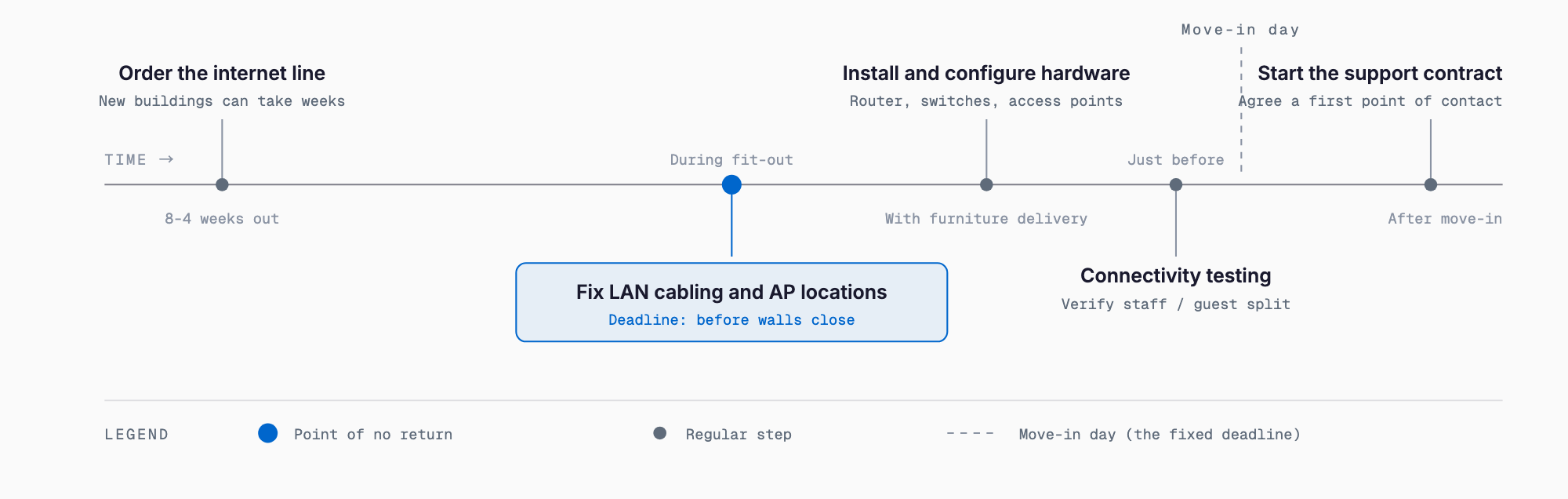
- 4–8 weeks before move-in: Apply for internet line activation (new buildings can take longer)
- Before walls and ceilings close: Finalize cable routes and AP locations, then run the cabling
- Around furniture delivery: Install and configure the router, switches, and APs
- Just before move-in: Test connectivity and confirm internal/guest network separation
- After move-in: Start the maintenance contract and share emergency contacts
What to Check in a Vendor Quote
When comparing quotes from multiple vendors, don't just compare totals — check whether these items are actually included.
- Equipment, installation, and configuration costs are itemized separately (be wary of quotes that just say "lump sum")
- The number and placement of APs is justified, not just a round number
- Network segmentation (internal / guest / IoT) is part of the design
- Maintenance hours, on-site response availability, and SLA (service level agreement) terms are spelled out
- Expansion costs for future headcount growth are estimated up front
- Equipment manufacturer and model numbers are specified (so future purchases match)
If we set up Wi-Fi well, do we still need wired LAN?
Fixed equipment like printers, security cameras, and meeting room displays should still be wired — it keeps their connection stable and reduces load on the Wi-Fi network. Going fully wireless often makes the whole network less stable, so wire what doesn't move.
Can we run cabling in a leased office?
Usually yes, but confirm the restoration terms with the landlord or property manager first. Work that alters the building, like ceiling cabling, may be restricted depending on the lease.
Should we avoid vendors with unusually cheap quotes?
Extremely low quotes sometimes skip network segmentation or maintenance support, or use consumer-grade equipment. Always check the itemized breakdown and warranty terms, not just the total.
When is it time to redo an existing office network?
If the network has slowed down as headcount grew, you're still on a consumer router, or guest Wi-Fi isn't separated from the internal network, it's a good time to review the setup.
Related free tools (no sign-up, instant results)
Feel free to contact us
Contact Us