Office Relocation IT Costs & Checklist for SMBs (2026)
Office move IT costs run about ¥600K–1.5M for 10 people and ¥2M–4.5M for 30. Cost ranges, a schedule from 6 months out, vendor roles, failures, checklist.
Office relocation IT costs run roughly ¥600K–1.5M in total for a 10-person company and ¥2M–4.5M for 30 people. But the bigger risk is not the price. It is failures in sequencing: the fiber line is not live on moving day, there are not enough LAN ports, or the phone number changes. These are scheduling problems, not budget problems. This article covers cost ranges by item, a backward schedule from six months before the move, how to divide work among vendors, common failures, and a checklist, written for owners and administrative staff at companies without a dedicated IT person.
The Full Picture of IT Work in an Office Move
IT work in a move falls into three groups: getting the new office working, moving what you already own, and telling the outside world your address has changed. When attention goes to interior work and movers, the third group is the one most often forgotten.
- Telecom: internet line (fiber), landline and phone numbers, Wi-Fi
- In-office equipment: LAN cabling, switches, routers, UTM (unified security appliance), multifunction printers, access control and security cameras
- Equipment relocation: packing, transport and reconfiguration of PCs, servers, NAS and network gear
- Information updates: company website, domain and email settings, Google Business Profile, registered addresses in SaaS tools and with business partners, business cards, envelopes, corporate registration
- Closing the old office: returning leased equipment, canceling lines and phone service, data erasure, items removed at restoration
The cost of the network portion alone is covered in Office Network and Wi-Fi Setup Costs. This article takes the wider view of the whole relocation, including that portion.
Cost Ranges by Item (Estimates)
The ranges below are general figures. Building structure, existing conduits, floor area and equipment grade change them substantially, so always collect quotes from several companies.
| Item | Estimated cost | Notes |
|---|---|---|
| New fiber line installation | ¥0–100K | Campaigns can make installation effectively free. Varies with building access |
| LAN cabling | ¥5K–15K per port | Unit price varies by ceiling, wall or floor routing. About 20–30 ports for 10 people |
| Wi-Fi (access points) | ¥30K–80K each | Business-grade, PoE-capable. Number set by area and headcount |
| Router and switches | ¥50K–400K | Business grade. UTM is additional |
| UTM (unified security appliance) | ¥100K–400K plus a few thousand to ¥20K monthly | Annual license fees are separate |
| Phone (switch to cloud PBX) | ¥0–100K initial plus ¥500–2,000 per user monthly | Some setups run on smartphones and PCs with no desk phones |
| Phone (conventional business phone system) | ¥300K–1.5M | Purchase or relocation of the main unit and handsets. Relocating is not always cheaper than buying new |
| Multifunction printer relocation | ¥20K–100K | Depends on the maintenance contractor. Leased units need the lessor's approval |
| PC and peripheral relocation and reconfiguration | ¥3K–10K per unit | No transport cost if you carry them yourself, but reconfiguration takes effort |
| Server and NAS relocation | ¥50K–300K | Shutdown, transport, reconnection and testing. See also NAS cost guide |
| Access control and security cameras | ¥200K–1.5M | Depends on number of cameras and doors. See the cost guide |
| Data erasure and disposal of old equipment | A few thousand to ¥10K per unit | Price varies with whether an erasure certificate is issued |
| Canceling old-office lines and phones | ¥0 to tens of thousands | Check renewal month, penalties and removal work fees |
Some quote items add fixed monthly costs rather than one-time work (UTM licenses, cloud PBX, the line itself). Compare not only initial costs but also how the monthly total changes after the move.
Total Cost by Company Size (10 and 30 People)
| Item | 10 people | 30 people |
|---|---|---|
| Line, router, UTM | ¥150K–500K | ¥300K–800K |
| LAN cabling and Wi-Fi | ¥200K–500K | ¥600K–1.5M |
| Phone (cloud PBX or business phone) | ¥50K–400K | ¥200K–1.2M |
| MFP, PC, server/NAS relocation | ¥100K–250K | ¥300K–700K |
| Access control and cameras (if newly installed) | ¥0–500K | ¥0–1.5M |
| Address updates, old equipment disposal, other | ¥50K–150K | ¥150K–400K |
| Estimated total | ¥600K–1.5M | ¥2M–4.5M |
The table excludes PC replacement, furniture, interior construction and restoration costs. IT often accounts for about 10–20% of the interior budget in a relocation. Because adding access control or cameras swings the total so much, request quotes that separate what is being newly installed from what is being moved.
Internet and Phone: The Two Items That Take the Longest
The internet line and the phone service control your IT schedule. Neither can be sped up by your own effort.
Fiber: Bringing fiber into a new building requires a site survey by the provider, approval from the building manager, and scheduling of the installation. From application to activation, 1–2 months is typical, and it can approach three months depending on the building's facilities (whether fiber is already in the building, whether shared conduits have space) and in busy seasons (March and September–October). Apply as soon as the lease is decided and at the latest three months before the move. In a building where other tenants already use a line, activation can be faster.
Landline and phone numbers: Numbers such as Tokyo's 03 can often be kept when moving within the same number area, but moving outside the area changes the area code and the number cannot be carried over. Even within the same area, procedures vary by contract type (analog line, hikari denwa, cloud PBX, and so on). Ask your provider right after the property is decided whether you can keep your number at the new address. A changed number ripples through business cards, the website, client notices and flyers.
If you want to protect your number, or use the move to rethink how you handle calls, cloud PBX is one option. Because company-number calls run on smartphones and PCs, no handset relocation or main unit work is needed, and activation tends to be quicker. You do need to check beforehand whether your current number can be ported to cloud PBX.
Also plan for any period when phones will be down on moving day: call forwarding from the old number to mobile phones, an announcement message, and a notice on your website.
LAN Cabling, Wi-Fi and UTM: Start After the Layout Is Fixed
The rule for LAN cabling is to design it after the seating layout and furniture placement are fixed. Cabling before seats are decided leads to redoing work: no LAN port under a desk, too few ports in a meeting room. You will need to coordinate with the interior contractor so cabling fits into the construction schedule.
- Plan LAN ports at about 1.3–1.5 times the number of seats (for growth, printers, NAS, Wi-Fi and cameras)
- Mark the positions of fixed devices such as MFPs, phones, NAS and servers on the cabling plan
- Provide ports in meeting rooms, reception and shared spaces
- Decide access point locations assuming ceiling mounting, and secure power (PoE)
- Decide where the router, switches and UTM will sit (a rack, ventilation, power, and a lockable location)
As explained in the guide to Wi-Fi and network equipment, using a consumer router in an office tends to cause unstable connections and security risks. If you introduce a UTM, be clear about the annual license fee and about who will do the configuration.
Relocating MFPs, PCs, Servers and NAS
MFPs: If leased, you cannot move them on your own. Notify the leasing or maintenance company and ask them to do the relocation. Confirm early the maintenance contact, relocation fee and date service resumes. Scan-to-folder destinations, email settings and IP addresses also need to be set up again at the new office.
PCs: Before transport, put name labels on each desktop and laptop and bundle parts, cables and AC adapters together to avoid confusion when unpacking. Network settings at the new office change (for example, if you used fixed IPs), so set aside a person and time for connection tests.
Servers and NAS are the highest-risk equipment in the move. Take a backup before relocation and run a restore test on it. Hard drives failing from transport vibration is not rare. The NAS and file server cost and operations guide is also useful. If possible, reserve half a day at the new office after activation to verify operation.
Address-Change Updates (Easy to Forget)
Finding out after the move that an old address is still in use is a quiet but persistent problem. These are the items most often missed.
- Company website (company profile, access map, contact page, footer)
- Google Business Profile (address, map pin, hours, phone number; an address change may trigger postcard or phone verification)
- Domain and email settings (address in WHOIS registration, organization information on SSL certificates)
- Billing and contract addresses in SaaS and cloud services
- Address-change notices to clients, banks, insurers and leasing companies
- Business cards, envelopes, invoice templates and email signatures
- Listings on social media, comparison sites, job boards and portals
- Corporate registration changes (Legal Affairs Bureau) and filings with tax, pension and labor offices (handled by administration or a labor consultant)
Changing a Google Business Profile address can require re-verification (postcard, phone or video), and the listing may be restricted until verification finishes. Starting the procedure one to two weeks before the move makes it more likely that the listing is ready when you open.
Backward Schedule (Six Months Before to One Week After)
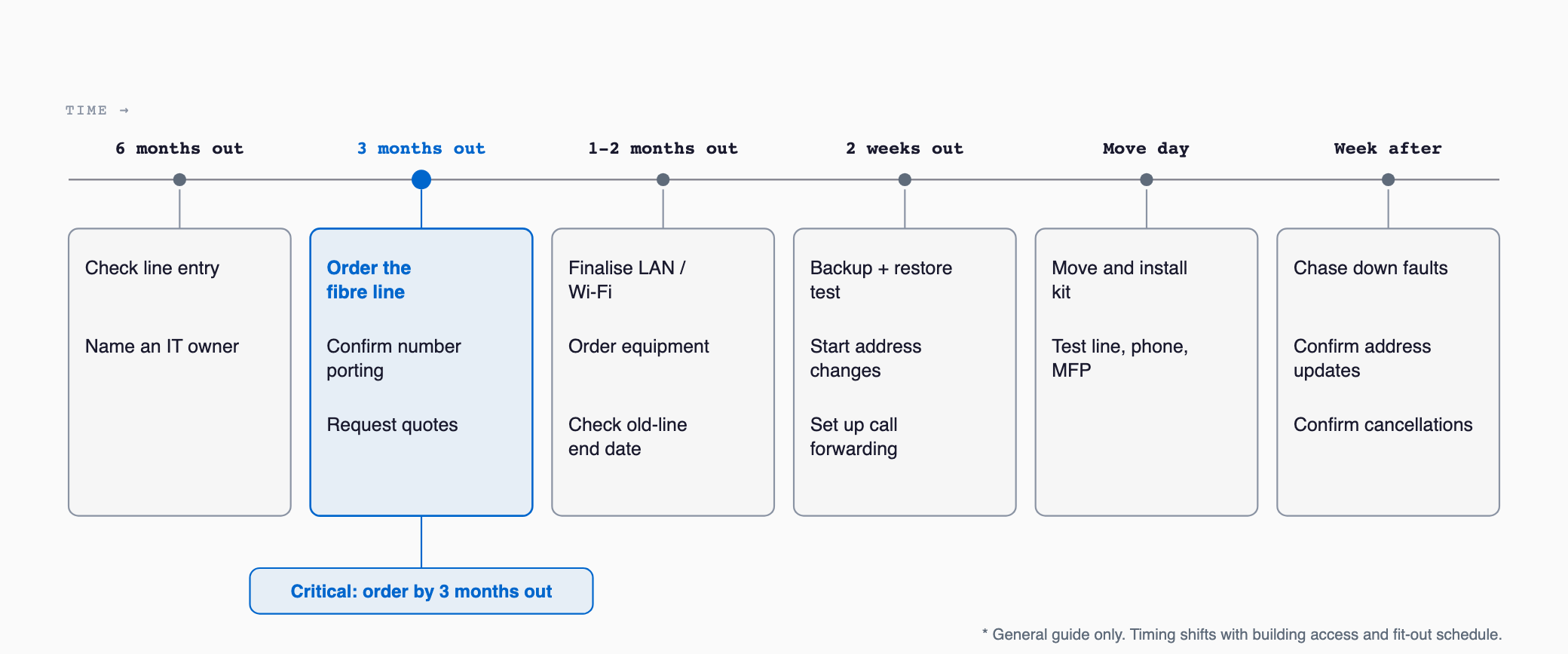
| Timing | Tasks | Typical owner |
|---|---|---|
| 6 months before | Check fiber availability, electrical capacity and equipment placement at candidate buildings. Appoint the person responsible for IT | Owner, administration |
| 4–5 months before | List cancellation terms and renewal months for current contracts (line, phone, lease, maintenance). Draft the seating layout | Administration, IT lead |
| 3 months before | Apply for fiber. Confirm whether the phone number can be kept. Request quotes from IT, telecom and interior contractors | IT lead |
| 2 months before | Finalize LAN, phone and Wi-Fi design. Build cabling into the interior schedule. Notify MFP and maintenance companies of the move | IT lead, interior contractor |
| 1 month before | Order equipment (check lead times). Confirm overlap of old-office line cancellation and new-office activation. Create a role sheet for moving day | IT lead |
| 2 weeks before | Take backups and test restores. Start address changes for Google Business Profile and others. Notify staff of temporary phone and email disruption | IT lead, administration |
| 1 week before | Set up call forwarding. Share packing rules for PCs and equipment. Arrange disposal and data erasure of old equipment | IT lead |
| Moving day | Transport and install servers, NAS and network gear. Verify line, Wi-Fi, phone and MFP connections | IT vendor, IT lead |
| 1 week after | List and fix issues. Confirm address updates on the website, SaaS and with partners. Confirm return of leased equipment and completion of line and phone cancellations | IT lead, administration |
The key point is to submit the fiber application three months before. That one rule avoids most failures.
Choosing Vendors and the "Who Oversees Everything" Problem
Several vendors are involved in an office move. Each has a different specialty, and if no one oversees the whole, responsibility becomes unclear.
| Vendor | Main role | Caution |
|---|---|---|
| Interior contractor | Walls, floors, ceilings, electrical work, conduits and holes for LAN | Ordering LAN cabling as "part of the interior work" tends to produce a weak design |
| Telecom provider (line and phone company) | Bringing in and activating fiber and phone lines | In-office LAN and Wi-Fi are often outside their scope |
| IT vendor (IT reseller or maintenance company) | Network design, device setup, PC and server relocation | Check whether the contract lets them coordinate with interior and line schedules |
| MFP and phone dealer | Relocating MFPs and business phones | Check lease contract holder and maintenance scope |
| Moving company | Ordinary furniture and PC transport | Servers and NAS may need special packing |
The most common failure pattern is the interior contractor saying their work ends here and the telecom provider saying theirs starts there, while no one owns the LAN ports and equipment placement in between. Appoint one person as the IT contact for the whole project, either an internal employee or an outside IT vendor engaged for the whole scope, and most of this problem disappears. If you have no internal IT person, ask IT vendors to quote a clearly defined scope that runs from design through moving-day attendance to post-move follow-up.
When choosing vendors, check the following.
- Is the quote itemized (not mostly lump-sum entries)?
- Will they attend on moving day and is there a contact route for trouble?
- Will the same company handle equipment warranty and maintenance after the move?
- Do they deliver design documents (cabling plan, IP address list)?
- Does their scope include removal of old-office equipment and data erasure?
Common Failures and Countermeasures
| Failure | Cause | Countermeasure |
|---|---|---|
| Fiber not live on moving day | Applied at the last minute. Waiting on building approval or installation | Apply 3 months before. Prepare a fallback such as a mobile router |
| Too few LAN ports or badly placed | Cabled before the layout was fixed | Design after layout is final. Plan 1.3–1.5 times seat count |
| Phone number changed | Did not check number continuity | Ask the provider right after the property is decided. Consider cloud PBX |
| Forgot to return leased equipment at the old office | Contracts not tracked | Make a contract list and confirm return dates, removal fees and penalties |
| Old PC or server discarded with data intact | Erasure left to the vendor | Obtain a data erasure certificate. Physically destroy disks or use erasure software |
| Forgot to cancel old-office line or phone | Noticed only when billing continued | Put cancellation dates and removal-work attendance on the schedule |
| NAS data corrupted | Transported without backup | Back up and test restore before moving |
| Some addresses still old | Update targets not fully listed | Share an update checklist and re-check one week after the move |
On data erasure, customer information can remain on the hard drives of PCs, servers and even MFPs. Confirm whether the leasing company will erase an MFP's internal storage on return and whether a certificate is issued. When you discard unneeded PCs, get a data erasure certificate recording the date, device and method, which you can use to explain to clients or auditors.
Checklist (Three Months Before to After the Move)
- One person is appointed as the overall IT contact
- The fiber application was submitted at least 3 months before the move
- We asked the provider whether the current phone number can be used at the new address (and considered alternatives such as cloud PBX if not)
- The seating layout is fixed and a LAN cabling plan exists
- LAN ports include a margin of 1.3–1.5 times the seat count
- Access point locations and power (PoE) are decided
- Locations for the router, switches and UTM are decided
- The MFP leasing and maintenance companies have been notified
- A list of equipment to move (PCs, servers, NAS, network gear) exists
- Backups were taken and restore tests were run
- A moving-day role sheet and contact system exist
- Call forwarding and voicemail announcements around the move date are set up
- Cancellation and return dates for old-office leased equipment, lines and phones are confirmed
- Data erasure, disposal and certificates for old equipment are arranged
- Address changes are done for the website, Google Business Profile, SaaS and business partners
- Issues and missed updates were re-checked one week after the move
Summary
Office relocation IT costs run about ¥600K–1.5M for 10 people and ¥2M–4.5M for 30. But what decides success is sequencing more than price: apply for fiber three months ahead, design the LAN after the layout is fixed, appoint one contact for all IT, and finish cancellation, return and data erasure at the old office. Start by listing your current contracts (line, phone, lease, maintenance) and checking their renewal months and cancellation terms.
How much does IT cost for an office move, by company size?
As a guide, ¥600K–1.5M in total for 10 people and ¥2M–4.5M for 30. Adding access control or cameras, and choosing a conventional phone system versus cloud PBX, change the total a lot. PC replacement, interior work and restoration are not included. Collect itemized quotes from several companies and compare.
How many months before the move should I apply for fiber?
About three months before at the latest. Activation typically takes 1–2 months, and building approval, installation work, or busy seasons such as March and September–October can push it toward three months. Once the property is decided, ask the building manager about fiber availability and apply right away.
Will my landline number change when I move the office?
Moving within the same number area often lets you keep it, but moving outside the area changes the area code and it cannot be carried over. Contract type also matters. When the property is decided, ask your phone provider whether you can continue at the new address. Switching to cloud PBX is another way to protect your number.
Should I hire the interior contractor, telecom provider or IT vendor?
Their roles differ and one company rarely covers everything. The interior contractor handles conduits and electrical work, the telecom provider brings in the line, and the IT vendor handles the internal network and device setup. What matters is appointing one overall contact. If you have no one internally, you can ask an IT vendor with a clearly defined scope from design to moving-day attendance.
Related free tools (no sign-up, instant results)
Feel free to contact us
Contact Us