PC Kitting Costs for SMBs: Pricing and How It Works
PC kitting readies a new PC for an employee, costing a few thousand to 20,000 yen per unit. Covers pricing, in-house vs outsourcing, a checklist and pitfalls.
PC kitting is the process of preparing a newly purchased computer so an employee can start using it right away. Basic setup typically costs around 3,000 to 10,000 yen per unit, while setup that includes data migration and software installation runs closer to 10,000 to 20,000 yen per unit. Small orders often carry a minimum fee or travel charge that makes them relatively more expensive, while larger orders can take advantage of automation to lower the per-unit cost.
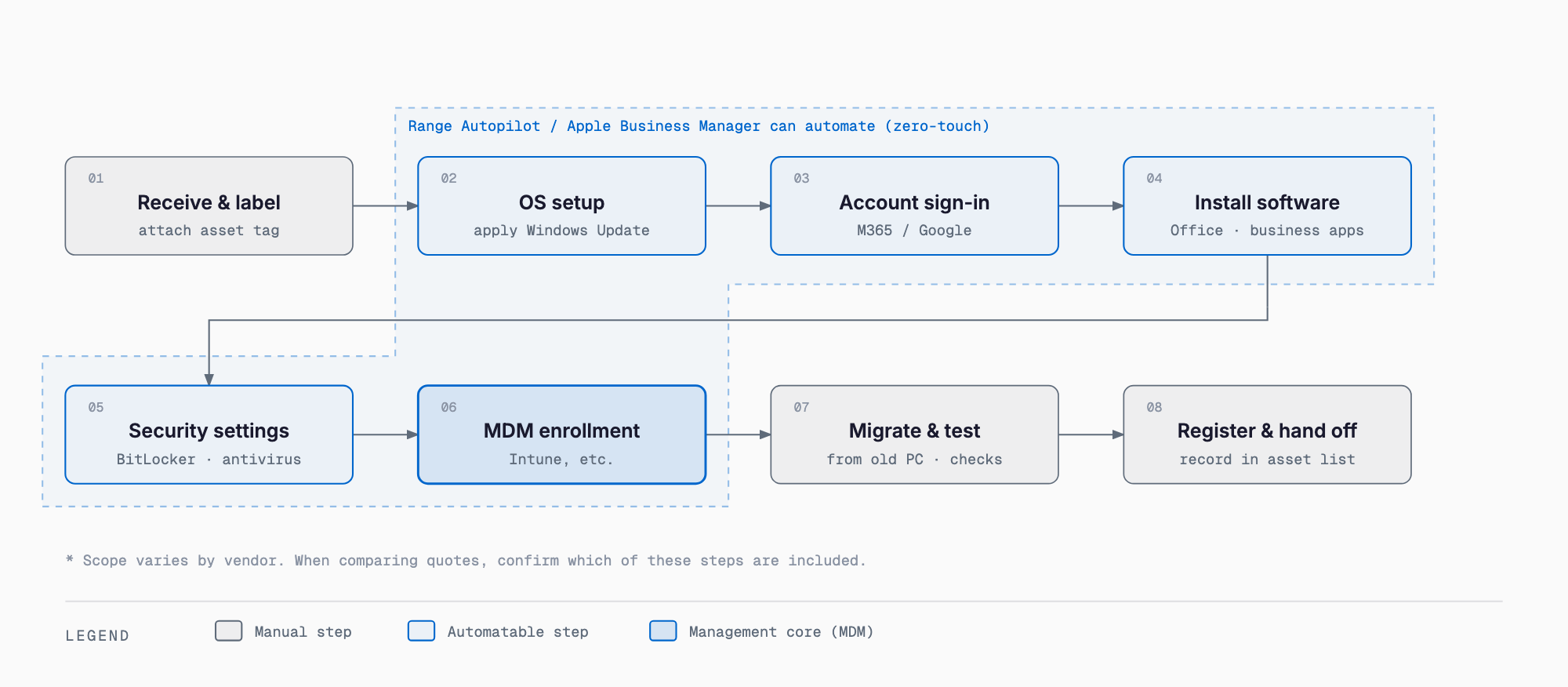
What kitting typically includes
The exact scope of "kitting" varies by vendor, but it generally covers a set of tasks that go well beyond simply turning on the machine and running through the initial setup wizard. The goal is to apply every setting the company wants standardized, without relying on the end user to configure anything.
- Initial OS setup and updates (Windows Update, etc.)
- Sign-in configuration for company accounts such as Microsoft 365 or Google Workspace
- Installing common business software (Office, Teams, line-of-business clients, etc.)
- Security settings (BitLocker drive encryption, antivirus software, password policy)
- Enrollment in an MDM (mobile device management) tool such as Intune or Autopilot
- Printer, internal network, and VPN connection setup
- Data migration from the old PC (desktop files, documents, email, etc.)
- Applying asset labels and registering the device in an asset ledger
Typical cost ranges
Kitting costs vary significantly depending on scope and order size. As a rough guide, the price ranges typically seen in the market break down as follows.
| Scope | Typical cost per unit | Notes |
|---|---|---|
| Basic kitting (OS setup, account setup, software install) | About 3,000-10,000 yen | Simpler scopes trend toward the lower end |
| Including data migration | About 10,000-20,000 yen | Varies with the amount of data migrated |
| Including security settings / MDM enrollment | About 10,000-25,000 yen | Covers BitLocker, Intune enrollment, etc. |
| Small orders (1-3 units) | Above prices plus travel/minimum fee | Travel charges or minimum order fees often apply separately |
| Automation setup (Autopilot, etc.) initial cost | Tens of thousands to over 100,000 yen (one-time) | Per-unit cost drops substantially once the setup is built |
These figures are general guidelines only; actual quotes vary by vendor, region, and requested scope. Before placing an order, it is worth getting quotes from multiple vendors and confirming the breakdown, including scope of work, travel fees, and any minimum order charges.
In-house vs. outsourcing vs. retailer options
There are generally three ways to handle kitting. Each comes with its own trade-offs.
| Approach | Pros | Cons |
|---|---|---|
| In-house (handled by staff) | No extra cost, staff know internal requirements | Eats into staff time, impractical at higher volumes |
| Outsourcing (kitting specialist) | Can process many units quickly, consistent quality | Costs money, takes effort to share company-specific rules |
| Retailer option at time of purchase | Convenient, ordered together with the hardware | Scope is often limited, pricing can run somewhat higher |
Handling it in-house is fine for a small number of units, but the risk of missed steps and inconsistent settings grows as volume increases. When a bulk replacement coincides with a PC refresh cycle, it is worth evaluating outsourcing or automation more seriously.
How many units make outsourcing or automation worthwhile
There is no hard rule, but as a rough guide, handling 5 to 10 units in-house or through a one-off outsourcing request is usually manageable. Once a company is regularly replacing more than around 10 units, paying for the initial setup of automation such as Autopilot tends to pay off because the per-unit cost drops enough to lower the total cost. For a handful of units purchased occasionally, a one-off outsourcing request or a retailer option is often sufficient.
Relationship to MDM and zero-touch kitting
With mechanisms like Intune Autopilot or Apple Business Manager, a PC can automatically apply pre-registered policies and apps as soon as it is plugged in and signed into, enabling what is called "zero-touch kitting." It takes effort to set up initially, but the payoff grows with the number of devices. If you are also considering device management across smartphones and tablets, it is worth reviewing MDM costs and rollout steps as well.
Pre-order checklist
- Have you finalized the number of units and the model/OS/specs?
- Is the scope of work clearly defined (basic setup, data migration, security settings)?
- Have you confirmed the licensing (OS, Office, business software) is registered under the right name and quantity?
- Have you decided who issues and manages administrator accounts?
- Have you decided how old PCs' data will be wiped and how the hardware will be disposed of?
- Do you have an asset ledger ready (asset number, assigned user, model, purchase date, etc.)?
- Have you confirmed travel fees, minimum order charges, and lead time in the quote?
- Have you compared quotes from multiple vendors?
Common pitfalls
- Confused license ownership: software such as Office ends up registered under a personal account, making it impossible to hand over cleanly when the employee leaves
- Administrator account tied to one person: only one staff member knows the admin password, leaving the company stuck when that person is unavailable
- Rolling out without an asset ledger: no record of who is using which PC, creating extra work later when doing an inventory check
- Skipping data wipe on old PCs: PCs are disposed of or handed off after a replacement without a proper factory reset or physical destruction, leaving data behind
A missing asset ledger in particular tends to cause problems down the road. Building good IT asset management habits from the moment a PC is deployed, recording the asset number, assigned user, and license details, makes the next replacement or kitting request far smoother.
Frequently asked questions
What exactly does kitting involve?
It covers everything from initial OS setup and updates, signing into company accounts, installing business software, and applying security settings, to MDM enrollment, data migration, and registering the device in an asset ledger, so an employee can start using the PC right away.
Can I request kitting for just one unit?
Yes, but small orders of 1-3 units often come with a minimum order fee or travel charge, so the per-unit cost tends to be higher than when ordering a larger batch at once.
What should we watch out for if we handle kitting in-house?
Keep a checklist of every setting to avoid missed steps, standardize license ownership under the company, and always maintain an asset ledger. Relying on one staff member's memory tends to cause mistakes and gaps as the number of units grows.
At what scale does automation such as Autopilot become worthwhile?
There is no fixed threshold, but once a company is regularly replacing more than around 10 units, the initial setup cost tends to pay off because the per-unit cost drops enough to lower the total cost. Below that, a one-off outsourcing request is often enough.
Related free tools (no sign-up, instant results)
Feel free to contact us
Contact Us