Employee Safety Confirmation System Costs for SMBs (2026)
Safety confirmation system costs for SMBs: SaaS runs 100-500 yen/user monthly, packages 300K-2M yen, custom 3M+ yen. Covers features and selection tips.
A safety confirmation system automatically sends a safety-check message to employees' smartphones or email when a disaster such as an earthquake or typhoon occurs, then automatically tallies and visualizes the responses. As a general 2026 market range rather than a specific quote, cloud SaaS pricing runs about 100-500 yen per employee per month plus 0 to a few tens of thousands of yen upfront, an on-premise package typically costs 300,000-2,000,000 yen upfront, a simple setup built on LINE or Google Forms costs a few tens of thousands to 500,000 yen, and a fully custom build with automatic seismic-intensity dispatch and system integrations runs 3,000,000 yen or more. Companies that still call or email employees one by one after every earthquake tend to face heavy after-hours and holiday response burdens, slow identification of unreachable employees, and reports to leadership that take hours to compile. This article breaks down safety confirmation system costs and how to choose an approach that fits your company's size and risk, in plain terms for non-IT staff. For the broader BCP picture, see IT BCP basics and the SMB IT risk management guide.
What a safety confirmation system actually does
A safety confirmation system is more than a tool that just asks employees to reply "I'm safe." It combines several functions: automatic dispatch triggered by Japan Meteorological Agency seismic intensity data, which sends messages to employees in the affected area once a set intensity threshold is reached; response aggregation, which automatically tallies and visualizes replies on safety status, ability to commute, and damage reports on a dashboard; family safety confirmation, letting employees register and check on family members alongside themselves; a BCP message board for broadcasting response policy, evacuation sites, and business-continuity instructions company-wide; and multi-channel delivery that combines email, a dedicated app, LINE, and SMS to make sure messages actually get through. You don't need every function from day one — automatic dispatch plus response aggregation alone already cuts the burden on whoever used to make those calls.
Cost ranges by approach
| Approach | Overview | Typical upfront cost | Typical monthly cost |
|---|---|---|---|
| 1. Cloud SaaS (per-user billing) | Contract a dedicated safety confirmation SaaS and run it on standard features | About 0-50,000 yen | About 100-500 yen per employee (minimum fee often applies) |
| 2. Package (on-premise, one-time purchase) | Deploy a safety confirmation package on your own server | About 300,000-2,000,000 yen | About 50,000-150,000 yen per year in maintenance |
| 3. Simple LINE / Google Forms setup | Combine existing free or low-cost tools, run manually or semi-automatically | A few tens of thousands to 500,000 yen (if you hire someone to build it) | Tool fees free to a few thousand yen; operation is manual |
| 4. Fully custom development | Build seismic-intensity dispatch, system integrations, and custom aggregation logic together | About 3,000,000-10,000,000 yen, more for larger scope | About 10-15% of upfront cost per year in maintenance |
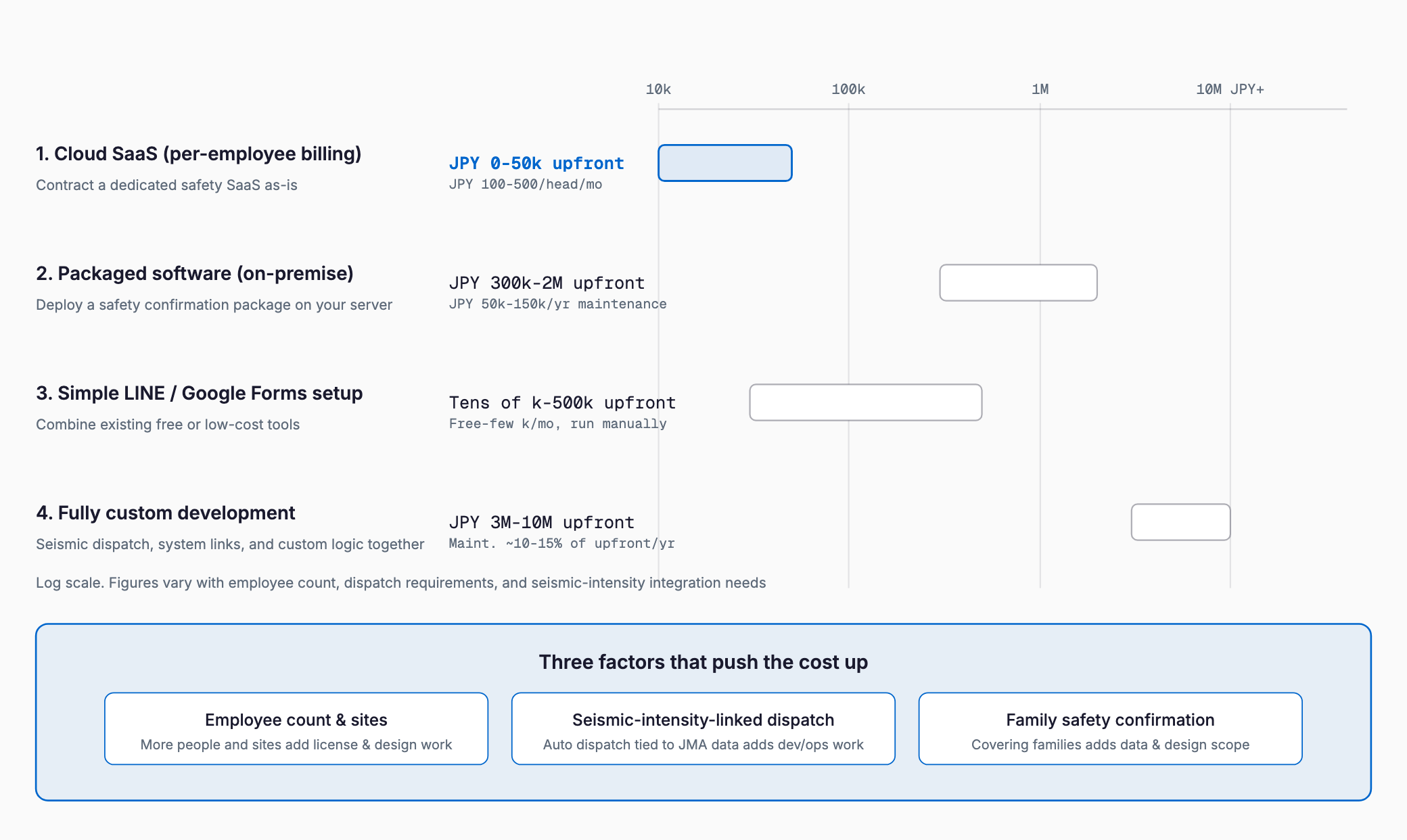
For a company of a few dozen employees where seismic-intensity-linked automatic dispatch and response aggregation cover the need, cloud SaaS is usually enough. The case for customization or a custom build grows stronger as you add family safety confirmation, coordination across multiple sites or group companies, or a proprietary aggregation format. See the SMB IT risk management guide for more on how these approaches differ in general.
What drives the cost
- Employee count and number of sites: more people to cover, and dispatch across multiple sites or group companies, both add license count and design work
- Number of delivery channels: email only versus a multi-channel mix of a dedicated app, LINE, and SMS changes both development and operating cost
- Whether dispatch is seismic-intensity-linked: automatic dispatch tied to JMA seismic intensity data versus a manually triggered send changes both operational load and the integration work required
- Whether family safety confirmation is needed: covering family members as well as employees adds to the data volume registered and the personal-data handling design
- BCP message board and multilingual support: whether you need company-wide emergency broadcasts and multilingual delivery for foreign employees changes the scope of added functionality
- Integration with existing systems: linking to attendance management or an HR database to auto-update the target list adds work proportional to the number of integrations
Free and low-cost alternatives, and their limits
Many companies run on a combination of free tools — a LINE group broadcast plus a Google Forms response collector — before adopting a dedicated system. For a company of a few dozen employees, where whoever is responsible can reliably act when a disaster hits, this can work for a while. But free-tool combinations have structural limits. They can't dispatch automatically based on JMA seismic intensity data, so if the person responsible for sending is themselves affected by the disaster, dispatch may be delayed or never happen at all. They also can't automatically resend to non-responders, leaving follow-up to manual effort. Response data ends up scattered across a LINE chat history and a spreadsheet, requiring manual re-aggregation for reports to leadership. There's also a privacy consideration: handling sensitive data like family safety status in general-purpose tools carries risk. As headcount grows, sites multiply, or leadership needs immediate reporting, it's worth considering a move to a dedicated system.
Selection checklist
- How many employees, sites, and group companies need to be covered?
- Is automatic dispatch linked to JMA seismic intensity data needed, or is a manual trigger enough?
- Does family safety confirmation need to be covered as well?
- Which delivery channels — email, a dedicated app, LINE, SMS — need to be combined, matching what employees actually use day to day?
- Does the system automatically resend to and follow up with non-responders?
- Is a BCP message board or other emergency broadcast function beyond safety confirmation needed?
- Can the target list be auto-updated by integrating with attendance management or an HR database?
- Is multilingual delivery needed for foreign employees?
- Are there limits or extra fees on how often you can run test dispatches?
Common failure patterns
A few patterns keep showing up in failed rollouts. First, the employee contact list is never updated after go-live, so joiners and leavers aren't reflected for years — and when an actual disaster hits, messages go to former employees while new hires get nothing. Second, companies stop at rollout and never run a test dispatch for years, so when an actual disaster strikes, a configuration mistake means dispatch never goes out, or employees have simply turned off app notifications and never notice. Third, even though the system supports automatic seismic-intensity-linked dispatch, it's left set to manual trigger, so a late-night or holiday earthquake finds no one available to send it and the initial response is delayed. Fourth, companies adopt a safety confirmation system on its own without thinking through IT BCP basics as a whole, so safety status gets confirmed but there's no backup plan for keeping operations running or an emergency contact network in place, leaving the initial response half-finished.
Operational tips (drills and contact data maintenance)
- Run test dispatches at least twice a year: at minimum twice a year, ideally once a quarter, send a test message following the real dispatch flow and check the response rate and any delivery issues
- Update contact data at onboarding and offboarding: build safety confirmation contact updates into the HR onboarding/offboarding process rather than leaving it to manual, ad-hoc updates
- Follow up individually with low-response departments: visualize test dispatch response rates by department and check notification settings or app adoption for departments with notably low rates
- Keep it positioned within the broader BCP plan: safety confirmation is only the entry point of BCP planning, so run it alongside data backup and business-continuity plans as covered in the SMB IT risk management guide
- Announce through multiple channels: when rolling out the system, announce it through both email and whatever tool your team uses day to day, as discussed in comparing business chat tools, to avoid anyone missing the announcement
Comparison summary by approach
| Consideration | Cloud SaaS / simple LINE setup fits when | Package / custom build fits when |
|---|---|---|
| Employee count / sites | A few dozen to a few hundred employees, few sites | Hundreds to thousands of employees, multiple sites or group companies |
| Dispatch requirements | Seismic-intensity dispatch plus email/app delivery is enough | Family confirmation, multilingual support, and custom aggregation are needed |
| Integration with other systems | No integration needed, or manual list updates are enough | Automatic integration with an HR database or attendance system is wanted |
| Upfront investment approach | Want to keep upfront costs low and start small | Ready to make a larger investment decision as part of BCP planning |
Who typically pays for a safety confirmation system?
In most companies, the employer covers the full cost as part of employee welfare and BCP (business continuity planning) spending. Charging employees directly is uncommon.
Can we get by with free tools alone?
For organizations of a few dozen employees, a manually operated LINE group or Google Forms can work for a while. However, these lack automatic dispatch triggered by earthquake intensity and automatic re-sending to non-responders, so they may fail exactly when the person responsible for sending messages is also affected by the disaster. As headcount grows, migrating to a dedicated system becomes worth considering.
Is a cloud SaaS or a simple LINE-based setup cheaper?
Looking only at upfront cost, a simple LINE-based setup is often cheaper. But once you factor in automatic dispatch linked to Japan Meteorological Agency seismic intensity data, family safety confirmation, and a BCP message board, standard cloud SaaS functionality is often cheaper in total. List the features you actually need before comparing options.
How often should we run drills after rollout?
At minimum twice a year, ideally once a quarter, sending a test dispatch and checking both the response rate and whether contact information is current. Pair this with an operational rule to update contact data whenever someone joins or leaves the company.
What else should we prepare alongside a safety confirmation system as part of BCP?
A safety confirmation system only covers part of the initial response. It's important to also build out data backup arrangements, an emergency contact network, and alternative means to keep operations running.
Summary
Safety confirmation system costs run about 100-500 yen per employee per month for cloud SaaS, 300,000-2,000,000 yen upfront for a package, a few tens of thousands to 500,000 yen for a simple LINE-based setup, and 3,000,000 yen or more for a fully custom build. What matters most isn't choosing the cheapest option, but first listing out which features — seismic-intensity-linked automatic dispatch, family safety confirmation, multilingual support — your company's size and risk profile genuinely require. Don't treat rollout as the finish line: build at least two test dispatches a year and ongoing contact data maintenance into your operating rules so the system actually works when a real disaster hits.
Related free tools (no sign-up, instant results)
Feel free to contact us
Contact Us