Why New Systems Go Unused — and How to Fix Adoption
Why do new systems go unused after rollout? Five root causes, pre-launch prep, the first 90 days, roles, costs, and metrics, with a checklist for owners.
What "Not Being Used" Actually Looks Like
When people say a new business system "was introduced but isn't being used on the ground," this usually falls into one of two patterns. The first is hollow use: staff log in but only touch a fraction of the features, still relying on Excel or paper forms alongside the system. The second is abandonment: staff never log in at all and simply drift back to the old way of working.
The short answer is that the single biggest cause of poor adoption is doing nothing after go-live. A system rollout doesn't end at contract signing or acceptance testing — it only pays off once there is a deliberate plan and structure for embedding it in daily work. This article walks through why systems stop being used, then lays out concretely what to do before go-live, in the first 90 days after go-live, and once the system has settled into daily operations.
Why Systems Go Unused — Five Common Causes
Adoption problems look different from company to company, but in practice they tend to trace back to a handful of recurring causes. The five most common are:
- Requirements defined without the front line: When the IT department or management sets requirements alone without incorporating input from the people who will actually use the system, the resulting screens and input fields don't match real workflows, and staff abandon the system as too hard to use
- Incomplete data migration: If migration from the old system or paper ledgers is incomplete, staff can't trust the numbers in the new system and keep double-checking against the old method in parallel
- Missing training: Handing out a manual without holding training sessions or setting up a place to ask questions means staff who get stuck on basic operations simply stop using the system
- Old methods left running in parallel: Unless the use of Excel or paper forms is explicitly retired alongside the new system, staff drift back to what they're used to, and the two methods keep coexisting indefinitely
- No clear owner: If nobody is assigned responsibility for driving adoption after go-live, problems that come up get left unaddressed and frustration on the ground simply accumulates
Missing training in particular is an easy cause to overlook, and as described in AI Adoption Failure Patterns: Six Common Ways Tools End Up Unused, it's a failure pattern that shows up regardless of what kind of system is being introduced.
What to Do Before Go-Live (From Kickoff to Acceptance)
Preparing for adoption can't wait until the system is finished — it's too late by then. From the kickoff stage onward, the people who will actually use the system on a daily basis need to be involved in defining requirements, and the screen design needs to be checked against real workflows.
At the acceptance stage, it isn't enough to confirm the system works to specification — it's worth also confirming that front-line staff can walk through a full set of operations using real business data. As explained in What Is "Acceptance Testing"? What to Check at Delivery, acceptance is both a contractual milestone with the development vendor and the last real opportunity to confirm the system is actually usable on the ground. If the underlying workflow itself is undocumented and depends on individual staff knowledge, it helps to run Digitalizing Manuals and Standard Operating Procedures alongside the system rollout, so operating instructions for the new system can be built on top of a properly documented process.
The First 90 Days After Go-Live
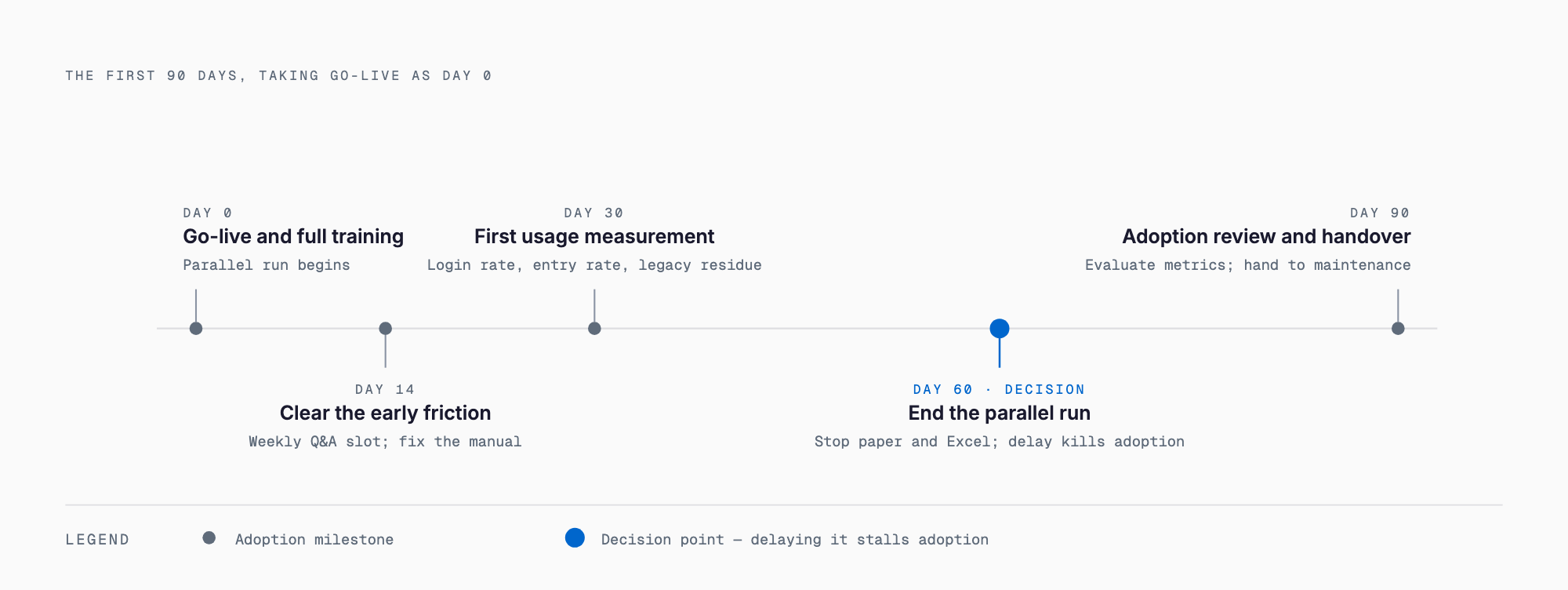
The 90 days immediately following go-live are the period that determines whether adoption succeeds or fails. Laying out what needs to happen at each stage helps prevent things from falling through the cracks.
| Period | What to Do | Purpose |
|---|---|---|
| Go-live to 2 weeks | Training for all users, run old system in parallel | Build muscle memory for basic operations |
| 2 weeks to 1 month | Weekly Q&A sessions, gather feedback on sticking points | Don't let small frustrations pile up |
| 1 to 2 months | Phase out old methods (Excel, paper) step by step | Eliminate the parallel-use state |
| 2 to 3 months | Review usage data, follow up individually with holdouts | Catch lagging adoption early |
| 3-month mark | Review overall adoption and revisit operating rules | Shift into steady-state operations |
Internal Structure and Roles for Driving Adoption
Making a system stick requires a structure for the operating phase, separate from the project team that ran the rollout itself. At minimum, the following roles should be assigned:
- Adoption owner: Holds ultimate responsibility for adoption progress and reports it to management
- Department lead (a point person per team): Collects questions from staff and handles simple how-to questions on the spot
- Support contact: A single point of escalation to the developer or vendor
- Data steward: Regularly checks for data-entry rule violations and data quality issues
It also helps to start planning the adoption phase in parallel with the later part of the development schedule described in How Long Does System Development Take?, rather than waiting until after go-live to think about it.
Typical Costs for Adoption Support
Driving adoption comes with real costs. The figures below are rough guidelines only — actual costs vary by company size, system complexity, and the support provider.
| Item | Typical Cost | Notes |
|---|---|---|
| Operational training (per session) | ¥50,000–150,000 | Varies with number of attendees and sessions |
| Manual / SOP development | ¥100,000–400,000 | Video manuals tend to push costs higher |
| Ongoing support (monthly) | ¥50,000–200,000 | Includes regular check-ins and Q&A |
| Additional customization | Quoted case by case | Common when front-line requests pile up |
These figures are only a general guide — actual costs depend on the scale of the system being introduced and the internal structure supporting it.
Metrics for Measuring Whether Adoption Is Working
Adoption should be tracked with numbers rather than gut feeling. The most useful metrics include:
- Login rate: What share of intended users are logging in regularly
- Data entry / usage rate: Whether required information is being entered and updated on schedule
- Old-method survival rate: Whether Excel or paper forms have truly been retired, or are still lingering in pockets
- Support request trend: Whether requests, high right after go-live, are declining over time
- Error / rework rate: Whether data-entry mistakes and rework are trending down
Adoption Checklist
- Did front-line staff take part in defining requirements?
- Did front-line staff walk through operations with real data during acceptance testing?
- Was training held for all users within two weeks of go-live?
- Is there a weekly (or more frequent) forum for handling questions?
- Has a clear deadline been set for retiring old methods (Excel, paper)?
- Has a single adoption owner been assigned?
- Has a department lead been appointed for each team?
- Is there a mechanism to review login and usage rates monthly?
- Is a 90-day adoption review scheduled?
- Is there a plan for individually following up with staff who are lagging behind?
Frequently Asked Questions
How long should we expect from go-live to full adoption?
It depends on the complexity of the system, but as a rough guide, plan for one to two months until basic operations take hold, and around three months until the old methods are fully retired and operations stabilize. Larger organizations or ones where workflows differ across departments may take longer.
What should we do if staff resist the new system?
Resistance is often rooted in concrete complaints such as I don't know how to use it or the old way is faster. The most effective approach is to have department leads gather specific feedback directly from staff, then separate usability issues from training gaps so each can be addressed on its own.
Can adoption support be outsourced to an external partner?
Yes, training sessions, manual creation, and ongoing monthly support can all be handled by an external vendor or consulting firm. However, if no internal owner is designated and everything is left to the outside partner, staff never develop a sense of ownership, and adoption can collapse again once the support contract ends.
Does a small organization need the same kind of structure?
In an organization with only a handful of employees, it is fine to simplify the structure, for example by having one person serve as both the adoption lead and the department point of contact. Even so, it is worth keeping the roles themselves clearly defined, since leaving responsibility ambiguous tends to stall adoption regardless of company size.
Related free tools (no sign-up, instant results)
Feel free to contact us
Contact Us