Maintenance SLA: Response Time, Uptime and Cost for SMBs
A maintenance SLA sets response times and uptime in numbers. See downtime at 99.5% and 99.9%, severity levels, 24/7 support at 2-3x cost, and pitfalls.
An SLA (Service Level Agreement) is a written commitment, made when you outsource maintenance or operations, that states what level of service the provider promises and how it is measured. Small and medium businesses do not need to decide many items. If you list the operations that hurt most when they stop, then decide how long a stoppage you can tolerate and how quickly someone must start responding, most of the SLA is settled. Around 99.5% availability with weekday daytime support is a realistic starting point, and moving to 24/7 coverage typically raises monthly costs to two to three times or more. This article walks through the basics of SLAs, the main items, availability benchmarks, incident severity levels, the effect on cost, a step-by-step way to decide, and the pitfalls that commonly trip people up in contracts. It is written for owners and staff who are not IT specialists. All cost figures are general market guidelines; actual amounts vary widely by contract and provider.
What Is an SLA — and How It Differs from an SLO and a Maintenance Contract
SLA stands for Service Level Agreement: an agreement between a service provider and a customer about the level of quality. In system maintenance it might say, for example, that the provider begins responding within 30 minutes of a report, that monthly availability will be at least 99.5%, and that part of the monthly fee will be reduced if the target is missed. What matters is that an SLA is not about good intentions. It is a promise made of measurable numbers, including what happens when the promise is not kept.
It helps to separate it from similar terms. An SLO (Service Level Objective) is the target the provider aims for internally, and is not necessarily a contractual promise. The SLA is the part of those targets promised to the customer. A maintenance contract is the broader concept: the whole agreement covering scope of work, fees, term, termination conditions, and handling of data. You can think of the SLA as the quality-promise section inside a maintenance contract. For what to check across the whole contract, see Maintenance Contract Checkpoints; for the overall picture of maintenance work itself, see the Complete Guide to System Maintenance and Operations.
| Term | Meaning | Where it appears |
|---|---|---|
| SLA | Service quality promised to the customer, and how a miss is handled | Written into the contract |
| SLO | The provider's internal target, often stricter than the SLA | Internal goal of the operations team |
| Maintenance contract | The whole agreement: scope, fees, term, termination, etc. | The SLA is one part of it |
Main Items to Include in an SLA
A maintenance SLA boils down to five questions: when are requests accepted, how fast does someone act, how fast is it fixed, how far can data be restored, and how are you informed. Here is how each item typically appears in contracts and service descriptions.
| Item | What it means | What to check |
|---|---|---|
| Availability | Share of a period in which the service is usable (e.g., 99.5% per month) | What is measured, and whether planned downtime is excluded |
| Reception and support hours | Hours when requests are accepted, and hours when work is actually done | Weekday daytime only, or nights and holidays too; reception and response are separate |
| Initial response time | Time from your report to the first reaction by a person | Whether it means a human acting, not an automatic acknowledgment |
| Recovery time objective (RTO) | Target time from failure to resuming business | Full or temporary recovery; a target or a guarantee |
| Recovery point objective (RPO) | How recent the data you can restore will be (e.g., last night, one hour ago) | Directly tied to backup frequency and storage location |
| Severity levels | Classification by impact, with response targets for each level | Who decides which level applies |
| Reporting and contact method | Channels (phone, email, chat) and the interval of progress updates | After-hours contacts and timing of reports |
| Regular reports | Monthly or periodic reports on uptime, incidents, and actions taken | Whether figures are given and improvements proposed |
RTO and RPO are the two items small businesses find most confusing. RTO (Recovery Time Objective) is how quickly service should be restored; RPO (Recovery Point Objective) is the point in time to which data can be restored. If the RPO is 24 hours, then in the worst case you recover only up to last night, and a day of entries must be redone. A shorter RPO requires more frequent backups, which costs more. For the thinking behind backup and disaster recovery, see Cloud Backup and Disaster Recovery Basics.
Availability Benchmarks — What Separates 99% from 99.9%
Availability is written as a percentage such as 99.9%, so the differences look small. Converted into allowed downtime, they are large. Assuming a 30-day (720-hour) month and a 365-day year, the figures are as follows.
| Availability | Allowed downtime per month | Allowed downtime per year | Typical fit |
|---|---|---|---|
| 99% | About 7.2 hours | About 87.6 hours | Internal information sharing, rarely used admin tools |
| 99.5% | About 3.6 hours | About 43.8 hours | Typical business systems, corporate websites |
| 99.9% | About 43.2 minutes | About 8.76 hours | E-commerce, reservation systems, systems tied directly to revenue |
| 99.99% | About 4.32 minutes | About 52.6 minutes | Payment and core infrastructure; rarely needed by small businesses |
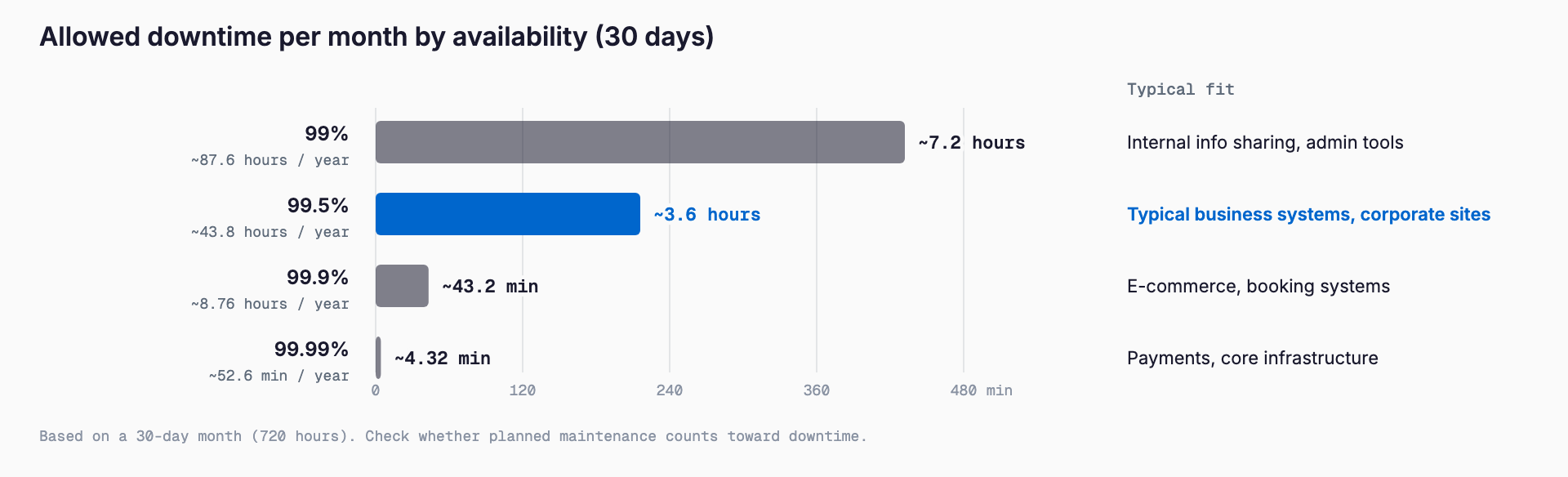
For most small and medium business systems, 99.5% to 99.9% is the realistic range. Between 99% and 99.9% the allowed downtime differs tenfold. Going from 99.9% to 99.99%, on the other hand, demands major investment in both architecture and operations, such as redundant servers and round-the-clock monitoring. Choosing a high number just because stopping is undesirable can inflate costs with little benefit to the business.
Another caution: the percentage alone does not tell you how usable the service is. The same 99.5% can mean one 3.6-hour outage or dozens of brief interruptions, which feel completely different on the shop floor. Outages at night or on holidays may barely matter, while one on a closing day or during a peak season can cause serious loss. In addition to the percentage, check the maximum length of a single outage and how critical time windows are treated.
Examples of Incident Severity Levels
Not every incident can be handled with the same priority. Many maintenance contracts therefore classify incidents by impact and set response and recovery targets for each class. Names and numbers vary, but about four levels is common. The table below is only an example, and the numbers are rough guides.
| Level | Example situation | Initial response target | Recovery target |
|---|---|---|---|
| S1 (critical) | No employee can use the core system, orders cannot be placed on the online shop, suspected data leak | Within 15-30 minutes | Within 4 hours (including temporary recovery) |
| S2 (major) | Some key functions are unavailable, work stops at one site or department only | Within 1 hour | Within 1 business day |
| S3 (minor) | A workaround exists; display glitches or partial malfunctions | 4 hours to next business day | Within a few business days, or at the next scheduled maintenance |
| S4 (request / inquiry) | How-to questions, minor improvement requests | Next to 3rd business day | Arranged case by case |
What matters is deciding in advance who judges the level and by what standard. Users tend to feel everything is S1, while providers tend to underestimate. Attaching concrete examples to an appendix of the contract or operating rules prevents arguments at every incident. A practical compromise is to cover only S1 incidents at night and on holidays and handle S3 and below during business hours.
How SLA Level Affects Cost
The SLA level feeds directly into the monthly maintenance fee, because staffing people outside business hours adds labor cost one-for-one. As a general market tendency, taking weekday daytime support (say 9:00 to 18:00) as the baseline, adding emergency response at night and on holidays often costs about 1.5 to 2 times as much, and requiring immediate 24/7 response often costs two to three times or more. The table below shows common patterns for small and medium business maintenance. These are only reference points for comparison, as the actual figures vary greatly with the provider, the size of the system, and its architecture.
| Support level | Example | Approximate cost (baseline = 1) |
|---|---|---|
| Weekday daytime | Requests accepted and handled 9:00-18:00 on weekdays; first response within hours to same day | 1x (baseline) |
| Weekday daytime + after-hours emergency intake | Emergencies accepted by phone, handled next business day or as far as possible | About 1.2-1.5x |
| Nights and holidays (on-call) | A person on standby; first response to critical incidents in about 1 hour even at night | About 1.5-2x |
| 24/7 immediate response and monitoring | Constant monitoring and shift-based staffing; first response within 15-30 minutes | About 2-3x or more |
For example, if weekday daytime maintenance is around 30,000 yen per month, a 24/7 setup would look like 60,000 to 100,000 yen or more. That only reflects the length of coverage, however. Redundant configurations, stronger backups, and monitoring tool fees push it higher still. Whether the increase is worth it should be judged against the loss from an outage: how much revenue is lost per hour of downtime, how much labor is wasted, and what the effect on trust would be. That estimate is the firmest basis for choosing an SLA level. For maintenance costs in general, the Complete Guide to System Maintenance and Operations is also useful.
How a Small Business Can Decide: Five Steps
Deciding an SLA does not require nailing down detailed numbers from the start. Working through the following order leads to a realistic level without strain.
- Step 1: List the operations that hurt when they stop. For each system (orders, shipping, invoicing, attendance, email, website), write down who is affected and how
- Step 2: Decide the tolerable downtime. Ask the people on site how many hours they could cover with manual work or phone calls. Systems with a workaround can have a lower level
- Step 3: Identify critical time windows. Check closing days, peak seasons, and business hours. Whether you need 24-hour coverage depends on whether the system is actually used at night and on holidays
- Step 4: Decide the RPO. Check whether redoing a day of entries is acceptable or even an hour is too much, and reflect it in backup frequency
- Step 5: Balance against cost. Get quotes at the ideal level and compare them with the loss from an outage. Do not set everything high; make only the critical systems high and keep others standard
The key is to vary the level by system. For example, give the order system weekday daytime support plus emergency night intake, and keep the internal information-sharing tool at standard support. This protects what matters while keeping total cost down. A contract that lets you choose the level per system usually suits small and medium businesses better than one that applies the same level to everything.
Relationship with Cloud Providers' Own SLAs
Major cloud services such as AWS, Microsoft Azure, Microsoft 365, and Google Cloud each publish their own SLA. Typically a monthly availability figure is stated, and if the provider falls short, part of the usage fee is credited. But these promises cover the cloud provider's own platform. They do not guarantee configuration mistakes in your business applications running on top, or defects in systems you built yourself.
When you outsource maintenance, you therefore have two layers of SLA: the cloud provider's (platform availability) and your maintenance provider's (application and operations response). Even if the maintenance provider promises 99.9%, you cannot realistically expect more than the platform itself delivers. Also, the availability of a system combining several services approaches the product of their individual figures; chaining three 99.9% services gives roughly 99.7% overall. Before signing, check the SLA of the cloud you use and make sure the maintenance provider's SLA does not promise more than that foundation allows.
SLA Pitfalls — Points Often Missed in Contracts
Having an SLA written down is not the same as being safe. In practice, expectations and contract terms often diverge in the following ways.
| Pitfall | What happens | Countermeasure |
|---|---|---|
| Limited compensation | A miss is often compensated only by service credits (a discount on later fees), not damages. Lost sales from an outage are not covered | Check the scope and cap of compensation; keep your own fallback for critical operations |
| "Best effort" wording | Numbers described as "aim to" or "strive to" are targets, not guarantees, and a miss creates no liability | Confirm in the wording whether it is a guarantee or a target |
| Planned downtime excluded | Maintenance windows are normally excluded from the availability calculation; long exclusions mean more real downtime | Check notice period, time of day, and monthly limit for planned downtime |
| Out-of-scope causes | User mistakes, network lines, external service failures, and natural disasters are often excluded | Ask for a list of what falls outside responsibility |
| Unclear measurement | If it is vague who measures, with what tool, and how often, a miss cannot be determined | Have the measurement and reporting method written down |
| Reception vs. response | Requests may be accepted 24 hours a day while the actual response comes the next business day | Check reception hours and response hours separately |
The limit of service credits is especially easy to misunderstand. Even when an SLA is missed, what you receive is often a reduction of a few to a few dozen percent of the monthly fee, which does not cover the actual business loss. Treat an SLA not as a way to get refunds but as a promise to prevent and quickly fix failures, and prepare for losses separately through backups, insurance, and manual fallback procedures.
Checklist Before Signing
Finally, here are the items worth confirming before signing a maintenance contract that includes an SLA. You do not need a yes to all of them, but you should know which ones remain blank.
- Have you listed the operations that hurt when they stop, and the downtime you can tolerate?
- Are reception hours and response hours written separately, with night and holiday handling made clear?
- Is initial response time defined as the time until a person reacts?
- Are there severity levels, and is it decided who judges them?
- Are RTO and RPO stated as guarantees or targets?
- Are the scope of availability, handling of planned downtime, and measurement method written down?
- Can you confirm the compensation for missed targets and its cap?
- Is there no contradiction between the cloud's SLA and the provider's SLA?
- Will regular (e.g., monthly) reports give you uptime and incident details in figures?
- Is the timing for reviewing the SLA (for example, once a year) decided?
Frequently Asked Questions
Is a maintenance contract without an SLA a problem?
Not necessarily, but it leaves unclear how quickly help will arrive during a failure. For small websites or internal tools where an outage has little impact, handling during business hours without an SLA can work. For systems tied directly to revenue or operations, at least the reception hours and initial response time should be confirmed in writing.
What availability should a small or medium business aim for?
About 99.5% for typical business systems, and about 99.9% for things like online shops and reservation systems where an outage halts sales. 99.99% demands heavy investment in architecture and operations and raises costs sharply, so it is needed only in limited cases. Convert the figure to monthly allowed downtime (about 3.6 hours at 99.5%, about 43 minutes at 99.9%) and judge whether your operations can tolerate it.
How much does 24/7 support raise the cost?
As a general market tendency, it often costs two to three times or more compared with weekday daytime support. Emergency intake only at night and on holidays may stay around 1.2 to 1.5 times. Because this varies greatly by system size, architecture, and provider, the sure way is to get quotes at several levels and compare them with the loss from an outage.
If AWS or Microsoft 365 has an SLA, do I still need my own SLA?
Yes. A cloud provider's SLA covers the availability of its platform, not defects in the business applications running on it, configuration errors, or your operational response. Compensation is also mostly service credits. Check the platform's SLA and your maintenance provider's SLA separately, and make sure they do not contradict each other.
Related free tools (no sign-up, instant results)
Feel free to contact us
Contact Us