MiniCPM-V 4.7 Requirements: 35B-A3B VRAM & GPU [2026]
MiniCPM-V 4.7 35B-A3B (Apache-2.0) needs ~20-22GB at 4-bit, 70GB+ in BF16 (est.): RTX 4090/5090 or 32GB Mac. iPhone LES, vLLM/GGUF setup. Updated Oct 2026.
MiniCPM-V 4.7 35B-A3B is an open-weight multimodal model that understands images, multiple images, documents, and video. At 4-bit quantization it needs an estimated 20-22GB of memory. It should run on an RTX 4090 (24GB), an RTX 5090 (32GB), or a Mac with 32GB of unified memory. In BF16 expect roughly 70GB+ (H100 80GB class); in FP8 about 36GB (a 48GB-class GPU). OpenBMB released it on October 12, 2026 under Apache-2.0, which allows commercial use.
However, the official model card states neither a PC-class VRAM requirement nor a context length. The memory figures in this article are estimates built on the facts OpenBMB has published (35B total parameters with about 3B active, the released formats, the license, and the official commands): parameter count times bytes per parameter, plus headroom for the vision encoder and KV cache. The official claim of running on an iPhone with 3GB relies on a special mechanism, and we explain below why that does not carry over to a PC.
Requirements at a Glance
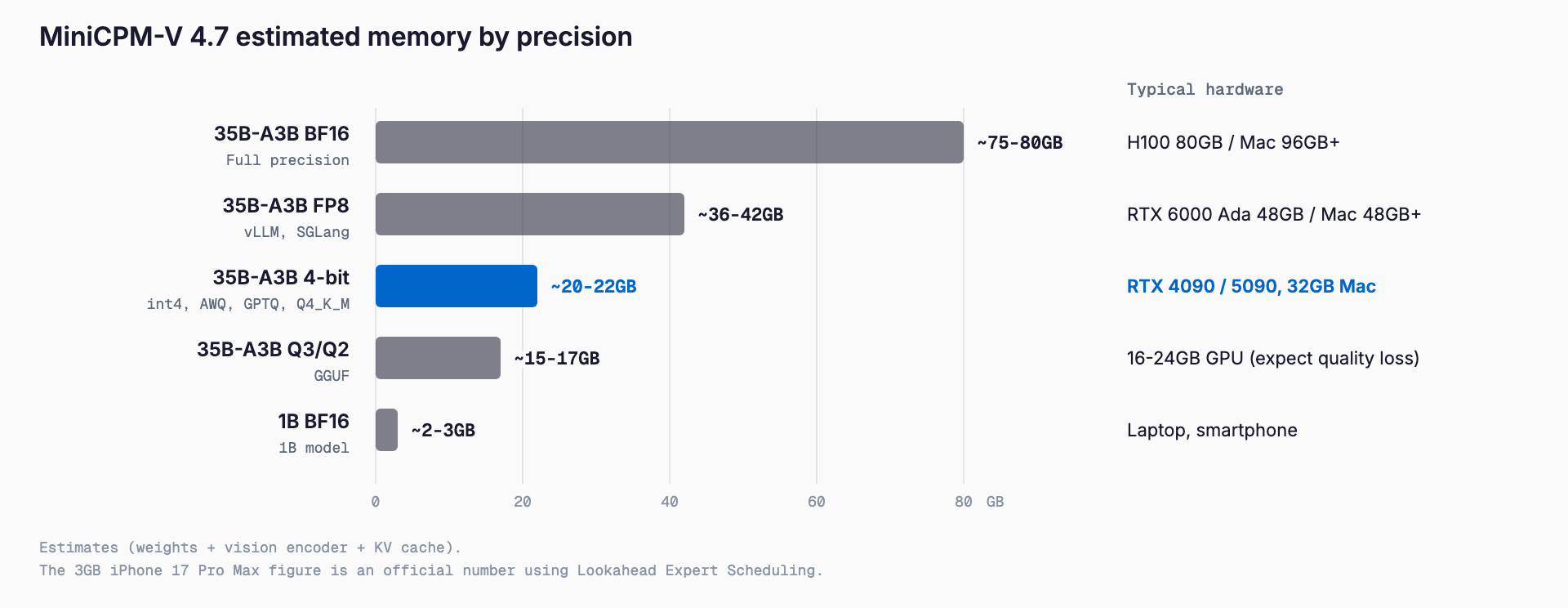
Here are the estimates for the 35B-A3B and 1B models. 'Weights only' is parameter count times bytes per parameter; 'practical' adds about 1GB for the vision encoder (mmproj) and a few GB for KV cache and image tokens. All figures are estimates.
| Model | Precision | Weights only (est.) | Practical (est.) | Suggested hardware |
|---|---|---|---|---|
| 35B-A3B | BF16 | ~70GB | ~75-80GB | H100 80GB, 96GB+ Mac, multi-GPU |
| 35B-A3B | FP8 | ~35GB | ~36-42GB | RTX 6000 Ada 48GB, 2x24GB, 48GB+ Mac |
| 35B-A3B | 4-bit (int4, AWQ, GPTQ, GGUF Q4_K_M) | ~18-20GB | ~20-22GB (est.) | RTX 4090 24GB, RTX 5090 32GB, 32GB Mac |
| 35B-A3B | GGUF Q3/Q2 | ~13-16GB | ~15-17GB (est.) | 16-24GB GPUs (expect quality loss) |
| 1B | BF16 | ~2GB | ~2-3GB | Ordinary laptop, smartphone |
| 1B | 4-bit | under 1GB | ~1GB | Smartphone, CPU inference |
If you want to check quickly whether your own GPU or Mac can run it, the VRAM calculator (free, no sign-up) estimates the required VRAM from the model, quantization, and context length you choose. MiniCPM-V 4.7 is available in its model list.
The 4-bit row is only a guide. GGUF Q4 variants use different bit widths per layer, so the actual file can be a few GB larger than the calculation above. Check the real file size before downloading. Because no context length is officially stated, leave extra headroom when you feed long documents, many images, or video, since the KV cache grows with the input.
What Is MiniCPM-V 4.7?
MiniCPM-V 4.7 is the latest generation of the MiniCPM-V multimodal series from OpenBMB in China. It was released on October 12, 2026, and on October 15 the 'DSpark' draft heads for speculative decoding were added. It comes in two sizes, 35B-A3B and 1B. The 35B-A3B is the first MoE (Mixture of Experts) model in the series, with about 35B total parameters and about 3B active per token.
| Item | Detail |
|---|---|
| Developer | OpenBMB |
| Release | October 12, 2026 (DSpark heads added October 15) |
| Sizes | 35B-A3B (MoE, 35B total / ~3B active), 1B |
| Inputs | Images, multiple images, documents, video |
| Vision encoder | SigLIP2 |
| Visual token compression | Mixed 4x/16x compression, early intra-ViT compression (from LLaVA-UHD v4) |
| Language backbone | Credited to Qwen3.5/Qwen3.6 (which one is not specified) |
| License | Apache-2.0 |
| Context length | Not stated officially |
Its defining feature is visual token compression. Tokenizing images and video naively inflates the input length, but MiniCPM-V 4.7 mixes 4x and 16x compression and also compresses early inside the vision encoder (ViT), reducing both the compute for image understanding and the KV cache. This helps memory and speed for workloads such as documents and video, where visual tokens pile up.
OpenBMB has also open-sourced a training method called SRFT (Self-Replay Fine-Tuning). We do not go into SRFT itself here, but the fact that the method is published alongside the weights is useful if you want to adapt the model on your own data.
Developer Claims and Benchmarks
OpenBMB claims that the 35B-A3B (Instruct) achieves a higher overall score than Qwen3.6 35B-A3B in less inference time, and that the 1B model substantially outperforms Qwen3.5 0.8B. These comparisons are shown in chart images on the official pages, and the numbers are not published as text, so this article does not quote specific official scores.
For reference, the third-party aggregator DataLearner lists MMStar 80.67, OCRBench 91.20, and MMMU 80.22. These are unofficial aggregated values, and the evaluation conditions may differ from the developer's claims. Always validate on your own data (forms, drawings, screenshots, and so on).
How 3GB on an iPhone Works (LES) and How a PC Differs
OpenBMB claims that the 35B-A3B decodes at 13+ tokens per second on an iPhone 17 Pro Max using only 3GB of memory. What makes this possible is a mechanism called Lookahead Expert Scheduling (LES), claimed to give about a 5x speedup on real devices. The supported platforms are iOS, Android, and HarmonyOS; the listed chips are Intel, AMD, Arm, Rockchip, and Houmo, with day-0 OpenVINO support.
The key point is that this is not ordinary inference with all weights resident in memory. In an MoE, only some experts are used per token, so a scheduler that looks ahead, loads only the needed experts from storage into memory, and releases them afterward can sharply reduce resident memory. It is reasonable to understand LES as this kind of special expert scheduling (streaming) technique; the official sources do not give internals, so we do not go further here.
So in ordinary PC operation with llama.cpp or vLLM, it is safer to plan for loading the full weights. Do not read the 3GB figure as a PC VRAM requirement. Because this approach depends on read bandwidth from storage, getting similar behavior on a PC would naturally require a runtime that OpenBMB supports (this is our inference).
Why an MoE Still Needs Memory for All 35B
An MoE computes only about 3B parameters per token, so its speed approaches that of a 3B-class dense model. But which experts get chosen changes from token to token, so in normal operation all experts must be kept somewhere quickly accessible. Memory capacity is therefore set by total parameters (35B), while compute speed is set by active parameters (~3B).
This property makes CPU offload practical: spilling what does not fit on the GPU into system memory. If you keep the expert weights in main memory and only the shared parts, such as attention, on the GPU, only about 3B parameters need to be moved and computed per token. Even a 16GB-class GPU paired with around 64GB of system RAM may work, at the cost of speed (estimate).
Guidance by GPU, Apple Silicon, and CPU Offload
- RTX 4090 (24GB): fits 4-bit (est. 20-22GB), but headroom is thin as context and images grow. For long inputs consider Q3 or combining with CPU offload
- RTX 5090 (32GB): comfortable at 4-bit even with several images or documents. FP8 (est. ~36GB) does not fit
- RTX 6000 Ada / A6000 (48GB): fits FP8, a good single-GPU option when quality matters
- H100 80GB: fits BF16 (est. 70GB+), though KV cache headroom is not large
- 2x24GB: FP8 split with tensor parallelism is conceivable
- Apple Silicon: 32GB unified memory for 4-bit, 64GB for comfortable 4-bit to FP8, and 96GB+ for BF16 (estimates). Subtract what the OS and other apps use
- CPU inference: GGUF supports CPU inference. It works if all weights fit in system RAM, but speed drops sharply
Similar estimates for other models are collected in our Holo4-35B-A3B requirements article and the Gemma 4 hardware requirements article. They are in the same 35B-A3B class, so the memory scale is similar.
How to Run It (vLLM / SGLang / Transformers / Docker / Ollama / llama.cpp)
These are the official launch methods listed on the model card. The commands are only an entry point; you will still need to tune options to your GPU memory.
- vLLM: pip install vllm, then vllm serve "openbmb/MiniCPM-V-4.7-35B-A3B"
- SGLang: python3 -m sglang.launch_server --model-path "openbmb/MiniCPM-V-4.7-35B-A3B" --host 0.0.0.0 --port 30000
- Transformers: pip install "transformers[serving]>=5.18.0", then transformers serve openbmb/MiniCPM-V-4.7-35B-A3B --port 8000 --host 0.0.0.0
- Docker Model Runner: docker model run hf.co/openbmb/MiniCPM-V-4.7-35B-A3B
- Ollama: an official page exists at ollama.com/openbmb/minicpm-v4.7. We could not confirm the exact tag at the time of writing, so check the tag on the official page
- llama.cpp: supported through GGUF. No official command example is given
As an example for llama.cpp (a generic pattern, not from the official card), image input needs an mmproj file in addition to the GGUF itself. For instance, launch with llama-server -m MiniCPM-V-4.7-35B-A3B-Q4_K_M.gguf --mmproj mmproj.gguf -ngl 99, and if memory is short, lower -ngl or combine it with the expert CPU-offload options. Check file names and options against your llama.cpp version and the distributed files.
If you are new to running local LLMs, our Ollama vs LM Studio comparison covers GUI-friendly options. The DSpark draft heads are distributed in BF16 and GGUF and can speed up generation through speculative decoding, but note that they require additional memory.
The 35B-A3B is distributed in BF16, FP8, int4, AWQ, GPTQ, and GGUF, with 54 quantized derivatives on Hugging Face. The 1B comes in BF16, int4 (bitsandbytes), AWQ, GPTQ, and GGUF. Both AWQ and GPTQ are W4A16 (4-bit weights, 16-bit activations).
Where the 1B Model Fits
The 1B model is sized for smartphones, CPU-only machines, and embedded devices. Weights are expected to be about 2-3GB in BF16 and under 1GB at 4-bit (estimates), so it runs easily on ordinary laptops and phones. OpenBMB claims it substantially outperforms Qwen3.5 0.8B.
The split is simple: the 35B-A3B for accuracy, the 1B for on-device-only use. Try the 1B for sorting site photos you do not want to send outside, or for light offline document reading, and the 35B-A3B for complex documents and charts. Requirements for small models are also covered in our MiniCPM5 2B article.
How It Differs from Other Models
| Item | MiniCPM-V 4.7 35B-A3B | Qwen3.6 35B-A3B | Holo4-35B-A3B | Gemma 4 | MiniCPM-V 4.7 1B |
|---|---|---|---|---|---|
| Architecture | MoE (35B total / ~3B active) | MoE (35B-A3B) | MoE (35B total / ~3B active) | — | 1B |
| Main use | Image, document, video understanding | — | Computer use (PC operation) | — | Lightweight on-device multimodal |
| License | Apache-2.0 | — | Apache-2.0 (35B-A3B) | — | Apache-2.0 |
| Context length | Not stated | — | 262,144 tokens | — | Not stated |
| 4-bit memory (est.) | ~20-22GB | — | ~20GB | — | under 1GB |
A dash in the table marks an item for which we have not confirmed a reliable source. The key takeaway is that models in the same 35B-A3B class serve different purposes. Holo4 targets computer use, operating a PC by looking at the screen, while MiniCPM-V 4.7 emphasizes image, document, and video understanding and puts phone-class operation front and center. Memory needs are roughly the same, so choose by purpose.
Commercial Use and License
MiniCPM-V 4.7 is licensed under Apache-2.0, and the model card states no extra terms. Apache-2.0 is a permissive license that allows commercial use, modification, and redistribution, requiring things like keeping copyright notices and including the license text. That makes it easy to embed in internal systems or your own services.
Even with a permissive license, handling images and documents that contain personal or confidential information is a separate matter. Being able to keep everything local, without sending data to a cloud API, is an advantage, but you still need to set storage and internal handling rules. Always confirm the final terms on the model card at the time you use it.
Troubleshooting (Out of Memory)
- OOM at startup: drop one precision tier (BF16 to FP8 to 4-bit). If it still does not fit, use Q3 GGUF or CPU offload of the experts
- Crashes when you add images: reduce image resolution or count. The vision encoder and the KV cache for image tokens need additional memory
- Crashes on long documents or video: start with a lower context limit (for vLLM, for example --max-model-len). The context length is not officially stated, so find the limit on your own hardware
- Extremely slow: part of the weights may be spilling to CPU or storage. Check how much stays on the GPU
- Numbers do not match the iPhone claim: 3GB comes from LES, a special mode, and is not a normal PC inference requirement
- Quality dropped: Q2 variants tend to degrade visibly. Use 4-bit or higher when possible
Summary
MiniCPM-V 4.7 35B-A3B is a multimodal MoE model whose estimated needs are 20-22GB at 4-bit, about 36GB in FP8, and 70GB+ in BF16. It lands in practical range on an RTX 4090/5090 or a 32GB Mac, and Apache-2.0 allows commercial use. With about 3B active it is faster than a dense 35B, but remember that memory is still needed for all the parameters.
The official 3GB-on-iPhone figure comes from LES, a special expert-scheduling technique, and is not a PC requirement. The 1B model suits fully on-device use. Since no context length is stated officially for either, measure with your own inputs before committing and choose a configuration with headroom.
Frequently Asked Questions
How much VRAM does MiniCPM-V 4.7 35B-A3B need?
The official card gives no PC requirement, but our estimates are 70GB+ for BF16, about 36GB for FP8, and about 20-22GB for 4-bit (int4, AWQ, GPTQ, GGUF Q4_K_M). At 4-bit, an RTX 4090 (24GB), RTX 5090 (32GB), or a 32GB Mac is a reasonable target.
If it runs in 3GB on an iPhone, will it run in 3GB on a PC?
No. The official claim relies on Lookahead Expert Scheduling (LES), a special mechanism that looks ahead and swaps experts in and out, not ordinary inference. With llama.cpp or vLLM, plan to load the full weights.
With about 3B active in an MoE, is 3B worth of memory enough?
No. Compute depends on active parameters (~3B), but the chosen experts change per token, so normally all 35B parameters must be in memory. CPU offload can move part of them into system RAM.
Can I use it commercially?
Yes. The license is Apache-2.0 and the model card lists no extra terms. You must still follow Apache-2.0 conditions such as keeping copyright notices, and you should confirm the final terms on the model card when you use it.
What is the context length?
It is not stated on the official model card. Long documents or video grow the KV cache, so test the limit on your own hardware and keep memory headroom.
Related free tools (no sign-up, instant results)
Feel free to contact us
Contact Us