What Is WeKnora? Tencent's Open-Source RAG, Agent & Wiki Kno
wledge Platform
WeKnora is an open-source LLM knowledge platform built by Tencent's WeChat team. It turns documents into RAG search, a ReAct agent, and a self-maintaining wiki under an MIT license you can self-host. This guide covers setup, features, and how it compares to alternatives.
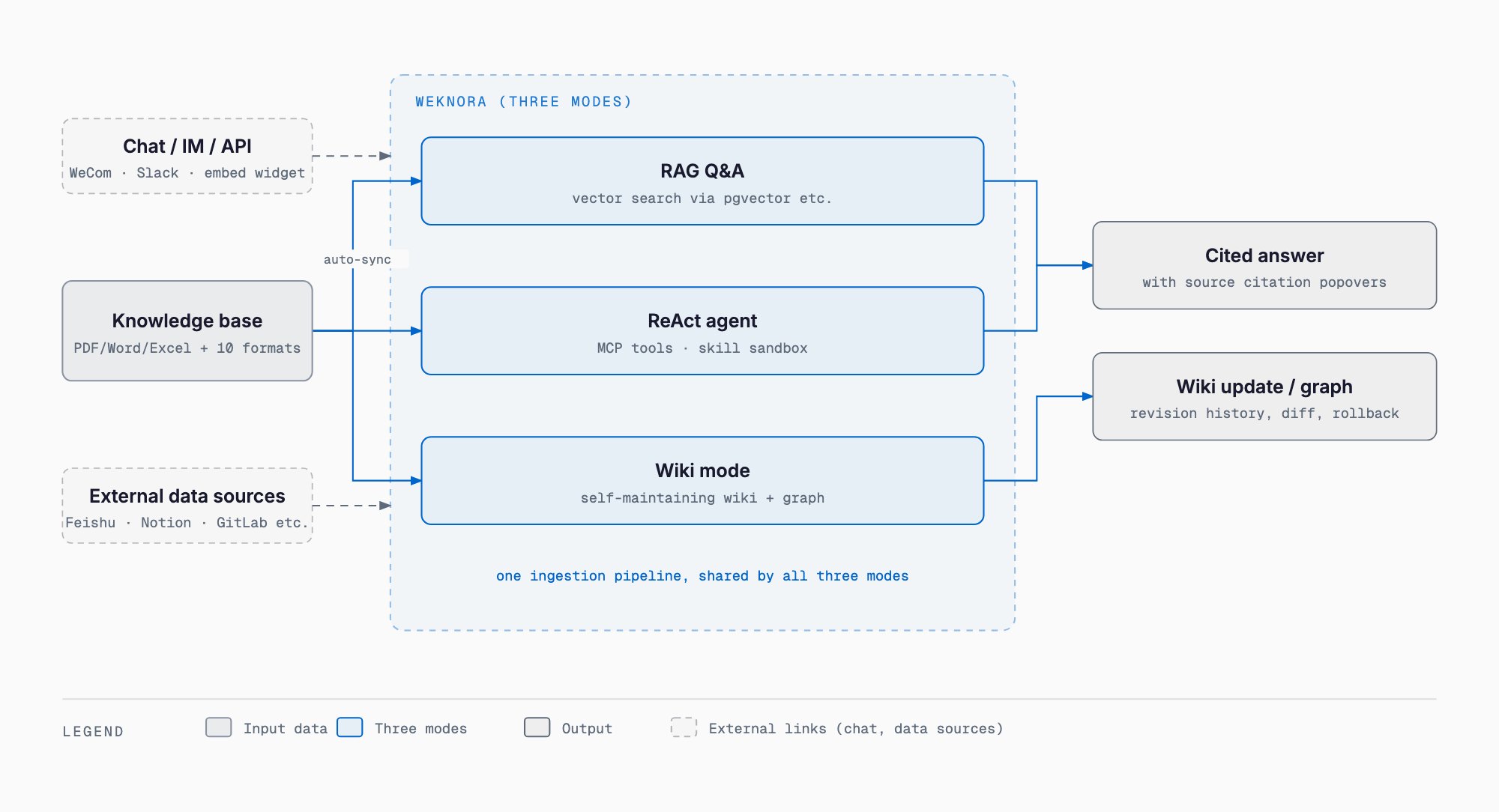
WeKnora is an open-source LLM knowledge platform built by Tencent's WeChat team and released under the MIT License. It lets you work with uploaded documents in three modes: RAG search for question answering, a ReAct agent that autonomously investigates, and a self-maintaining wiki that grows on its own. The bottom line: it's a full-featured, self-hostable platform written in Go, best suited to companies that want advanced knowledge management while keeping data on their own servers or private cloud.
WeKnora originated as the internal technology powering Tencent's WeChat Dialog Open Platform, which lets businesses embed chatbots into WeChat Official Accounts. As of this writing (September 22, 2026), it has roughly 28,700 GitHub stars and its latest stable release is v0.8.0. The GitHub repository was created in July 2025 and its first release shipped in September 2025; in September 2026 it hit GitHub Trending and drew renewed attention. Development has been active, with releases shipping roughly once or twice a month since then.
Basic facts about WeKnora
| Item | Detail |
|---|---|
| Developer | Tencent (WeChat team) |
| License | MIT License (some third-party components carry separate licenses) |
| Primary language | Go |
| Latest release | v0.8.0 (released September 3, 2026, as of this writing) |
| Stars | ~28,700 (as of this writing, September 22, 2026) |
| Official site | weknora.weixin.qq.com |
| Runtime | Docker / Docker Compose (self-hosted) |
| Supported LLMs | OpenAI, Anthropic Claude, DeepSeek, Qwen, Gemini, Hunyuan, Ollama (local models) and 20+ others |
| Vector database | PostgreSQL + pgvector (default); also Elasticsearch, OpenSearch, Milvus, Weaviate, Qdrant, Tencent VectorDB and more |
What WeKnora can do
| Feature | Detail |
|---|---|
| RAG Q&A | Vector search over the knowledge base with cited answers, for everyday lookups |
| ReAct agent | Autonomously combines search, MCP tools, skill sandboxes and web search to handle multi-step research tasks |
| Wiki mode | Agents turn raw documents into a structured, interlinked Markdown wiki with an auto-generated knowledge graph; supports manual editing, revision history and rollback |
| Skill catalog & sandbox | Install skills from ClawHub, SkillHub, git or zip and run them in Docker, E2B or Cube sandboxes |
| MCP tool integration | Calls MCP tools including OAuth2-authenticated remote services, with mid-conversation authorization |
| Cross-session long-term memory | Remembers profile, preferences, facts and tasks across sessions, with auto-extraction, user confirmation and on-demand search |
| Data source sync | Auto-syncs from Feishu Wiki/Drive, GitLab, Tencent IMA, Notion, Yuque, DingTalk Docs and RSS feeds |
| Multi-workspace RBAC | 4-tier role matrix (Owner/Admin/Contributor/Viewer), per-knowledge-base ownership, and audit logs |
| Chunk editing with revisions | Edit retrieval chunks directly in the UI, with diffing and one-click rollback |
| Folder tree | Preserves the original directory structure of uploaded folders, browsable like a file manager |
Installation and pricing
WeKnora itself is free, MIT-licensed open-source software. Any environment that can run Docker and Docker Compose — your own servers, a VPS, or a private cloud — can be up and running in minutes. What you do pay for is whichever LLM API you connect (OpenAI, Claude, DeepSeek, etc.) and the cost of running your own infrastructure. Using Ollama for local models can eliminate external API charges entirely.
# Prerequisites: Docker, Docker Compose, and Git installed
git clone https://github.com/Tencent/WeKnora.git
cd WeKnora
cp .env.example .env   # Edit .env as needed (LLM API keys, etc.)
docker compose pull    # Pull the latest images
docker compose up -d   # Start core services
Once started, visit http://localhost to access the web UI. To use a local Ollama model, run ollama serve > /dev/null 2>&1 & first. Extra components like Neo4j for the knowledge graph, MinIO for object storage, and Langfuse for tracing are each enabled independently via --profile flags.
# Example: enable the knowledge graph (Neo4j) and object storage (MinIO)
docker compose --profile neo4j --profile minio pull
docker compose --profile neo4j --profile minio up -d

# Enable everything
docker compose --profile full pull
docker compose --profile full up -d
Getting started, step by step
After logging into the web UI, create a workspace and a knowledge base, then upload your internal documents. WeKnora supports 10+ formats — PDF, Word, Markdown, HTML, Excel, PowerPoint, images, and XMind among them — and uploading a whole folder preserves its directory structure.
1. Create a workspace
2. Create a knowledge base and configure the LLM, embedding model, and vector DB
3. Upload documents (drag and drop a whole folder if needed)
4. Once parsing finishes, ask questions in chat (RAG mode)
5. Switch to agent mode for complex research that needs MCP tools or web search
6. Enable wiki mode to auto-generate wiki pages and a knowledge graph from the knowledge base
WeKnora also ships as an MCP server, so Claude Desktop or any other MCP-compatible client can search and register knowledge in a WeKnora knowledge base (see the MCP configuration guide). For API integrations, scoped API keys let you restrict programmatic access to specific capabilities.
Beyond Docker Compose, WeKnora is also distributed as a Chrome extension, an npm package (@wxg-prc-cpg/dsh-weknora), and a ClawHub skill, giving you lightweight ways to call it from a browser or an existing chat tool without standing up the full stack yourself.
How it compares: Dify, RAGFlow, AnythingLLM, Open WebUI, NotebookLM
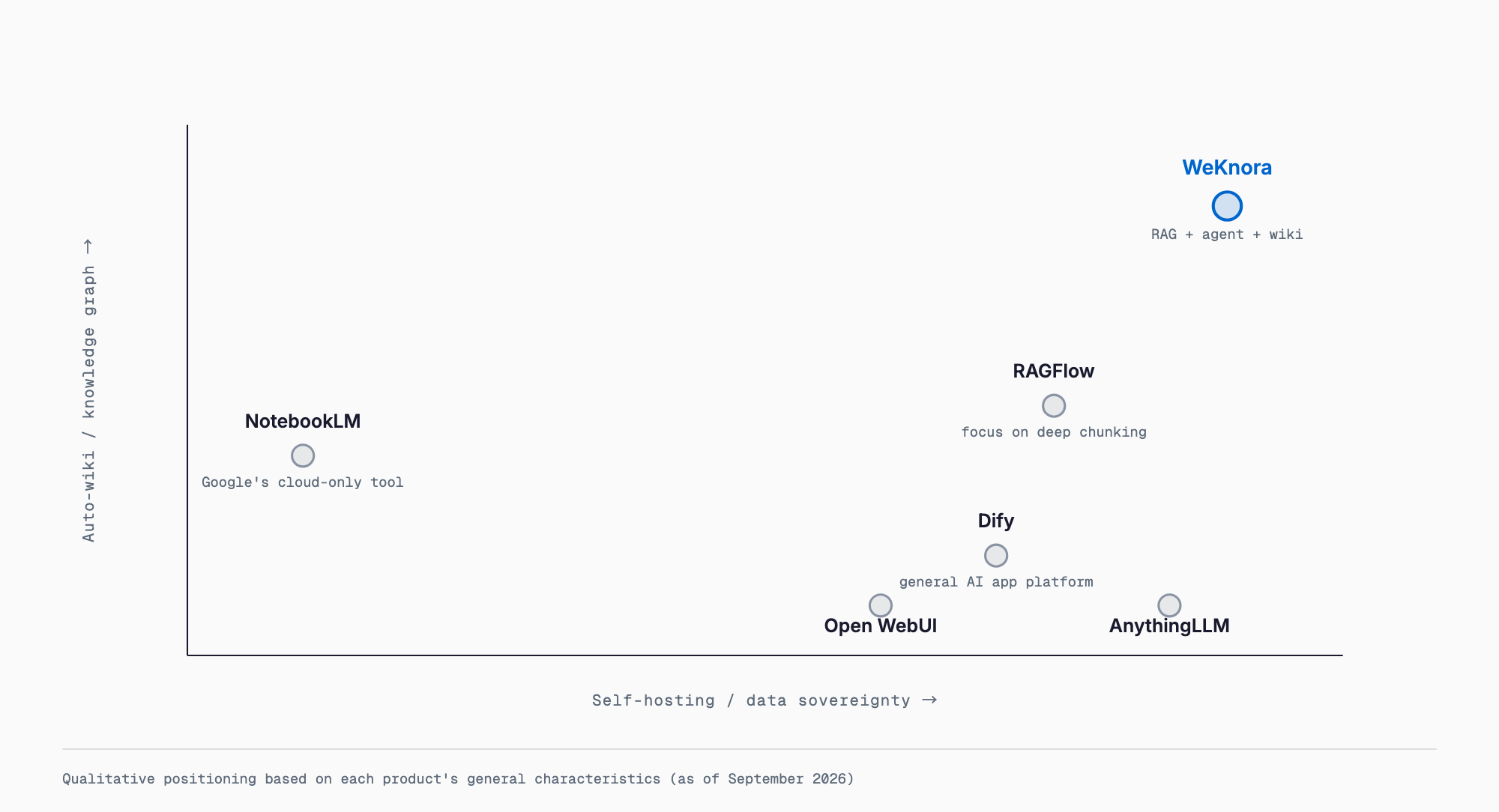
Because people often search for comparisons like "WeKnora vs Dify" or "WeKnora vs RAGFlow," here's how it stacks up against common alternatives. These are qualitative comparisons, and features on all of these tools change frequently.
| Tool | Positioning | Key difference from WeKnora |
|---|---|---|
| Dify | Low-code platform for building LLM apps | Dify's focus is general-purpose AI workflow building, with knowledge features as one piece. WeKnora specializes in knowledge use — RAG, wiki, knowledge graph — with deeper document management |
| RAGFlow | RAG engine focused on deep document parsing | RAGFlow centers on layout-aware parsing and chunk quality. WeKnora integrates RAG with an agent and wiki mode into one system |
| AnythingLLM | Lightweight RAG chat UI for individuals and small teams | AnythingLLM's strength is easy setup. WeKnora is built for organizational use, with workspace RBAC, audit logs, and skill sandboxes |
| Open WebUI | Chat UI for local LLMs like Ollama | Open WebUI is a polished chat interface but has limited knowledge management. WeKnora goes further, turning documents into a wiki with a knowledge graph |
| NotebookLM | Google's cloud-only notebook-style AI | NotebookLM can't be self-hosted — your data stays with Google. WeKnora can run entirely within your own infrastructure, keeping data sovereignty intact |
Cautions and who it fits
- Login authentication has shipped since v0.1.3, but the maintainers themselves recommend running production deployments on an internal network rather than exposing them directly to the public internet
- The knowledge graph feature requires enabling the Neo4j profile separately — it isn't part of the default setup
- The project ships new features quickly, so the recommended upgrade practice is to pin WEKNORA_VERSION in .env before running docker compose pull
- A Japanese README (README_JA.md) is available, but the detailed product documentation is mostly in English and Chinese
- Self-hosting assumes both Docker knowledge and available server or cloud resources
- Good fit: companies that want to self-host internal document search, teams that want to mix and match multiple LLM providers and vector databases, and IT staff who want agent and MCP capabilities consolidated into one platform
- Not a good fit: individuals or small teams who'd rather avoid server operations and stick to a cloud SaaS, or organizations without the resources to configure Docker and LLM APIs themselves
Use case: an AI that can search internal company documents
A common pain point for IT staff at small and midsize companies is that internal regulations, manuals, and old quotes are scattered across a file server and hard to find when needed. Uploading these documents into a WeKnora knowledge base folder by folder keeps them searchable while preserving the original folder structure. Fixed-format documents like work rules or approval templates are a good match for RAG Q&A mode — asking "what's the carry-over rule for paid leave?" gets an instant answer — while messier material like old quotes, where conditions vary case by case, suits the ReAct agent mode for compound requests like "find past quotes with similar conditions to Company A's and compare them." Running a batch of manuals through wiki mode turns them into an interlinked knowledge base that keeps growing with every update. Reducing the "where was that document again?" problem is especially valuable for companies without a dedicated IT department.
FAQ
Is WeKnora free to use?
The software itself is free, open-source under the MIT License. You'll still pay for your own server or cloud infrastructure and for whichever LLM API you connect. Using Ollama for local models can avoid API charges entirely.
Does it support Japanese documents and local LLMs?
Yes, it can parse and search Japanese documents, and a Japanese README (README_JA.md) is provided. Local LLMs are supported via Ollama, so you can run it without any cloud API once ollama serve is running.
Should I choose WeKnora or Dify?
Choose Dify if you want to build general-purpose AI workflows and chatbots broadly. Choose WeKnora if your priority is RAG search, wiki generation, and knowledge-graph use over internal documents. They're better thought of as tools with different goals than direct competitors.
How much technical knowledge does deployment require?
Getting it running via Docker Compose takes just a few commands, but production use requires planning around LLM API key management, choosing a vector database, and security settings such as restricting access to an internal network.
How does the wiki mode's knowledge graph work?
It visualizes relationships between concepts auto-extracted from your documents, making it easier to see the big picture alongside the wiki pages' interlinks. Pages also support manual editing and rollback from revision history.
Summary
WeKnora is an open-source platform that consolidates RAG, agent, and wiki-style knowledge use into a single self-hosted system, built on technology Tencent's WeChat team refined in production. Being MIT-licensed and self-hostable, with support for local LLMs and private vector databases, makes it appealing to companies that don't want data leaving their own infrastructure. At the same time, it assumes you're comfortable managing Docker operations and security settings yourself, so it's worth deciding upfront how much of the operational burden your organization wants to own. For more on RAG and knowledge-base design, see our articles on building internal knowledge search with Qwen3.5-9B and RAG and building a RAG-powered customer support AI with Ollama and OpenClaw. If reducing vector search costs is a priority, our complete guide to Amazon S3 Vectors is also worth a look. We also support companies with adoption and team-building through AI consulting and AI BPO — feel free to reach out via contact.
Feel free to contact us
Contact Us