Is Web Accessibility Mandatory for Small Businesses? Criteri
a and Costs
Japan's 2024 law made reasonable accommodation mandatory, but web accessibility stays best-effort. Covers WCAG 2.1 AA, costs, and a checklist for SMB owners.
The short answer: Japan's 2024 legal reform made "reasonable accommodation" a legal obligation, not web accessibility itself. There is no article in the law that requires businesses to make their websites accessible — web accessibility work falls under a separate "environment building" category, which remains a best-effort duty. Even so, the practical starting point for most small businesses is the same either way: assess your current site, then knock out the improvements you can make for free today.
What web accessibility actually means
Web accessibility means making sure a website's information and functions are reachable regardless of age, physical condition, or the environment someone is browsing from. It is often mistaken for a feature aimed only at people with disabilities, but in practice it also affects older users, people with temporary impairments, and anyone browsing on a poor connection. Concrete examples include the following.
- Whether content is read correctly by a screen reader
- Whether the entire site can be navigated and operated using only a keyboard, without a mouse
- Whether information is distinguishable for people with color vision differences, not conveyed by color alone
- Whether video content includes captions or transcripts
- Whether the layout still works cleanly when text size is enlarged
- Whether text size, spacing, and contrast are comfortable enough for older users
The Standards: JIS X 8341-3 and WCAG
In Japan the reference standard is JIS X 8341-3:2016, which was written to align with the international WCAG 2.0. Internationally, WCAG 2.1 / 2.2 succeeded it, with three conformance levels — A / AA / AAA. In practice AA is the level most organizations target, and it is the level worth naming when you brief a vendor. Japan’s Digital Agency publishes a free "Web Accessibility Introduction Guidebook", a practical starting point for a small business. In the United States, administrative rules covering state and local government also reference WCAG 2.1 AA, so AA has become a widely shared benchmark.
What changed with the April 2024 legal reform
Japan's amended Act for Elimination of Discrimination against Persons with Disabilities took effect on April 1, 2024, and turned "reasonable accommodation" from a best-effort duty into a legal obligation for private businesses as well. Reasonable accommodation refers to responding, within a range that does not impose an excessive burden, when a person with a disability requests that a social barrier be removed. A typical example is a request such as "the contact form is hard to use, please let me reach you by phone instead."
Building an accessible website from the ground up, on the other hand, falls under a separate category called "environment building," which remains a best-effort duty. The two are not unrelated, though: the more accessible a site already is, the fewer situations will arise where individual reasonable accommodation is needed. That relationship means treating web accessibility as low priority simply because it is a best-effort duty is not necessarily the safest reading.
| Item | Legal status | Example |
|---|---|---|
| Providing reasonable accommodation | Legal obligation (since April 2024) | Case-by-case response to individual requests (phone alternative, format changes, etc.) |
| Environment building (including web accessibility) | Best-effort duty | Designing and improving the site as a whole to be accessible in advance |
Four reasons small businesses should still consider it
- A growing share of actual older users: in industries where many customers or partners are older adults, attention to text size and contrast translates directly into usability
- Overlap with SEO and machine readability: cleaning up heading structure and adding alt text also improves how well search engines can crawl a site, so the work overlaps heavily with accessibility improvements
- Procurement requirements from public bodies and large enterprises: more transactions with municipalities and large companies now include accessibility compliance checklists
- Consideration for overseas partners: the EU's European Accessibility Act has applied since June 28, 2025, and businesses offering e-commerce or online services to consumers in the EU may be expected to comply
A new site build or a renewal project is also the easiest moment to fold accessibility in without much extra cost — building it into the design from the start is far cheaper than retrofitting it later, when the scope of changes tends to grow. It is worth deciding your approach at the same time you are reviewing the cost of building a corporate website or the cost of a website renewal.
Response levels and rough cost ranges
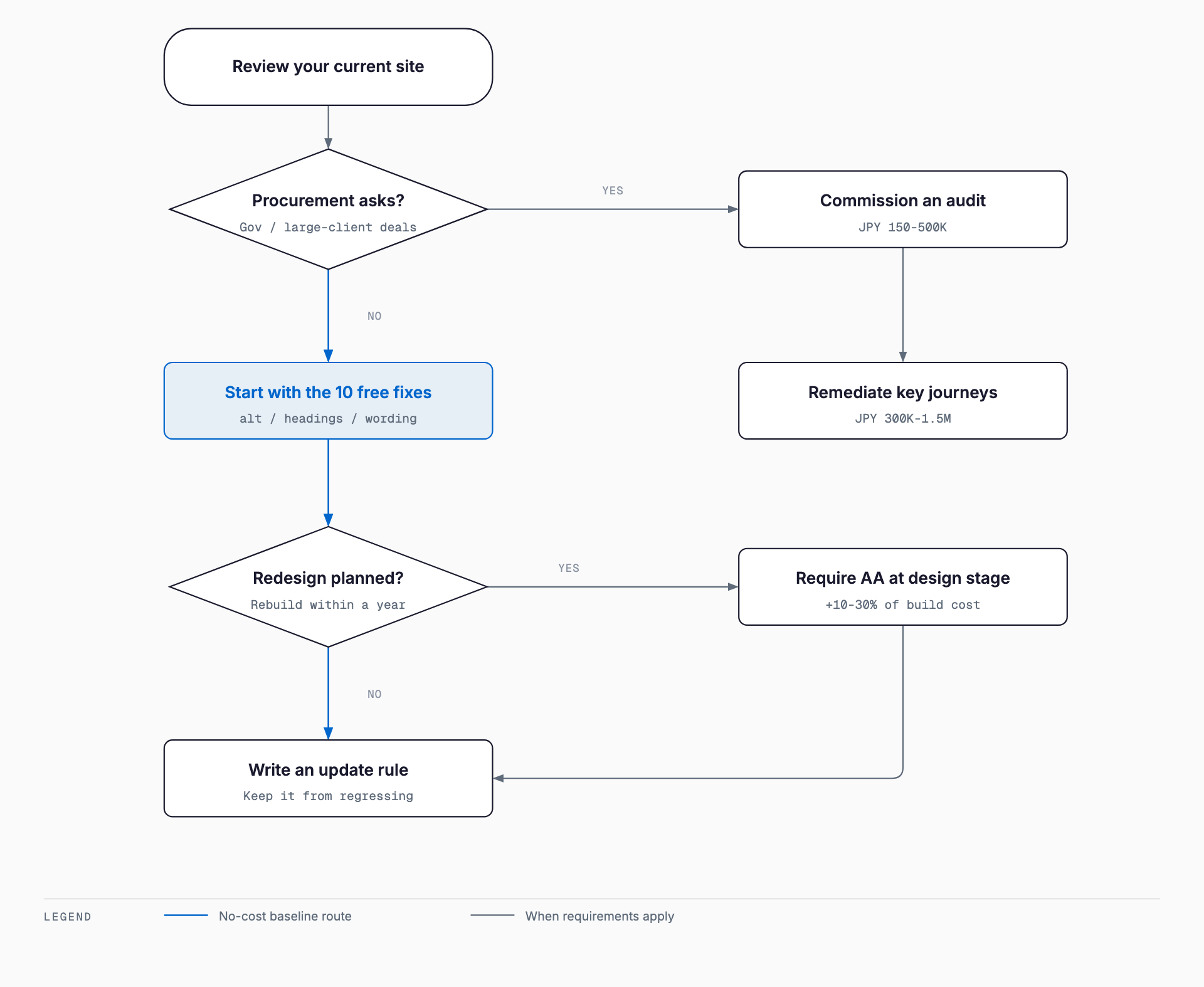
The figures below are only rough guidelines — actual cost depends on the size and page count of your site, how well it is already built, and which agency you work with. A practical approach is to first identify what you can improve in-house for free, then consider an external audit if needed.
| Response level | Content | Rough cost |
|---|---|---|
| Minimal (in-house) | Adding alt text, cleaning up heading structure, rewriting link text, improving text size/color contrast | ¥0-100K (effectively ¥0 if only using in-house time) |
| Audit only | Accessibility audit of an existing site plus an improvement report (site of roughly 10-30 pages) | ¥150K-500K |
| Partial rework | Reworking key pages, forms, and navigation based on audit findings | ¥300K-1.5M |
| Built into a new build or renewal | Requiring roughly WCAG 2.1 AA from the design stage | +10-30% of normal build cost |
| Ongoing operation | Check process for updates, one re-audit per year | ¥10K-50K/month or ¥100K-300K/year |
Before commissioning an audit or rework, it is worth checking whether the site's underlying structure and information design already have gaps — that lets you improve accessibility and overall usability in the same pass; the SEO and site design checklist is a useful companion reference. Many businesses fold the ongoing check cost into their existing website maintenance cost budget.
A 10-item checklist you can start today
1. Does every meaningful image have descriptive alt text?
2. Are headings (h1-h6) structured in a logical, hierarchical order?
3. Is link text more specific than just "click here" or "learn more," so the destination is clear?
4. Is there sufficient contrast between text and background?
5. Does the layout still hold up when text is enlarged via the browser's zoom (use relative units, not fixed pixel sizes)?
6. Can the main functions of the site be operated using only the Tab key, without a mouse?
7. Does every form field have a label, and are error messages specific rather than generic?
8. Do video items include captions or transcripts?
9. Is autoplay, excessive flashing, or aggressive animation avoided?
10. Is important information also readable directly on the web page, rather than locked inside a PDF only?
Common misconceptions and pitfalls
- Trusting a pitch that "one line of overlay-widget code fixes everything": such tools can help to a degree, but they are widely reported to fall short of fixing underlying structural problems in a site
- Aiming for full AAA compliance and stalling out: in practice, AA is the level most commonly used as a target, since some AAA criteria are not realistic for many sites
- Assuming accessibility means sacrificing design: contrast and text-size considerations are usually better treated as design constraints to work within, not a reason to abandon a design direction
- Handling it only at launch and letting it decay during operation: missing alt text and broken heading structure tend to creep back in during routine content updates unless there is an ongoing check process
How to brief an agency when you outsource the work
A vague request like "please be mindful of accessibility" makes it hard for an agency to quote accurately or for you to sign off on the deliverable. Clarifying the following points before you request a quote helps avoid mismatched expectations.
- State the target standard concretely, such as "roughly WCAG 2.1 AA"
- Define the scope of pages covered (the entire site, or just the main user journeys)
- Agree in advance on how compliance will be checked at delivery (automated tools, manual review, expert review, or a combination)
- Decide whether maintaining the standard after launch will be built into your ongoing operations rules
Is there a penalty for not addressing web accessibility?
Web accessibility work itself is a best-effort duty, and there is no penalty provision tied to that alone. However, refusing to provide reasonable accommodation without a legitimate reason can be treated as a violation of the legal obligation under the amended disability discrimination law. Check guidance from the relevant government agency or a specialist for the details that apply to your situation.
Is it worth doing for a small company?
Yes. Many improvements, such as adding alt text and cleaning up heading structure, cost nothing beyond staff time, and they also tend to improve search visibility and usability for older customers. Starting with the free, in-house improvements is generally seen as the practical first step.
Is it cheaper to rework an existing site or build a new one with accessibility in mind?
Building accessibility in from the design stage of a new build or renewal is generally considered cheaper in total than reworking an existing site afterward. Depending on how the existing site was built, the scope of a retrofit can expand and end up costing more than expected.
Are automated checking tools enough on their own?
Automated tools are useful for flagging mechanically checkable items like contrast ratios or missing alt text, but many issues, such as whether link text is genuinely clear or whether the operation flow makes logical sense, are reported to require human review. Combining automated checks with manual review is the realistic approach.
How long does this typically take?
Minimal in-house improvements can often begin within days to a few weeks. If you commission an external audit, plan on roughly 2-4 weeks for the audit alone depending on site size, and a few months if rework is included.
Related free tools (no sign-up, instant results)
Feel free to contact us
Contact Us