Auto Repair Shop Systems: Cost Guide and How to Choose
A guide to business systems for auto repair shops covering maintenance work orders inspection dates customer records parts stock billing and how to choose one
At auto repair shops and vehicle inspection businesses with 3 to 30 employees, it is still common to find paper work orders, inspection due dates tracked in an Excel sheet, and parts ordered over the phone or by fax. Before introducing a system, it helps to first map out which parts of the business you actually want to digitize, then decide whether to use a ready-made cloud package or build something custom to match your own workflow. This article walks through the business areas a shop system should cover, typical cost ranges, how to decide between off-the-shelf and custom development, a pre-implementation checklist, and how to roll a system out in stages.
Common pitfalls when digitizing a repair shop
A repair shop's work spans reception, estimates, actual repair work, parts procurement, and billing, so misjudging the scope of digitization can bring the shop floor to a halt. The following pitfalls come up again and again.
- Work orders stay on paper, with mechanics jotting progress notes by hand while working
- Inspection and maintenance due dates live in one staff member's personal Excel file or calendar, so reminders get missed when that person is out
- Parts are ordered by a mix of phone calls and faxes, making it impossible to see stock levels and order status in real time
- Mechanics lose time on paperwork like writing estimates and entering invoices instead of focusing on actual repair work
- Customer and vehicle information sit in separate ledgers, creating extra manual matching work for inspection reminders and repeat visits
The business areas a system should cover
When evaluating a system for a repair shop, it helps to organize the requirements around five areas: work order management (tracking progress and work details from reception through completion), inspection management (automatically flagging upcoming due dates and issuing reminder notices), customer and vehicle records (linking customer data to vehicle history), parts inventory management (visibility into stock levels and reorder points), and billing and sales management (the full flow from estimate to invoice). Running these as separate tools tends to fragment information, so it is worth ensuring that at minimum the customer/vehicle records and work order management share the same system.
Typical cost ranges
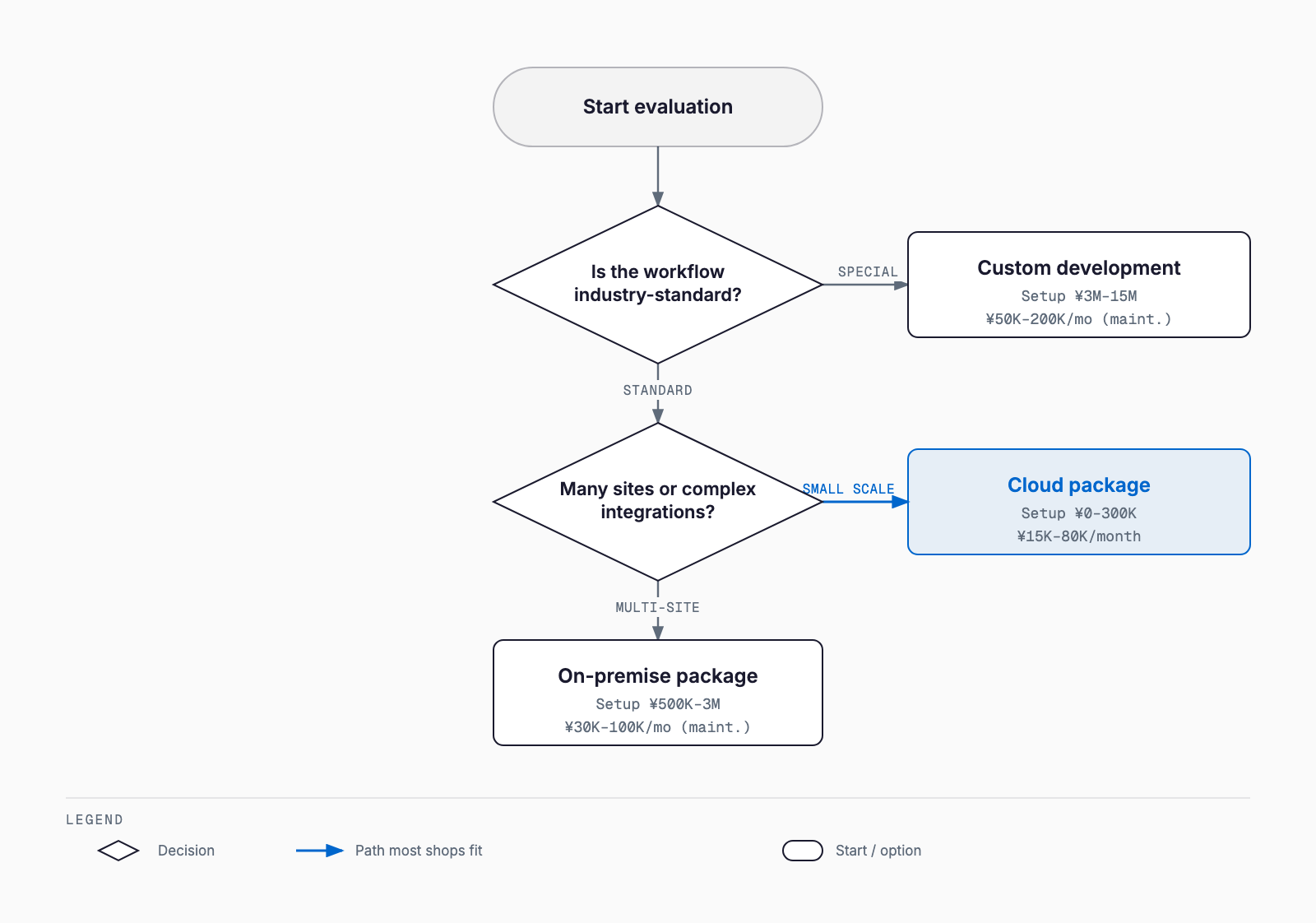
Systems for repair shops generally fall into three categories: cloud-based packages, on-premise packages, and custom (scratch) development. The figures below are rough ranges only, and will vary depending on the scope of features, number of locations, and whether integration with existing systems is required. Treat them as a starting point before requesting an actual quote.
| Type | Setup cost | Monthly cost (incl. support) | Characteristics |
|---|---|---|---|
| Cloud package | ¥0 to ¥300K | ¥15K to ¥80K | Fast to set up and low cost; customization is limited |
| On-premise package | ¥500K to ¥3M | ¥30K to ¥100K (support) | Runs on your own server; easier to match existing workflows |
| Custom development | ¥3M to ¥15M | ¥50K to ¥200K (support) | Fully tailored to your operations; typically 3 to 9 months to build |
Even a low-setup-cost cloud package can see its monthly fee climb once you add multi-location support, more user accounts, or integration with existing accounting software. Custom development, by contrast, carries a larger upfront cost but can sometimes keep ongoing support costs lower depending on how you staff operations. For cost comparisons in other industries, see Reservation system cost guide and Inventory management system cost guide.
Off-the-shelf or custom: how to decide
The key question is whether your own workflow closely matches what is standard across the industry. If your basic inspection, maintenance, and repair flow does not differ much from a typical shop, a cloud package is often more than enough and lets you keep both setup cost and implementation time down significantly. On the other hand, the following situations are worth weighing against custom development or a heavily customizable package.
- You must strictly follow a specific manufacturer's dealer standards or a proprietary work process
- You want to automate ordering through API integration with a parts wholesaler or supplier's system
- You need unified management across multiple locations or business lines (repair, bodywork, rental cars, etc.)
- Integration requirements with existing core systems (accounting, payroll, etc.) are complex
- You have plans to eventually offer the system as a service to other businesses
For most shops, a realistic approach is to start with a cloud package and consider switching to custom development later, once work volume or the number of locations grows. If you are selecting a system without a dedicated IT staff member, System introduction guide for companies without IT staff covers the general approach and is worth reading alongside this article.
Pre-implementation checklist
Working through the following items internally before selecting a system will make conversations with vendors go much more smoothly.
- Current formats and monthly volume of work orders, estimates, and invoices
- Annual number of inspections handled and the current method for due-date reminders
- Number of main parts suppliers and how often and how orders are placed
- Number of staff who will use the system and how it will be used on the floor (tablet, PC, etc.)
- Whether integration with existing accounting software, POS, or CRM tools is needed
- Whether data needs to be shared across locations, if you operate more than one
- How much paper and historical data needs to be migrated (everything, or just the last few years)
Rolling out in stages
Trying to digitize every process at once puts a heavy burden on the shop floor and often fails to stick. A staged rollout tends to reduce resistance and improve adoption. In the first stage, digitize inspection due-date tracking and customer/vehicle records so reminders no longer slip through. In the second stage, move work order creation and progress tracking into the system and retire paper work orders. In the third stage, connect parts inventory management with billing and sales management so the flow from estimate to invoice is unified. Leaving one to two months between each stage for staff to settle into the new workflow makes the transition much smoother.
Relationship with e-document retention and invoice rules
When choosing a system for a repair shop, it is also worth checking how it handles accounting-related compliance. Under Japan's Electronic Bookkeeping Act, invoices and receipts exchanged through electronic transactions must, in principle, be retained as electronic data rather than printed out. Even if parts are still ordered by fax or paper delivery slip in some cases, it is worth confirming that the system can meet retention requirements wherever email- or system-based transactions occur. Under the qualified invoice (インボイス) system, it also matters whether the invoicing feature can automatically include the required details, such as the registration number and tax amounts by rate. Whichever route you take, be sure to build these compliance requirements into the requirements definition stage for a package or custom system.
Common failure patterns
Failed system rollouts at repair shops tend to share a few common causes. One is choosing a package based on price alone and later finding it lacks essential functionality such as inspection due-date management. Another is deciding on a system without input from experienced mechanics on the floor, so the new workflow never sticks and the shop reverts to paper. A third pattern is rolling out parts inventory management on its own without connecting it to work order or billing management, leading to isolated, locally optimized tools that don't talk to each other. A system is not the goal in itself; it is a means of reducing time spent on paperwork and preventing mistakes like missed inspection reminders. Keeping that in mind at every stage of selection helps avoid these failure patterns.
Using subsidies and grants
Introducing a business system may qualify for public subsidies or grants, including Japan's IT introduction subsidy program. Eligible expense categories and application windows change each fiscal year, so it is essential to check the latest program guidelines at the point you start considering implementation. For an overview of the subsidy programs small and medium businesses can use for IT investment, see SMB IT subsidy guide.
FAQ
Does a small repair shop really need a business system?
Even a small shop with only 3 to 5 employees can face serious problems from missed inspection reminders or parts ordering mistakes. Digitizing just the customer and vehicle records already saves time compared with paper, which is why many small shops start with an entry-level cloud package.
If I can't decide between a cloud package and custom development, which should I consider first?
If your workflow does not differ much from a typical repair shop, starting with a cloud package and adding customization or integrations only where you feel gaps tends to be the most cost-effective approach. Custom development is worth considering mainly when your requirements are unusual and already well defined.
How long does implementation typically take?
A cloud package can usually go live within one to two months of signing a contract. Custom development typically takes three to nine months from requirements definition to release, though rolling out in stages lets you start using some features earlier.
How much of our existing paper customer and vehicle records should we migrate?
Migrating everything is ideal, but in practice many shops prioritize migrating records for customers and vehicles seen in the last three to five years and keep older records on paper. It's best to decide the scope based on how much data entry effort you can realistically spare.
Related free tools (no sign-up, instant results)
Feel free to contact us
Contact Us