Backlog Price Hike: Redmine as an Alternative
Backlog raises prices on January 1, 2027, about 2.3x for unlimited users. This guide compares the new plans and covers Redmine self-hosting as an alternative.
Nulab, the company behind the project management tool Backlog, has announced a new pricing structure that takes effect on January 1, 2027. The current four plans will be consolidated into three, and existing contracts will move to the new plans in turn at their next renewal. According to a report by ITmedia (August 27, 2026), users on the current Standard plan (unlimited users, ¥16,000/month) who want to keep unlimited users will need to move to the Business plan at ¥36,300/month — roughly a 2.3x increase. This article lays out the new pricing in detail and then examines, neutrally, the option of self-hosting the open-source project management tool Redmine, including the practical constraints of migrating data.
Your Options After the Price Change: A Decision Flow
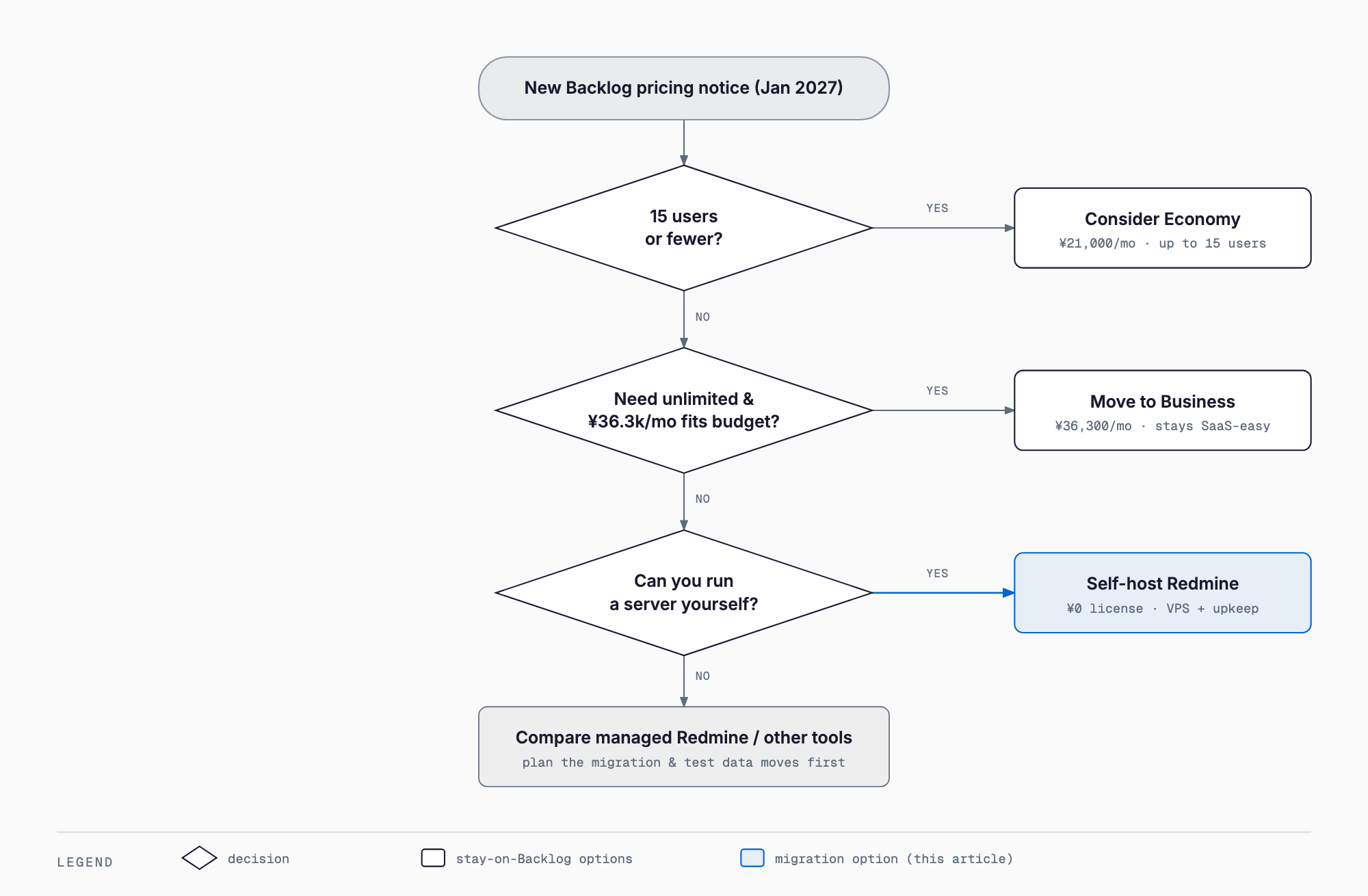
Responding to the new pricing can be broken into roughly four options. First, if your team has 15 or fewer users, you could switch to the Economy plan at ¥21,000/month and give up unlimited users. Second, if you need unlimited users and the budget allows, you could move to the Business plan at ¥36,300/month and keep the convenience and support of a SaaS product. Third, if you want to reduce license costs and have the in-house capability (or a trusted IT partner) to run a server, self-hosting the open-source tool Redmine becomes an option. Fourth, if you don't have that operational capacity, you could outsource the setup and operation of Redmine, or consider switching to another project management SaaS, such as the ones covered in our comparison of Linear, Jira, Asana, and Notion. We'll look at each of these in turn.
The Old and New Plans, Side by Side
According to Nulab's official announcement, the new plan structure takes effect on January 1, 2027, consolidating the current four plans (Free, Standard, Premium, Platinum) into three: Economy, Business, and Professional. Monthly billing will be limited to credit card payment only, and the 3-month and 6-month payment options will be discontinued. Nulab states the reason for the revision is to support continued feature development and service quality improvements as project-based work increases and demand grows for cross-organizational task management and centralized information. Because existing contracts migrate at their next renewal, billing does not change immediately for every customer.
| Plan | Monthly | Annual (per month) | Users | Projects | Storage |
|---|---|---|---|---|---|
| Economy | ¥21,000 | ¥19,950 | Up to 15 | 30 | 30GB |
| Business | ¥36,300 | ¥34,485 | Unlimited | Unlimited | 100GB |
| Professional | ¥100,000 | ¥95,000 | Unlimited | Unlimited | 300GB |
Nulab has also published where current plans migrate automatically: current Premium moves to Business, and current Platinum moves to Professional. Separately, ITmedia's report (August 27, 2026) notes that users on the current Standard plan (unlimited users, ¥16,000/month) will need to move to the Business plan (¥36,300/month) to keep unlimited users — about a 2.3x increase — and that some reactions on social media called the change harsh. It's also worth noting this isn't the first major revision: Backlog raised prices by up to 50% back in January 2023. Full migration mapping details are available on Nulab's official announcement page.
What Is Redmine?
Redmine is an open-source project management tool licensed under GPLv2. It offers issue (ticket) tracking, Gantt charts, a wiki, repository integration, and custom fields — features that overlap substantially with Backlog — and the license itself is free. As of August 2026, versions 7.0, 6.1, and 6.0 are all being maintained in parallel by the development community. Unlike Backlog's SaaS model, Redmine is typically self-hosted on your own server or VPS.
The cost structure looks quite different from Backlog's. While the license is free, you'll need to budget for server costs (a VPS is often in the range of a few thousand yen per month) plus the ongoing work of setup, updates, and backups. In effect, a SaaS monthly fee gets replaced by the effort of running it yourself, and which option is cheaper overall depends heavily on how much operational capacity your organization already has. The official site is redmine.org, where documentation and plugins are published.
Cost Comparison: Business, Redmine, and Economy
| Option | License/Monthly fee | Additional cost | Effort |
|---|---|---|---|
| Backlog Business | ¥36,300 (official price) | None | Minimal — runs as SaaS |
| Redmine self-hosted | ¥0 | VPS cost, roughly a few thousand yen/month | Setup, updates, and backups fall on your team (or a partner) |
| Backlog Economy | ¥21,000 (up to 15 users) | None | Minimal, but capped at 15 users |
The Reality of Migrating from Backlog to Redmine
One thing worth stating plainly before you plan a migration: the official migration tool Nulab provides (the Redmine Importer) only works in the Redmine-to-Backlog direction. There is no official tool for the reverse — moving data from Backlog to Redmine.
A practical approach is to export data via Backlog's API (which can retrieve issues, comments, and attachments) and write a script that loads it into Redmine using Redmine's REST API or its built-in CSV import feature for issues. For a smaller, narrower dataset, manually building a CSV file is also an option.
- Easier to migrate: issue titles, descriptions, statuses, assignees, due dates, and custom fields (though field mapping still needs to be designed)
- Harder to migrate: exact reproduction of comment authors and timestamps
- Harder to migrate: bulk migration of attachments
- Harder to migrate: wiki content (Backlog's notation differs from Textile/Markdown)
- Harder to migrate: peripheral settings like notifications and Git integration
A common rule of thumb in practice is that it's often cheaper overall not to insist on migrating every bit of history perfectly. Instead, rebuild only the active, in-progress work in the new environment, and keep past data accessible via Backlog's export or as an archive for reference. Running both tools in parallel for a period — keeping Backlog around for reference while Redmine operations stabilize — is also a realistic way to make the switch.
Steps for a Successful Migration
- Inventory the data: decide which projects and time ranges are actually worth migrating, and prioritize them
- Choose a migration method: API-driven scripting versus manual CSV import
- Run a test migration: try it on a subset of projects first, and check field mapping, character encoding, and formatting issues
- Run both systems in parallel: use Backlog and Redmine together for a period to confirm nothing breaks operationally
- Cut over: once operations are stable, complete the migration to Redmine and keep Backlog as an archive
Which Option Fits Which Kind of Company?
If your organization can fit within 15 users, switching to the Economy plan (¥21,000/month) may be enough. If you need unlimited users and the post-revision budget is workable, staying on the Business plan and keeping the convenience, support, and stability of a SaaS product is also a reasonable choice — for many organizations, staying on Backlog is genuinely the simplest, lowest-risk option. On the other hand, if you want to reduce license costs and have the in-house or partner capability to run a server, Redmine self-hosting becomes a viable option. Without that operational capacity, outsourcing Redmine's setup and operation, or switching to another project management SaaS, are also worth comparing. If this is prompting a broader look at recurring software costs, our guide to reviewing SaaS subscription costs may also be useful.
Frequently Asked Questions
When does the Backlog price increase take effect?
According to Nulab's official announcement, the new plan structure and pricing take effect on January 1, 2027. Existing contracts migrate to the new plans at their next renewal, so the exact timing depends on your renewal date.
Is Redmine really free to use?
Redmine itself is open-source software under the GPLv2 license, so there's no license fee. However, you'll still need to budget for server costs (a VPS is often a few thousand yen per month) and for the ongoing work of setup, updates, and backups.
Can Backlog data be moved to Redmine as-is?
A complete migration isn't straightforward. Nulab's official migration tool only works from Redmine to Backlog — there's no official tool for the reverse direction. You'd need to build a migration using Backlog's API and Redmine's REST API or CSV import, and things like comment authors and timestamps, wiki formatting, and bulk attachment migration all require some compromise.
What should teams with 15 or fewer users do?
With 15 or fewer users, switching to the Economy plan (¥21,000/month) may let you continue at a lower cost than an unlimited-user plan. Just be aware it caps out at 30 projects and 30GB of storage.
Conclusion
Backlog's new pricing takes effect on January 1, 2027, and keeping unlimited users will mean roughly a 2.3x cost increase according to press reports. The four options — switching to Economy, moving to Business, self-hosting Redmine, or outsourcing/switching tools — each come with real trade-offs. Migrating to Redmine in particular deserves care, since no official migration tool exists in that direction: it's worth estimating the effort and cost of data migration honestly before deciding.
Related free tools (no sign-up, instant results)
Feel free to contact us
Contact Us