NVIDIA SkillSpector: Scan Agent Skills Before You Install
SkillSpector is NVIDIA's open-source scanner. It checks Agent Skills for Claude Code and other CLIs before install, scoring risk 0-100 by static analysis.
SkillSpector is an open-source security scanner (Apache 2.0, Python 3.12+) that NVIDIA published on August 3, 2026. It scans "Agent Skills" — the SKILL.md Markdown files, optionally bundled with Python scripts, that Claude Code, Codex CLI, Gemini CLI, and similar tools load — before installation. It combines static analysis with optional LLM-based semantic review to produce a risk score from 0 to 100 and a clear install-or-not verdict. The repository lives at github.com/NVIDIA/SkillSpector, and installing it is a single uv tool install command.
Why Agent Skills need scanning at all
An Agent Skill is a way to extend what an AI coding agent can do. In practice, though, it's third-party Markdown instructions and Python code that, once installed, runs with the same file access, command execution, and network privileges the agent already has. That's the same supply-chain risk npm packages and browser extensions carry, spreading through an ecosystem with far less review infrastructure behind it. NVIDIA's own survey found vulnerabilities in 26.1% of published skills and suspected malicious intent in 5.2%. Skills that bundle an executable script were 2.12x more likely to contain a vulnerability than skills that don't — plain-text-only skills are meaningfully safer than skills shipping code. As covered in our comprehensive guide to Agent Skills and Tools, the extension mechanism itself is a real productivity win, but "installed" should never be conflated with "trusted." And as CVE-2026-65105 in NemoClaw's Ollama integration showed, vulnerabilities around locally-running AI agents can be severe precisely because a single point of access can poison every subsequent conversation — which is exactly why any third-party code intake point, skills included, deserves careful vetting.
What it detects — 17 categories, 71 patterns
SkillSpector's detection rules span 17 categories and 71 patterns, covering everything from LLM-specific attacks like prompt injection and anti-refusal manipulation, to classic software security concerns like privilege escalation and supply-chain tampering, to MCP-specific issues like least-privilege violations and tool poisoning.
| Category | Patterns | Example detections |
|---|---|---|
| Prompt injection | 6 | Hidden instructions injected into the agent |
| Anti-refusal | 3 | Manipulation that bypasses safe refusals |
| Data exfiltration | 4 | Paths that leak sensitive data externally |
| Privilege escalation | 3 | Attempts to gain unintended permissions |
| Supply chain | 9+ | Dependency tampering, typosquatting, etc. |
| Excessive agency | 5 | Triggers for unauthorized autonomous action |
| Output handling | 3 | Unsafe post-processing/execution of output |
| System prompt leakage | 3 | Attempts to extract internal prompts |
| Memory poisoning | 3 | Persistent corruption of conversation memory |
| Tool misuse | 3 | Unintended invocation of other tools |
| Rogue agent | 2 | Autonomous action outside intended control |
| Trigger abuse | 3 | Malicious conditional activation |
| Behavioral AST | 9 | Dangerous constructs like exec/eval/subprocess |
| Taint tracking | 5 | Env vars/file content flowing to exfil sinks |
| YARA signatures | 4 | Malware, web shells, cryptominers |
| MCP least privilege | 4 | Excessive permission requests from MCP servers |
| MCP tool poisoning | 4 | Tampering with MCP tool definitions themselves |
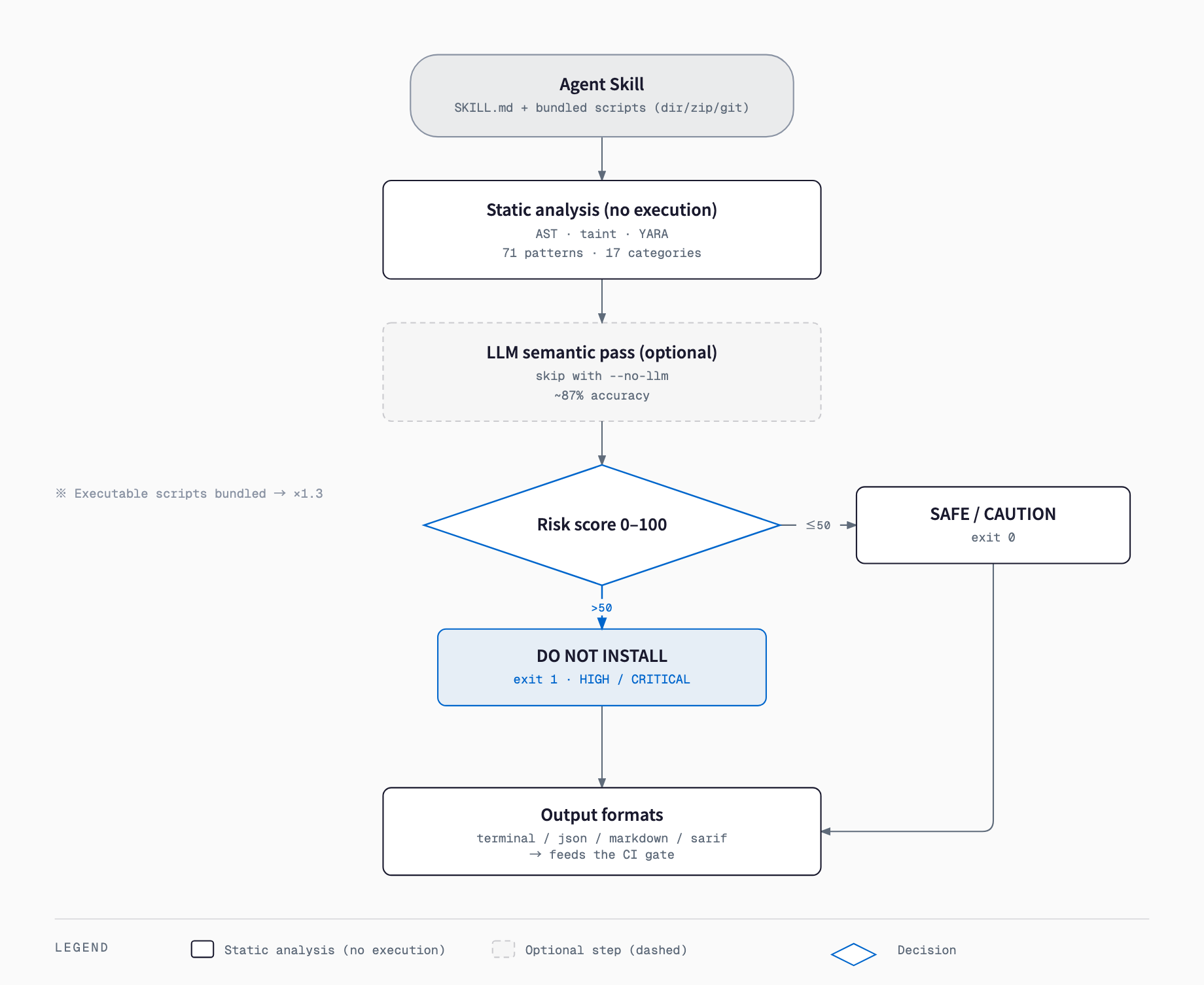
The detection pipeline runs in two stages. First, static analysis walks the AST to catch exec/eval/subprocess calls, traces environment variables and file contents through taint analysis to see if they reach a network sink, matches against YARA rules for malware, web shells, and cryptominers, and applies regex-based pattern checks — all of this runs locally and never executes the skill's code. Second, an optional LLM semantic pass catches context-dependent malicious intent that static rules alone miss, cutting down false positives. NVIDIA reports roughly 87% detection accuracy with the LLM pass enabled.
Reading the risk score
Findings roll up into a single risk score from 0 to 100, mapped to four severity bands and a recommended action.
| Score range | Severity | Recommendation |
|---|---|---|
| 0–20 | LOW | SAFE (install) |
| 21–50 | MEDIUM | CAUTION (review before deciding) |
| 51–80 | HIGH | DO NOT INSTALL |
| 81–100 | CRITICAL | DO NOT INSTALL |
Points are added per finding based on severity: a CRITICAL finding adds 50 points, HIGH adds 25, MEDIUM adds 10, and LOW adds 5. If the skill bundles an executable script, the resulting score is multiplied by 1.3x — a direct reflection of that 2.12x vulnerability-likelihood figure above, and a deliberate design choice not to grade code-bearing skills on the same curve as plain-text ones. For CI gating, the default pass/fail line sits at a score of 50, as covered below.
Installation
Python 3.12 or later is required. You can install directly from GitHub with uv or pip, build from source with make install-dev, or build a Docker image.
# Install with uv (recommended)
uv tool install git+https://github.com/NVIDIA/skillspector.git

# Install with pip
pip install git+https://github.com/NVIDIA/skillspector.git

# Install from source for development
git clone https://github.com/NVIDIA/SkillSpector.git
cd SkillSpector
make install-dev

# Build the Docker image
make docker-build
Usage — the fastest path
SkillSpector accepts a local directory, a single SKILL.md file, a ZIP archive, or a Git URL as its scan target. Limits are 100MiB per scan and 10,000 members inside a ZIP archive.
# Scan a local directory
skillspector scan ./my-skill/

# Scan a Git URL directly
skillspector scan https://github.com/user/my-skill

# Scan a ZIP archive
skillspector scan ./skill.zip

# Scan a single SKILL.md file
skillspector scan ./SKILL.md

# Static analysis only, no LLM call, fast
skillspector scan ./my-skill/ --no-llm

# Save the current findings as a baseline for future diffing
skillspector baseline ./my-skill/ -o .skillspector-baseline.yaml
Output formats and CI integration
The default output is a human-readable terminal report (--format terminal), but json, markdown, and sarif are also available. Writing -o report.sarif produces a SARIF file that drops straight into any SARIF-aware viewer, including GitHub's Security tab via CodeQL uploads. For CI, what matters is the exit code: 0 when the score is 50 or below (LOW/MEDIUM), 1 when it exceeds 50 (HIGH/CRITICAL), and 2 on a scan error. That alone is enough to build a gate — run skillspector scan as a GitHub Actions step and let exit code 1 fail the job to block risky skills from merging. The JSON output also carries risk_score, severity, recommendation, safe_to_install, and findings fields for anyone wiring the results into a dashboard or notification pipeline.
LLM semantic analysis and privacy
The LLM semantic pass supports openai, anthropic, anthropic_proxy, bedrock, nv_build (NVIDIA Inference, the default), claude_cli, and codex_cli as providers, selected via the SKILLSPECTOR_PROVIDER environment variable. If the chosen provider is unavailable, SkillSpector automatically falls back to static-analysis-only results. The key thing to understand: the LLM pass sends the skill's file contents to whichever external provider you've configured. For internal-only skills or anything that might contain sensitive material, --no-llm is the reasonable default, restricting the scan to static analysis. Dependency CVE lookups query OSV.dev (Open Source Vulnerabilities) in real time, no API key required, with automatic fallback when offline. The static analysis stage itself is entirely local and never executes the skill's code.
Running as an MCP server
SkillSpector isn't limited to the CLI — it can also run as an MCP server. Install with the skillspector[mcp] extra and run skillspector mcp to start a stdio-transport server, or skillspector mcp --transport http --host 127.0.0.1 --port 8000 to listen over HTTP. That lets an agent like Claude Code call the scan_skill(target, use_llm, output_format) tool itself before pulling in a new Agent Skill, effectively letting the agent audit its own extension mechanism autonomously rather than relying on a human running the CLI separately.
# Install with MCP server support
uv tool install 'skillspector[mcp] @ git+https://github.com/NVIDIA/skillspector.git'

# Start over stdio (wired into an agent's MCP config)
skillspector mcp

# Start over HTTP
skillspector mcp --transport http --host 127.0.0.1 --port 8000
How it differs from existing tools
SkillSpector is not a universal replacement for other security tooling — it occupies a specific niche, and knowing what it does and doesn't cover matters before you adopt it.
| Tool | What it checks | How it differs from SkillSpector |
|---|---|---|
| SkillSpector | Pre-install review of Agent Skills (SKILL.md + bundled code) | Purpose-built for LLM/agent-specific attacks: prompt injection, MCP poisoning, etc. |
| General-purpose SAST (Semgrep, etc.) | Generic source-code vulnerability patterns | Has no rules for LLM/agent-specific attacks like prompt injection |
| Dependency scanners (OSV-Scanner, Dependabot, etc.) | Known CVEs in dependencies | Doesn't catch malicious code itself or prompt-layer poisoning; SkillSpector overlaps here via its own OSV.dev lookups |
| Sandboxed execution / permission limits | Actual runtime behavior (file access, network destinations) | SkillSpector is primarily static and never executes the skill; it can't see behavior that only appears at runtime |
Being honest about the limits this comparison surfaces matters. SkillSpector's core is static analysis — it doesn't execute the skill's code, so behavior that only manifests at runtime (dynamically assembled code, environment-dependent branching) can slip past it. The LLM semantic pass improves accuracy but sits at roughly 87%, not perfect detection of a carefully disguised malicious skill. Treat the SkillSpector score as one signal, not the sole gate, and pair it with sandboxed execution and least-privilege operating practices for real defense in depth.
Is SkillSpector free to use?
Yes. It's open source under the Apache 2.0 license and freely available on GitHub.
Does it work with any Agent Skill?
It targets SKILL.md-format Agent Skills used by Claude Code, Codex CLI, Gemini CLI, and similar tools, and accepts a local directory, single file, ZIP archive, or Git URL as the scan target.
Is there any point in disabling the LLM pass?
Yes. Static analysis alone (AST walking, taint tracking, YARA signatures, regex patterns) already catches most dangerous code structures. For sensitive skills, --no-llm avoids sending file contents to an external provider entirely.
How do I wire this into CI?
SkillSpector returns exit code 1 when the risk score exceeds 50, so a CI step that runs skillspector scan and fails the job on a non-zero exit is enough to gate merges. SARIF output is also supported for integration with SARIF-aware viewers.
Does a clean scan mean a skill is safe to install?
Not entirely. SkillSpector is primarily static analysis, so it never executes the skill and can miss behavior that only appears at runtime. The LLM pass runs at roughly 87% accuracy. Treat the score as one signal and pair it with sandboxed execution and least-privilege practices.
Does it also check dependency vulnerabilities?
Yes. Dependency CVEs are looked up in real time against OSV.dev (Open Source Vulnerabilities), no API key required, with automatic fallback when offline.
Feel free to contact us
Contact Us