Business Card Management Software Costs in 2026
Business card management tools like Sansan, Eight Team, and myBridge run from a few thousand to tens of thousands of yen a month. Here is how to choose.
Business card management software ranges from free plans to cloud SaaS costing a few thousand to tens of thousands of yen a month, up to enterprise plans with setup fees in the hundreds of thousands of yen. In short, a one-person IT team or small business with a modest number of cards usually does fine with a monthly plan in the low thousands of yen, while sales teams wanting CRM integration should budget for a higher-tier monthly plan.
What a business card management system actually solves
A business card management system digitizes paper cards through scanning or smartphone photos so the information becomes searchable and shareable company-wide. Its core purpose is to prevent contacts from being locked inside one employee's card holder, and to stop client relationships from vanishing when that employee leaves. Well-known services include Sansan, Eight Team, and myBridge, and many now go beyond simple digitization to offer automatic company-data updates, personnel-change alerts, and CRM/SFA integration. Think of it as turning a stack of paper cards into a searchable, shared company database.
Deployment types: SaaS, dedicated scanners, phone photos, and CRM-embedded
Business card tools generally fall into four types. Cloud SaaS plans are billed monthly, accessed through a browser or app, and suit teams sharing data across multiple offices. Plans with a dedicated scanner are built for digitizing large volumes of cards quickly and accurately. Smartphone-camera-only tools let sales staff register a card on the spot after meeting a client. Finally, some CRM or sales-support tools, such as HubSpot, embed card-scanning as a feature, which suits companies already running a CRM and looking to avoid adding another separate tool. Which type fits best depends heavily on how your team actually exchanges and uses cards.
Ballpark costs of major products (as of August 2026, based on public information)
| Product | Deployment | Approx. monthly cost | Approx. setup cost | Notes |
|---|---|---|---|---|
| Sansan | Cloud SaaS with operator data entry | Tens of thousands of yen or more (quote-based) | Tens to hundreds of thousands of yen | Strong track record with large enterprises; automatic company-data updates and SFA integration |
| Eight Team | Cloud SaaS | A few thousand to low tens of thousands of yen per user | Free to a few tens of thousands of yen | Business version of the popular free Eight app; widely adopted by SMEs |
| myBridge | Cloud SaaS | Free tier available; paid plans from a few thousand yen | Free to a few tens of thousands of yen | Generous free tier, easy to start small |
| HubSpot (CRM-embedded) | Integrated CRM | Free tier available; paid plans from thousands to tens of thousands of yen | Free to a few tens of thousands of yen | Card scanning is one feature within a broader sales-management platform |
| Generic scanner + spreadsheet | On-premise / manual | Near zero (excluding labor) | A few tens of thousands of yen for a scanner | Low searchability and sharing, but the cheapest way to start |
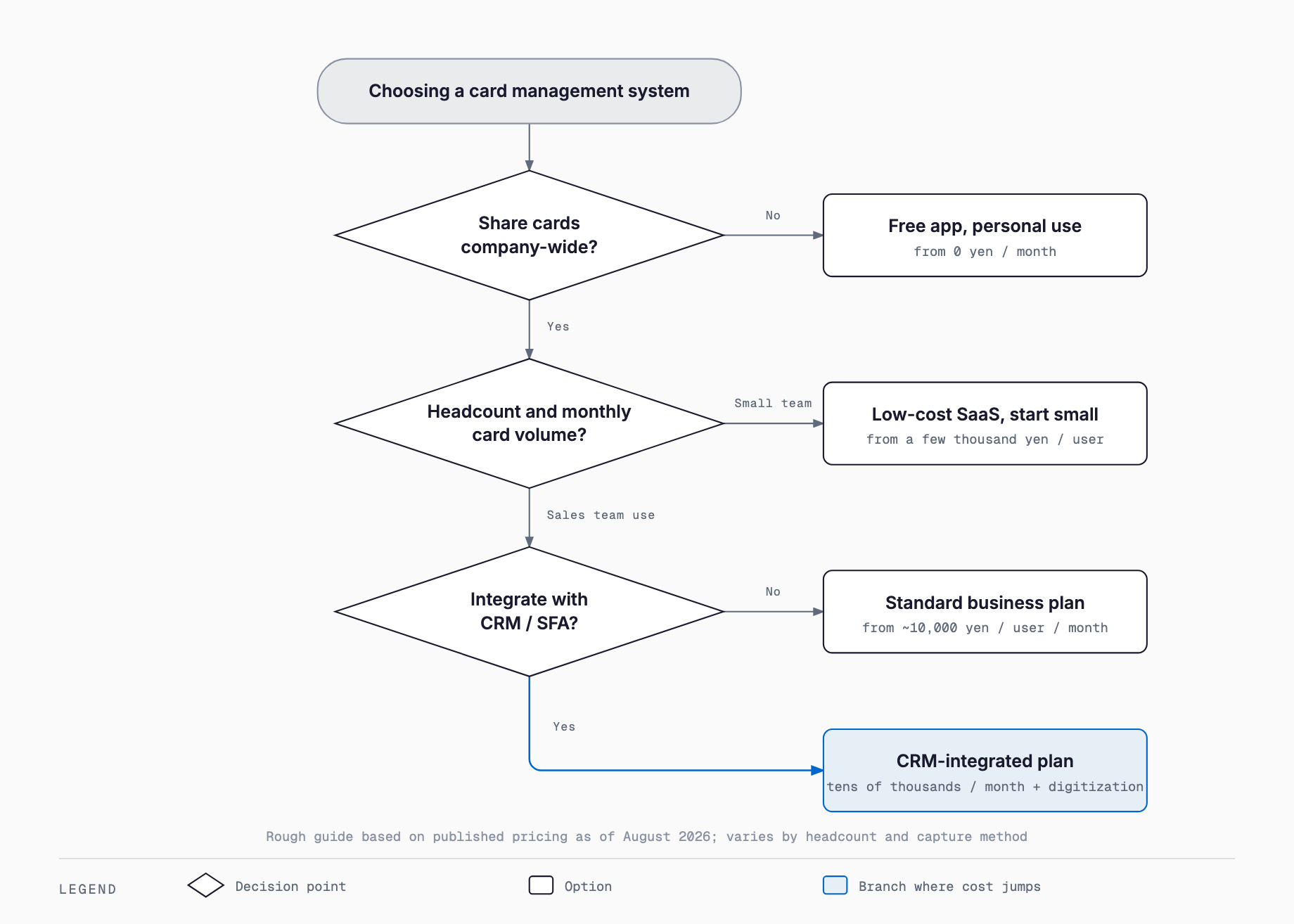
These figures are only rough estimates based on each vendor's publicly available information as of August 2026; actual quotes vary with user count, add-ons, and contract terms. Always request quotes from several vendors and apply them to your own card volume and user count before deciding.
Four factors that drive the cost
Quotes for what looks like the same kind of tool can vary widely, mainly because of four factors. First is the number of users, since pricing is usually per registered ID. Second is data-entry accuracy: relying solely on AI-OCR is cheaper than adding human operator verification, which costs more but is more accurate. Third is whether you already own a compatible scanner, since plans requiring a dedicated scanner add to the setup cost. Fourth is whether you need to bulk-digitize a backlog of paper cards accumulated over the years, sometimes called a card "stocktake," which can incur a separate one-time fee for registering hundreds or thousands of cards at once. When comparing quotes, check that these four conditions are matched across vendors.
When free or low-cost tools are enough, and when they aren't
If your card-exchange volume is low and only one or a few people manage it, a free plan like myBridge or a simple phone-photo tool is usually sufficient. But companies where multiple sales reps interact with the same clients, or that want personnel and company-data changes reflected automatically, or that need genuine integration with an existing CRM or SFA, will often find free tools lacking in features or accuracy. If you want to use "who exchanged a card with whom, and when" as part of your sales activity history, a paid cloud SaaS plan or a CRM-embedded tool is worth considering to avoid duplicate records and scattered information later on.
Pre-purchase checklist
- Have you tallied how many cards are exchanged monthly and how many user IDs you'll need to register?
- Do you need to bulk-digitize a backlog of paper cards, and is that cost included separately in the quote?
- Have you confirmed how accuracy and price differ between AI-OCR-only entry and entry with human operator verification?
- Do you need integration with an existing CRM, SFA, or sales management system?
- Since card data is personal information, have you designed admin permissions and viewing scope internally?
- Have you set rules for handing over cards and client contacts managed by an employee who is leaving (see also this IT offboarding checklist)?
- Have you tested actual entry accuracy and usability with a free plan or trial period?
- Have you confirmed the contract term, cancellation conditions, and whether your data can be exported?
Common failure patterns
One common failure is adopting a system that then goes unused on the ground. If photo registration feels cumbersome for sales staff, they gradually stop using it, and the company drifts back to individual folders or physical card holders. A second pattern is losing valuable contacts when an employee leaves without ever registering the cards and client relationships they had been managing personally. A third pattern is half-hearted integration between the card system and an existing CRM or internal chat tool, which forces staff to enter the same information twice and ends up creating more work rather than less. Anticipating these failure modes and setting clear operating rules before rollout is key to avoiding them.
Decision guide by company size
For a company with a handful of employees and only dozens of card exchanges a month, starting with a free plan or a low-cost phone-photo tool is the realistic choice. For a company of dozens of employees where multiple sales staff exchange cards and want to share client information across the organization, a cloud SaaS plan in the low thousands to low tens of thousands of yen per month tends to offer the best cost-performance. If you're also thinking ahead to AI use cases in sales or deeper CRM integration, it's worth comparing higher-tier monthly plans or CRM-embedded tools. Whatever your size, testing the actual usability through a free plan or trial before signing a full contract is the safest first step.
What's the typical cost range for a business card management system?
Based on public information as of August 2026, some tools offer free plans, cloud SaaS options typically run a few thousand to tens of thousands of yen a month, and enterprise plans with dedicated scanners or operator data entry can carry setup fees of several hundred thousand yen. Costs vary with user count and accuracy requirements, so it's best to get quotes from multiple vendors.
Is it hard to get by with only free tools?
If your card volume is low and only a small team manages it, a free tool can work fine. But if you need multi-person sharing, automatic company-data updates, or real integration with an existing CRM, free plans often fall short on features, and moving to a paid plan is worth considering.
What should we watch out for regarding personal information on business cards?
Business cards contain personal information such as names, company names, and contact details, so you need to design internal viewing permissions and access scope in advance. It's also worth confirming, before signing, where the vendor stores your data and what security measures they have in place.
Can these systems integrate with an existing CRM or SFA?
Most cloud-based business card management systems offer some form of CRM/SFA integration, such as API connections or automatic data syncing, but the extent varies by service and plan. Before adopting one, check its track record and specific integration method with the CRM or SFA you already use.
Related free tools (no sign-up, instant results)
Feel free to contact us
Contact Us