Local LLM Context Length and VRAM: KV Cache Formula Guide
Local LLM OOM errors usually come from the KV cache, not model weights, because it grows linearly with context length. Formula, sizing table and fixes.
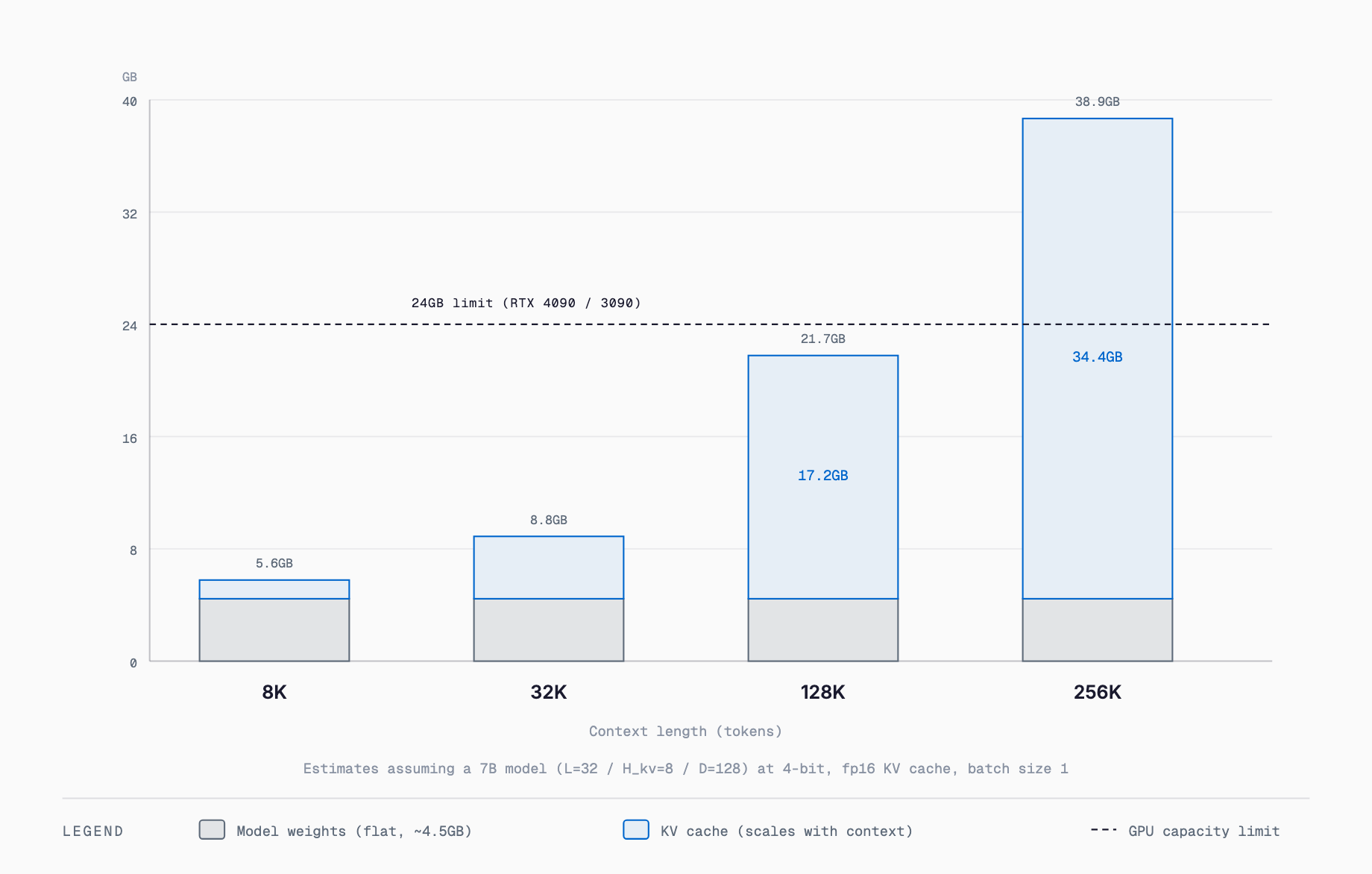
The VRAM cost of the KV cache can be estimated with a simple formula: 2 x layers x KV heads x head dimension x context length x bytes per precision. For a given model, KV cache grows linearly as context length rises from 8K to 128K to 1M tokens, so even a 7B-class model can need several GB at 128K and tens to over 100GB at 1M tokens. When model weights fit in VRAM but an out-of-memory error appears the moment you paste in a long document or a long chat history, this formula explains why: the KV cache is a separate, dynamically growing pool of memory.
What the KV Cache Is — Why Memory Grows With Every Token
A Transformer's self-attention mechanism looks back at the Key (K) and Value (V) vectors of every previous token each time it generates a new one. Recomputing those vectors from scratch every step would be far too slow, so inference engines store the already-computed K and V vectors in VRAM as a "KV cache" and reuse them for the next token. Model weights are a static VRAM cost fixed at load time, but the KV cache grows dynamically in proportion to the number of tokens processed so far (prompt plus generated tokens) — that difference is the key point. Most cases of "the model loaded fine, but it suddenly runs out of memory once I paste in a long passage or the conversation runs long" trace back to this dynamic growth of the KV cache.
The KV Cache VRAM Formula
KV cache (bytes) = 2 x L x H_kv x D x S x P x B

  L   : number of layers (num_hidden_layers)
  H_kv: number of KV heads (num_key_value_heads; with GQA this is fewer than the query head count)
  D   : head dimension (head_dim; commonly 64-128)
  S   : context length (sequence length in tokens)
  P   : bytes per element (fp16/bf16=2, fp32=4, int8=1, int4=0.5)
  B   : batch size (concurrent conversations; usually 1)
  2   : one set each for Key and Value

Example: a Llama-family 7B-class model (L=32, H_kv=8, D=128, fp16, B=1) at S=128,000:
  2 x 32 x 8 x 128 x 128,000 x 2 = approximately 17.2GB

The real values for L, H_kv, and D can be found in a model's config.json (num_hidden_layers / num_key_value_heads / head_dim). A model that does not use GQA has H_kv equal to the query head count, which makes the KV cache larger still when run through this same formula.
KV Cache Sizing Table by Context Length (fp16, approximate)
| Context Length | 7B-class (L32/Hkv8/D128) | 14B-class (L40/Hkv8/D128) | 30B-class MoE (L48/Hkv8/D128) | 70B-class (L80/Hkv8/D128) |
|---|---|---|---|---|
| 8K | ~1.1GB | ~1.3GB | ~1.6GB | ~2.7GB |
| 32K | ~4.3GB | ~5.4GB | ~6.4GB | ~10.7GB |
| 128K | ~17.2GB | ~21.5GB | ~25.8GB | ~43GB |
| 256K | ~34.4GB | ~43GB | ~51.5GB | ~86GB |
| 1M | ~137GB | ~172GB | ~206GB | ~344GB |
All figures assume fp16, batch size 1, and the layer count / KV head count / head dimension shown; real models vary based on the values in their config.json. See our GGUF quantization guide for how to choose among GGUF-quantized model variants.
To estimate the requirement for a specific model as you vary quantization and context length, use our VRAM calculator (free, no sign-up) — it shows how the context-length choice moves the total.
How GQA and MQA Shrink the KV Cache
Early Transformers used MHA (Multi-Head Attention), where the number of KV heads equals the number of query heads, so a model with more attention heads paid a proportionally larger KV cache. GQA (Grouped Query Attention), used by most mainstream models since Llama 2, instead shares one KV head across a group of query heads — for example, thinning 32 query heads down to 8 KV heads cuts the KV cache to roughly a quarter by simple arithmetic. Taking this further, MQA (Multi Query Attention) reduces KV heads to just one, maximizing the savings at the cost of a small quality trade-off from reduced representational capacity. The reason nearly every major open-weight model in 2026 uses GQA is that as context lengths keep growing, the KV cache cost becomes impossible to ignore. See this 1M-context model guide for an example of a model built around a 1M-token context.
KV Cache Quantization: fp16 vs q8 vs q4
| Precision | Bytes per element | Reduction vs. fp16 | Typical quality impact |
|---|---|---|---|
| fp16 / bf16 | 2 bytes | Baseline (no reduction) | None |
| q8 (int8-equivalent) | 1 byte | ~50% smaller | Usually negligible, within benchmark noise |
| q4 (int4-equivalent) | 0.5 bytes | ~75% smaller | Recall accuracy over long context can drop slightly; often acceptable for chat, but worth verifying for code generation or tasks needing precise numeric recall |
MoE Models: KV Cache Is Not Determined by "Active Parameters"
An MoE (Mixture of Experts) model reduces compute by routing each token through only a subset of its experts — for example, activating only 3 billion of 30 billion total parameters. That saving applies to the weight computation inside the FFN (feed-forward) layers, but the self-attention layers that produce the KV cache still run across essentially every layer as normal. In other words, an MoE model can shrink its weight VRAM and active compute, but its KV cache size still follows the same formula of total layers x KV heads x head dimension, and ends up close to that of a dense model with a similar layer configuration. Assuming that a small active-parameter count also means a small memory footprint, and then feeding the model a long context, is a common way to run out of VRAM sooner than expected.
Practical Settings to Avoid OOM
- Figure out the context length you actually need and cap it at startup; few workloads genuinely require reserving space up to 1M tokens
- In engines like llama.cpp, set --cache-type-k / --cache-type-v to q8_0 or q4_0 to quantize the KV cache itself
- Use an inference engine that supports Flash Attention (or Paged Attention) to avoid memory fragmentation and wasted allocation
- Fix batch size at 1 to avoid duplicating KV cache allocations across concurrent requests
- Tune the number of GPU-offloaded layers (e.g. n-gpu-layers) to leave headroom in VRAM for the KV cache
- Prefer models built with GQA or MQA, which use fewer KV heads for a given parameter count
- Consider an inference engine or setting that can offload the portion of the KV cache that does not fit in VRAM to CPU RAM
- For long-running chat use cases, periodically summarize or discard older turns to reset the effective context length
How to Estimate VRAM Needs in Practice
Estimating the VRAM a local LLM needs comes down to adding up four things: (1) the quantized model weight size, (2) the KV cache at the maximum context length you expect to use, (3) temporary activation buffers during inference (typically a few hundred MB to about 1GB), and (4) overhead from OS desktop rendering or display output on the same GPU (roughly 0.5-1.5GB). Per-model VRAM requirements are covered in articles like the Gemma 4 requirements reference, but many of the figures quoted there are measured at short context lengths, so when you plan to feed in long documents or hold long conversations, you need to add the KV cache figure from this article's formula on top.
Common Troubleshooting
"The model loads fine, but it runs out of memory the moment I paste in a long passage" almost always means VRAM was sized against the model weights alone, without budgeting for KV cache growth. Similarly, "it suddenly crashes on the second or third response in a conversation" usually happens because chat history accumulates every turn, stretching the effective context length and the KV cache along with it. In both cases, capping the maximum context length, summarizing and discarding older turns, and enabling KV cache quantization are effective fixes. How manageable the KV cache is also depends heavily on which inference engine you choose, so the inference engine comparison is worth reading alongside this guide.
Is it safe to quantize the KV cache?
Most inference engines (llama.cpp and others) offer dedicated KV cache quantization options such as q8_0 or q4_0, and q8 is generally considered to have only a minor effect on output quality. Pushing down to q4 can slightly reduce recall accuracy over long context, so for code generation or tasks that need precise numeric recall it is worth verifying quality before adopting it.
Can the KV cache be offloaded to system RAM?
Some inference engines support placing all or part of the KV cache in CPU RAM, but the transfer between GPU and CPU becomes a bottleneck and generation speed drops sharply. It works as an emergency workaround when VRAM is insufficient, but for regular use it is more practical to choose a GPU with more VRAM or to adjust context length and quantization instead.
How is the KV cache handled on Apple Silicon's unified memory?
Because Apple Silicon shares one memory pool between CPU and GPU, there is no need to reserve a separate VRAM pool, and the KV cache can grow to use whatever system memory is free — a real advantage. That said, total memory is still capped by installed RAM, and the OS and other apps share the same pool, so a figure estimated from the formula is not guaranteed to hold in practice; checking on the actual hardware is recommended.
Why does generation get slower as context grows?
As the KV cache grows, generating each new token requires scanning a larger set of stored K and V vectors, so the cost of the attention computation rises roughly in proportion to context length. The KV cache also consumes more memory bandwidth as it grows, so throughput in tokens per second tends to drop as context gets longer.
How much VRAM does it take to actually use a 1M-token context?
As the sizing table in this article shows, even a 7B-class model can need over 100GB of KV cache in fp16 to fully use a 1M-token context. Even with q4 quantization, tens of GB typically remain, which is not realistic on a single consumer GPU. A more realistic approach is either a multi-GPU workstation setup with large VRAM, or simply designing the workload around a context length of tens to low hundreds of thousands of tokens rather than the full 1M.
Related free tools (no sign-up, instant results)
Feel free to contact us
Contact Us