CLI-Anything: Turn Any App Into an Agent CLI (2026)
CLI-Anything is an Apache 2.0 open-source framework that automatically converts any software — GIMP, Blender, LibreOffice, and more — into an agent-native CLI through a 7-phase pipeline: analyze, design, implement, plan tests, write tests, document, publish. Updated Sep 2026.
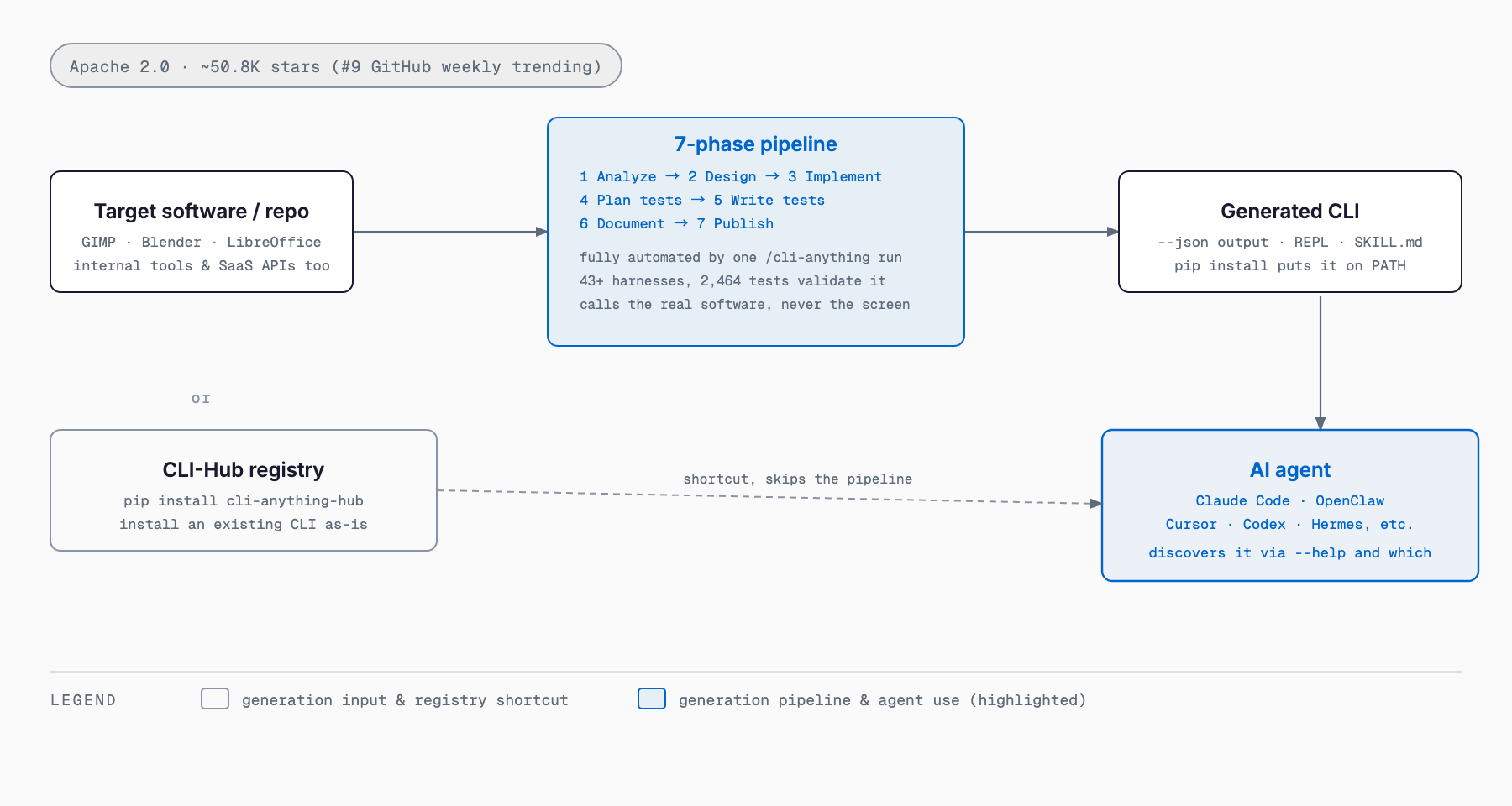
CLI-Anything is an open-source framework that automatically converts any software or repository — GIMP, Blender, LibreOffice, and more — into a structured CLI that AI agents can operate directly. A fully automated 7-phase pipeline (analyze, design, implement, plan tests, write tests, document, publish) generates a Python CLI that calls the real software's backend. No screenshots, no clicking — just a structured --json output and REPL interface that makes software agent-native.
It's built by HKUDS, a GitHub organization founded on March 8, 2026, tied to a research group at the University of Hong Kong. As of this writing (September 28, 2026), the repository has roughly 50,844 stars and 4,646 forks, and it ranked #9 on GitHub's weekly trending list with +1,105 stars in a single week, alongside a Trendshift trending badge. It's licensed under the Apache License 2.0. This article covers how the pipeline works, installation, basic usage, and how it compares to GUI automation and MCP servers, based only on the official README and GitHub repository.
What Is CLI-Anything? Fixing "AI Is Bad at Using Real Software"
The README frames the problem this way: "AI agents are great at reasoning but terrible at using real professional software. Current solutions are fragile UI automation, limited APIs, or dumbed-down reimplementations that miss 90% of functionality." CLI-Anything's answer isn't to reimplement a GUI — it's to auto-generate a structured interface to the real software. There are two entry points.
| Goal | Where to start |
|---|---|
| Use the existing CLI ecosystem right now | Install cli-anything-hub, browse the registry (CLI-Hub), and install a ready-made CLI as-is |
| Build a new agent-native CLI | Install the CLI-Anything plugin/skill for your agent, then run the 7-phase harness generator |
What It Can Do — The 7-Phase Pipeline
Hand the agent the target software's source code (or an available online repository), and the following 7 phases run fully automatically to produce a CLI.
- 1 Analyze: scans the source code and maps GUI actions to APIs
- 2 Design: architects command groups, the state model, and output formats
- 3 Implement: builds a Click-based CLI with REPL, JSON output, and undo/redo
- 4 Plan Tests: creates a TEST.md with unit + E2E test plans
- 5 Write Tests: implements the comprehensive test suite
- 6 Document: updates TEST.md with results
- 7 Publish: creates setup.py and installs the CLI to PATH
How Broad Is the Coverage?
The README's "When to Use CLI-Anything" table spans 17 categories of software, from creative tools like Blender and GIMP to business tools like GitLab and Grafana to scientific software like FreeCAD and QGIS. Here are some of the representative categories.
| Category | What it enables | Notable examples |
|---|---|---|
| GitHub repositories | Turns any open-source project into an agent-controllable tool through automatic CLI generation | VSCodium, WordPress, Calibre, Zotero, Joplin |
| AI/ML platforms | Automates model training, inference pipelines, and hyperparameter tuning through structured commands | Stable Diffusion WebUI, ComfyUI, Ollama, InvokeAI |
| Data & analytics | Enables programmatic data processing, visualization, and statistical analysis | JupyterLab, Apache Superset, Metabase, DBeaver |
| Development tools | Streamlines code editing, building, testing, and deployment via command interfaces | Jenkins, Gitea, Portainer, SonarQube, iTerm2 |
| Creative & media | Controls content creation, editing, and rendering workflows programmatically | Blender, GIMP, OBS Studio, Audacity, Kdenlive |
| Game development | Manages game projects, scenes, and exports through headless engine interfaces | Godot Engine, s\&box |
| Scientific computing | Automates research workflows, simulations, and complex calculations | FreeCAD, QGIS, ParaView, KiCad |
| Enterprise & office | Converts business and productivity tools into agent-accessible systems | NextCloud, GitLab, Grafana, LibreOffice, ERPNext |
| Diagramming & visualization | Creates and edits diagrams, flowcharts, and architecture diagrams programmatically | Draw.io (diagrams.net), Mermaid, PlantUML |
| AI-native search | Neural and deep web search via embedding-based APIs | Exa |
Test Coverage and Track Record
Every CLI harness is validated through four layers: unit tests with synthetic data, native E2E tests that check generated project files, true-backend E2E tests that invoke the real software, and CLI subprocess tests against the installed command. As of this writing, the README's test results table shows 30 harnesses passing 2,464 tests total, a 100% pass rate. The project structure lists 43+ harnesses in total, including newer ones not yet in the results table.
| Harness | Test results |
|---|---|
| blender | 208 passed (150 unit + 58 e2e) |
| inkscape | 202 passed (148 unit + 54 e2e) |
| audacity | 161 passed (107 unit + 54 e2e) |
| libreoffice | 158 passed (89 unit + 69 e2e) |
| kdenlive | 155 passed (111 unit + 44 e2e) |
| shotcut | 154 passed (110 unit + 44 e2e) |
| obs-studio | 153 passed (116 unit + 37 e2e) |
| gimp | 107 passed (64 unit + 43 e2e) |
| Total (30 harnesses) | 2,464 passed (100% pass rate) |
Installation and Pricing
| Item | Detail |
|---|---|
| Maintainer | HKUDS (GitHub organization, founded 2026-03-08) |
| License / pricing | Apache License 2.0, open source, free |
| Implementation | Python 3.10+, Click 8.0+, pytest |
| CLI-Hub | Package manager installed via pip install cli-anything-hub (on PyPI) |
| Supported agents | Claude Code, Cursor, Pi, OpenClaw, OpenCode, Codex, Hermes, Reasonix, Qodercli, GitHub Copilot CLI, and more |
| Track record | 43+ harnesses, 2,464 tests, published arXiv tech report (arXiv:2606.03854) |
If you just want to use an existing CLI, install the CLI-Hub package manager. It lets you browse, search, install, update, and uninstall registry CLIs from one command.
pip install cli-anything-hub

cli-hub list
cli-hub search image
cli-hub install gimp
cli-hub info gimp
cli-hub launch gimp
To generate a brand-new CLI, install it as a Claude Code plugin. Add the marketplace, install the plugin, then run /cli-anything with a path or repo for the target software.
# Add the marketplace
/plugin marketplace add HKUDS/CLI-Anything

# Install the plugin
/plugin install cli-anything

# Generate a CLI for GIMP in one command (runs all 7 phases)
/cli-anything ./gimp
How to Use It — Shortest Path
- Pick a target: have the source code on hand, or an online repository you can point to
- Give your agent the plugin: install CLI-Anything for a supported agent such as Claude Code, Cursor, or OpenClaw
- Run /cli-anything: pass it a path or repo, and everything from analysis to publish runs automatically
- Use the generated CLI: pip install -e . puts cli-anything-<software> on PATH, and agents discover it via --help and which
- Refine incrementally when needed: /cli-anything:refine runs gap analysis and adds coverage, and can be re-run repeatedly without breaking anything
# Broad refinement across all capabilities
/cli-anything:refine ./gimp

# Focused refinement on a specific area
/cli-anything:refine ./gimp "I want more CLIs on image batch processing and filters"
If you only want to give agents the ability to find CLIs on their own, installing the CLI-Hub meta-skill via npx skills lets an agent discover and install the right CLI from the registry for a given task. For related agent platforms and MCP integration, see the Claude Code MCP Integration Guide; for parallel-agent workflows, see What Is Worktrunk? and What Is Orca?.
How It Compares — GUI Automation vs. CLI vs. MCP
There are broadly three ways to let an agent operate existing software: screen-based clicking (RPA / computer-use style GUI automation), protocol-based tool calls (MCP servers), and a structured CLI, which is what CLI-Anything generates. Each has a different strength.
| CLI generated by CLI-Anything | GUI automation (RPA / computer-use) | MCP server | |
|---|---|---|---|
| How it works | Calls the real software's backend API/library directly | Reads screenshots and replays mouse/keyboard actions | Calls tools and data sources over a standard protocol |
| Fragility | Relatively stable since it doesn't depend on UI appearance (an explicit design goal in the README) | Breaks easily when UI layout or wording changes | Depends on the server implementation and API changes |
| Output format | Structured JSON via --json, plus human-readable tables | Only on-screen state; structured output needs to be added separately | Whatever tool-call/response format the server defines |
| Coverage | Any software whose source is available, or an online repo (auto-generated via the 7-phase pipeline) | Essentially anything with a screen | Limited to whatever the provider has implemented as an MCP server |
| Setup effort | One /cli-anything run to generate, then just pip install | Automation scenarios need to be built per screen | Requires building your own server, or waiting on the provider |
| License / pricing | Apache 2.0, free (the generated CLI is free too) | Varies by tool; commercial RPA products are often paid | The protocol itself is free; pricing of individual MCP servers depends on the server |
The README positions CLI-Anything as something that can "flat-out replace GUI-based agent approaches," while treating MCP servers as a separate layer rather than a competitor. It's technically possible to expose a CLI-Anything-generated CLI over an MCP server, and one harness (ArcGIS Pro) is registered as a wrapper around an existing MCP bridge. For MCP server testing and debugging tools, see the MCPJam Inspector overview.
Caveats and Who It's For
- Because the generated CLI calls the real software's backend, the actual software (GIMP, Blender, LibreOffice, etc.) needs to be installed separately — the README notes to install any required upstream application too
- The README describes "Zero Compromise Dependencies": tests fail rather than skip when a backend is missing, so a working install of the real software is a hard requirement
- Generation runs through the 7-phase pipeline via an AI agent, so you need a supported agent (Claude Code, Cursor, OpenClaw, etc.) and your own agreement with that agent's provider
- On Windows with Claude Code, shell commands run via bash, so the README notes you need Git for Windows or WSL installed
- It's built for developers and teams who want an agent to reliably operate existing GUI software or APIs. If a service already has a solid official API, direct API integration may be faster than generating a CLI
FAQ
Is CLI-Anything free to use?
Both the framework and the CLIs it generates are free and open source under the Apache License 2.0. The target software the CLI calls into, such as Blender or LibreOffice, still needs to be installed separately, and its own license and pricing apply.
Which agents can I use it with?
The official README lists SKILL-compatible agents including Claude Code, Cursor, Pi, OpenClaw, OpenCode, Codex, Hermes, Reasonix, Qodercli, and GitHub Copilot CLI. Generated CLIs are designed to be self-discoverable via --help and the which command.
How is it different from GUI automation (RPA / computer use)?
GUI automation replays clicks and keystrokes based on screenshots, so it breaks when the UI's layout or wording changes. CLI-Anything instead generates a CLI that calls the real software's backend API/library directly, returning structured JSON to the agent without screenshots or clicks.
Does it replace MCP servers?
It's a different layer rather than a direct competitor. MCP calls tools and data sources over a protocol, limited to whatever the provider has implemented as an MCP server. CLI-Anything can auto-generate a CLI for any software whose source is available via its 7-phase pipeline, and a generated CLI can technically be exposed over an MCP server too.
Is the test coverage solid?
As of this writing, the README's test results table shows 30 harnesses passing 2,464 tests total, a 100% pass rate, validated across four layers: unit tests, native and true-backend E2E tests, and CLI subprocess tests. The project structure lists 43+ harnesses in total.
Summary
CLI-Anything addresses the gap between "AI agents that reason well" and "software that's hard for them to actually use" by auto-generating a structured CLI that calls the real software's backend, rather than reimplementing its GUI. A fully automated 7-phase pipeline runs from analysis to publish, and the project has built up a track record of 43+ harnesses and 2,464 tests.
If you just want to use an existing CLI, installing from the CLI-Hub registry is often enough. If you need a new CLI for an internal tool or unsupported software, /cli-anything is the place to start. For teams frustrated by fragile GUI automation, or that need an agent to operate software without a solid API, it looks like a strong option worth trying.
Sources
Related free tools (no sign-up, instant results)
Feel free to contact us
Contact Us