Cloud in a Bottle Explained
Unified-Login Self-Hosting vs Umbrel, CasaOS, YunoHost & Coolify (Sep 2026)
As of Sep 2026, Cloud in a Bottle is an AGPL-3.0 self-hosting platform Imbue released on Sep 5, 2026. This guide covers its unified login, container isolation, install requirements, and how it compares to Umbrel, CasaOS, YunoHost, and Coolify.
What Is Cloud in a Bottle? Imbue's Open-Source Take on Unified-Login Self-Hosting
Cloud in a Bottle is an open-source self-hosting platform that Imbue released under the AGPL-3.0 license on September 5, 2026. Installed on a single Ubuntu machine, its Python control plane serves a dashboard and routes incoming HTTP(S) requests to individual apps running in rootless, hardened Podman containers. Its headline feature is unified authentication: log into the dashboard once, and you don't need to sign in separately to each connected app.
What It Does: Unified Auth, Container Isolation, and an App Catalog
At the core of the architecture sit Caddy, which terminates HTTPS, and CoreDNS, which issues wildcard subdomains. Together they give every installed app its own HTTPS-secured subdomain automatically. Each app is defined by a cloudinabottle.toml manifest, and the project says any Dockerfile-based, containerized app can be added this way without forking the core project.
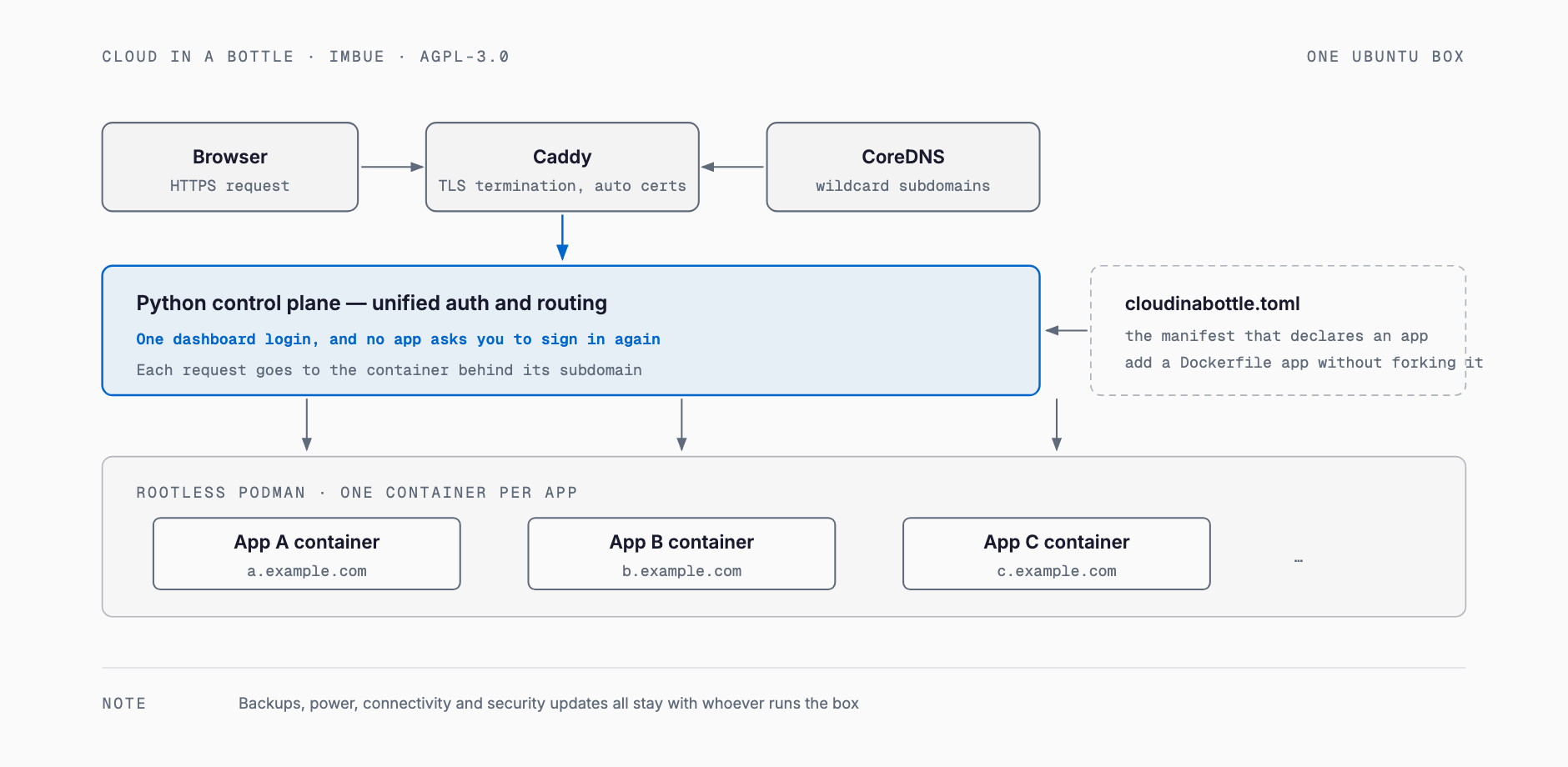
- Unified auth: One dashboard login grants access to every connected app
- Container isolation: Each app runs in its own rootless, hardened Podman container, keeping permissions separated between apps
- Automatic HTTPS: Caddy plus CoreDNS issues a dedicated subdomain and TLS certificate for every app automatically
- App catalog: Apps can be added from cloudinabottle.org/apps, but the team says it is deliberately curated to keep UX quality high — as of September 2026, the supported list is still limited
System Requirements and Installation
The only requirements the official docs spell out are a freshly installed Ubuntu 24.04 machine and a root filesystem that supports idmapped mounts (ext4, xfs, or btrfs). Specific minimum RAM, CPU, or disk figures are not publicly stated as of September 7, 2026. The documentation walks through three separate deployment scenarios: a cloud VPS, a dedicated home server, and a home machine shared with family.
| Item | What the docs say |
|---|---|
| OS | Freshly installed Ubuntu 24.04 |
| Filesystem | Must support idmapped mounts (ext4, xfs, or btrfs) |
| Domain | One domain, with its A record pointed at the server's IP |
| RAM / CPU / disk | No specific minimums published as of September 7, 2026 |
| Example deployment targets | Cloud VPS / dedicated home server / home machine shared with family |
curl -fsSL https://raw.githubusercontent.com/cloud-in-a-bottle/cloud-in-a-bottle/main/scripts/provision.sh \
  | sudo bash -s -- --domain mycooldomain.com --acme-email you@example.com
This provisioning script creates an unprivileged host user, installs the required packages plus rootless Podman, clones Cloud in a Bottle onto the machine, and registers it as a systemd service — all in one pass. If you don't want to run your own server, Imbue also offers managed hosting (with a $10 starting credit). The idea of logging into a dashboard and then operating each app under your own account echoes the philosophy behind self-hosting the dev environment itself, as seen in Coder.
Fastest Path to a Working Setup
- Get a domain and point its A record at your server's IP address
- Run the provisioning script above to initialize the Ubuntu machine as a "host"
- Open the dashboard in a browser and create the owner account
- Pick and launch apps from the catalog — from then on, the same login works for all of them
How It Differs from Umbrel, CasaOS, YunoHost, and Coolify
Self-hosting platforms already exist in this space: Umbrel and CasaOS, which feel closer to a consumer NAS; YunoHost, with years of community track record; and Coolify, closer to a developer-facing PaaS. What sets Cloud in a Bottle apart is putting unified authentication front and center from day one. That said, YunoHost also ships its own SSO layer (SSOwat) with LDAP integration, giving compatible apps a unified login too — so unified auth by itself isn't unique to Cloud in a Bottle.
| Tool | License | Unified auth | Primary audience | Container runtime | Ease of adding apps |
|---|---|---|---|---|---|
| Cloud in a Bottle | AGPL-3.0 | Yes (one dashboard login for every app) | Individuals/technical users who want their own personal cloud | Rootless Podman (one hardened container per app) | Write a cloudinabottle.toml manifest, no forking needed |
| Umbrel | PolyForm Noncommercial (source-available, not OSI-approved open source) | No (each app has its own login) | First-time home-server users | Docker via the Umbrel App Store | Mostly one-click installs from the official store |
| CasaOS | Apache-2.0 | No (each app has its own login) | Beginners starting on low-spec hardware like a Raspberry Pi | Docker | One-command install, very large app store |
| YunoHost | AGPL-3.0 | Yes (SSOwat + LDAP for integrated apps) | People running a community or family server with an admin mindset | Native packages plus Docker | Custom packaging format, steeper learning curve |
| Coolify | Apache-2.0 | No (no consumer-style unified login) | Developers deploying their own apps (PaaS use case) | Docker | Git-push deploys, very flexible but not catalog-based |
Good Fit vs. Poor Fit
- Good fit: A solo developer who wants to consolidate several self-built or open-source apps behind one login
- Good fit: Someone comfortable with Ubuntu and containers who can manage their own server
- Poor fit: An organization that needs to run a specific existing business application as-is, given the still-limited app catalog
- Poor fit: Anyone without server-operations experience who isn't willing to handle incident response themselves (unless using the managed option)
A Point Raised at Launch
Before launch, an account believed to be linked to Imbue opened roughly eleven issues on unrelated GitHub repositories requesting cloudinabottle.toml support, without disclosing the affiliation. This was called out in the Hacker News discussion (around 600 points and roughly 300 comments as of September 2026). Creator Zack Polizzi acknowledged the issue, saying such requests should have come from a real, disclosed account, and characterizing it as a mistake rather than a deliberate spam campaign. Because self-hosting projects ask users to hand over personal data — family photos, password managers, and the like — trust matters more here than in most software categories, so this episode is worth noting as a matter of record.
What Small Businesses Should Weigh Before Self-Hosting
Self-hosting can cut cloud subscription costs, but it also shifts every operational responsibility that a cloud provider used to shoulder back onto your own organization. The question of how much to keep in the cloud versus running in-house echoes the trade-offs discussed in hybrid cloud and local LLM cost reduction. Before adopting it, decide in advance who inside the company owns each of the following.
- Backups: You are responsible for designing and testing regular off-site backups against failure, human error, or ransomware
- Power and connectivity: If the machine sits at home or in your office, a power outage or line failure takes the service down directly
- Security patching: Deciding when to apply OS and container-runtime security updates is now your call, not a cloud provider's
- Domain and network management: Exposing the service externally requires a domain and a stable connection, and managing those contracts and settings becomes your team's job
Frequently Asked Questions
Is Cloud in a Bottle free to use?
Self-hosting it on your own server is free, since it's AGPL-3.0 open-source software. If you'd rather not run your own server, Imbue also offers a paid managed hosting option that starts with a $10 credit.
What hardware do I need to run it?
The official docs list a freshly installed Ubuntu 24.04 machine and a filesystem supporting idmapped mounts (ext4, xfs, or btrfs) as requirements, but specific minimum RAM, CPU, or disk figures are not publicly stated as of September 7, 2026.
Can I migrate apps I already run in Docker?
According to the project, any already-containerized app can be added by writing a cloudinabottle.toml manifest, without forking the core project. That said, you'll still need to verify each app works correctly yourself.
What's the biggest difference from Umbrel or CasaOS?
The biggest difference is that unified authentication is a first-class feature. Umbrel and CasaOS generally require a separate login per app, whereas Cloud in a Bottle and YunoHost let you access connected apps after a single login to a dashboard or portal.
Can I run an existing business application on it as-is?
As of September 2026, the app catalog is deliberately kept small, and the team itself describes the supported list as still limited. For running an existing business app unmodified, it's often not the best fit yet.
Is the launch controversy still an issue?
The creator has already acknowledged and apologized for the issue raised on Hacker News and stated that similar issue-posting practices won't be repeated. Still, since trust is especially important for self-hosting projects, it's worth knowing the background before adopting it.
Feel free to contact us
Contact Us