What Is CUDA for AMD on Windows? Running CUDA Apps on AMD GP
Us via ZLUDA + HIP/ROCm
A guide to Speedstu/CUDA-for-AMD-Windows, which hit 135 points on Hacker News. Covers how this reproducible ZLUDA + AMD HIP/ROCm stack runs CUDA-targeted Windows apps on AMD GPUs, validated hardware, installation, what works and what doesn't, and how it compares to plain ZLUDA, ROCm on Linux, DirectML, and Vulkan-based llama.cpp.
What Is CUDA for AMD on Windows?
CUDA for AMD on Windows (GitHub: Speedstu/CUDA-for-AMD-Windows) is a reproducible setup stack for running CUDA-targeted Windows applications on AMD GPUs, without an NVIDIA GPU. It combines ZLUDA (a CUDA driver API compatibility layer) with AMD's HIP SDK/ROCm libraries via a set of scripts, primarily targeting CUDA-facing compute workloads such as those using CUDA-enabled LibTorch. It hit the Hacker News front page in September 2026, reaching 135 points and 68 comments (all figures in this article are as of September 14, 2026).
What It Can Do — Validated Scope
As the README explicitly states, this project does not claim that every CUDA program or AI model works. What's published is a record of actually testing the public, upstream-only path — using only the official ZLUDA release and AMD HIP SDK, with no private or recovered DLLs. The validated environment is as follows.
- ZLUDA v6-preview.69 (official release)
- AMD HIP SDK 6.4
- LibTorch 2.3.0+cu118
- Validated GPU: Radeon RX 9060 XT (gfx1200)
- nvcuda, cuBLAS, cuBLASLt, cuSPARSE, and cuFFT all pass cuda_check
- A 2,216,347-parameter PPO neural network completed forward/inference, training, and optimizer steps
- One validation run completed 65,536 timesteps on the reference workload
How It Works — From a CUDA Call to the AMD GPU
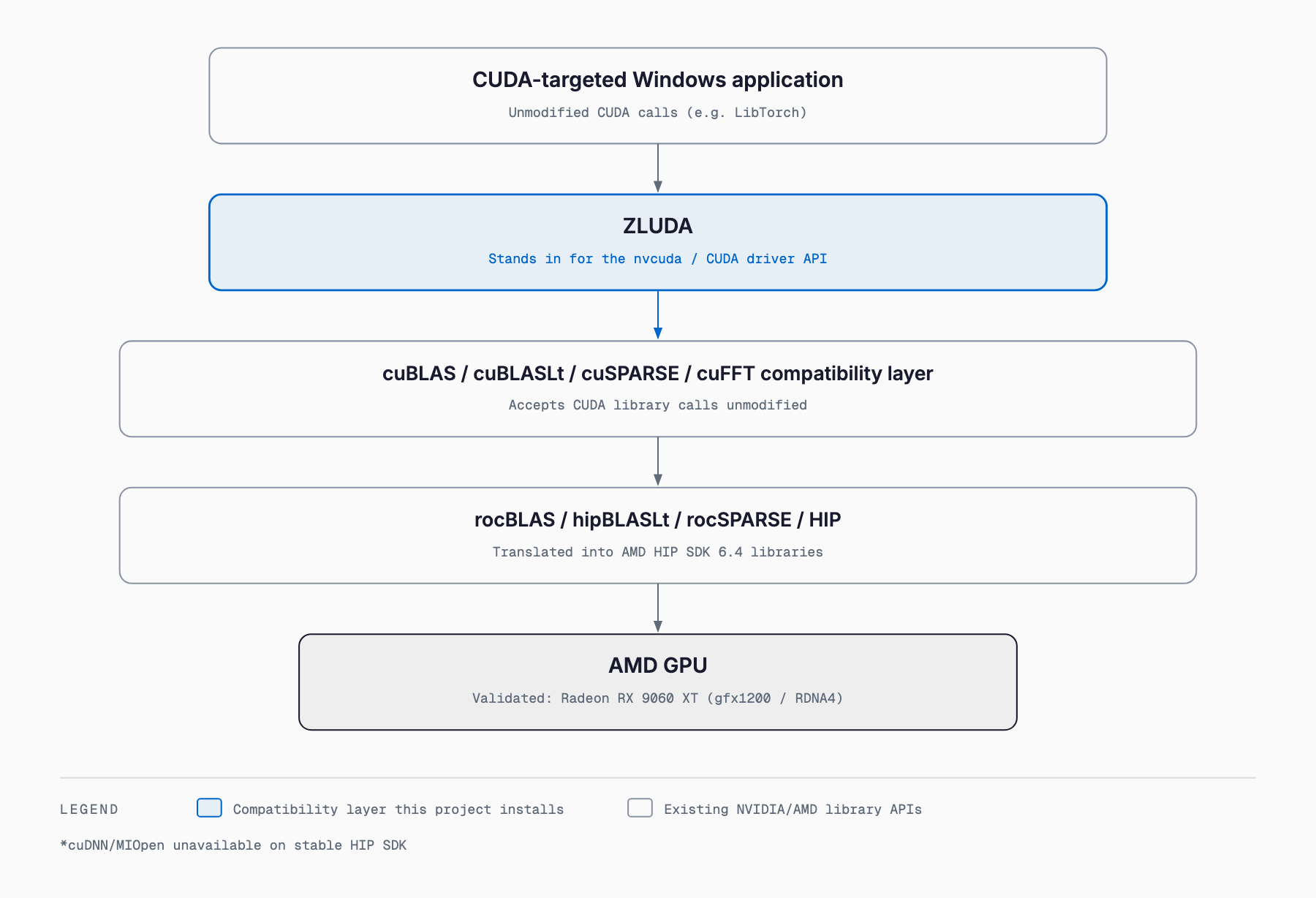
Following the README's own diagram, the translation happens in five stages. A CUDA-targeted Windows app's call first reaches ZLUDA, which stands in for the CUDA driver API (nvcuda). From there it passes through a compatibility layer for CUDA library calls such as cuBLAS, cuBLASLt, cuSPARSE, and cuFFT, which get translated into the AMD HIP SDK's own libraries — rocBLAS, hipBLASLt, rocSPARSE, and HIP. The call is finally executed on the AMD GPU. From the application's point of view it's still calling CUDA; underneath, everything is delegated to AMD's libraries.
Supported GPUs and Requirements
As of September 14, 2026, the only AMD GPU this project labels "validated" is the Radeon RX 9060 XT (gfx1200, RDNA4). Every other AMD GPU is treated as a candidate, not a guaranteed working device, and the README asks users to file a GPU compatibility report — whether it works or fails — as a GitHub issue.
| Item | Requirement |
|---|---|
| OS | Windows x64 |
| GPU | AMD Radeon (only RX 9060 XT / gfx1200 validated; others are candidates) |
| GPU driver | Current AMD GPU driver |
| HIP SDK | AMD HIP SDK for Windows (with HIP Libraries); validated at 6.4, newer versions treated as unverified |
| ZLUDA | v6-preview.69 (pinned and auto-fetched by the installer) |
| If using LibTorch | LibTorch 2.3.0+cu118 (~2.66GB download) |
Setup Steps
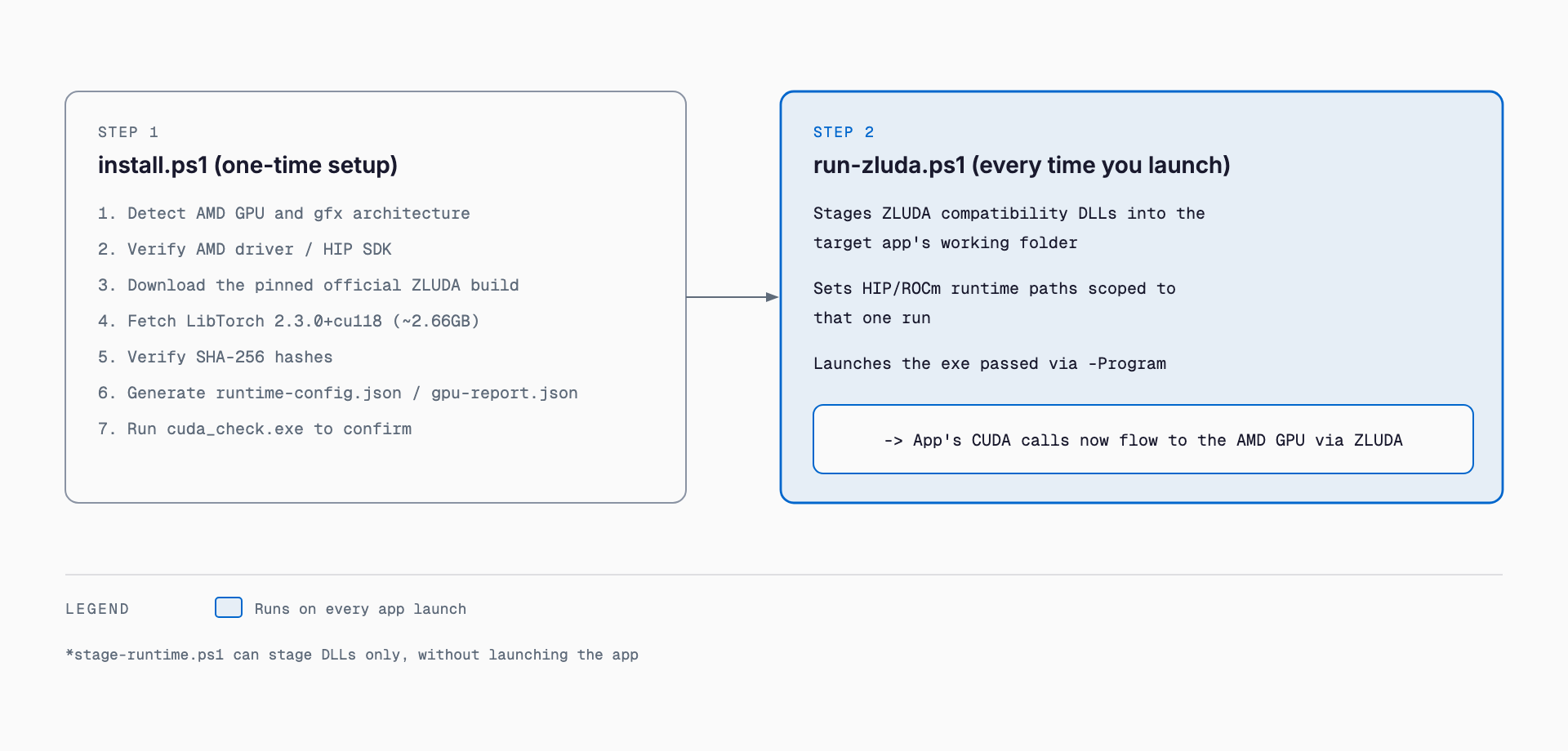
Setup breaks into two phases: a one-time run of install.ps1, and run-zluda.ps1 as the launcher used every time you run an app.
# 1. Prerequisite: install a current AMD GPU driver and AMD HIP SDK for Windows (with HIP Libraries)

# 2. Clone and run the installer
git clone https://github.com/Speedstu/CUDA-for-AMD-Windows.git
cd CUDA-for-AMD-Windows
powershell -ExecutionPolicy Bypass -File .\scripts\install.ps1

# Skip the LibTorch download if you don't need it
.\scripts\install.ps1 -SkipLibTorch
install.ps1 detects the AMD GPU and its gfxXXXX target, verifies the AMD driver/HIP SDK and required math libraries, downloads the pinned official ZLUDA Windows build, fetches LibTorch 2.3.0+cu118, verifies the downloaded files' SHA-256 hashes, generates .runtime\runtime-config.json and .runtime\gpu-report.json, and finally runs ZLUDA's own cuda_check.exe against the installed stack — all in one pass.
# Launch your CUDA-targeted app through this every time
.\scripts\run-zluda.ps1 -Program C:\path\to\app.exe

# Or stage the DLLs without launching
.\scripts\stage-runtime.ps1 -TargetDir C:\path\to\your-app

# Diagnose the machine
.\scripts\doctor.ps1
.\scripts\gpu-scan.ps1
.\scripts\test-runtime.ps1
run-zluda.ps1 stages the required ZLUDA compatibility DLLs beside the target application's working folder and sets the HIP/ROCm runtime paths scoped to that one run, before launching the app. Rather than permanently rewriting system-wide environment variables, it restages the DLLs next to the app on every launch — a practical detail worth understanding before deploying it broadly.
What Works and What Doesn't
The README lists CUDA-facing library calls (nvcuda, cuBLAS, cuBLASLt, cuSPARSE, cuFFT) and GEMM-heavy LibTorch training workloads as confirmed working. In practice, a roughly 2.2 million-parameter PPO network reportedly completed both training and inference cleanly. The following, however, are currently unsupported or unstable.
- cuDNN/MIOpen: not included in the validated stable HIP SDK, so convolution-heavy (CNN) workloads may not work. Dense/GEMM-heavy LibTorch training doesn't strictly require cuDNN, and the validated PPO workload completed without it
- NCCL and TensorRT: the README explicitly notes these may fail
- Unsupported PTX instructions and some custom CUDA extensions: may fail
- ZLUDA's own limits: the README states plainly that "ZLUDA is not a complete CUDA implementation," so coverage is workload-dependent
Performance — vs. the Custom Overlay
Early in development, the project also experimented with an unpublished custom cuBLAS/cuBLASLt/HIP overlay. But in a controlled A/B test run on September 13, 2026 (10 iterations per runtime on the same RX 9060 XT PPO workload, with the first iteration of each trial discarded as warmup), the public upstream-only path reached a median 13,278 SPS versus 12,876 SPS for the custom overlay — the overlay was about 3.03% slower. Based on this result, the project defaults to the upstream-only path and does not publish the custom overlay's binaries (its provenance is incomplete, and the recovered HIP runtime contains third-party AMD binaries). Separately, historical tuned runs under a different training configuration reportedly reached roughly 70k–109k overall steps/s.
How It Differs from Other Options
Several other paths exist for running CUDA-targeted software, or equivalent compute, on AMD hardware. They differ in Windows support, setup complexity, and how thoroughly they've been validated.
| Approach | OS | Mechanism | Validation scope | Ease on Windows |
|---|---|---|---|---|
| CUDA for AMD on Windows (this article) | Windows | ZLUDA + AMD HIP SDK 6.4, auto-set up via reproducible scripts | Measured and auto-verified on RX 9060 XT / LibTorch PPO workload | High (installer and launcher provided) |
| ZLUDA alone | Mostly Linux, Windows experimental | The CUDA driver API compatibility layer itself, translating to HIP/ROCm | Needs per-project, per-workload verification | Moderate (manual setup and DLL placement) |
| ROCm on Linux | Linux | AMD's official native GPU compute stack (developed directly against HIP) | Supported for AMD-official GPU/OS combinations | Not supported on Windows (requires switching OS) |
| DirectML | Windows | GPU-vendor-neutral ML acceleration API layered on DirectX 12 | Provided and validated by Microsoft/vendors as a DirectML compatibility layer | High (native to Windows, but requires rewriting CUDA code) |
| Vulkan backend (e.g. llama.cpp) | Windows/Linux/macOS | Inference engine implementations built on the Vulkan API | Validated per inference engine's own Vulkan backend | High (GPU-vendor-neutral, but can't reuse CUDA code as-is) |
As the table shows, CUDA for AMD on Windows' distinguishing goal is running existing CUDA-targeted Windows apps unmodified. DirectML and Vulkan backends each require writing (or using an already-ported) code against their own API, whereas the ZLUDA-style approach intercepts CUDA calls themselves underneath the app — making it an option when you want to keep using an existing CUDA-dependent codebase as-is.
License and Risk Notes
The scripts and documentation the project itself publishes are MIT licensed, free to use, modify, and redistribute. ZLUDA, AMD ROCm/HIP, NVIDIA CUDA components, and PyTorch/LibTorch each retain their own upstream licenses, though, so it's worth checking those before relying on this stack. The README explicitly lists the following limitations.
- Only the RX 9060 XT (gfx1200) is currently validated
- ZLUDA is not a complete CUDA implementation
- Windows exposes only a subset of the full ROCm ecosystem
- cuDNN/MIOpen is unavailable on the validated stable HIP SDK path
- NCCL, TensorRT, unsupported PTX behavior, and some custom CUDA extensions may fail
- The ZLUDA_CC=8.6 environment variable is a CUDA-facing compatibility value, not the actual AMD GPU architecture
The GPU scanner (gpu-scan.ps1) records the GPU model, gfx architecture, driver, and HIP information, and the README states it does not intentionally collect usernames, tokens, or user files. Even so, given that the stack bundles third-party binaries, it's worth checking it against your organization's software and security policies before adopting it.
Related Articles
FAQ
Which AMD GPUs does CUDA for AMD on Windows support?
As of September 14, 2026, only the Radeon RX 9060 XT (gfx1200, RDNA4) is validated. Other AMD GPUs are recognized as candidates, but not guaranteed to work. The project asks users to file GitHub compatibility reports, whether the GPU works or fails.
Can I run an existing CUDA app on AMD hardware without an NVIDIA GPU?
The design intercepts CUDA calls via ZLUDA and translates them for AMD, without modifying the app. It does not claim every CUDA program works, though — workloads depending on cuDNN, NCCL, TensorRT, or some custom CUDA extensions may fail.
How much effort does setup take?
After installing an AMD GPU driver and HIP SDK 6.4, a single run of install.ps1 automatically downloads and verifies ZLUDA and LibTorch. After that, you just launch apps through run-zluda.ps1 each time.
How is this different from setting up ZLUDA on its own?
Plain ZLUDA requires manually placing DLLs and setting environment variables. This project automates pinning a specific HIP SDK version, fetching and hash-verifying a known ZLUDA build, detecting the GPU, and confirming it works end to end via scripts, and publishes measured results on the RX 9060 XT.
How does performance compare to the custom-tuned overlay?
In a September 13, 2026 A/B test, the public upstream-only path reached a median 13,278 SPS versus 12,876 SPS for the custom overlay — the upstream path was about 3.03% faster. Based on that result, the project defaults to the upstream-only path.
Can this be used commercially?
The project's own scripts and documentation are MIT licensed, which is permissive enough for commercial use. However, ZLUDA, AMD ROCm/HIP, NVIDIA CUDA components, and PyTorch/LibTorch each follow their own separate licenses, so those should be checked before relying on the stack in practice.
Related free tools (no sign-up, instant results)
Feel free to contact us
Contact Us