What Is Context Mode? The MCP Server That Cuts AI Agent Tool
Output by 98%
A guide to mksglu/context-mode, which passed 22,000 GitHub stars with +2,102 in a single week. Covers how it sandboxes tool output to cut context window consumption, how to install it on Claude Code, and how it compares to OpenViking, ECC, and the built-in /compact command.
What Is Context Mode?
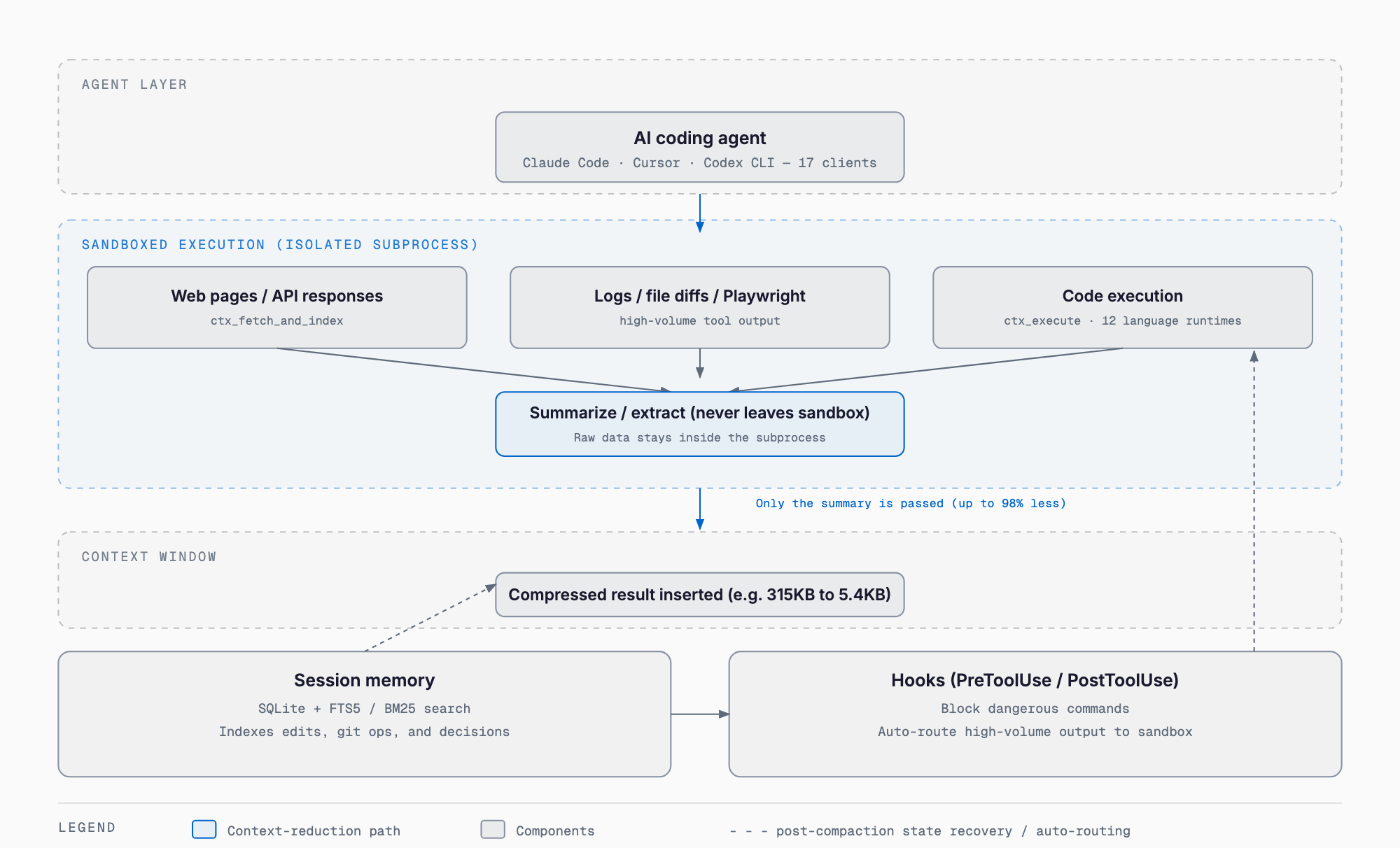
Context Mode (mksglu/context-mode) is an open-source MCP server distributed for AI coding agents such as Claude Code and Cursor. It processes tool output — web pages, API responses, log files, code execution results — inside an isolated sandbox subprocess, so raw data never enters the context window directly; only a summarized or extracted result is returned. The developer claims up to 98% token reduction. As of September 2026, the project has surpassed 22,000 GitHub stars, gaining 2,102 stars in a single week and trending on GitHub.
The Problem It Addresses — Context Window Bloat
AI coding agents tend to load large tool outputs — fetched web pages, log contents, batches of GitHub Issues, Playwright browser snapshots — directly into the context window. Over a session, this eats into usable context length and drives earlier compaction (history compression via summarization) and degraded response quality. Context Mode's developer frames this as "the other half of the context problem," tackling it from the tool-output side rather than the conversation-history side.
How It Works — Four Components
Context Mode is built from four main mechanisms. First, sandbox execution: MCP tools like ctx_execute and ctx_execute_file run code inside an isolated subprocess, and only stdout returns to the context. Second, session memory: file edits, git operations, errors, and user decisions are logged to SQLite (with FTS5 full-text search), tracking state across context compaction events. Third, a knowledge base: BM25-ranked search retrieves only relevant indexed content on demand. Fourth, hook enforcement: PreToolUse/PostToolUse hooks block dangerous commands while automatically routing high-volume tool output into the sandbox.
MCP Tools and Supported Languages
Per the README, Context Mode ships 11 MCP tools: ctx_execute, ctx_execute_file, ctx_batch_execute, ctx_index, ctx_search, ctx_fetch_and_index, ctx_stats, ctx_doctor, ctx_upgrade, ctx_purge, and ctx_insight. Code execution supports 12 language runtimes: JavaScript, TypeScript, Python, Shell, Ruby, Go, Rust, PHP, Perl, R, Elixir, and C#.
Effect — Vendor-Published Benchmarks
The following figures are from the README and are vendor-published numbers. A Playwright snapshot goes from 56.2KB to 299B (about 99% reduction), 20 GitHub Issues go from 58.9KB to 1.1KB (about 98% reduction), and a full session goes from 986KB to 62KB (about 94% reduction). The developer states this extends usable session time before compaction from roughly 30 minutes to roughly 3 hours. As of September 2026, no independent third-party reproduction of these benchmarks has been confirmed, and actual reduction rates will vary by the tools used and the project's content.
Supported Clients — 17 Platforms
The README lists support for 17 clients, including Claude Code (via the plugin marketplace), Gemini CLI, VS Code Copilot, JetBrains Copilot, GitHub Copilot CLI, Cursor, OpenCode, KiloCode, OpenClaw, Codex CLI, Antigravity IDE, Antigravity CLI, Kiro, Zed, Pi Coding Agent, and OMP (Oh My Pi). Hook enforcement effectiveness varies by client, though: the README notes Cursor lacks a SessionStart hook so compaction recovery is unavailable there, and Antigravity IDE and Zed have no hook support at all, leaving routing compliance around 60% versus roughly 98% in hook-enabled setups.
Installation — Claude Code
The recommended path for Claude Code is installation via the plugin marketplace. For other clients, a global npm install is the base route, with per-client MCP server config entries and optional hook setup required afterward.
# Claude Code (recommended)
/plugin marketplace add mksglu/context-mode
/plugin install context-mode@context-mode

# Other platforms (global install)
npm install -g context-mode
Requirements
Per the README, Linux requires Node.js 22.5 or higher (or Bun), while macOS/Windows require Node.js 20 or higher. Older Linux distributions such as CentOS 7/8 and Alpine may need build tools including a C++ compiler for the native better-sqlite3 build.
License and Adoption
Context Mode is published under the Elastic License 2.0 (ELv2). The source is public and free to use and modify, but unlike an OSI-approved open-source license in the strict sense, it is a "source-available" license that restricts repackaging as a managed service offered to third parties — worth checking before adopting it commercially. The README lists Microsoft, Google, Meta, Amazon, IBM, NVIDIA, ByteDance, Stripe, Datadog, and Salesforce as "adopters," but this appears to reference companies that use the Elastic License 2.0 license form generally rather than confirmed production use of Context Mode itself. The project ranked #1 on Hacker News with over 570 points. It is free with no account required, and all processing runs locally with no cloud telemetry, per the README.
How It Compares to Existing Approaches
Approaches to reducing context consumption already include Claude Code's built-in /compact history summarization, external memory/knowledge systems such as ByteDance-affiliated Volcano Engine's OpenViking (context database), and agent-harness optimization suites such as affaan-m/ECC. Context Mode's distinguishing focus is narrower: it intercepts tool output at the point of generation, confining it to a sandbox and returning only a summary.
| Approach | Mechanism | Primary target | Delivery | Session continuity | License |
|---|---|---|---|---|---|
| Context Mode | Processes tool output in an isolated subprocess, returns only a summary | High-volume tool output (web/logs/execution results) | MCP server + hooks (17 clients) | Yes (SQLite+FTS5 restores state after compaction) | Elastic License 2.0 (source-available) |
| Built-in /compact | Summarizes the entire conversation history via the LLM | Conversation history overall | Built into the agent | Detail is often lost after summarization | Follows the host agent |
| OpenViking | Unifies memory, knowledge, and skills as a filesystem with tiered loading | Long-term memory and knowledge retrieval | External server (integrated via MCP etc.) | Yes (persisted via viking://) | Core AGPLv3; CLI/examples Apache 2.0 |
| ECC (affaan-m/ECC) | Optimizes the whole harness via subagents, skills, and commands | Development workflow overall | Plugin, npm package, GitHub App | Mostly guideline-driven; automated persistence is limited | Check the repository for current terms |
/compact is a reactive measure that compresses the entire conversation history after the fact, while Context Mode is a proactive measure that isolates tool output the instant it is generated — the two are not mutually exclusive and are meant to be used together. OpenViking focuses on long-term memory, knowledge, and skill management, a different role from Context Mode's immediate tool-output reduction. ECC also touches context management but has a much broader scope covering overall agent-harness operations.
Effectiveness and Limitations
If the reduction rates hold up in real usage as claimed in the README, the potential benefit is fewer compaction events during long sessions and a better chance of completing complex tasks within a single session. The limitations are equally clear, though. First, the reduction figures are vendor-published benchmarks and will vary with real-project output. Second, hook enforcement effectiveness is client-dependent, with reduced benefit on Cursor, Antigravity IDE, and Zed. Third, the Elastic License 2.0 is source-available, so any redistribution or SaaS-ification plan needs a careful read of the license terms. Fourth, while ctx_execute_file is confined to the project root by default and network fetches reportedly block cloud metadata endpoints (169.254.169.254) and dangerous URI schemes by default, granting a tool sandboxed code-execution rights still warrants its own internal security review.
Practical Use Cases
For SME contracted development, the clearest fit is long AI-coding-agent sessions where tool output tends to balloon — auditing a large existing codebase, parsing large log files, or gathering requirements through multi-page web scraping. For short, small-scope tasks, the setup overhead may outweigh the benefit.
Related Articles
- What Are i-have-adhd and Ponytail? — Inside GitHub's Two Trending Coding-Agent Skills (Sep 2026)
- OpenViking: Unifying AI Agent Memory, Knowledge and Skills
FAQ
Is Context Mode free to use?
Yes, it is free with no account required. It is licensed under the Elastic License 2.0 (ELv2), which makes the source public but is a source-available license, not a strictly OSI-approved open-source license.
Which AI coding agents does it support?
The README lists 17 supported clients, including Claude Code, Cursor, Gemini CLI, VS Code Copilot, and Codex CLI. Hook-based routing enforcement effectiveness varies by client, however.
Does it really cut context usage by 98%?
The vendor's own benchmarks show roughly 99% reduction for a Playwright snapshot and roughly 98% for a GitHub Issues fetch. No independent third-party reproduction has been confirmed as of September 2026, and actual reduction varies by tool type and project content.
How is it different from OpenViking or ECC?
OpenViking is an external context database focused on long-term memory, knowledge, and skill management. ECC is a broader agent-harness operational optimization suite. Context Mode specifically intercepts tool output the moment it is generated, sandboxing it and returning only a summary to the context.
Can it be used alongside the built-in /compact command?
Yes. /compact reactively compresses the whole conversation history, while Context Mode proactively reduces tool output before it enters context — the two serve different roles and are meant to be used together.
Related free tools (no sign-up, instant results)
Feel free to contact us
Contact Us