Cue by Manus (cue.im) Explained: A Personal-Agent App with Its Own Phone, Email, Wallet, and Computer
Features, How to Get In, Pricing, and Caveats [Invite-Only]
Cue by Manus (cue.im), launched with Manus 2.0, gives Agents a phone, email, wallet and PC. Free in invite-only early access. Not Cue AI (cueai.app). Caveats.
Cue by Manus (cue.im) is a personal-agent app that Manus announced on September 28, 2026, alongside Manus 2.0. Each Agent can have four identities: a phone, an email, a wallet, and a computer, and uses them to handle calls, bookings, payments, and tasks on your behalf. The official site lists a mobile app plus macOS and Windows versions, and the app is on the App Store (Japan) and Google Play. Access is currently by invite code in early access: it is free with a code, and a Plus membership is included at no cost once you get in.
This article is based on the Japanese page of cue.im, the official blog, the official help center, the App Store (Japan), and Google Play as of October 14, 2026. It is a different product from "Cue AI" at cueai.app, from a different company, which we cover in a separate article. Where the official sources are silent we write "not stated officially," and we do not cite figures from third-party reviews.
What Is Cue by Manus? The Personal-Agent App Launched with Manus 2.0
The official blog describes Cue as a new standalone app for personal agents on smartphone and desktop, built on the same infrastructure as Manus. The official site's tagline reads "Your Personal Agents, With Their Own Identity" in English. According to the official help center, Cue and Manus share the same account and the same data, and at present you cannot delete only your Cue account while keeping Manus. Our overview of Manus 2.0 as a whole is in this article.
| Item | Details |
|---|---|
| Name | Cue by Manus ("Cue" on the official site; English title "Cue - Your Personal Agents, With Their Own Identity") |
| Developer | Manus (operated by Butterfly Effect Pte. Ltd.) |
| Announced | September 28, 2026 (together with Manus 2.0, per the official blog) |
| Type | A standalone app for personal agents, for smartphone and desktop |
| Platforms | Official site: macOS and Windows downloads plus a mobile app. Official blog: web, desktop, and mobile. Stores: App Store (Japan) and Google Play |
| App UI languages | 22 languages per the App Store listing (Japanese included) |
| Access | Invite-code access (early access) |
| Price | Free with an invite code during early access. The official regular price is not stated officially |
| Latest version | App Store 26.17.13; Google Play updated October 14 |
| Store ratings | App Store (Japan): 34 ratings, average 4.8. Google Play: 4.7 (2.4K reviews), 10K+ downloads |
An Agent's Identity: Phone, Email, Wallet, and Computer
The core idea of Cue is to give an Agent its own standing in the world. According to the official site and store descriptions, an Agent can have the following four.
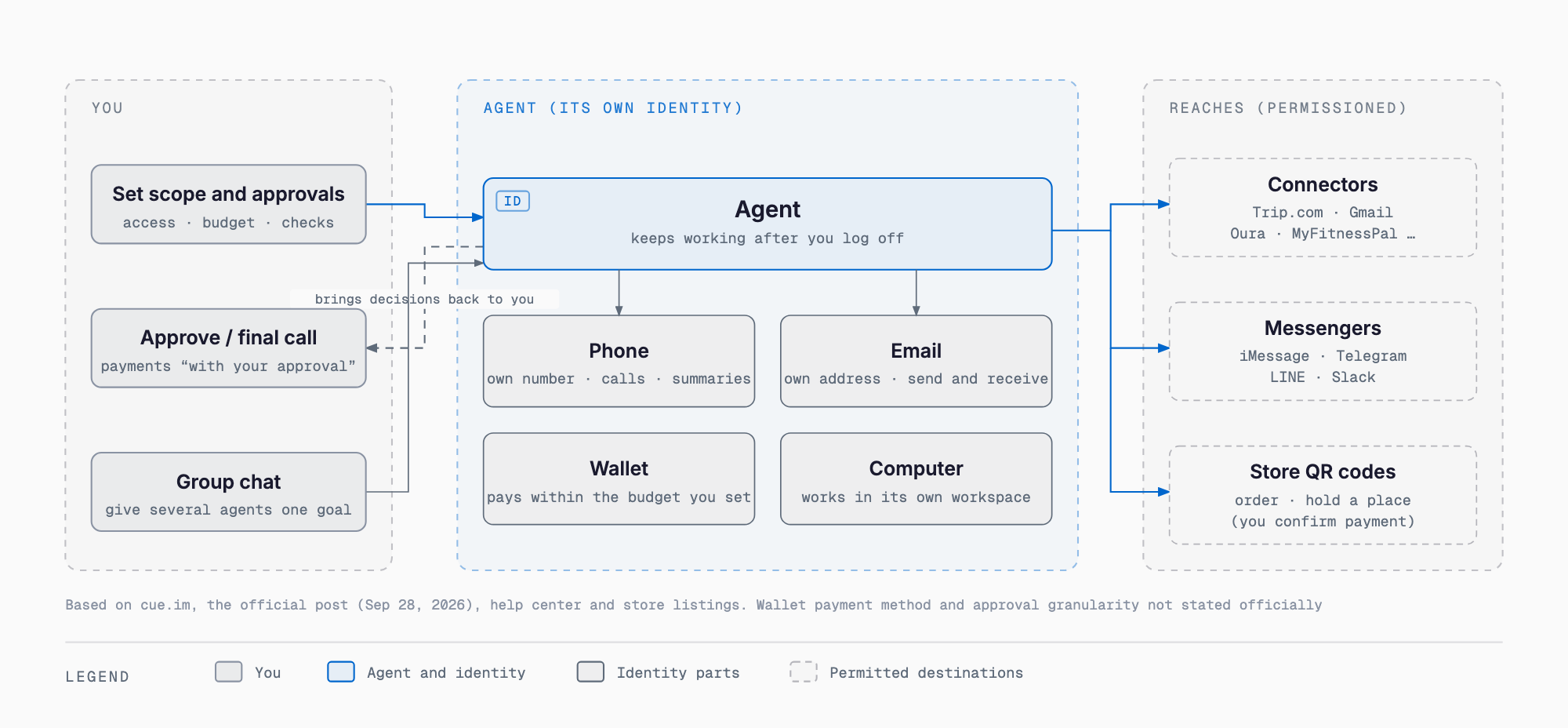
| Element | Official description |
|---|---|
| Phone | Makes and receives calls and sends messages from its own number. Takes forwarded calls and leaves a summary in Cue |
| Sends and receives email from a dedicated address | |
| Wallet | Pays within the permissions you control and the budget you set. Described as paying with "its own card" |
| Computer | Works in a dedicated workspace with the apps and tools it needs, and continues working after you log off |
The official site's FAQ says an Agent can have its own email address, computer workspace, phone number, and wallet, and that you control what it can access and which actions need approval. On approval, the FAQ says you set the scope of confirmation, and the Agent brings the work back to you when a decision is needed. The Google Play description says purchases and payments are completed with your approval. However, whether each payment is confirmed individually is not stated officially (see below).
What It Can Do: Teams, QR Creation, Connectors and Messengers, Watching and Booking
The official blog gives a "team" (group chat) example in which several Agents work together in one conversation: one researches a launch venue in New York, another builds a shortlist, and a third drafts materials. You set the direction and make the final call. The main features are as follows.
- Create by scanning: the official site promotes "scan to create an Agent." Per the Google Play description, scanning a supported cafe or restaurant's ordering QR code creates a Cue dedicated to that service, which reads the menu and places an order; you confirm the payment. The official blog also mentions holding a place in a waiting line as an example
- Connectors: the official site lists examples such as Trip.com, oura, Gmail, and MyFitnessPal. Per the Google Play description, it connects to supported apps such as email, calendar, and messaging with your permission, and you can change permissions at any time
- Messenger integrations: according to the official help center, four are supported at present: iMessage, Telegram, LINE, and Slack. You can connect several to the same Agent and keep them active at once. The steps are Open the Agent, then Agent Info, Integration, Messenger, Connect, repeated for each platform. On a corporate network, you may need to switch to mobile data for the first OAuth step
- Memory and Dream: per the Google Play description, it remembers food preferences, travel habits, learning progress, and plans you want to continue, and resumes where you left off
- Automations: per the Google Play description, it builds a daily agenda, a weekly shopping list, and monitors changes, either on a schedule or in response to supported events and conditions
The official site groups use cases into six categories: booking and travel, shopping, communication and errands, money, daily life, and work and creativity, each with sample prompts. Japan-related examples include a five-day family trip to Tokyo (a hotel near a subway station, Disney tickets, Narita transfers), a half-day matcha route in Uji, comparing a Suica and a subway pass while staying in Shinjuku, "tell me when the dollar hits 160 yen," and "I'm in Tokyo this week with jet lag; answer calls from the US for me." There are many watching examples too: campsite openings, earlier appointment slots, event registrations opening, and ticket releases, all following the pattern of booking or notifying you the moment a slot opens.
How to Get In and Pricing: Invite Code, Plus Included, Phone Numbers Sold Separately
The flow is to create a free account and enter an invite code after signing in. Per the Google Play description, once you get access a Plus membership is included at no cost. The official blog says you can start with the code MEETCUE, but that is as of September 28, and whether it is still valid is not stated officially. The same blog says people who get access also receive extra invite codes to share. From the desktop, the official help center says you can scan the QR code shown in the Agents (Cue!) tab of the Manus sidebar to download the app.
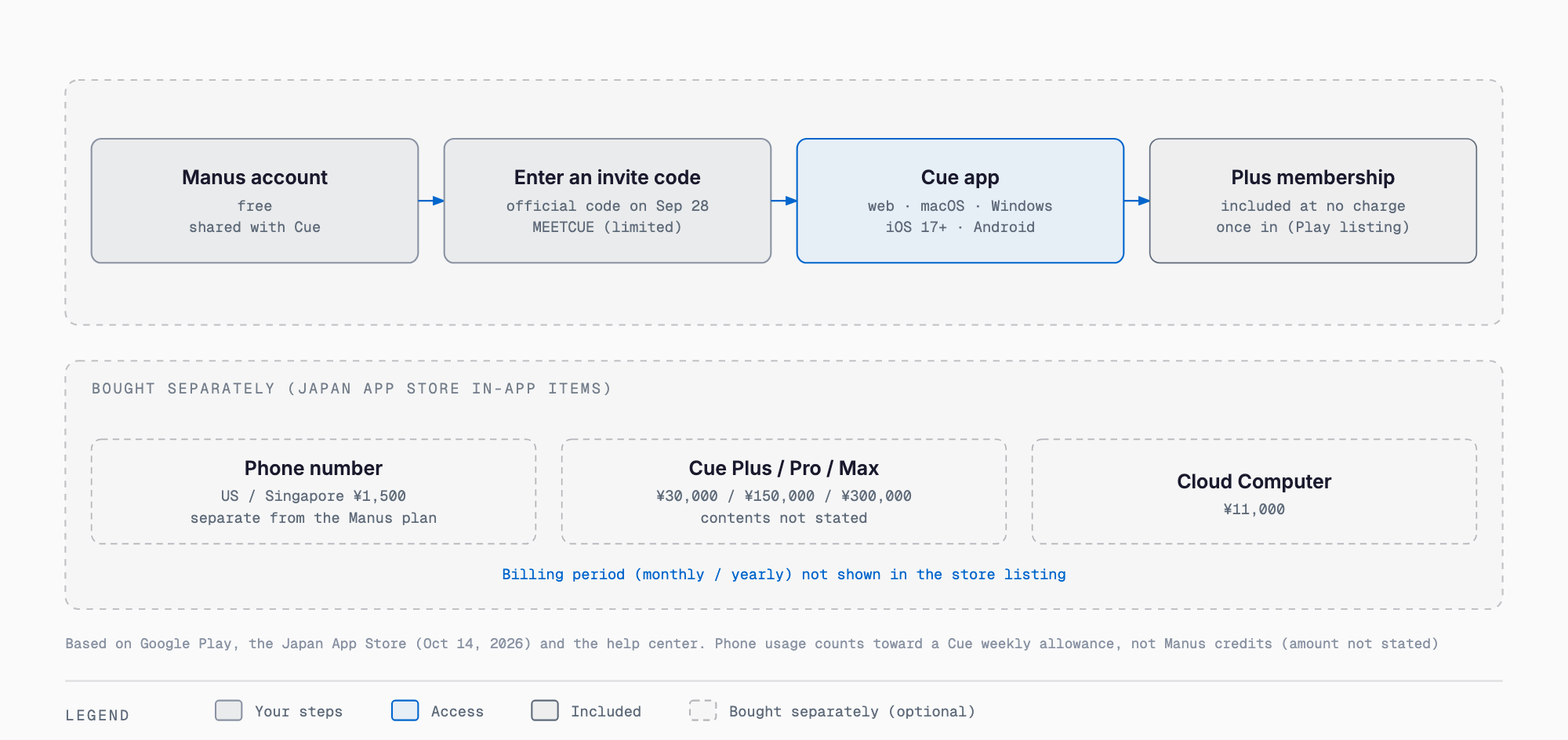
| Item | Details |
|---|---|
| Early-access price | Official blog (September 28): free with an invite code; limited quantity, first come first served |
| Plus | Google Play description: a Plus membership is included once you get access. What Plus contains is not stated officially |
| Phone-number subscription | Official help center: purchased separately from a Manus membership. Phone usage does not consume Manus credits and counts toward Cue's weekly allowance. The price, the allowance amount, and supported countries are not given in the article text |
| App Store in-app purchases | US Phone Number ¥1,500, Singapore Phone Number ¥1,500, Cue Plus ¥30,000, Cue Pro ¥150,000, Cue Max ¥300,000, Cloud Computer ¥11,000 (shown in JPY; the billing period cannot be read from the list, and the contents of each plan are not stated officially) |
| Regular price | Not stated officially, including the price after early access ends |
For reference, the same help center lists Manus itself as Free at $0 (300 credits/day refresh, 1 concurrent task), Pro from $20/month, from $40/month, and Team from $20/seat/month, with a 17% discount for annual billing. That is a separate scheme from Cue's, so do not conflate them.
Devices and Store Listings
| Item | App Store (Japan) | Google Play |
|---|---|---|
| Name | Cue by Manus | Cue by Manus |
| Seller | BUTTERFLY EFFECT PTE. LTD. | BUTTERFLY EFFECT PTE. LTD. |
| Version / update | 26.17.13 (five updates from 26.17.1 to 26.17.13 in the last five days) | Updated October 14, 2026 |
| Size | 236.2MB | Not confirmed in this article |
| Supported OS | iOS 17.0 or later, iPadOS 17.0 or later, macOS 14.0 or later (Apple M1 or later), visionOS 1.0 or later | Not confirmed in this article |
| Languages | 22 (Japanese included) | Not confirmed in this article |
| Age rating | 13+ | 3+ |
| Rating / downloads | 34 ratings, average 4.8 | 4.7 (2.4K reviews), 10K+ |
| Data | Data linked to you: purchases, contact info, user content (emails/text, photos/videos, audio, and so on), identifiers, diagnostics (developer-declared) | May be shared with third parties: personal info and device IDs. May be collected: 9 types including personal and financial info. Encrypted in transit; deletion requests available |
As of September 28, the official blog said the iOS version would be available after App Store review was complete. As of October 14 it is listed on the App Store in Japan. The version moved 26.17.1, 26.17.9, 26.17.10, 26.17.12, 26.17.13 over the last five days, so updates are frequent. The App Store listing says "Designed for iPad. Not verified for macOS." To use it on a Mac, the listing requires macOS 14.0 or later and Apple M1 or later. The privacy label declares contact info, user content, and purchases as data linked to you, so review it before letting an Agent handle your email or call content. On Google Play the rating is 4.7 (2.4K reviews).
What Isn't Stated Officially: Points to Check Before Adopting
- Regular price: the price after early access ends, and the contents of Cue Plus / Pro / Max, are not stated officially
- Phone numbers: supported countries (US and Singapore judging from the App Store product names), SMS support, and the weekly allowance amount are not given in the help center text
- Wallet: payment methods, how limits are enforced, and refunds are not stated officially. The official site includes an example paying through Link. Whether approval is once per feature or per payment is also unstated, and the same question remains unanswered in the comments on Product Hunt
- Availability in Japan: the app is listed on the Japanese App Store and its UI supports Japanese, but whether phone numbers and wallets can be used in Japan is not stated officially
- Dedicated computer: the conditions for availability are not stated officially (the App Store list does include Cloud Computer)
- Audit logs: how you can review call and payment history is not stated officially
For a small business or sole proprietor trying it out, starting with low-risk errands is the realistic approach. Set payment budgets small, use a separate email rather than your main business address, and do not hand over customer information or contract-related messages. For where to draw the line on what to delegate to AI, the article on tasks to delegate and not delegate to AI is a useful reference.
Where It Sits: See the dots, Muse, and Grok Bot Articles for Comparison
Cue belongs to the wave of always-on personal agents that act on the user's behalf. We cover comparable products from other companies in the articles on OpenAI dots, Meta Muse, and Grok Bot; see those articles and each company's official pages for specifications and prices. The Manus-side features for operating a computer on the desktop are in the Manus Studio article.
The company's situation is worth noting too. Manus was acquired by Meta on December 29, 2025, Chinese authorities ordered the deal reversed on April 27, 2026, and it returned to independent operation in August 2026. On October 8, TechCrunch reported its first funding round since the split: more than $500 million, led by Boyu Capital and IDG Capital. Cue is one of the first new products since regaining independence.
FAQ
Is Cue by Manus free to use?
According to the official blog, it is free with an invite code during early access. The Google Play description says a Plus membership is included at no cost once you get access. A phone-number subscription, however, is purchased separately from a Manus membership. The regular price is not stated officially.
Where can I get an invite code?
The official blog (September 28) says you can start with MEETCUE, and that people who get access also receive extra invite codes to share. Whether MEETCUE is still valid is not stated officially.
Can I use it in Japanese?
The official site has a Japanese page, and the App Store (Japan) listing includes Japanese among the app's 22 languages.
Can I use a phone number or wallet in Japan?
Not stated officially. The phone numbers in the App Store purchase list are US and Singapore only; no Japanese number is listed. Availability of the wallet in Japan is not stated either.
Will it make payments on its own?
The official site FAQ says you set the scope of confirmation and that the Agent brings work back when a decision is needed. The Google Play description also says purchases and payments are completed with your approval. Whether approval is per payment or per feature is not stated officially, so check before adopting it.
Is it the same as Cue AI (cueai.app)?
No. Cue by Manus (cue.im) is a Manus product, while Cue AI at cueai.app is a different product from a different company. We cover Cue AI in a separate article.
Can I leave Cue only?
According to the official help center, Cue and Manus share the same account, and at present you cannot delete only your Cue account while keeping Manus.
Sources
- Cue official site
- Official blog: Introducing Manus 2.0
- Official help: What's new in Manus 2.0
- Official help: Can I connect multiple messaging Agents at once in Cue?
- Official help: What is the current membership pricing for Manus?
- Official help: How can I delete my account?
- Official help: How can I use Mail Manus?
- App Store (Japan): Cue by Manus
- Google Play: Cue by Manus
- Product Hunt: Cue by Manus
- TechCrunch (2026-10-08)
Feel free to contact us
Contact Us