What is Doory
an Open-Source Canva Alternative (Features, Self-Hosting, vs Penpot)
Doory is a self-hostable open-source Canva alternative. Features, Docker Compose setup steps, license caveats, and how it compares with Penpot and Figma.
Doory (GitHub: shaongitbd/doory) is a self-hostable, open-source Canva alternative: a browser-based design editor for posters, social posts, slides, resumes and business cards, with export to PNG, PDF, MP4 and more. Commercial use is allowed, but the license is the Attribution Assurance License rather than MIT or Apache 2.0, and it requires you to show the author's credit inside the running app.
This article is based on the official README, the GitHub repository page and the Hacker News thread ("Doory – Open-Source Canva", 117 points and 44 comments) as of October 12, 2026. It covers features, the tech stack, the license, a Docker Compose setup, usage, how Doory differs from Canva, Penpot, Figma and others, and what to check before relying on an early-stage project. The repository had 363 stars, 6 commits and no published releases at that time, so it is very new.
What Doory is — a self-hosted design editor in the browser
The README describes Doory as a browser-based design editor and a free alternative to Canva. It targets the things non-designers make every day: posters, social posts, stories, slides, invitations, resumes, thumbnails and business cards. Because you run it on your own server, designs and uploaded images stay under your control.
The README says every feature is free, with no paid plans, watermarks or ads. Guests can start designing immediately and their work is saved in the browser. Signing up moves guest designs to the cloud, meaning the server running Doory.
What it can do
The following comes from the README. It is a list of documented features, not something we tested one by one.
- Text: headings, curved text, text effects, font pairings, lists, an open-licensed font catalogue, and custom font uploads
- Elements: shapes, lines, arrows, about 25,000 icons, emoji, illustrations, stickers and QR codes
- Photos: uploads, cropping, masks, filters, and background removal that runs in the browser; stock photo search needs an Unsplash or Pexels key
- Layout: layers (lock, hide, reorder, group), alignment guides, snapping, rulers, multi-page designs with mixed page sizes, and magic resize
- Motion: 27 enter/exit animations, 12 emphasis effects and 16 page transitions on a timeline
- Sound: a built-in library of 24 music loops and 88 sound effects (CC0), plus uploads, voiceover recording, trims and fades
- Presenting: speaker notes, timing, auto-advance, a laser pointer and a second presenter window
- Sharing and collaboration: share links with view, comment or edit access (optionally password-protected), pinned comments, version history, and real-time co-editing with live cursors
- Brand kits: saved colors, fonts and logos
- Export: PNG (with transparency), JPG, SVG, PDF, MP4, WebM and animated GIF, generated in the browser per the README; print-ready PDFs include bleed and crop marks
Ten starter templates ship with it: a gig poster, wedding invitation, event story, sale post, cafe flyer, quote card, resume, YouTube thumbnail, pitch deck and business card. All are editable, admins can add more, and they can be filtered by category, size and orientation. It has nothing like Canva's huge template and asset library, so it is realistic to treat Doory as something where you grow your own templates.
Tech stack
- Frontend: React 19, TypeScript, Vite, Fabric.js (canvas rendering), Yjs (collaboration) and Zustand (state)
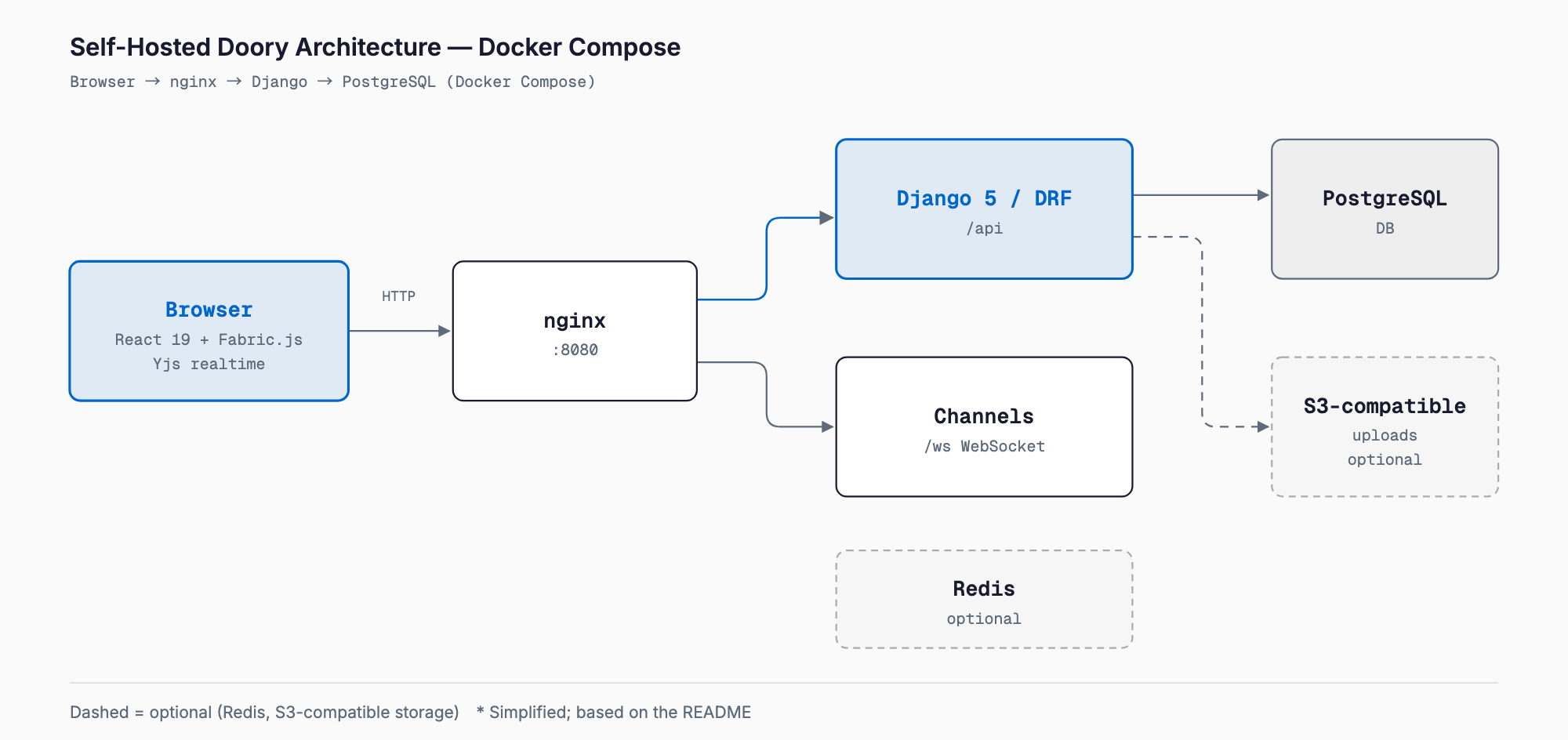
- Backend: Django 5, Django REST Framework, Channels (WebSockets) and PostgreSQL
- Infrastructure: Docker Compose with nginx, optional Redis, and optional S3-compatible storage
This is a conventional web app stack that most teams can maintain. It builds on established libraries: Fabric.js for the canvas and Yjs, a CRDT library, for co-editing, so the sync logic is not written from scratch. According to the README, the web container serves the app and forwards /api and /ws to the backend, so the browser sees a single address.
License — what the Attribution Assurance License means
The README names the Attribution Assurance License, and the repository contains LICENSE and NOTICE files. You may use, modify and redistribute the software, including commercially, under two conditions:
- Keep the LICENSE and NOTICE files with the software
- Display the author credit prominently in the running app (the README gives the text "Doory by Siam, creator and maintainer of Doory" plus the GitHub URL)
This is the practical difference from MIT or Apache 2.0, which normally only require you to keep copyright notices in the source or distribution, not on screen. The Attribution Assurance License is an attribution-style license that asks for credit in the running application. For purely internal use the impact may be small, but if you embed Doory in a branded service for customers or resell it as a white-label product, the credit becomes a constraint on your UI.
Third-party software, fonts and content keep their own licenses, which the README says are listed in THIRD_PARTY.md. If your organization limits itself to OSI-approved licenses, check with legal or IT before adopting it. This is a summary of the README, not legal advice.
Setup — self-hosting with Docker Compose
The README gives a three-command setup. You need a machine with Docker and Docker Compose, and you run the commands in the cloned repository.
git clone https://github.com/shaongitbd/doory.git
cd doory
cp .env.example .env     # set DJANGO_SECRET_KEY (openssl rand -base64 48) and POSTGRES_PASSWORD
docker compose up -d --build
docker compose exec api python manage.py createsuperuser
Then open http://localhost:8080 in your browser. The first two lines (git clone and cd) are the usual steps we added; the README's core is the three commands after them.
A fresh install is empty. The README lists optional commands to load starter content:
docker compose exec api python manage.py seed_gallery          # template categories
docker compose exec api python manage.py sync_fonts --popular 100
docker compose exec api python manage.py seed_templates        # add --update to refresh
docker compose exec api python manage.py seed_elements         # shapes and graphics
docker compose exec api python manage.py sync_element_packs    # icons, emoji, illustrations
docker compose exec api python manage.py sync_models           # background removal model
docker compose exec api python manage.py sync_audio            # music and sound effects
The main .env settings, per the README:
- SITE_URL: public address of the site, without a trailing slash
- DJANGO_ALLOWED_HOSTS: comma-separated host names the site accepts
- SECURE_SSL_REDIRECT, SECURE_COOKIES: true behind HTTPS, false for plain HTTP
- EMAIL_URL, DEFAULT_FROM_EMAIL: SMTP settings; without them, emails print to the API log
- WEB_PORT, WEB_BIND: publishing address (default 0.0.0.0:8080)
- INSTALL_CHROMIUM: set to false to skip the headless browser used for server-side PDF export
- GOOGLE_CLIENT_ID: enables Google sign-in
- UNSPLASH_ACCESS_KEY, PEXELS_API_KEY: enable stock photo search
- USE_S3 and AWS_*: store uploads in S3-compatible storage
For development, the README describes make setup, make dev-api (localhost:8000) and make dev-web (localhost:5173).
Using it — from first design to sharing
According to the README, you can open the editor and start designing without an account. Click an element to edit it, use the toolbar for styling, manage stacking in the Layers panel, and export from the export menu. Sign-in is needed for cloud saving, sharing and brand kits.
- 1. Pick a template: open one of the ten starter templates; admins can add more
- 2. Edit: swap text, photos and shapes; background removal runs in the browser
- 3. Add motion and sound: set animations, page transitions, music or voiceover if needed
- 4. Share: create a share link with view, comment or edit access; co-editing shows live cursors
- 5. Export: PNG/JPG/SVG for images, PDF with crop marks for print, MP4/WebM/GIF for video
The README does not say how long or high-resolution video and GIF exports can practically be. Since they are generated in the browser, results may depend on the device.
How it differs from other tools
The table below sets Doory's documented behavior beside the commonly known positioning of each tool. Prices and features of the non-Doory tools change, so check their official pages.
| Tool | Main use | Hosting | License / model | Difference from Doory |
|---|---|---|---|---|
| Doory | Template-based design for non-designers (posters, social, slides, video) | Self-host (Docker Compose) | Open source (Attribution Assurance License) | The subject of this article; early stage |
| Canva | Same use, with a vast template, asset and stock photo library | SaaS only | Commercial SaaS (free and paid plans) | Far more polished with more assets; Doory lets you keep data on your own server |
| Penpot | UI/UX design and designer-developer collaboration | Self-host or cloud | Open source (MPL 2.0) | Penpot is product-design oriented; Doory targets marketing material, social posts and slides |
| Polotno Studio | Canva-like web design editor | Use the web app | Polotno SDK is a commercial toolkit | Centered on an embeddable SDK; Doory is a complete app you can run yourself |
| Photopea | Photoshop-style image editing | Browser (cloud) | Free ad-supported tier (not open source) | For advanced raster editing; Doory is for multi-page, template and co-editing work |
| Excalidraw | Hand-drawn whiteboard and diagrams | Self-host possible | Open source (MIT) | For sketches and brainstorming; Doory is for polished deliverables |
| Figma | UI design, prototyping, FigJam | SaaS only | Commercial SaaS | A professional design tool; Doory is for simple Canva-style production |
As a rule of thumb: for non-designers making posters and social images from templates, Canva and Doory are in the same space; for UI design and developer collaboration, Penpot and Figma; for photo retouching, Photopea; for diagrams and rough sketches, Excalidraw. Doory's distinction is putting a Canva-style UI, including video, audio and co-editing, on your own server.
If video is your interest, there is a code-driven alternative: see What is HyperFrames — an HTML-to-video framework for agents, which generates MP4 from HTML instead of a GUI editor.
Who it suits, and what to watch for
Doory suits people who:
- do not want design data in an external SaaS and want to self-host simple marketing material
- are comfortable with Docker, Django and React and can add features or fix bugs
- want to study or build on a Canva-style editor for their own use
- want to pilot at small scale and expand step by step
As of October 12, 2026, the GitHub page shows 6 commits, no releases, 363 stars and 14 forks, and the README has no roadmap or limitations section. Things to check before relying on it:
- Operations: backups (PostgreSQL and the uploads volume or S3), HTTPS (SECURE_SSL_REDIRECT and SECURE_COOKIES), management of DJANGO_SECRET_KEY and POSTGRES_PASSWORD, and SMTP for email
- Security: the README asks for private reports through the repository's Security tab; confirm you can track fixes and updates
- Third-party assets: fonts, icons, illustrations and audio carry separate licenses; read THIRD_PARTY.md before commercial use
- Credit display: decide how to handle the attribution requirement if you offer Doory under your own brand
- Load: test simultaneous co-editing and long video exports for server and browser load
- Continuity: estimate whether you could maintain it yourself if development stalls
The safe route is to run Docker Compose in a separate test environment and try real material first: your own templates, rendering with your fonts, print settings for PDFs. The README says nothing specific about Japanese or other non-Latin fonts, so verify which fonts sync_fonts provides on a real instance.
Reception on Hacker News
The Hacker News post "Doory – Open-Source Canva" had 117 points and 44 comments as of October 12, 2026. Our paraphrase of the thread shows mixed opinions.
- Positive: reasonable for non-critical open-source use; AI tools make it easier to fix bugs in abandoned projects; one commenter gave detailed UX feedback and called it practical
- Critical: many said it looks vibe-coded; specific UI complaints included broken text in the shapes menu, a cluttered header, duplicated export and save-status controls and prominent sign-up prompts; one commenter reported a crash during testing
- Commit history: people questioned the single starting commit and the thin evidence behind the README's reasons-to-choose section. A commenter who appeared to speak for the project said the editor came from a smaller internal project and that using Claude or Codex in open source is common; another pointed out that Claude is listed as author on the commits
- Core argument: Canva's value lies in templates, assets and stock photos that open source cannot easily match, and the bundled templates look generic
- Request: someone asked whether it could be API- and MCP-first so designs can be generated from repository context
The thread had no discussion of the license. These are individual opinions at one point in time, not a verdict on quality. The rough UI and the crash report are common for an early-stage project, but you should confirm them in your own environment.
What is unverified
- We did not test the README's features hands-on
- The README does not state maximum video length or resolution, Japanese font quality, or limits on simultaneous editors
- Current pricing and licensing of Penpot, Polotno, Photopea, Excalidraw and Figma should be checked on their official sites
- We did not review the project site (doory.art)
FAQ
Is Doory free to use?
The README says every feature is free, with no paid plans, watermarks or ads. You still pay for your own server and the effort of running it, and stock photo search needs your own Unsplash or Pexels API key.
Can I use it commercially or inside my company?
The README says use, modification and redistribution are allowed, including commercially. The conditions are keeping the LICENSE and NOTICE files and prominently displaying the author credit in the running app. These differ from MIT or Apache 2.0, so check them against your organization's open-source policy.
What do I need to run it on my own server?
A machine with Docker and Docker Compose. Copy .env.example to .env, set DJANGO_SECRET_KEY and POSTGRES_PASSWORD, run docker compose up -d --build and then createsuperuser, and open http://localhost:8080. Templates and assets are loaded with separate seed and sync commands.
Can it replace Canva or Penpot?
It does not match Canva's library of templates, assets and stock photos, and Penpot targets UI/UX design, a different use. Doory is an option if you want Canva-style simple production in your own environment, and starting with a pilot is the realistic approach today.
Do co-editing and video export actually work well?
The README documents real-time co-editing with Yjs and MP4, WebM and GIF export. We did not verify them, and a Hacker News commenter reported a crash during testing. Try them in your own environment and for your own use before committing.
Where is my data stored?
According to the README, guest work is saved in the browser, and signed-in work is stored on the server running Doory (PostgreSQL). Uploads go to a local volume or S3-compatible storage. You are responsible for backups.
Feel free to contact us
Contact Us