Business AI Plans: ChatGPT, Claude, Gemini, Copilot Compared
Business AI plans for SMBs: ChatGPT and Claude cost about 20 USD per user a month, Gemini comes with Workspace, Copilot Chat is free. Costs for 10-30 staff.
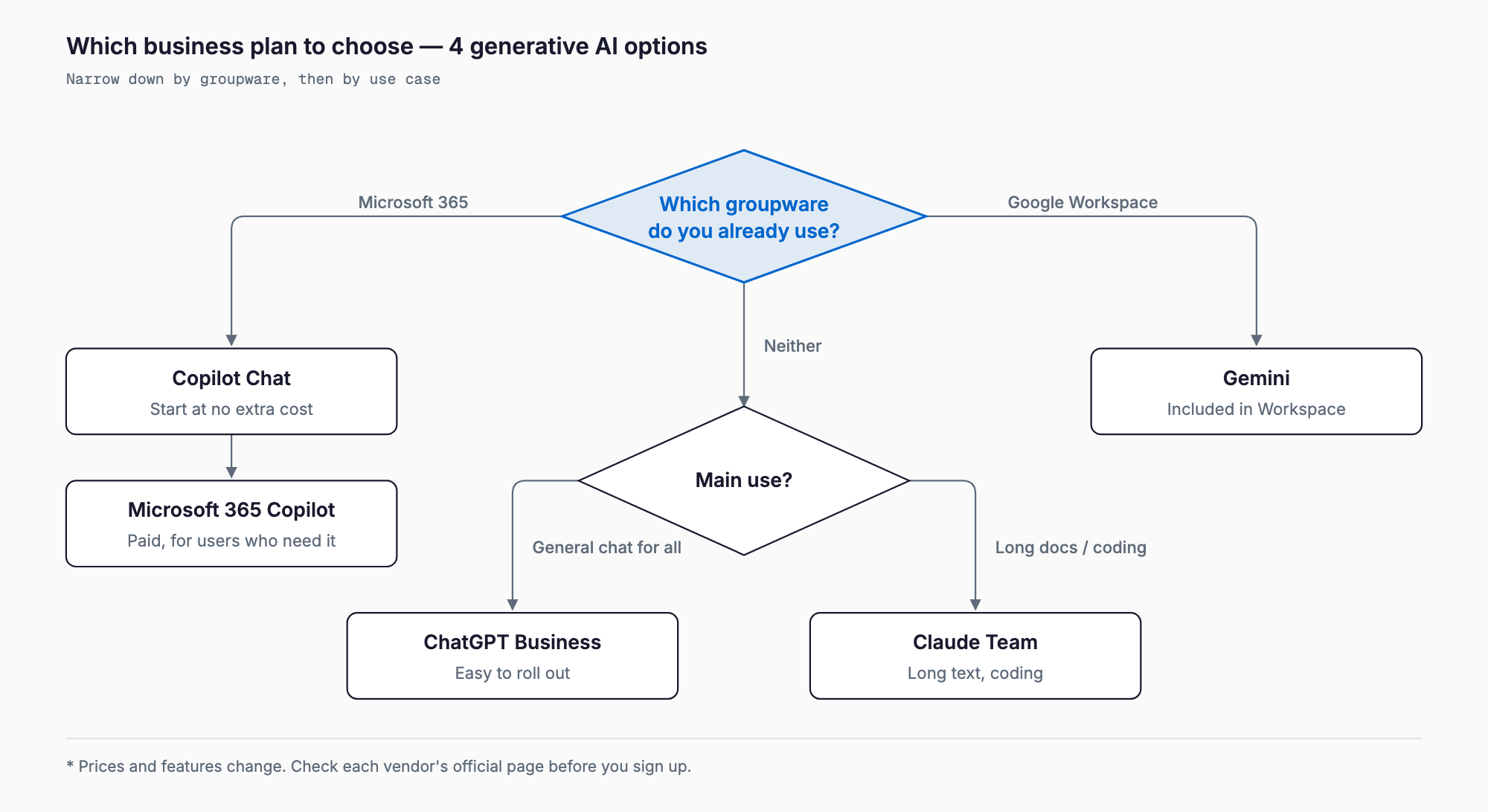
The short answer: for a small or mid-sized company, the safest choice is the AI plan that matches the office suite you already use. If you run Microsoft 365, start with Copilot (the free Copilot Chat first, then paid Microsoft 365 Copilot seats for the people who need it). If you run Google Workspace, Gemini is already built into the subscription, so you can begin with no separate AI fee. If you use neither, or simply want an all-purpose AI chat for everyone, ChatGPT Business and Claude Team both cost roughly 20 USD per user per month on annual billing (about 3,000 yen at 150 yen to the dollar), with business data excluded from model training by default. All figures are estimates based on official announcements and secondary reports as of October 2026 and will move with exchange rates and price changes, so confirm on each vendor pricing page before signing. The biggest risk is not the price gap but employees quietly using free or personal AI accounts for work. For the wider rollout picture, see the SMB generative AI adoption guide.
The four families of business plans compared
We compare ChatGPT (OpenAI), Claude (Anthropic), Gemini (Google) and Copilot (Microsoft). Each has business plans separate from its personal subscriptions. What they share: business data is not used for model training by default, administrators can manage users centrally, and security features such as single sign-on (SSO, which lets staff sign in to the AI with their normal company login) are available.
Pricing is per user per month, and annual billing is cheaper than monthly. Reports put ChatGPT Business and Claude Team at about 20 USD on annual billing and 25 USD on monthly billing, with a minimum of around two seats (sources disagree, so verify). Gemini is bundled into Google Workspace pricing. Copilot splits into a paid license added on top of Microsoft 365 and a chat feature that costs nothing extra.
Business plan comparison table
| Item | ChatGPT Business (formerly Team) | Claude Team | Gemini (inside Google Workspace) | Microsoft 365 Copilot |
|---|---|---|---|---|
| Price per user per month (estimate) | About 20 USD annual / 25 USD monthly | Standard seat about 20 USD annual / 25 USD monthly; Premium seat about 100 USD annual | Workspace Business Standard is about 14 USD annual and includes Gemini (no separate AI fee) | Copilot Business about 18-21 USD annual (promotional pricing exists; for 300 users or fewer); full Microsoft 365 Copilot about 30 USD |
| Free option | Personal free tier (no business admin or training exclusion) | Personal free tier (same caveat) | Gemini app available to Workspace customers | Copilot Chat at no extra cost with eligible Microsoft 365 plans |
| Minimum seats | About 2 (reported) | Newer sources say 2; older ones say 5 | Follows your Workspace seat count | Requires a Microsoft 365 license |
| Business data used for training | Not by default | Not by default | Workspace data is not used for training | Covered by enterprise data protection; not used for training |
| Main admin features | Admin console, SAML SSO, app connectors | Central billing, SSO, admin controls | Existing Google Admin console settings | Existing Entra ID and Purview permission and protection settings |
| Best fit | Teams that want a general AI chat for everyone | Teams focused on long documents, writing and coding | Companies already on Google Workspace | Companies already on Microsoft 365 |
These figures combine official announcements and third-party reporting as of October 2026 and are estimates; exchange rates, taxes and promotions change them. Copilot Business in particular has an 18 USD promotional price whose end date differs by source. The minimum seat count and which features each Claude seat includes are also reported inconsistently, so check the official pages.
Characteristics and cautions for each service
ChatGPT Business is the most familiar tool for most employees, which keeps training costs low. It offers an admin console, SAML SSO and connectors to tools such as Slack and Google Drive, and conversations are excluded from model training by default. It is easy to pilot with a small group. For writing usage rules, see company rules for ChatGPT.
Claude Team is regarded as strong at reading and summarizing long documents, writing and coding help, and lets you mix Standard and Premium seats. Premium offers far higher usage and suits developers and heavy users; putting everyone on Premium would multiply costs roughly fivefold, so reserve it for heavy users.
Gemini has the lowest barrier for Google Workspace customers: AI is built into Gmail, Docs, Sheets and Meet, and the old separate add-on is gone. Note that Workspace base prices rose when Gemini was bundled, so it is not accurate to call it cheap on an AI-only basis. Google Cloud also sells a separate product, Gemini Enterprise, for company-wide search and agents; its Business edition is reported at about 21 USD per seat with higher tiers above that. For ordinary office work, first check whether Gemini inside Workspace is enough.
Copilot is confusing because several products share the name. Copilot Chat is included at no extra cost with eligible Microsoft 365 plans; it is web-grounded chat and does not directly work inside Word, Excel or Outlook. The paid Microsoft 365 Copilot puts AI inside Word, Excel, PowerPoint, Outlook and Teams. Copilot Business, for organizations with 300 users or fewer, is priced lower. Before buying paid seats for everyone, use the free Copilot Chat to find where AI actually helps.
How to choose
Look at three things in order rather than at the price list first: fit with your existing environment, main use cases, and management and security requirements.
1. Fit with your existing office environment
Microsoft 365 companies can naturally start with Copilot Chat and grow into Teams and Outlook, because file permissions and sharing settings carry over to the AI. Google Workspace companies get the shortest path with Gemini. The differences between the suites are covered in Google Workspace vs Microsoft 365 for SMBs. You can add ChatGPT Business or Claude Team on top of either, but the AI will not be directly connected to your internal files by default.
2. Use cases
| Main use | Options to consider | Why |
|---|---|---|
| Email, meeting notes, documents | Copilot or Gemini | Works inside Outlook, Teams, Gmail and Meet |
| General AI chat for everyone | ChatGPT Business | Many people already know it; low training cost |
| Long documents, summaries, writing quality | Claude Team | Reported strength with long materials |
| Programming and development | Claude Team Premium and others | Developers may justify higher-usage seats |
| Searching internal files | Copilot, Gemini business products | Can respect existing permissions |
3. Management and security requirements
Check five points: whether data is excluded from training, whether admins can add and remove users, whether SSO is supported, whether an audit log is available, and whether data retention can be configured. The first three are generally standard in business plans, while detailed audit logs and retention controls are often limited to Enterprise-level plans. Most small companies can start with the Business or Team tier and consider an upgrade only if, for example, a client demands audit logs.
Monthly and annual cost simulation for 10 and 30 employees
The estimates below assume 150 yen to the dollar, rounded. Actual invoices vary with exchange rates, consumption tax and promotions.
| Plan (per user) | 10 users monthly | 10 users annual | 30 users monthly | 30 users annual |
|---|---|---|---|---|
| ChatGPT Business annual (about 20 USD = 3,000 yen) | About 30,000 yen | About 360,000 yen | About 90,000 yen | About 1.08M yen |
| ChatGPT Business / Claude Team monthly billing (about 25 USD = 3,750 yen) | About 38,000 yen | About 450,000 yen | About 113,000 yen | About 1.35M yen |
| Claude Team Standard annual (about 20 USD) | About 30,000 yen | About 360,000 yen | About 90,000 yen | About 1.08M yen |
| Copilot Business annual (about 21 USD = 3,150 yen) | About 32,000 yen | About 380,000 yen | About 95,000 yen | About 1.13M yen |
| Gemini (bundled in Workspace) | No extra AI fee | 0 yen | No extra AI fee | 0 yen |
| Microsoft 365 Copilot annual (about 30 USD = 4,500 yen) | About 45,000 yen | About 540,000 yen | About 135,000 yen | About 1.62M yen |
| Claude Team mix (8 Standard + 2 Premium of 10) | About 54,000 yen | About 650,000 yen | - | - |
Buying a seat for everyone gets expensive. A 30-person company giving everyone Copilot Business pays about 1.13 million yen a year, but if only 10 people will actually use it, the bill is about 380,000 yen. Start with the people most likely to use it and add seats as usage shows up. Training and rule-making cost extra; see the cost of generative AI employee training.
Risks of using free or personal AI accounts for work
Employees typing work material into personal free accounts or personal paid plans is the first problem to fix, before the question of which business plan to buy. Depending on settings, personal services may use inputs to improve models, and the company cannot see or manage who uses them. The main risks:
- Customer data, quotes and contracts remain in accounts the company does not control
- Chat history and files stay in a personal account when someone leaves or changes roles
- The company cannot see who entered what, so incidents cannot be traced
- SSO and permission controls are unavailable, so account takeovers go unnoticed
- You cannot answer security questionnaires from clients
Switching to a business plan does not solve this by itself. You still need rules about what may and may not be entered. If the rules stay vague, personal accounts will keep being used alongside the contract.
Rollout checklist
- Confirm your current mail and file platform (Microsoft 365 or Google Workspace)
- Decide the pilot size (start with about 5-10 people) and target tasks
- Write down what may and may not be entered
- Confirm on the official page that data is excluded from training before signing
- Check SSO, admin permissions and whether you need audit logs
- Choose annual or monthly billing and confirm cancellation and seat-change terms
- Build a 10-20% margin into the budget for exchange rates and price changes
- Appoint someone to field internal questions
- Tell staff to stop using personal free accounts for work
- Schedule a review of usage after three months
Common failure patterns
First, buying seats for everyone when most go unused; a small monthly fee becomes hundreds of thousands of yen a year in fixed cost. Second, handing out tools with no rules, leading to confidential data being entered. Third, choosing on price alone and ending up with a tool that does not fit the existing office suite, so people do not adopt it. Fourth, budgeting from outdated articles and finding the real invoice differs. Fifth, confusing free Copilot Chat with paid Microsoft 365 Copilot and being disappointed that AI does not work inside Word.
The fixes are simple: pilot with a small group, write the rules first, verify current official prices, and review seat counts every three months.
FAQ
Which plan should a small company choose first?
Match your existing office environment. Start with Copilot Chat on Microsoft 365 or Gemini on Google Workspace. If you have no fixed environment or want a general AI chat for everyone, pilot ChatGPT Business or Claude Team with about 5-10 people.
Is my input excluded from training on business plans?
Business plans from these vendors generally do not use business data for model training by default. Scope and conditions can vary by contract and settings, so check each vendor official terms and data protection pages before signing.
Can the company just reimburse employees for personal paid plans?
Payment is separate from control. With personal accounts the company cannot see users or inputs and cannot recover data when someone leaves. Consolidating work use on business plans is safer.
Can I budget using the prices in this article?
They are estimates based on official announcements and reports as of October 2026. Exchange rates, tax, promotions and plan changes will move them. Confirm on each pricing page or quote and allow a 10-20% margin.
Is the free Copilot Chat enough for work?
It handles web-grounded questions and drafting, but it does not directly operate inside Word or Excel. Find the tasks where it helps first, then add paid seats only for the people who need them.
Related free tools (no sign-up, instant results)
Feel free to contact us
Contact Us