Email Mis-send Prevention and PPAP Alternatives for Small Bu
sinesses
Why mis-sends happen, why PPAP is being dropped and what replaces it: share links, free settings, paid tools, an incident flow and costs for 10 and 30 staff.
Mis-sent email is not an unusual lapse but an almost inevitable result of how mail software works: address autocomplete, mixing up CC and BCC, attaching the wrong file, reply-all. Most companies have lived through at least one. Separately, "PPAP" - sending a password-protected ZIP in one email and the password in a second one - is increasingly refused by business partners since the Japanese government changed course. This article covers mis-send prevention and PPAP alternatives as a single flow, layered from free settings to operating rules to paid tools.
Why mis-sends happen
Mis-sends come less from carelessness than from default behavior in mail clients. The typical patterns are:
- Address autocomplete: you type "Tanaka", accept the first suggestion, and it is a different Tanaka at another company
- To / CC / BCC mix-ups: a bulk mailing exposes every recipient's address
- Wrong attachment: an old version, or another client's quote, goes out
- Reply-all: an internal, candid reply reaches external recipients on the thread
- Typos in the address: one wrong character in the domain delivers it to a different company
What they share is that a sent message generally cannot be taken back. That is why you need both a way to catch mistakes before sending and a defined procedure for after.
What PPAP is
PPAP is the common nickname for a practice of sending a file as a password-protected ZIP in one email and the password in a second email. It has long been standard in Japanese business, on the premise that sending the password separately keeps the file safe.
Why PPAP is being phased out
- The password travels on the same channel: anyone who can read the first email can read the second. In a mis-send, both messages reach the wrong person, so nothing is protected
- Antivirus cannot inspect the contents: encrypted ZIPs slip past scanning and have been abused to spread malware such as Emotet
- It burdens the recipient: unzipping, typing a password and checking a second email every time
- The government changed course: in 2020, central ministries announced they would stop using PPAP, and the move spread to the private sector
- More companies refuse it: mainly large enterprises now quarantine or reject encrypted-ZIP emails at their mail gateways
PPAP does have one narrow benefit: in a mis-send, a separately sent password can make the contents harder to open. But it provides neither real transport security nor malware protection, and today the risk of a partner refusing the message outweighs it.
Alternatives to PPAP
| Method | How it works | Best for | Watch out for |
|---|---|---|---|
| Cloud storage share links (Microsoft 365 OneDrive / SharePoint, Google Drive) | Store the file in the cloud and email a link restricted to named viewers, with expiry and download controls | Companies already on Microsoft 365 or Google Workspace | Misconfiguring the link as "anyone with the link" |
| Dedicated file transfer service | The sender uploads; the recipient is notified with a download URL; logs are kept | Frequent file exchange with outsiders | Monthly fee; explaining the tool to partners |
| Mail-gateway auto conversion | Attachments are automatically replaced with download links | Company-wide standardization without relying on staff habits | Setup cost and operations design |
| Use the partner's own portal or chat | Follow whatever the client designates | When the client specifies one | A growing number of tools across clients |
For most small businesses, the first move is to use the share-link feature of the Microsoft 365 or Google Workspace you already pay for, with correct settings. It needs no new contract and no extra cost. At minimum, decide these three things for share links:
- Limit who can open it: choose "specific people" only, so the recipient's email address is verified
- Expiry: auto-expire in, say, 7 to 30 days depending on the purpose
- Permissions: view-only, and restrict downloads where needed
Cloud sharing settings go hand in hand with how the company manages accounts. For related points on unmanaged tools and personal devices, see Shadow IT and BYOD rules for small businesses.
A layered approach to preventing mis-sends
No single measure stops mis-sends completely. Layering free settings, operating rules and paid tools gives the best return. Start with what is free, then fill the remaining gaps with rules and tools.
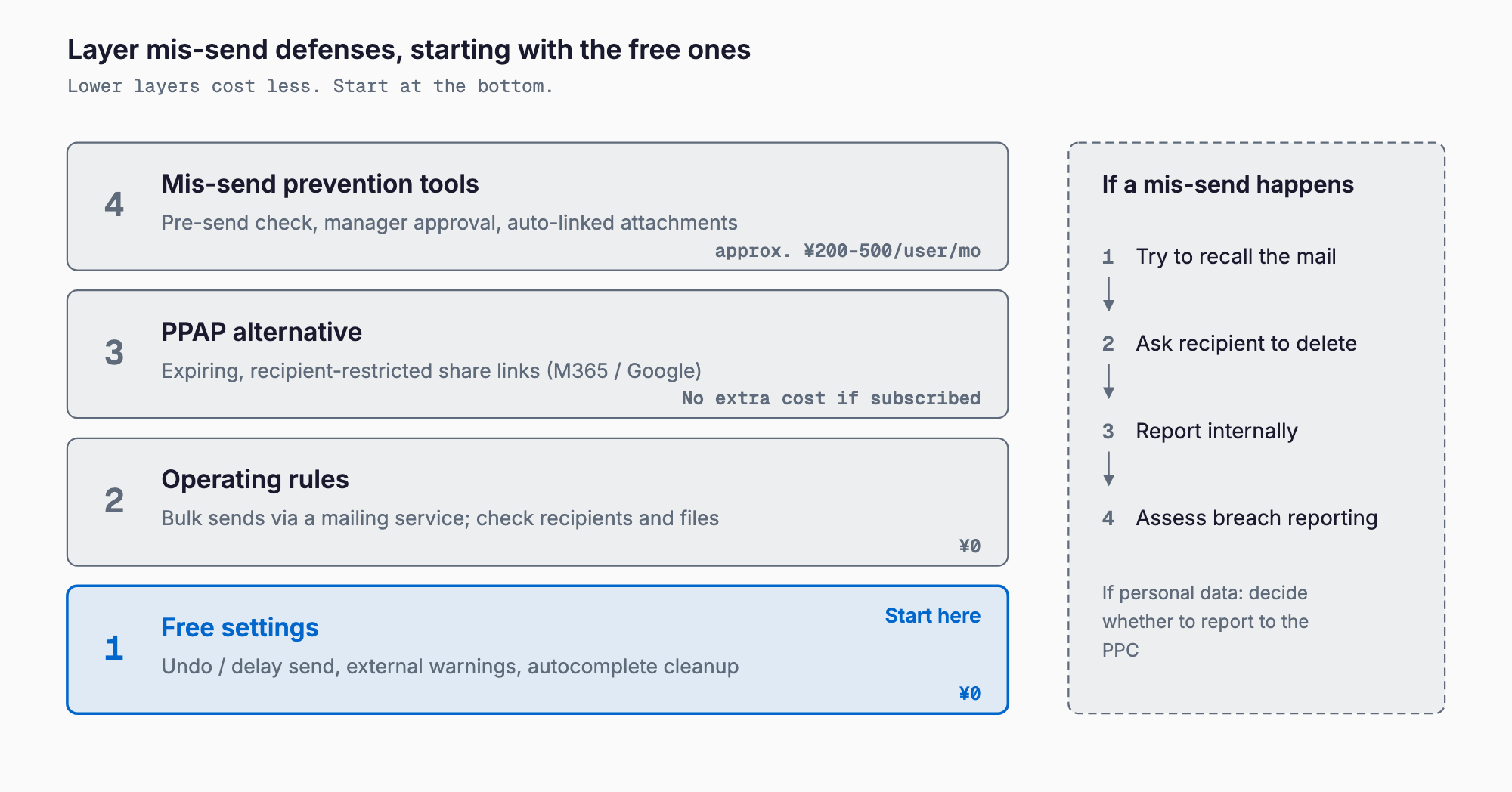
Layer 1: free settings
| Setting | What it does | Effect |
|---|---|---|
| Undo send (Gmail) | A cancellation window of up to 30 seconds | Lets you stop a message you notice right after sending |
| Delayed send (Outlook) | A rule holds outgoing mail for a set time (e.g. 1 to 2 minutes) | Same; most mistakes are noticed right after sending |
| External recipient warnings | Outlook (Exchange Online) external tag and MailTips, Gmail external-recipient warnings | Makes it obvious a message is going outside |
| Autocomplete cleanup or disabling | Remove stale or duplicate suggestions, or turn the feature off | Fewer mis-sends to similar names |
| Attachment check habit | Read the file name and recipient aloud before sending | Fewer wrong attachments |
Delayed sending is especially effective, since people usually notice a mistake just after pressing send. Even a 30-second to 2-minute window rescues more cases. Setting names and available delays vary by plan and version, so check the official help for your product.
Layer 2: reduce it with operating rules
- No BCC for bulk mail: every use of BCC invites a mix-up. For more than a few dozen recipients, switch to a mail delivery service
- Double-check important sends: for quotes, contracts and anything with personal data, have a second person confirm recipients and attachments, or forward to a supervisor first
- Naming rules: put the client's name in the file name so it can be compared with the recipient
- Avoid reply-all: on threads that include outsiders, reply only to those who need it
- Send personal data via share links, not attachments: access controls can still stop a mis-sent link
Too many rules are not followed. Start with three: no BCC for bulk mail, a clear list of what gets double-checked, and share links for sensitive files.
Layer 3: paid mis-send prevention tools
Mis-send prevention tools fill the gaps that free settings and rules cannot. Typical features are:
- Pre-send confirmation screen: forces a display of external recipients and BCC before sending
- Hold and supervisor approval: delays sending and lets an approver check
- Automatic link conversion or encryption of attachments: a PPAP replacement that turns attachments into download links
- Domain and keyword restrictions: block or warn on mail containing keywords that suggest personal or confidential data
- Send logs: trace who sent what to whom, and when
| Type | Monthly cost per user (rough guide) | Characteristics |
|---|---|---|
| Cloud (SaaS) | About 200 to 500 JPY (rough guide) | Quick to adopt and workable for small teams; some vendors set minimum seats or contract terms |
| Add-on (extends your existing mail client) | From a few hundred JPY, or a one-time license (rough guide) | Added to the current environment; check which mail clients are supported |
| Gateway (server or appliance) | Initial cost from several hundred thousand JPY (rough guide) | For large organizations; usually excessive for small companies |
These figures are only a rough guide and vary widely by vendor, plan, number of users and feature scope (link conversion, encryption, approval workflows). Get quotes from several vendors and try a trial period before deciding. On the sender-authentication side of email security, see also SPF, DKIM and DMARC for small businesses.
What to do when a mis-send happens
The top priority is to report immediately and not hide it. The longer the delay, the more likely the message is opened or forwarded. Decide the flow in advance:
- 1. Confirm the facts: record when, to whom and what was sent (body, attachments, number of recipients)
- 2. Report at once to a supervisor or the person in charge of information management: do not settle it on your own
- 3. Try to cancel or recall: cancel within the undo window if possible. Outlook message recall only works under certain conditions, such as an unopened message, and often fails, so do not rely on it
- 4. Contact the wrong recipient: by phone or email, say it was a mistake and ask them to delete the message and attachments and not to read, forward or save them. Get a reply confirming deletion
- 5. Deal with the intended recipient: if it never arrived, send it again to the correct address
- 6. Judge whether it counts as a leak of personal or confidential information: see the next section
- 7. Record what happened and prevention steps: turn it into a settings or rule change
Judging whether it is a personal data leak
If the mis-sent email contained personal information, it may count as a leak under Japan's Act on the Protection of Personal Information. Since the April 2022 amendment, leaks meeting certain criteria must be reported to the Personal Information Protection Commission and notified to the individuals concerned. The rough criteria are:
- Special care-required personal information is included (e.g. medical history, criminal record)
- There is a risk of financial damage (e.g. credit card numbers that could be misused)
- There is a risk it was done with unlawful intent (e.g. unauthorized access)
- The number of people affected exceeds 1,000
Many ordinary mis-sends fall outside these criteria and carry no reporting duty. However, whether they apply depends on the individual case, and even when reporting is not required, an apology and explanation to those affected may be appropriate. This is only an overview: check the Personal Information Protection Commission's official guidance, and consult a specialist when in doubt.
Cost guide for 10-person and 30-person companies
| Item | 10 people | 30 people |
|---|---|---|
| Free settings only (delayed send, external warnings) | 0 JPY (setup effort only) | 0 JPY (setup effort only) |
| Share-link practice (already on Microsoft 365 / Google Workspace) | No extra cost | No extra cost |
| Mis-send prevention tool (cloud, 200 to 500 JPY per user per month) | About 2,000 to 5,000 JPY a month (24,000 to 60,000 JPY a year) | About 6,000 to 15,000 JPY a month (72,000 to 180,000 JPY a year) |
| Dedicated file transfer service (if adopted) | From a few thousand JPY a month (rough guide) | From about 10,000 JPY a month (rough guide) |
| Outsourcing settings and rule setup | About tens of thousands of JPY (rough guide) | About tens of thousands to 100,000 JPY (rough guide) |
All of the above are rough guides, and many products set minimum users or minimum fees. A realistic order is to cut a large share of the risk with free settings and share links, then consider paid tools for what remains. For the cost of people-side measures such as training, see Security awareness training cost.
Checklist
- Undo send or delayed send is enabled for every employee's mail
- External recipient warnings (such as an external tag) are enabled
- Stale autocomplete suggestions have been cleaned up
- Bulk mail to dozens of recipients uses a mail delivery service, not BCC
- There is a double-check rule for quotes, contracts and mail containing personal data
- PPAP has been replaced with share links that have expiry and restricted viewers
- Partners were told about the change in how files will be delivered
- Everyone knows who to report a mis-send to and the steps
- You know which official guidance to check for a mis-send involving personal data
- You compared the cost and benefit of a mis-send prevention tool
FAQ
What should we tell business partners when we stop using PPAP?
A short note is enough: for stronger security, files will now be shared through expiring links instead of password-protected ZIPs, with an explanation of how to receive them. Some partners may still want PPAP, so check their rules and agree on a change client by client rather than switching everyone at once.
What can we do for free?
The usual options are undo send or delayed send in your mail client, external recipient warnings, cleaning up autocomplete suggestions, and sending files by Microsoft 365 or Google Workspace share links. They cost nothing extra and remove a large share of mis-sends. Names and features differ by plan, so check the official help.
Do we always have to report a mis-send?
Internally, it is best to make reporting to a supervisor or information manager mandatory. A legal duty to report to the Personal Information Protection Commission applies only in certain cases, such as special care-required information, risk of financial damage, risk of unlawful intent, or more than 1,000 people affected. Whether it applies depends on the situation, so check the official guidance and consult a specialist if unsure.
Does a small company need a mis-send prevention tool?
If you have few staff and a limited range of mail, free settings and operating rules are often enough. If you routinely email customers' personal data, send many bulk mailings to outsiders, or are asked by clients to meet security requirements, cloud tools starting at a few hundred yen per user per month are an option.
Can Outlook message recall undo a mis-send?
It only works under specific conditions, such as an unopened message inside the same organization, so it cannot be relied on to cancel mail sent to outside recipients. Rely on stopping messages before they leave (delayed send, recipient confirmation) and on contacting the wrong recipient directly after the fact.
Summary
Before buying expensive tools, start with the free layer: delayed send, external recipient warnings, a review of BCC practice and a move to share links. PPAP offers little real security and is increasingly refused, so migrate to share links with expiry and restricted viewers. Cover what remains with a mis-send prevention tool starting at a few hundred yen per user per month, and make sure everyone knows the reporting and response flow before a mis-send happens.
Related free tools (no sign-up, instant results)
Feel free to contact us
Contact Us