What Is Janas-LLM? Run an 80B MoE on 32GB RAM via SSD Stream
ing
Janas-LLM is a C engine that streams MoE experts from SSD, running an 80B model on 32GB RAM at 24 tokens/s. Specs, llama.cpp comparison, setup, caveats.
Janas (Janas-LLM) is a local inference engine written in C that runs large MoE (Mixture of Experts) language models while keeping the weights on disk. It streams only the experts needed for each token from an NVMe SSD and keeps frequently reused experts in a RAM cache. The author claims an 80-billion-parameter model runs on a laptop with 32GB of RAM. It lives at prabanta-dev/janas on GitHub and reached the Hacker News front page on October 13, 2026 (143 points, 48 comments).
This guide draws on the repository, the author's benchmarks and the HN discussion: how Janas works, a requirements table, a speed comparison with llama.cpp, install steps, usage, how it differs from similar tools, and the caveats. It is experimental, early-stage software, and every number below was measured by the author on a single machine. Similar ideas are covered in our articles on colibri and Edge0-35B-A3B.
What Janas is — a C engine that streams experts from SSD
Janas is a family of AI tools written in C with no dependencies beyond the C library; the first component is the inference engine, Janas-LLM. The author is Maurizio “camauri” Cammalleri. The goal is to run large MoE models on ordinary computers, with or without a GPU.
Two ideas do the work. First, the model weights stay on disk, and only the experts needed for each token are streamed from the NVMe SSD. Second, experts that get reused often stay in a RAM cache so fewer reads hit the SSD. Weights are read with O_DIRECT, an integrated GPU handles prompt processing (prefill) through Vulkan if one is available, and thread counts are tuned automatically.
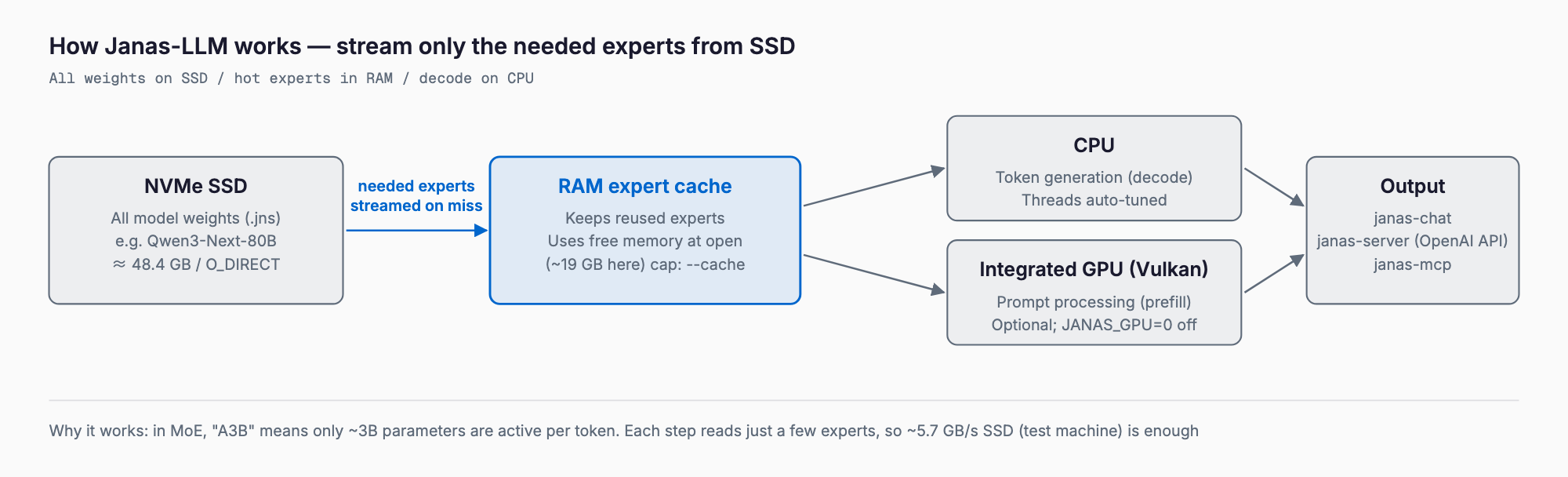
Why this works for MoE models
An MoE model can have a huge total parameter count, but each token only uses a small slice of it (the active parameters). Qwen3-Next-80B-A3B, for example, has 80B parameters in total, yet only about 3B are active per token (the “A3B” in the name). So you do not have to hold everything in RAM: fetching just the needed parts from the SSD is enough. A dense model that uses all of its parameters for every token cannot be run this way.
What matters for speed is which experts to keep in RAM. HN commenters called the caching algorithm vital, model-dependent and still unsolved. Janas uses the free memory available when the model is opened as its expert cache, and --cache <GiB> caps it.
Requirements table
The table separates what the project lists as supported from the author's test machine. Anything described as a recommendation is based on that test machine; other setups are untested.
| Item | Supported / required | Author's test machine |
|---|---|---|
| OS | Linux x86-64 (Ubuntu 22.04, Debian 12+), Windows 10 (1903+) / 11 x86-64 | Debian 13 (kernel 6.12) |
| CPU | x86-64 (CPUs without AVX-VNNI untested) | Intel Core Ultra 9 185H |
| RAM | 32GB with about 19GB cache for an 80B-class model (48.4GB) | 32GB DDR5 |
| Storage | NVMe SSD (read speed directly drives performance) | 1TB NVMe (about 5.7GB/s) |
| GPU | Optional (works without). A Vulkan-capable integrated GPU is used for prefill | Integrated Arc GPU (Mesa 26.1 Vulkan) |
| Build | GCC 14.2 when building from source | GCC 14.2 |
macOS and Apple Silicon are not listed as supported, and ARM is not mentioned. AMD CPUs, discrete GPUs, slower disks and CPUs without AVX-VNNI have not been tried by the author. Models are converted .jns files, with Qwen3, Qwen3.5, Qwen3.6, Qwen3-Next, Qwen3-Coder-Next and Gemma 4 families available.
Benchmarks — Janas vs llama.cpp (Vulkan)
The author compares Janas with llama.cpp (Vulkan build 2b18470, Q4_K_M) by reading a 1,024-token prompt and then generating. Runs were on October 9-11, 2026 (Windows results on October 12), in tokens/s. Read is prompt processing and write is generation.
| Model | Read: Janas / llama.cpp | Write: Janas / llama.cpp |
|---|---|---|
| Qwen3-Next-80B-A3B (48.4GB) | 62 / 16 | 24 / 2.8 |
| Qwen3-Coder-Next (48.4GB) | 66 / 14 | 22 / 2.2 |
| Qwen3.6-35B-A3B | 104 / 79 | 19 / 12 |
| Qwen3-30B-A3B | 135 / 122 | 32 / 15 |
| Gemma-4-26B-A4B-it | 84 / 76 | 18 / 12 |
| Gemma-4-12B-it | 65 / 46 | 9.9 / 7.1 |
| Qwen3.5-9B | 111 / 78 | 14 / 8.7 |
| Gemma-4-E4B-it | 122 / 109 | 20 / 15 |
| Qwen3-4B | 193 / 164 | 27 / 18 |
| Gemma-4-E2B-it | 191 / 150 | 38 / 19 |
| Qwen3.5-2B | 441 / 323 | 52 / 28 |
| Qwen3.5-0.8B | 799 / 519 | 109 / 32 |
| Qwen3-0.6B | 939 / 670 | 130 / 45 |
On the 48.4GB 80B-class models the gap is large: 24 tokens/s for generation on Janas against 2.8 on llama.cpp. For small models that fit in RAM the gap narrows. One exception: with Qwen3-30B in the UD-Q3_K_XL quant, Janas reads more slowly (100 vs 112) but writes about 3x faster (36 vs 11).
Caveats apply. With a default build, llama.cpp ran out of memory on Qwen3-Next-80B even with experts on the CPU, and only ran with GGML_CPU_REPACK=OFF plus --no-host 1 -lm mmap; Janas ran with no extra options. It is also a single-machine comparison, and the methods are not perfectly matched.
Speculative drafts in chat push generation higher: 37 tokens/s on Qwen3-Next-80B-A3B (22 without), 34 on Qwen3.6-35B-A3B, 26 on Gemma-4-26B-A4B and 24 on Qwen3.5-9B. Acceptance rates were 74-89% on Qwen and the larger Gemma models.
Installation
The prebuilt binary is the quickest route. On Linux, download janas-linux-x86_64.tar.gz from the latest release, extract it and run janas-chat.
tar xzf janas-linux-x86_64.tar.gz
cd janas
./janas-chat
On Windows, extract janas-windows-x86_64.zip and start it from PowerShell.
.\janas-chatTo build from source you need build-essential (optionally libvulkan-dev, glslang-tools and vulkan-tools for the GPU path). Output goes to bin/x86_64-linux/.
./build.sh
# release build with tests
./build.sh release test
Models are the converted .jns files published under prabanta-dev on Hugging Face. janas-chat can list, download and verify them, there is a standalone janas-get, and you can convert a GGUF yourself. Janas writes data only to ~/.cache/janas and the output directory you choose. Set the environment variable JANAS_GPU=0 to disable the GPU.
Usage — chat, server, mcp and bench
| Tool | Role |
|---|---|
| janas-chat | Interactive CLI. Speculative drafts via --draft / --mtp, MCP tool use, built-in services for weather, flights, earthquakes, maps, prices, GitHub, git and Wikipedia. Ctrl-C stops, Ctrl-D exits |
| janas-mcp | Serves the model as tools to Claude Code, editors and other MCP clients |
| janas-server | OpenAI-compatible HTTP API, browser chat, and code completion (/v1/completions with suffix support and llama.cpp-style /infill, for VS Code / VSCodium) |
| janas-bench | Writes a speed report |
| Library | Usable from C and FreeBASIC; converters such as hf2jns_mtp are included |
For Claude Code and similar agents, janas-mcp exposes the local model as an MCP tool. A practical split is to hand research and drafting to the local model and keep judgment calls with your main agent. Use janas-server when a tool needs an OpenAI-compatible API.
How memory and disk are used
The expert cache takes the free memory available at the moment the model is opened. Running the 48.4GB Qwen3-Next-80B on a 32GB laptop gave about 19GB of cache. With a browser and editor open, the author kept about three quarters of the speed but waited five times longer on disk, and recommends using an idle machine.
Janas vs llama.cpp, colibri and Edge0
| Tool | Approach | Implementation | Main targets | Notes |
|---|---|---|---|---|
| Janas | Streams experts from SSD plus RAM cache | C (no dependencies) | Linux / Windows x86-64 | Experimental. GPL-3.0-or-later |
| llama.cpp (mmap) | Memory-maps weights and relies on the OS page cache | C/C++ | Wide range incl. Mac | General-purpose and stable. Can struggle under memory pressure with large MoE |
| colibri | SSD streaming for huge MoE with little RAM | pure C | Large MoE models | Guide |
| Edge0-35B-A3B | SSD offload runs a 35B model in under 3GB RAM | MLX | Apple Silicon | Guide |
For a GPU-centered engine, Strata takes the other route of tiering VRAM and RAM. Janas aims at running large MoE models without a GPU as long as the SSD is fast, so the two target different setups.
Caveats — who it suits and who it does not
- Experimental: Early development. The API and CLI change without notice, sometimes several times a week. The exception is .jns model format version 2 on Hugging Face, which is meant to stay readable. There is no formal version number.
- Stability not verified: The author says so explicitly. Aggressive memory and disk use can push the desktop into swap, and GPU use once caused a driver reset that froze the desktop.
- SSD speed matters: Only a roughly 5.7GB/s NVMe was tested. Slower disks are expected to hurt a lot, and remote storage such as S3 would be far too slow (an HN point).
- Agent workloads need thought: HN commenters questioned whether prefill of about 60 tokens/s on 80B-class models is enough, since agents consume far more input tokens.
- No Mac support: macOS / Apple Silicon is not listed as supported.
- License: The core is GPL-3.0-or-later. It bundles GNU libmicrohttpd (LGPL 2.1+), yyjson (MIT) and Mbed TLS for HTTPS MCP. Converted models keep their original licenses (MODELS.md).
It suits people with an x86-64 PC around 32GB of RAM and an NVMe drive who want to try large MoE models away from their daily setup. For now it does not suit a primary work machine, Macs, agents that feed in very long inputs, or production uses that need stability.
What Hacker News said
- Some argued it re-discovers what llama.cpp's mmap already does.
- Others noted large speedups in specific cases.
- Debate over whether about 60 tokens/s prefill is enough for agentic workloads, which consume far more input tokens.
- The expert caching algorithm was described as vital, model-dependent and unsolved.
- The quality of the documentation was criticized.
FAQ
Does it run on a Mac or Apple Silicon?
Not at the moment. The supported environments are Linux x86-64 (Ubuntu 22.04, Debian 12+) and Windows 10 (1903+) / 11 x86-64; macOS and ARM are not mentioned. For a similar approach on Apple Silicon, Edge0-35B-A3B targets MLX.
Will it wear out my SSD?
Janas mostly reads, and writes are the main cause of SSD wear, so a read-heavy workload is unlikely to wear a drive much, although the author has not tested this. The risk is memory pressure that makes the system swap, because swapping writes to disk. Use --cache <GiB> to cap the cache.
How much RAM do I need?
It depends on the model. The author ran the 48.4GB Qwen3-Next-80B on a 32GB laptop with about 19GB of expert cache. Less RAM means more SSD reads and slower output; small models fit in RAM and need far less.
Can I use it commercially?
Janas itself is GPL-3.0-or-later, so commercial use is possible if you comply with the GPL, such as providing source. Models are separate: converted .jns files keep the original model license (see MODELS.md), so check the terms for the Qwen or Gemma 4 model you use.
How does it differ from llama.cpp?
In the author's benchmarks the gap is small for small models that fit in RAM and large for 80B-class models (24 vs 2.8 tokens/s generation). It is a single-machine comparison, and llama.cpp is a general-purpose tool that runs stably in many environments.
Does it work without a GPU?
Yes. It runs with or without a GPU, and JANAS_GPU=0 disables it. An integrated GPU handles prefill through Vulkan, but the author only tested an integrated Arc GPU; discrete GPUs are untested.
Summary
Janas uses the MoE property that few parameters are active per token, streaming experts from SSD so models larger than RAM can run. On the author's single machine, a 48.4GB Qwen3-Next-80B ran at 24 tokens/s generation (37 with speculative drafts) in 32GB of RAM, well ahead of llama.cpp under the same conditions. Keep in mind that it is experimental, tested on one machine only, has no macOS support, has modest prefill speed and is GPL-3.0. A spare x86-64 machine and a smaller model are the safest way to start.
Related free tools (no sign-up, instant results)
Feel free to contact us
Contact Us