Excel VBA Macro Dependence: Handover and Migration Costs
Excel macro (VBA) dependence is best handled before the author leaves: inventory and document first. Five options, cost ranges and a handover checklist.
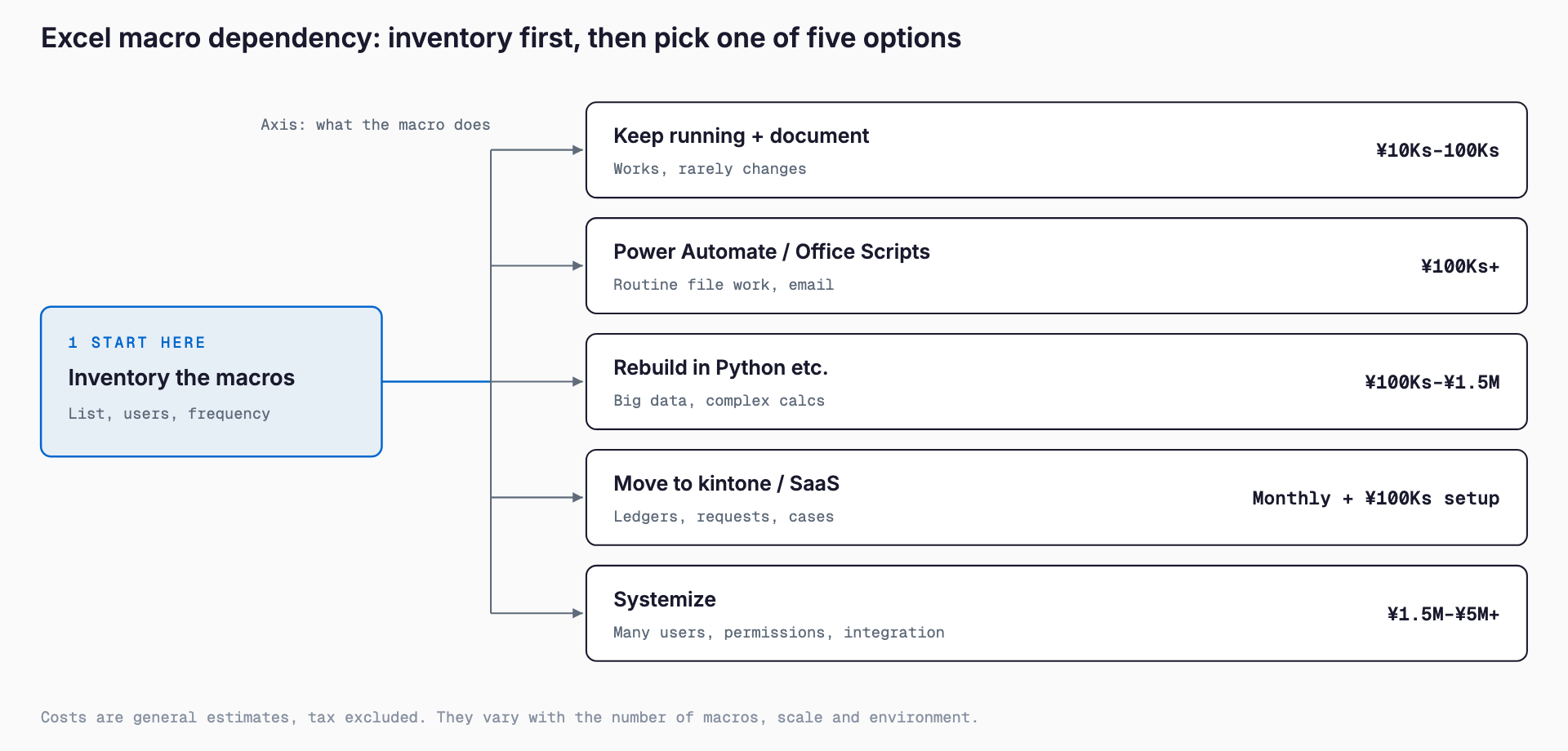
Dependence on one person for Excel macros (VBA) causes a work stoppage if you deal with it only after that person has left. The steps follow a fixed order. First, take an inventory of your macros (which files contain them, what they are for, and who uses them). Then choose among five options, one macro at a time: keep it running and document it, replace it with Power Automate or Office Scripts, rebuild it in Python or similar, move to kintone or another SaaS, or build a proper system. You do not have to rebuild everything; the realistic approach is to deal first with the macros that would hurt most if they stopped.
Costs below are general market estimates only. Inventory and documentation often run from tens of thousands to several hundred thousand yen, small fixes from tens of thousands to several hundred thousand yen, replacement with another tool from several hundred thousand to around 2 million yen, and full systemization from 1.5 million to 5 million yen or more. This article is written for owners and administrative staff at companies without IT staff. It covers why macros become person-dependent, the risks of leaving them alone, how to take an inventory, a comparison of five options, cost ranges, what to hand over before someone leaves, and cautions when hiring outside help. General dependence on one person is covered in how to hand over a system only one person can touch; here we focus on VBA macros.
Why VBA macros tend to depend on one person
Many VBA macros were written by a staff member to make their own work easier and then extended bit by bit. They are easy to create, but several factors combine to leave a state where only the author understands them.
- There is no design document or specification, so the code itself is the only record. After years of additions, even the author may have forgotten what each part does
- Variable and sheet names use the author's own abbreviations, so others cannot tell the intent
- Comments are few or outdated, and there is no change history
- The logic is embedded in an Excel file, and the company does not know where that file is or how many copies exist
- There are unwritten steps to run it (press the buttons in this order each month, update this sheet first, it only works on this PC)
- The VBA project is password-protected and only the author knows the password
- No one else in the company can read or write VBA, so no one can review it
- While it works, nobody is bothered, so handover and cleanup keep getting postponed
Unwritten steps and password protection are especially easy to miss. Even if the code survives, without the assumed way of using it or the password, in practice no one can touch it. The broader problem of Excel dependence is also covered in comparing where to move from Excel.
Risks of leaving it alone
If you leave macro dependence unaddressed, the problem tends to surface suddenly. Here are five typical risks.
The first is the departure or reassignment of the owner. Once the author is gone, you cannot fix errors, cannot change the specification, and cannot even explain what the macro does. Work that depends on macros, such as monthly invoicing or sales totals, is hit hardest when it stops.
The second is breakage from Office updates or the move to 64-bit. Some old VBA code uses declarations (Declare statements) that call Windows functions directly, and in 64-bit Office it may not run as is and may need rewriting. Add-ins and external libraries in use may also not support the new version. It is not unusual for a macro to stop suddenly when a PC is replaced or when you switch to Microsoft 365.
The third is the change in behavior since 2022. Microsoft made macros in files obtained from the internet (received by email, downloaded, or saved via a sharing link) blocked by default. Opening such a file shows a yellow or red warning and the macro does not run. Previously, clicking Enable Content was enough, but now you may need to change settings or unblock the file. If the workaround the owner used to tell people verbally was not handed over, all that remains is the complaint that the macro suddenly stopped working.
The fourth is the effect of the VBScript retirement. Microsoft has announced a phased retirement of VBScript, and macros that call VBScript internally may stop working in the future. This does not mean VBA itself is about to disappear, but parts of a macro that rely on VBScript or similar mechanisms (sometimes used for file operations or reading system information) may quietly stop working. How much you are affected depends on how the macro is written, so during the inventory it is reassuring to check the places that call external components.
The fifth is that nobody notices a malfunction. Even if a macro keeps producing wrong numbers, no one can verify it without understanding its contents. If the macro does not keep up with changes such as a tax rate update, a new customer code, or an inserted column, invoice amounts and stock counts drift silently. A macro that keeps running without anyone noticing can sometimes do more damage than one that stops.
First step: a macro inventory checklist
Before thinking about how to respond, understand where you stand. You do not need to fix anything yet; just list what exists. Make one ledger in a spreadsheet and fill in the following items.
- Where the macro-enabled files (.xlsm, .xlsb, .xla, .xlam, personal macro workbooks, and so on) are, in which folders or on which PCs
- The file name, last updated date, and how many copies or old versions exist
- The purpose of each macro (invoicing, sales totals, stock updates, sending email, and so on) in one line
- Who uses it and how often (daily, weekly, monthly, once a year)
- The impact if it stops (work stops, it can be done by hand, no problem)
- Input and output: which files or systems it reads from and where it writes
- External connections (other Excel files, Access, databases, email, PDF output, external software, network folders)
- Whether the VBA project is password-protected and who knows the password
- Who created it, who can fix it, and who currently maintains it
- Whether there is a procedure for running it (the order of button presses, data to prepare beforehand)
- The operating environment (Excel version, 32-bit or 64-bit, whether it only runs on a specific PC)
- When the last problem occurred and how it was handled
Once the ledger is done, set priorities on two axes: how much it hurts if it stops, and how much time remains before the author leaves. Start with macros that would stop work and whose owner is leaving soon. A macro used once a month that can be replaced by manual work can often wait. While building the list you may also find macros nobody uses anymore, and simply tidying those up reduces the workload.
Five options compared
The options fall into five groups. Which is right depends on the macro's importance, complexity, number of users, and how often it will change. Costs are general market estimates and vary with scale and requirements.
| Option | Suited to | Cost estimate | Main caution |
|---|---|---|---|
| 1. Keep running and document | It works but nobody knows how; you want to protect the current state first | Tens of thousands to several hundred thousand yen | The root dependence remains. Weak against environment changes |
| 2. Power Automate / Office Scripts | Routine file handling, sending email, Excel operations on the web | From several hundred thousand yen (licenses extra) | License and environment limits. Not suited to complex processing |
| 3. Rebuild in Python or similar | Large data volumes, complex calculations, integration with other systems | Several hundred thousand to about 1.5 million yen | Needs a runtime environment and a maintainer |
| 4. Move to kintone or a SaaS | Ledgers, requests and approvals, case management, billing and inventory | From a few thousand yen a month plus setup of several hundred thousand yen | Operations must change. Reproducing forms takes ingenuity |
| 5. Systemize (web business system) | Multiple users, permission control, integration with other systems, long-term use | 1.5 million to 5 million yen or more | Costly and slow. Clear requirements decide success |
Option 1: Keep it running and document it
This is the simplest option and the first to consider. You leave the code alone, keep using it, and read through the contents to put them in writing. Specifically, you write down each macro's purpose, processing flow, inputs and outputs, usage steps, what to do when trouble occurs, and where the passwords are kept. If possible, add comments to the code and attach a glossary explaining what variable and sheet names mean.
The value of this option is turning a situation where it runs without anyone understanding it into one where it runs and is understood. If you move to another approach later, this document becomes the basis for the requirements. The caution is that keeping it running only buys time and is not a root fix. It remains weak against changes to Excel and Windows environments, so for important macros, think about the next step in parallel.
Option 2: Power Automate and Office Scripts
For companies using Microsoft 365, replacing macros with Power Automate or Office Scripts is an option. Power Automate can automate saving files, sending email, and approval flows by connecting parts on screen. Office Scripts is a TypeScript-based automation feature for Excel on the web, and its target environment differs from VBA, which assumes desktop Excel. To automate operations of desktop applications, Power Automate for desktop is another route.
This suits routine work with a clear flow, such as collecting the files in a folder every morning and pasting them into a summary sheet, or emailing the person in charge when a request arrives. VBA that performs detailed cell formatting or heavy, complex calculations is harder to replace as is. Available features depend on your Microsoft 365 plan and licenses, so check beforehand. As a low-code way to automate, the guide to introducing RPA is also a useful reference.
Option 3: Rebuild in Python or similar
For aggregation of large data volumes or processing that crosses multiple files and systems, you can rebuild in a general-purpose language such as Python. Code can be managed as text, change history is easy to keep, and tests are easy to write. Strong libraries exist for reading and writing Excel and CSV, and processing that was slow in VBA can sometimes become faster.
However, the PC that runs it needs a Python environment, and you must secure someone who can maintain it. If nobody in the company has development experience, the rebuilt version may become a new source of dependence on one person. Decide who runs it, where, and who looks at errors before adopting it. Even when maintenance is outsourced, it is important to keep the code and the run procedure in your hands as company assets.
Option 4: Move to kintone or a SaaS
If the macro is really doing work like entering data in a ledger and totaling it, circulating requests, or tracking case status, moving to a no-code business app such as kintone, or to a dedicated SaaS for billing, inventory, or attendance, is effective. You no longer hand files around, and simultaneous use by several people, permission control, and history records come as standard.
On the other hand, you may not be able to reproduce the look of existing forms or detailed calculation rules exactly. You also need to be ready to review how the work is done to fit the SaaS. If you organize what the current macro does before moving, it is easier to separate what the SaaS's standard features can do from what they cannot. If you are considering moving something built in Access, the comparison in the Access migration guide works with a similar way of thinking.
Option 5: Systemize (a web business system)
When the macro supports a core business process and has many users, exchanges data with other systems, or needs permissions and audit records, rebuilding it as a web business system becomes an option. It can be used from a browser, data is managed in one database, and backup and permission control can be designed in.
It costs more and takes longer. What decides success is not technology but organizing the requirements. If you place an order without deciding what the current macro does, how much to keep, and what to change, you are likely to hear after completion that the old macro was more convenient. So finishing the documentation of option 1 before ordering ends up cheaper and safer. For how to proceed with an order, comparing where to move from Excel is also a useful reference.
Cost estimates
Costs vary widely with the number of macros, the amount of code, the number of screens and forms, integration with other systems, and the required environment. The table below gives general market estimates and does not state definite amounts. Use it as a yardstick when comparing quotes.
| Stage | Content | Cost range (estimate) | Typical duration |
|---|---|---|---|
| Inventory and documentation | Listing macros, reading the code, writing procedures and specification notes | Tens of thousands to around 500,000 yen (depends on number and scale) | Several days to about a month |
| Small fixes | 64-bit support, error fixes, handling the block, minor feature additions | Tens of thousands to several hundred thousand yen | Several days to several weeks |
| Replacement | Moving to Power Automate, Python, kintone or SaaS, and so on | Several hundred thousand to around 2 million yen (monthly fees extra) | About 1 to 3 months |
| Systemization | Rebuilding as a web business system starting from requirements | 1.5 million to 5 million yen or more | 3 to 6 months or more |
The trick to keeping costs down is not treating every macro the same way. After the inventory, allocate the budget in stages: low-importance macros are only kept running, medium ones are replaced, and only core ones are systemized. Finishing the documentation first also raises the accuracy of later quotes and makes extra charges less likely. If the budget is limited, you can also commission only the inventory and documentation first and decide the next step from the result.
Checklist of what to hand over before someone leaves
If a staff member's departure is decided or near, have them leave the following items first. If time is short, secure them from the top down.
- Record the VBA project password (if any) and the sheet and workbook protection passwords in a place the company manages
- The location of the master macro-enabled file and how to identify the latest version (tidy up old versions and copies)
- A brief summary of each macro's purpose, processing flow, and inputs and outputs, as diagrams or bullet points
- The operating steps for each run, with screenshots (a video recording is also effective)
- Special monthly or yearly processing (for example, manual steps only in the closing month)
- Past errors and how they were handled
- External connections (referenced files, folders, databases, email settings, add-ins)
- The operating environment (Excel version, 32-bit or 64-bit, required reference settings, conditions of the PC used)
- Test data (sample data made from real data) and examples of correct results
- Have the successor run it once using only the written procedure, and reflect any sticking points in the document
The last item is especially important. The writer may think it is clear, but when a successor reads it for the first time, steps are often missing. If you hold a rehearsal before departure, with the successor running it in the presence of the author, missing information turns up on the spot.
Cautions when asking outside help
When you cannot handle it in-house, you will ask an outside specialist or development company. Here are the points people tend to regret.
- Rights to and delivery of source code: confirm in the contract that the rebuilt code and deliverables remain with your company as its assets. Include the source code and procedure documents in the deliverables
- Removing password protection: without the VBA project password you cannot read the contents. If you ask for it to be removed, confirm that your company legitimately owns and manages the file, and do not include files you do not hold rights to, such as files entrusted by a customer. Discuss in advance with the contractor whether and how this can be done
- Handling of test data: real data contains personal and customer information. Before handing it over, prepare anonymized or dummy data, or sign a non-disclosure agreement (NDA)
- Use current behavior as the baseline: before rebuilding, save the results of the current macro and compare them with the new system to confirm they match (parallel running)
- Confirming requirements: besides behaving as it does now, tell them up front what you want to fix and what you want to drop
- Scope of maintenance: decide whether post-delivery bug fixes are free, until when, and who the contact is
- Assumptions in the quote: tell them the number of macros, lines of code, integration targets, and environment, and get a quote that states its assumptions. Collect quotes from several companies and compare
Before handing files to outside parties, check your internal information management rules. Files that contain data provided by customers may not be allowed to leave the company under the contract.
Frequently asked questions
Will VBA macros stop working altogether?
There is no announcement that VBA itself will stop working soon, and many companies still use it. However, it is weak against environmental changes, such as macros in internet-sourced files being blocked by default, support for 64-bit Office, and the phased retirement of VBScript. Even if you keep using it, the premise should be that you understand and document its contents.
The person who made it has already left and we do not know the password. What should we do?
First check whether the macro is still used and whether work would be affected if it stopped. For important ones, you can ask an outside specialist to read through the code. If the password protection must be removed, confirm that your company legitimately manages the file and discuss with the contractor whether and how to do it. If that is difficult, another way is to infer the specification from the macro's output and rebuild it.
Do we need to rebuild all of the macros?
No. It is realistic to rank them by importance during the inventory and deal first with those that would hurt most if they stopped. Unused macros are simply tidied away, minor ones are kept running and documented, and only core ones are considered for replacement or systemization.
How much should we budget?
As general market estimates, inventory and documentation are often tens of thousands to around 500,000 yen, small fixes tens of thousands to several hundred thousand yen, replacement several hundred thousand to around 2 million yen, and systemization 1.5 million to 5 million yen or more. Because the number of macros, code volume, and integration targets change this greatly, please compare several quotes.
Summary
For Excel macro dependence, acting while the macros are still working costs less and causes less confusion than dealing with it after the author has left. The steps boil down to three things: understand the current state with an inventory, set priorities by importance, and use keeping-and-documenting, replacement, and systemization as appropriate.
The first step is to list the macro-enabled files and ask the owner for the passwords and operating steps. That alone greatly lowers the risk that only the author understands them. After that, decide the options according to importance while looking at the inventory result. All costs here are general market estimates, so please make the actual decision based on the state of your own macros.
Related free tools (no sign-up, instant results)
Feel free to contact us
Contact Us