FLUX 3 Image Klein Requirements, VRAM & How to Use (5.6B Gen
eration + Editing, Oct 2026)
FLUX 3 Image Klein requirements: 8GB VRAM via INT8 and ComfyUI; reference runs need 25-31GB. Released Oct 15, 2026. 5.6B, 10 references, pup adds 28GB.
FLUX 3 Image Klein is a 5.6B-parameter open-weights image generation and editing model released by Black Forest Labs (BFL) on October 15, 2026. The short answer: with the INT8 build and ComfyUI it runs on a consumer GeForce RTX with as little as 8GB of VRAM, but the official reference-code measurements are much higher, at 31GB for BF16, 26GB for FP8 and 25GB for NVFP4, and the prompt upsampler (pup) adds roughly 28GB more. The gap comes from quantization, offloading and how the text encoder is handled, and this article breaks it down. The model supports text-to-image, image editing, multi-reference generation with up to 10 reference images and native 4K output. The license is the FLUX Kommunity License v1.0, which allows commercial outputs for qualifying users with under US$5M in annualized gross revenue. Below we cover requirements, setup, licensing, how it compares with other models, and troubleshooting.
Requirements at a glance
| Setup | VRAM guide | Suggested GPU (rough) | Notes |
|---|---|---|---|
| INT8 + ComfyUI (memory management / offloading) | 8GB+ | RTX 4060 8GB, RTX 4070 class | Based on the BFL/NVIDIA announcement. Under 9s per 1MP on an RTX 4070 |
| FP8 (reference code) | 26GB (B200, 1024x1024, upsampler off) | RTX 5090 (32GB) class | Weights are 5.6GB, but the total including the text encoder is 26GB |
| BF16 (reference code) | 31GB (same conditions) | RTX 5090 (32GB) is tight; 48GB+ such as RTX PRO 6000 is safer | Weights are 11.2GB. Fine-tuning Klein Base also fits this class |
| NVFP4 (reference code) | 25GB (same conditions) | Blackwell-generation GPUs | Officially under 0.6s per 1MP on GB300 |
| Any of the above + prompt upsampler (pup) | About +28GB (measured on an 80GB GPU) | 80GB-class GPU, or run pup separately / use the API | pup is a separate 9B model. The model card says not to use the model without an upsampler |
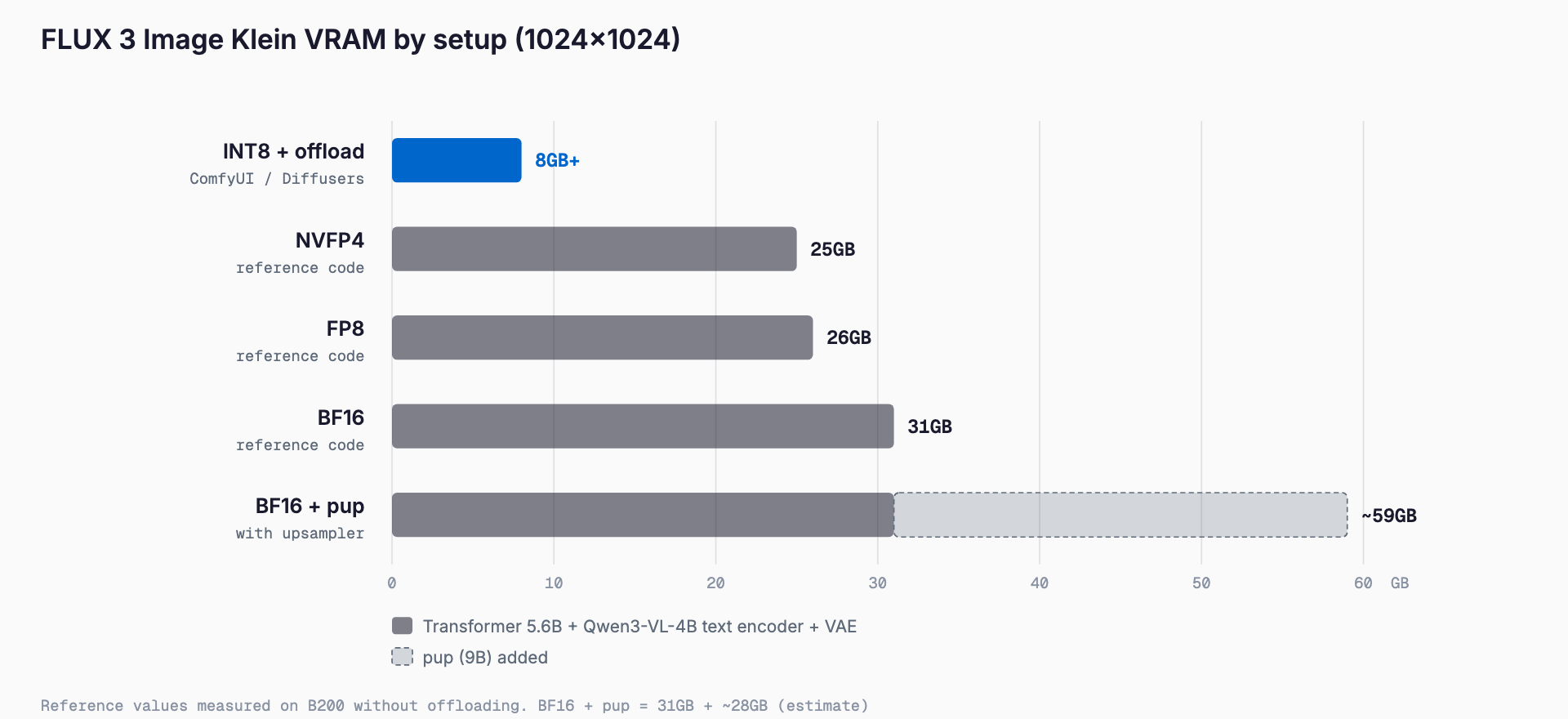
The GPU column is our own rough mapping from the official figures; BFL does not publish a list of recommended GPUs. The VRAM figures were measured on a B200, so other GPUs may differ slightly depending on implementation and drivers. The model card itself warns that the size of a quantized file does not equal GPU memory use.
Support on Apple Silicon and other Macs is not stated officially, and MPS (Metal) behavior and speed are unverified. We give no Mac numbers here.
Why 31GB and 8GB can both be true
The official material contains two numbers that look contradictory: 31GB measured with the reference code in BF16, and the blog's claim that it runs on consumer GPUs with 8GB of VRAM. They describe different conditions.
- The reference-code figure: This is measured with the generator (transformer), the Qwen3-VL-4B-Instruct text encoder and the VAE all resident on the GPU with no offloading. The BF16 generator alone is 11.2GB, the text encoder adds roughly 8GB (a rough estimate for a 4B model held in BF16), and activations sit on top, reaching 31GB in total
- The 8GB setup: The generator is quantized to INT8 to shrink the weights, and the memory management in ComfyUI or Diffusers (offloading unused components to CPU memory) keeps the amount on the GPU at any moment small. The trade-off is that you need system RAM and accept transfer time
- The text encoder is a separate part: The 5.6B figure excludes the text encoder; the safetensors metadata shows about 6B. When budgeting VRAM, think in terms of generator plus text encoder plus VAE
So 8GB works only under the condition of INT8 plus offloading, not with everything kept on the GPU. The system RAM requirement is not published; as a rough guess, 16GB or more, and 32GB for comfort, but that is our estimate and not an official figure.
What FLUX 3 Image Klein is
FLUX 3 Image Klein is the second open-weights release in the FLUX 3 family, after FLUX 3 Action, a robotics model. Klein is a 5.6B-parameter image transformer that handles both text-to-image generation and image editing in a single model.
Klein vs. Klein Base
| Item | Klein (distilled) | Klein Base (undistilled) |
|---|---|---|
| Precision | BF16 (FP8 and NVFP4 variants included) | BF16 |
| Steps | 16 | 50 |
| Guidance | None | 3.5 |
| Main use | Inference and everyday generation; the model used on the BFL API | Fine-tuning, LoRA training, research |
| Hugging Face repo | black-forest-labs/flux-3-image-klein | black-forest-labs/flux-3-image-klein-base |
For plain image generation, choose Klein (distilled): 16 steps and no guidance make it fast. If you want to train your own style or products with LoRA, start from the undistilled Klein Base. The Klein repo includes FP8 (variants/fp8r) and NVFP4 (variants/nvfp4) quantized variants, and the blog also mentions an INT8 build developed with NVIDIA.
Components: text encoder, VAE and pup
- Text encoder: Qwen3-VL-4B-Instruct (Apache-2.0), loaded as a component separate from the generator
- VAE: ae.safetensors
- Prompt upsampler (pup): black-forest-labs/flux-3-image-klein-pup. A separate 9B model with an 18.8GB download that rewrites short instructions into detailed full-scene descriptions. The model card advises against using the model without it
- ComfyUI package: black-forest-labs/flux-3-image-klein-comfy, packaged so that ComfyUI can load it directly
pup runs independently of the generator and used about 28GB of extra GPU memory when measured on an 80GB GPU. Keeping it resident alongside the generator is hard on consumer GPUs, so splitting the work is realistic: run pup as a separate step, offload it to the CPU, or use the API, which includes upsampling.
What it can do
- Text-to-image: Generates natively up to 4K
- Image editing: What BFL describes as pixel-perfect editing, changing the targeted area while preserving the rest
- Multi-reference generation: Accepts up to 10 reference images to combine people, products and styles
- Bounding boxes: Place elements or confine edits using [top, left, bottom, right] on a 0 to 1000 grid
- LoRA training: Ostris AI Toolkit and NVIDIA NeMo AutoModel are the officially mentioned options
Prompting matters. BFL says short prompts tend to give generic output and recommends writing full scene captions. The pup automates this rewriting.
Generation speed
Official speeds vary a lot with GPU, precision and steps. With the distilled model (16 steps), INT8 and 1MP, it takes about 4 seconds on an RTX 5090 and under 9 seconds on an RTX 4070 (ComfyUI).
| Condition | GPU | Time |
|---|---|---|
| Distilled, INT8, 1MP | RTX 5090 | About 4s |
| Distilled, INT8, 1MP | RTX 4070 | Under 9s (ComfyUI) |
| Distilled, 1024x1024, 16 steps | GB300 | 0.55s |
| Distilled, 1024x1024, 16 steps | RTX 4070 | 8.9s |
| Distilled, NVFP4, 1MP | GB300 | Under 0.6s |
| Base, 1024x1024, 50 steps | GB300 / DGX Station | 1.7s |
| Base, 1024x1024, 50 steps | DGX Spark | 43.8s |
| BFL API (median, 1MP) | Cloud | 4.54s text-to-image, 7.18s editing |
Applying a LoRA adds about 5% in time on GB300. Note that on lower-bandwidth systems such as DGX Spark, Base at 50 steps takes over 40 seconds. For everyday use, the distilled model with its small step count is the better fit.
Benchmarks and differences from FLUX.2 klein
In BFL's internal evaluation, FLUX 3 Image Klein ranks first among open-weights models in text-to-image, multi-reference and editing, and it is said to beat closed models such as Ideogram V4.5 and FLUX.2 [pro] in some categories. These are internal results, not third-party verification, so compare it on your own workload before adopting it.
- Versus FLUX.2 [klein] 9B: 38% fewer parameters, yet +91 Elo in text-to-image and +70 Elo in editing
- Versus Qwen-Image 2.1 (7B) and Krea 2 (12.9B): It is the smallest of the group, and performance per size is the selling point
Installation and usage
Day-one support covers ComfyUI, Hugging Face Diffusers, TensorRT-LLM, SGLang Diffusion and vLLM-Omni. For personal use, ComfyUI is the easiest way in.
Using ComfyUI
- Update ComfyUI to the latest version
- Agree to the license on the gated Hugging Face repo (black-forest-labs/flux-3-image-klein-comfy), log in, then download the model
- On an 8GB-class GPU choose the INT8 build; with more VRAM choose FP8 or BF16
- Load the official template workflow, enter a full-scene prompt and run
Check the model card and the ComfyUI template for the exact INT8 file names and where to place them; these may change between versions, so we do not state file names here.
Using Diffusers
Diffusers must be installed from the GitHub main branch, not the PyPI release. The following minimal example follows the official guidance.
pip install git+https://github.com/huggingface/diffusers
huggingface-cli login
import torch
from diffusers import ModularPipeline
pipe = ModularPipeline.from_pretrained("black-forest-labs/flux-3-image-klein")
pipe.load_components(dtype=torch.bfloat16)
pipe.to("cuda")For the generation call and its argument names, see the sample code on the model card. We show only what we could confirm from the official material.
Using the reference CLI
The official repository ships a reference CLI. To generate one image from a prompt with the distilled model:
python scripts/cli.py '<prompt>' --model distilled --out out.pngPass --image to supply reference images. The reference CLI includes an NSFW classifier.
License and commercial use
The license is the FLUX Kommunity License v1.0. Non-commercial use is permitted. For commercial outputs, Qualifying Users with under US$5M in gross annualized revenue (including affiliates) may generate them subject to the terms. Larger organizations need a commercial license through bfl.ai (self-hosted licensing or the API).
- Revenue is judged including affiliates
- The Hugging Face repos are gated (you must agree to share contact information and log in)
- The license text is authoritative; read it before deciding on specifics such as internal use versus client deliverables
- On safety, BFL describes dataset filtering, post-training fine-tuning and red-teaming with the external partner Cinder
Using the API
You can use flux-3-image-klein through the BFL API without your own GPU. The API includes prompt upsampling and pixel restoration, so you avoid running pup locally. The announced starting price is $0.009 and up (check the official pricing page for billing units and per-resolution rates). You can also try it in the Playground and on Hugging Face Spaces.
Choose between local and API by frequency of use and data sensitivity: local for images that cannot leave your organization, API for prototyping and occasional use.
Comparison with other models
| Model | Parameters | Highlights | License | Min local VRAM guide |
|---|---|---|---|---|
| FLUX 3 Image Klein | 5.6B (excluding text encoder) | Generation and editing, up to 10 references, native 4K, bounding boxes | FLUX Kommunity License v1.0 (commercial outputs under US$5M revenue) | 8GB+ (INT8 + ComfyUI) |
| FLUX.2 [klein] 9B | 9B | Previous generation; FLUX 3 Image Klein has 38% fewer parameters, +91 Elo (gen), +70 Elo (edit) | — | — |
| Qwen-Image 2.1 | About 7B | Unified generation and editing, transparent PNG, 10-image references | Non-commercial research only | Not officially published |
| Krea 2 | 12.9B | — | — | — |
We cover Qwen-Image 2.1 in Qwen-Image-2.1 requirements. On licensing, Qwen-Image 2.1 is limited to non-commercial research, while FLUX 3 Image Klein allows commercial outputs under US$5M revenue, which is a major practical difference. Cells marked with a dash are items we could not confirm from official information.
Troubleshooting
CUDA out of memory
- Switch to the INT8 or FP8 build
- Enable offloading in ComfyUI or Diffusers to move unused components to CPU memory
- Lower the resolution (start around 1MP)
- Do not put the prompt upsampler (pup) on the same GPU; it adds about 28GB, so run it separately or use the API's upsampling
- Check that other applications are not holding VRAM
401 error when downloading
The Hugging Face repos are gated. Open the model page in a browser, agree to the license and sharing of contact information, and also run huggingface-cli login on the command line to set your token. Agreeing alone is not enough to download.
Class not found in Diffusers
The released version of Diffusers does not yet include the support code. Reinstall from the GitHub main branch. Older ComfyUI versions may also fail to load the model, so update to the latest.
Outputs look generic
Short instructions tend to produce generic images. Rewrite the prompt as a full scene description covering subject, composition, lighting, background and texture. pup automates this rewriting.
Frequently asked questions
How much VRAM does FLUX 3 Image Klein need?
It depends on the setup. BFL says the INT8 build with ComfyUI runs on GeForce RTX GPUs with 8GB of VRAM. Running the reference code without offloading was measured on a B200 at 1024x1024 with the upsampler off at 31GB for BF16, 26GB for FP8 and 25GB for NVFP4. Adding pup requires roughly another 28GB.
Does it run on an RTX 4060 8GB?
BFL says the INT8 build with ComfyUI memory management runs on RTX GPUs with 8GB of VRAM. Speed on the RTX 4060 8GB specifically is not published, but under 9 seconds per 1MP is quoted for the RTX 4070. Expect it to be slower on 8GB because of transfers to and from CPU memory.
Can I run it on a Mac?
Apple Silicon support is not stated officially, and MPS operation and speed are unverified. The officially announced day-one support is ComfyUI, Diffusers, TensorRT-LLM, SGLang Diffusion and vLLM-Omni. If you need it on a Mac, the API is the safer route.
Can I use it commercially?
Under the FLUX Kommunity License v1.0, Qualifying Users with under US$5M in gross annualized revenue, including affiliates, may generate commercial outputs subject to the terms. Larger organizations need a commercial license from bfl.ai (self-hosted or API). Check the license text for details.
Should I use Klein or Klein Base?
Use the distilled Klein for ordinary generation and editing; it needs only 16 steps. Klein Base, undistilled at 50 steps, is meant for LoRA training, fine-tuning and research. Guidance is not used for Klein and is 3.5 for Base.
Is the prompt upsampler (pup) required?
The model card advises against using the model without a prompt upsampler. But pup is a separate 9B model with an 18.8GB download and about 28GB of extra GPU memory. If you cannot fit it locally, the BFL API provides upsampling as part of the service.
Related free tools (no sign-up, instant results)
Feel free to contact us
Contact Us