Company Social Account Hacked? 8 First Steps for SMBs
Company Instagram, X, Facebook Page, LINE or TikTok account hijacked? Get 8 first steps, official recovery routes, sample notices and a prevention checklist.
A hijacked company social media account is one that a third party has gained access to, using stolen credentials or similar means, so they can log in, post, and change settings without your permission. If you can still log in, change the password immediately, sign out of all devices, and turn on two-factor authentication. If you cannot log in, report the takeover through each service's official recovery channel, and warn customers and followers through a different channel. This article covers Instagram, X, Facebook Pages, LINE Official Accounts, and TikTok, and lays out first-response steps and prevention for business owners and non-IT staff.
Common Signs of a Hijacked Account
A takeover does not always start with being locked out. Sometimes settings are changed quietly, and you notice only later. If you see any of the following, suspect a takeover or the early stage of one.
- Your usual password no longer works, or the email address or phone number on the account has changed to something unfamiliar
- Posts, Stories, Reels, follows, likes, or sent DMs appear that no one on your team made
- Notification emails such as "New login from an unrecognized device," "Your password was changed," or "Your email address was changed"
- Customers or followers tell you they received a suspicious link, or an investment or side-job pitch, from your account
- Unfamiliar ad delivery or charges show up in your ad account or on your card
- The profile name, icon, bio, or link has been rewritten
- Unknown people or accounts appear in the list of admins or content creators
The easiest sign to miss is the notification email. Social networks send a notice to the registered address whenever a setting changes. If that address belongs to one person or to a shared mailbox nobody checks, detection can be delayed by days. Knowing in advance who receives these notices helps you catch problems early.
Why Accounts Get Hijacked
Most takeovers are not sophisticated hacks. They exploit human psychology and gaps in daily operations. The typical causes are as follows.
- Phishing DMs and emails: A message like "Your account violates our terms" or "Appeal here" leads to a fake login page that captures IDs, passwords, and verification codes
- Fake "copyright violation" or "verified badge" notices: These create urgency ("Your post infringes copyright; respond within 24 hours or it will be removed") or hope ("Get a free verified badge") to make you open a link. They may look official and even use real company or staff names
- Reused passwords: Attackers try ID and password pairs leaked from other services (credential stuffing), so a reused password puts your social accounts at risk too
- Accounts of former employees and contractors: If the account is managed through a person's own account or personal email, access can remain after they leave, or the password may stay shared
- Connected apps and third-party tools: Scheduling tools, analytics tools, or unfamiliar apps that still have access can leak data or be abused
- Malware on devices: A suspicious browser extension or program on a PC or phone can steal login or session information
What these have in common is that they look like official communications. Their usual trick is to rush you, so pause before opening any link, and check through the app or a bookmarked official site rather than the link in the message. For how to handle passwords and two-factor authentication, see our article on two-factor authentication and password management.
Eight First-Response Steps
A takeover is a race against time. The longer it continues, the more scam DMs go out to your followers and customers, the more ad fraud accumulates, and the more your brand suffers. Work through the steps below in order, keeping in mind that whether you can still log in changes your first move.
1. Check whether you can log in: Try your usual password. If it works, the account is not fully taken over yet, so go straight to step 2. If it does not, start the official recovery in step 5 in parallel
2. Change the password and sign out of all devices: Set a long, unique password, and use the settings screen to log out of all devices and review active sessions, disconnecting any you do not recognize
3. Set up or review two-factor authentication: An authenticator app is recommended. Also check that no verification method added by the attacker (phone number or email) remains, and remove anything suspicious
4. Revoke connected apps and external services: Disconnect apps you do not recognize and scheduling tools you no longer use. Remove permissions from anyone unknown in the admin or creator list
5. Start each service's official recovery: If you cannot log in, report and verify your identity through the channels in the next section. Do not rely on unofficial "recovery agents"
6. Notify followers and customers through another channel: You cannot announce from a hijacked account. Use another social account, your own website, LINE, or email to say, "Do not open any DM or link that came from this account"
7. Preserve evidence: Save screenshots of suspicious posts, DMs, notification emails, and login history, with dates and times. You will need them for recovery requests and for police or card-company consultations
8. Contact police and the card company if there is damage: If there is DM-based fraud, unauthorized ad charges, or customer data exposure, contact your local police cybercrime consultation desk and your card issuer. If customer personal data may have leaked, legal obligations may also apply
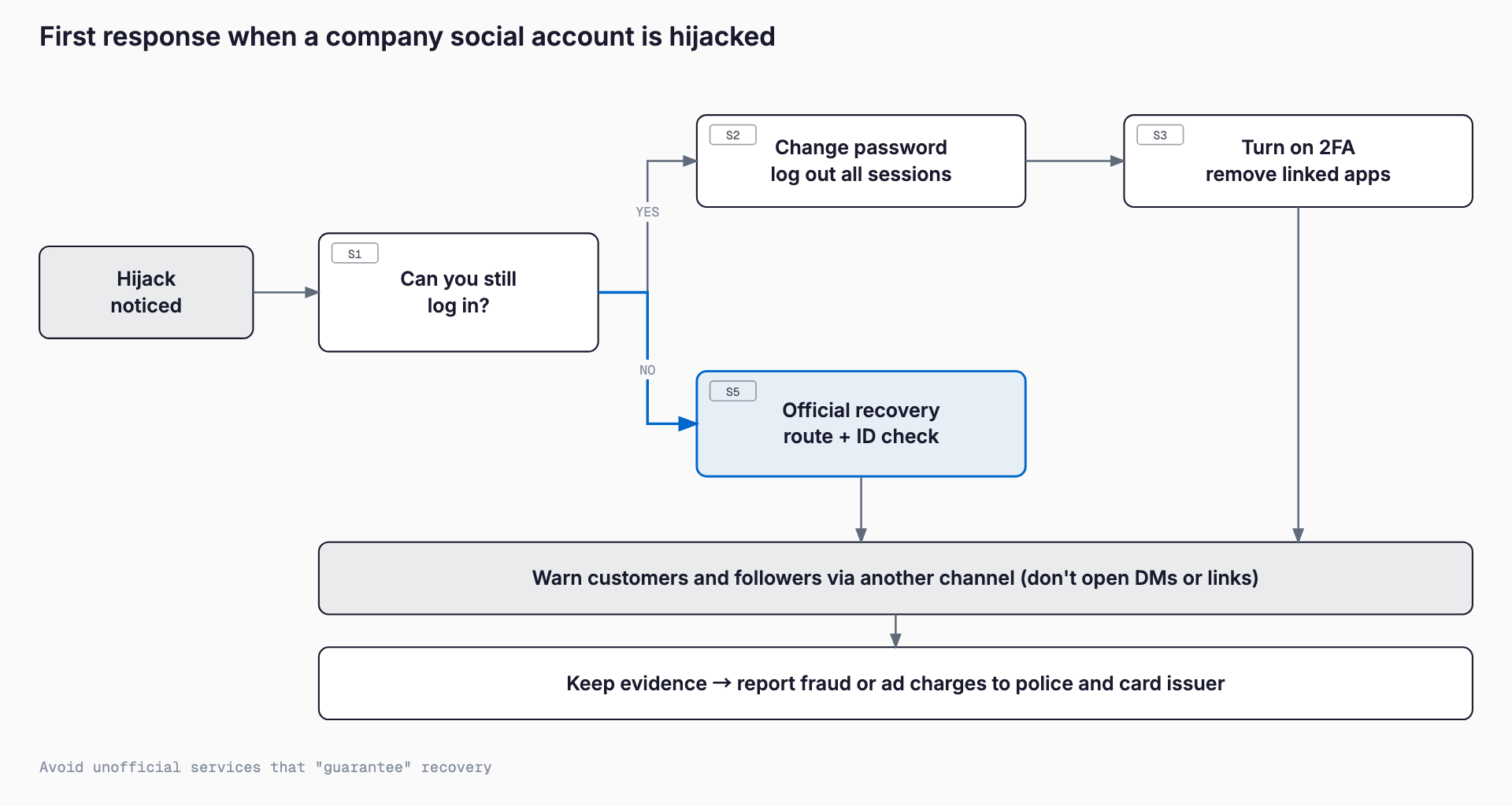
Steps 2 to 4 can often be done in about ten minutes, while the official recovery in step 5 can take days or longer. To keep harm from spreading while you wait, put out the notice in step 6 first. If the attacker has also changed the email address or phone number, a normal password reset will not work, and you will need a recovery process that includes identity verification.
If you suspect the PC or phone itself is infected, work from a different, safe device before changing passwords. Typing a new password on an infected device can expose it again. For the overall approach to first response, including device problems, see our first-response guide for IT emergencies.
Attackers may also target your website admin screen and domain accounts at the same time as your social accounts. Take this chance to check that none of them share a password with your social accounts. For website problems, see what to do when your website is defaced.
Recovery Channels by Platform
Screens and rules change from time to time. The table below summarizes the typical routes; always check each service's official help for the latest procedure before you act. Do not hand over personal information or passwords to unofficial sites that show up in search results, or to individuals and companies who contact you on social media.
| Service | Main recovery route | What to prepare in advance | Cautions |
|---|---|---|---|
| Start from "Get help" on the login screen. For a takeover, report it at instagram.com/hacked, then verify through your email or phone number and identity verification (such as a selfie video) | Access to the registered email and phone number, the device used when the account was created, backup codes | If the attacker changed the email or phone number, a normal reset will not work. Do not follow instructions from DMs claiming to be official | |
| Facebook Page / Meta Business Suite | Report the takeover at facebook.com/hacked. A Page is tied to the personal Facebook accounts of its admins, so secure the admin's personal account first. Ask other admins in Meta Business Suite (business portfolio) to check permissions | At least two admins, business verification documents, the Page's admin list | If a personal account is hijacked, the Page is affected too. With only one admin, recovery is much harder |
| X (formerly Twitter) | Submit the hijacked or compromised account report form from the Help Center. Reset the password and review logged-in devices in parallel | Registered email and phone number, authenticator app, backup codes | Replies can take time. Beware of scams posing as paid verification |
| LINE Official Account | Check admin permissions in LINE Official Account Manager and ask other admins to remove suspicious permissions. If you cannot log in, contact LY Corporation (LINE Yahoo) through its inquiry form | LINE Business ID, at least two admins, the registered email address | LINE Official Accounts are linked to personal LINE accounts and the LINE Business ID. Also check whether staff members' personal LINE accounts were compromised |
| TikTok | Use the login screen's trouble-logging-in guidance to reset the password, then report the takeover through the Help Center | Registered email and phone number, your two-factor method | Reusing the same password as other social networks makes a chain of takeovers likely. You may receive notices of removed or banned videos |
For every service, whether you can still access the registered email address and phone number is the key to recovery. If you are asked for a selfie video or ID, first confirm that you reached the request through the official app or the official help page. Secondary damage, where fake recovery pages steal identity documents, has also been reported.
Sample Announcements to Customers and Followers
You cannot announce from the hijacked account, so use a channel that has not been affected: another social account, your website, a LINE Official Account, or email. Adapt the examples below to your situation. Until confirmed, avoid naming individuals or stating a specific cause.
- Short alert for social media: "Our Instagram account may have been accessed without authorization. Please do not open or delete any DMs or links sent from this account. We will update you as soon as it is restored."
- Email to business partners: "Thank you for your continued support. Our official social media account may have been operated by a third party without authorization, and we are investigating and working on recovery. Please do not open URLs or files in messages sent from that account. If you have any questions, please reply to this email."
- Notice on the website: "Notice regarding unauthorized access to our official social media account: Since around (date), our official account may have been used by a third party. If you received a suspicious post or DM, please do not open the link and contact us."
- After recovery: "Our official account was restored on (date). We apologize for the concern this caused. To prevent a recurrence, we will enforce two-factor authentication and review how we manage the account."
How Long Recovery Takes and What It Costs
If you go through the official recovery process yourself, it costs nothing. A mild case where you can still change the password may be resolved the same day or the next day, while recovery that involves identity verification can take days to weeks. In some cases the service decides not to restore the account. It tends to take longer, or become difficult, when the attacker changed the email address or phone number and you cannot provide the original verification information.
If you ask a specialist company for investigation or recovery support, costs vary widely, roughly from tens of thousands of yen, and more if forensic investigation is needed. This is only a rough guide and not a firm figure. If you do hire anyone, get the cost breakdown and scope of work in writing.
- Do not trust a company that "guarantees 100% recovery"; whether an account is restored is decided by the service, and an outside company cannot guarantee it
- Avoid companies that demand a large prepayment or ask you to hand over your password or verification codes
- Individuals who message you on social media offering to "get your account back" are very likely scammers seeking secondary victims
- Before hiring anyone, try the official recovery process first
Prevention Checklist
Once an account is hijacked, recovery takes time and effort. Most cases can be prevented with preparation. Please check the following.
- Turn on two-factor authentication: An authenticator app is recommended, as it resists attacks such as SIM swapping better than SMS
- Store backup codes: They help you recover access if you lose your phone. Print them and keep them in a safe place, or save them in a password manager
- Stop sharing one password: A shared password makes it impossible to trace who leaked it and hard to change when someone leaves. Share and manage credentials through a password manager
- Have at least two admins and stop depending on personal accounts: Grant permissions per person through Meta Business Suite or the LINE Business ID, so another admin can respond if one account is compromised
- Remove permissions as soon as someone leaves or changes roles: Build password changes and permission removal into the handover process. See our IT checklist for departing employees
- Audit connected apps: About twice a year, review the connected apps in each service's settings and disconnect any you no longer use
- Share how to tell official notices apart: Teach everyone to check through the app or a bookmarked official site before opening a link, and to look for odd sender domains or wording
- Turn on login alerts: Send alerts about new-device logins and setting changes to an address that several people can read
- Keep devices up to date: Update the OS, browser, and security software, and avoid unnecessary extensions
Setting Operating Rules
Technical measures alone tend to break down when staff change or get busy. Even a small company benefits from deciding the following three points, on a single sheet of paper if need be, so it can move quickly when something happens.
- Who is the admin: Decide the ultimate owner (the owner, or general affairs) and a backup admin. Do not add or remove admins on one person's judgment, and keep a record of changes
- How passwords are managed: Decide on a password manager, where credentials are kept, and when they are changed (when someone leaves, or when something suspicious happens). Do not keep them on sticky notes or in personal notebooks
- Permission levels for posting staff: Give people who only post a role that cannot change settings or add admins. Give outside production companies access only for the necessary period and remove it afterward
It also helps to decide an emergency contact chain (who contacts whom) and one template announcement. Reviewing the rules once a year, together with staff changes, is a realistic routine.
Frequently Asked Questions
What should I do first if I can no longer log in?
First, check your registered email for "password changed" or "email changed" notices, then start the service's official recovery (for example, "Get help" on the Instagram login screen or instagram.com/hacked, or facebook.com/hacked for Facebook). In parallel, warn customers and followers through another social account, your website, or email.
Can a hijacked account always be recovered?
Not always. Whether it is restored is up to each service. It becomes difficult if the attacker changes your registered email address or phone number, so it is important to have multiple admins and to keep backup codes and identity verification information on hand.
Will hiring a specialist company guarantee recovery?
No company can guarantee recovery, because the service itself decides. Avoid companies that promise a sure recovery or ask for a large prepayment. It is more realistic to try the official recovery first and, if needed, seek help with investigation or recurrence prevention.
We run the company account from an employee's personal account. Is that a problem?
It is high risk. If that person leaves or their personal account is hijacked, you may lose the company account too. We recommend switching to per-person permissions through Meta Business Suite or the LINE Business ID, and having at least two admins.
Related free tools (no sign-up, instant results)
Feel free to contact us
Contact Us