EmbeddingGemma 2 Requirements
RAM from 191MB, No GPU Needed [Memory Table, Setup & RAG, 2026]
EmbeddingGemma 2 runs in 191MB RAM (text only) and about 1.5GB BF16 for all modalities, no GPU. Memory table, setup, local RAG. October 2026.
EmbeddingGemma 2 Requirements: Hundreds of MB for Text, About 1.5GB in BF16 for Everything
EmbeddingGemma 2 is an open embedding model released by Google DeepMind on October 6, 2026 (Apache 2.0). It maps text, code, images, video, and audio into one 768-dimensional vector space. A GPU is not required: text-only weights are about 0.54GB in BF16 (estimate), and even the full multimodal build is about 1.5GB (estimate). Google's own measurements on a quantized Pixel 11 Pro show about 191MB of active RAM for text only and about 567MB for the full multimodal model. This article covers memory estimates, running on CPU, Mac, phones, and browsers, the shortest setup code, and plugging it into a local RAG stack. Official figures and my own estimates are labeled separately.
What Is EmbeddingGemma 2, and How It Differs from v1
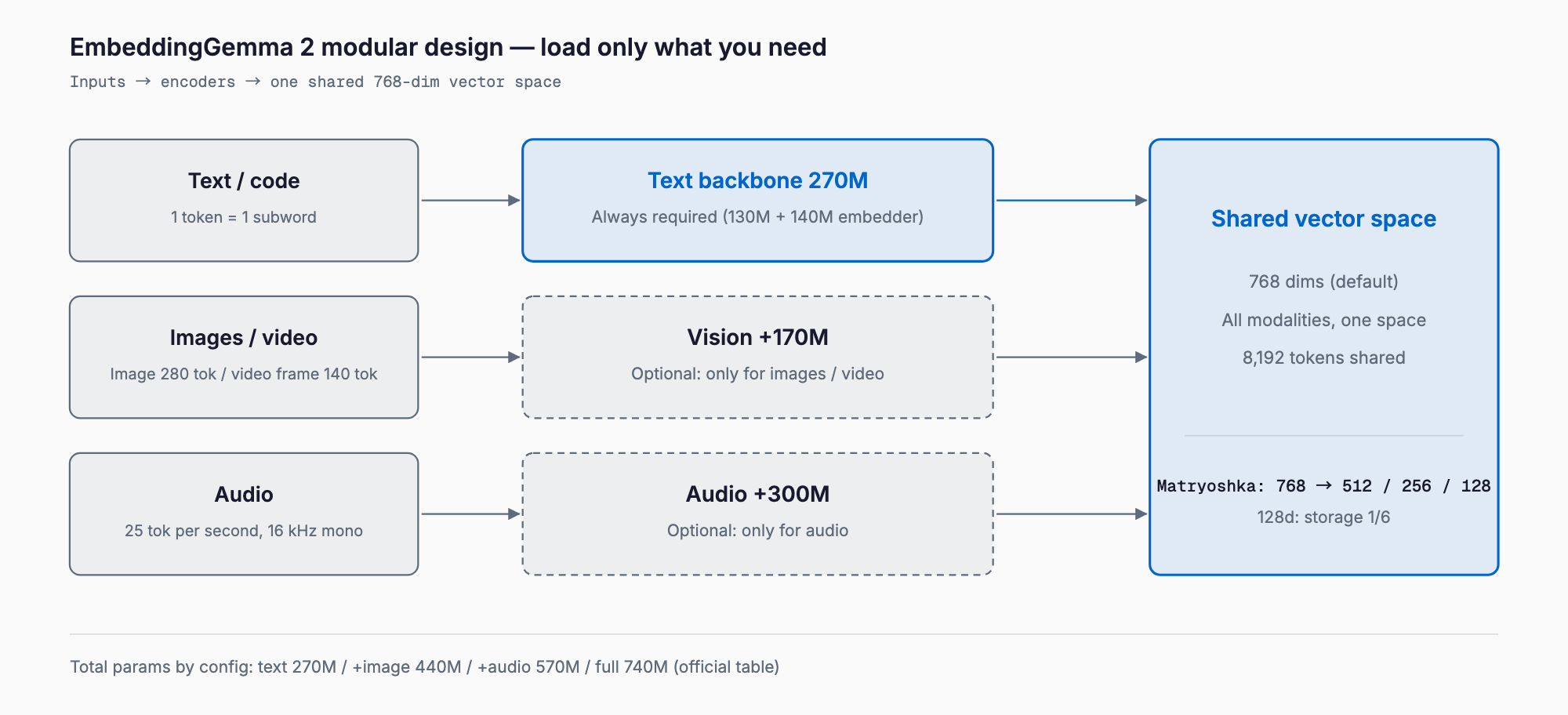
The model has 740M parameters in total: a 270M text backbone plus a 170M vision encoder and a 300M audio encoder that you add only if you need them. Unused modalities are simply not loaded, so text-only search stays at roughly 270M parameters.
| Item | EmbeddingGemma 2 | Original EmbeddingGemma |
|---|---|---|
| Inputs | Text, code, images, video, audio | Text |
| Total parameters | 740M (270M to 740M by config) | About 300M class (value at v1 launch) |
| Vector size | 768 (truncate to 512/256/128) | 768 (truncatable) |
| Context | 8,192 tokens (shared across modalities) | 2,048 tokens (value at v1 launch) |
| MTEB multilingual v2 | 61.36 | 61.15 |
| MTEB code v1 | 78.68 | 68.76 |
| License | Apache 2.0 | Gemma terms of use |
Multilingual text scores are nearly flat; the gains are in code retrieval (NDCG@10 from 68.76 to 78.68) and multimodal support. Published multimodal scores include MMEB v2 image 57.28, visual documents 67.84, video 50.67, MSEB retrieval 69.54, and MAEB 49.39. All are Google's numbers, with independent verification still to come.
Requirements at a Glance (Memory Estimates)
Weight memory is roughly parameters times bytes per parameter (FP32 = 4, BF16 = 2, 8-bit = 1, 4-bit = 0.5). The table below uses that formula and shows estimates for weights only. Runtime buffers add more depending on input length, so plan for about 1.2 to 1.5 times these figures.
| Config (estimate, weights only) | Params | FP32 | BF16 | 8-bit | 4-bit |
|---|---|---|---|---|---|
| Text only | 270M | ~1.08GB | ~0.54GB | ~0.27GB | ~0.14GB |
| Text + image | 440M | ~1.76GB | ~0.88GB | ~0.44GB | ~0.22GB |
| Text + audio | 570M | ~2.28GB | ~1.14GB | ~0.57GB | ~0.29GB |
| Full multimodal | 740M | ~2.96GB | ~1.48GB | ~0.74GB | ~0.37GB |
The official measurements, on a quantized Pixel 11 Pro, are about 191MB for text only and about 567MB for full multimodal (active RAM). That is in line with the 4-bit and 8-bit columns above and small enough to keep resident on a phone.
Running on CPU, Mac, Phones, and Browsers
- CPU / Mac: text-only needs a few hundred MB, so an 8GB machine is fine. Without a GPU, FP32 (about 1.1GB, estimate) is the safe choice. MLX and llama.cpp support has been reported for Apple Silicon.
- GPU: not required. It mainly helps when embedding large document sets in bulk. vLLM and SGLang support has also been reported.
- Phones: runs on-device through MediaPipe and LiteRT; Google describes the quantized build as a single file running on CPU or GPU (measurements above are from the Pixel 11 Pro).
- Browser: transformers.js with WebGPU has been reported, but the official Hugging Face model card does not mention it, and I could not confirm a browser-ready model ID.
How to Use It: Shortest Code
In Python (sentence-transformers, reported as 6.1.0 or later), load the model ID google/embeddinggemma-2. Use the SearchQuery prompt name for queries and Document for stored text; skipping them lowers quality without any error. For text-only use, drop the vision and audio encoders with config_kwargs.
import torch
from sentence_transformers import SentenceTransformer

# Never float16. bfloat16 if the GPU supports it, otherwise float32
dtype = torch.bfloat16 if torch.cuda.is_available() and torch.cuda.is_bf16_supported() else torch.float32

model = SentenceTransformer(
    "google/embeddinggemma-2",
    model_kwargs={"torch_dtype": dtype},
    config_kwargs={"vision_config": None, "audio_config": None},  # text only (270M)
    truncate_dim=256,  # Matryoshka: 768 / 512 / 256 / 128
)

q = model.encode("How do I return an item?", prompt_name="SearchQuery", normalize_embeddings=True)
d = model.encode("Returns are accepted within 14 days of delivery.", prompt_name="Document", normalize_embeddings=True)
print(model.similarity(q, d))
Ollama's official library lists it as embeddinggemma-2. Tags follow the modality configurations: 270m (text only, 378MB), 440m (text + image, 714MB), 570m (text + audio, 990MB), and 740m (full, 1.3GB, same as latest). For text search alone, 270m is the lightest choice. Call the embedding API as below. LM Studio and llama.cpp (GGUF) are also reported to be supported.
# Text only: the lightest 270m tag (378MB)
ollama pull embeddinggemma-2:270m

curl http://localhost:11434/api/embed -d '{
  "model": "embeddinggemma-2:270m",
  "input": ["task: search result | query: return procedure", "title: none | text: Returns within 14 days."]
}'
Images, video, and audio take no text prefix; the placeholders are <|image|>, <|video|>, and <|audio|>. As a guide, an image costs 280 tokens by default (about 29 images), a video frame 140 tokens (about 58 frames), and audio 25 tokens per second (about 5.5 minutes, 16 kHz mono), all within a shared 8,192 tokens.
Plugging It into Local RAG, and Choosing a Matryoshka Dimension
A vector database such as Qdrant works well. The example below stores and searches 256-dimension vectors (it reuses model from above). For the rest of the pipeline, see a local RAG with Qwen3.5-9B and the WeKnora RAG knowledge platform.
from qdrant_client import QdrantClient
from qdrant_client.models import Distance, VectorParams, PointStruct

client = QdrantClient(":memory:")  # use a URL or path in production
client.create_collection("docs", vectors_config=VectorParams(size=256, distance=Distance.COSINE))

texts = ["Returns are accepted within 14 days of delivery.", "Shipping is a flat 800 yen nationwide."]
vecs = model.encode(texts, prompt_name="Document", normalize_embeddings=True)
client.upsert("docs", points=[PointStruct(id=i, vector=v.tolist(), payload={"text": t}) for i, (v, t) in enumerate(zip(vecs, texts))])

qv = model.encode("How much is shipping?", prompt_name="SearchQuery", normalize_embeddings=True)
hits = client.query_points("docs", query=qv.tolist(), limit=3).points
for h in hits:
    print(h.score, h.payload["text"])
Official MTEB multilingual v2 scores are 61.36 at 768 dimensions, 61.17 at 512, 60.41 at 256, and 57.89 at 128. For text only, 256 dimensions costs about one point; 128 saves more storage but loses about 3.5 points. Multimodal quality (MMEB overall) falls faster: 59.01 at 768, 56.24 at 256, 45.65 at 128, and Google recommends 128 only for text-only workloads. For storage, one million vectors take about 1.5GB at 768 dimensions in BF16 and about 250MB at 128.
Comparison with Other Embedding Models
| Model | Inputs | Dimensions | Max input | Delivery |
|---|---|---|---|---|
| EmbeddingGemma 2 | Text, code, images, video, audio | 768 (truncatable) | 8,192 tokens | Open weights (Apache 2.0), local |
| Original EmbeddingGemma | Text | 768 (truncatable) | 2,048 tokens | Open weights, local |
| Qwen3-Embedding (0.6B/8B) | Text | Up to 1024 / 4096 (truncatable) | 32K tokens | Open weights (Apache 2.0), local |
| OpenAI text-embedding-3-large | Text | 3072 (truncatable) | 8,191 tokens | API (pay per use, cloud) |
| Gemini Embedding 2 | Text, images, documents, audio, video | 3072 (truncatable) | 8,192 text tokens | API (public preview at launch) |
In short: choose EmbeddingGemma 2 to search images and audio in the same space while keeping everything local; Qwen3-Embedding for long text-only documents (32K); and OpenAI or Gemini if you would rather call a managed API. Specs and pricing change, so check each vendor's current documentation before adopting.
Caveats
- Do not use float16: Google warns it can silently produce NaN or degraded embeddings. Use bfloat16 or float32.
- Test Japanese and other languages on your own data: it covers 100+ languages, but Google notes performance may not be equal across them. I could not find a language-specific score for Japanese.
- 8,192 tokens are shared across modalities: you cannot fit 29 images plus long text in one input. Chunk long documents.
- Prefix mistakes: queries and documents use different formats. For titled documents, build title: {title} | text: {content} yourself.
- Benchmarks are Google's published numbers: independent replication is still pending.
FAQ
Does EmbeddingGemma 2 run without a GPU?
Yes. The text-only build needs about 0.54GB in BF16 or about 1.08GB in FP32 (estimates), so a CPU machine with 8GB of RAM works. Google reports about 191MB for text only on a quantized Pixel 11 Pro.
How much memory does it need?
Official measurements on a quantized Pixel 11 Pro are about 191MB for text only and about 567MB for full multimodal. My weights-only estimates for PCs are about 0.54GB (text only, BF16) and about 1.48GB (full, BF16). Add 1.2 to 1.5 times for runtime buffers.
Does it support Japanese?
It covers 100+ languages, but I could not confirm an official Japanese-only score. Test retrieval on your own documents before adopting it.
Which Matryoshka dimension should I pick?
For text only, 256 is a good balance, about one point below 768 on MTEB multilingual v2. 128 saves storage but drops multimodal quality sharply, so use it for text-only.
Should I upgrade from the original EmbeddingGemma?
For text-only multilingual search the scores are nearly equal (61.36 vs 61.15), so it is optional. Upgrade for better code retrieval (68.76 to 78.68), longer inputs (8,192 tokens), or images and audio in the same space.
Can I run it in float16?
Avoid it. Google warns that float16 can silently give NaN or degraded embeddings and recommends bfloat16 or float32.
Summary
EmbeddingGemma 2 loads only the modalities you need: a few hundred MB for text only, about 1.5GB in BF16 (estimate) for everything, and it runs on GPU-less PCs, phones, and browsers. A solid starting point is sentence-transformers with text only, SearchQuery and Document prompts, and 256 dimensions. For how to think about hardware by model size, see Gemma 4 hardware requirements.
Related free tools (no sign-up, instant results)
Feel free to contact us
Contact Us