GPT-6 Astra Goes GA in GitHub Copilot: What Admins Must Know
Sept 4, 2026: GPT-6 Astra is GA in GitHub Copilot on Pro+, Max, Business, Enterprise, billed via AI credits that drain fast on output. Check model policy.
On September 4, 2026, GitHub announced in its Changelog that GPT-6 Astra is now generally available in GitHub Copilot. It rolls out to Copilot Pro+, Max, Business, and Enterprise plans across most surfaces, billed through usage-based AI credits under provider list pricing. Because the model is enabled by default unless an admin turns it off, teams should check their model policy settings before usage climbs.
What was announced
According to GitHub's Changelog, GPT-6 Astra has moved from limited preview to general availability inside Copilot. Unlike a preview rollout that required opt-in, eligible users on qualifying plans can now select it directly from the model picker without a separate request. GitHub explicitly notes that "rollout will be gradual," so it will not necessarily appear for every eligible user on day one — expect it to reach accounts over the following days to weeks.
For the model's underlying specs, see our deep dive on GPT-6 Astra pricing and benchmarks: roughly a 1.05M-token context window, a 128K-token maximum output, and a knowledge cutoff of April 30, 2026. Notably, this Changelog entry does not state what context window limit applies inside Copilot itself — the model's raw specs and Copilot's product-level ceiling are two different things.
Where it's available
GitHub's Changelog lists a wide set of surfaces where GPT-6 Astra becomes selectable.
| Surface | Notes |
|---|---|
| VS Code | Standard Copilot Chat and inline completions |
| Visual Studio | For .NET/C# developers |
| Copilot CLI | Agent-style terminal usage |
| GitHub Copilot coding agent | Autonomous, long-running agent tasks |
| github.com | Web-based Copilot Chat |
| GitHub Mobile (iOS/Android) | Mobile access |
| JetBrains IDEs | IntelliJ-family editors |
| Xcode | For iOS/macOS developers |
| Eclipse | For Java developers |
Eligible plans are Copilot Pro+, Max, Business, and Enterprise. The free tier and the base Copilot Pro plan are not part of this GA.
Pricing in practice — how far do AI credits go
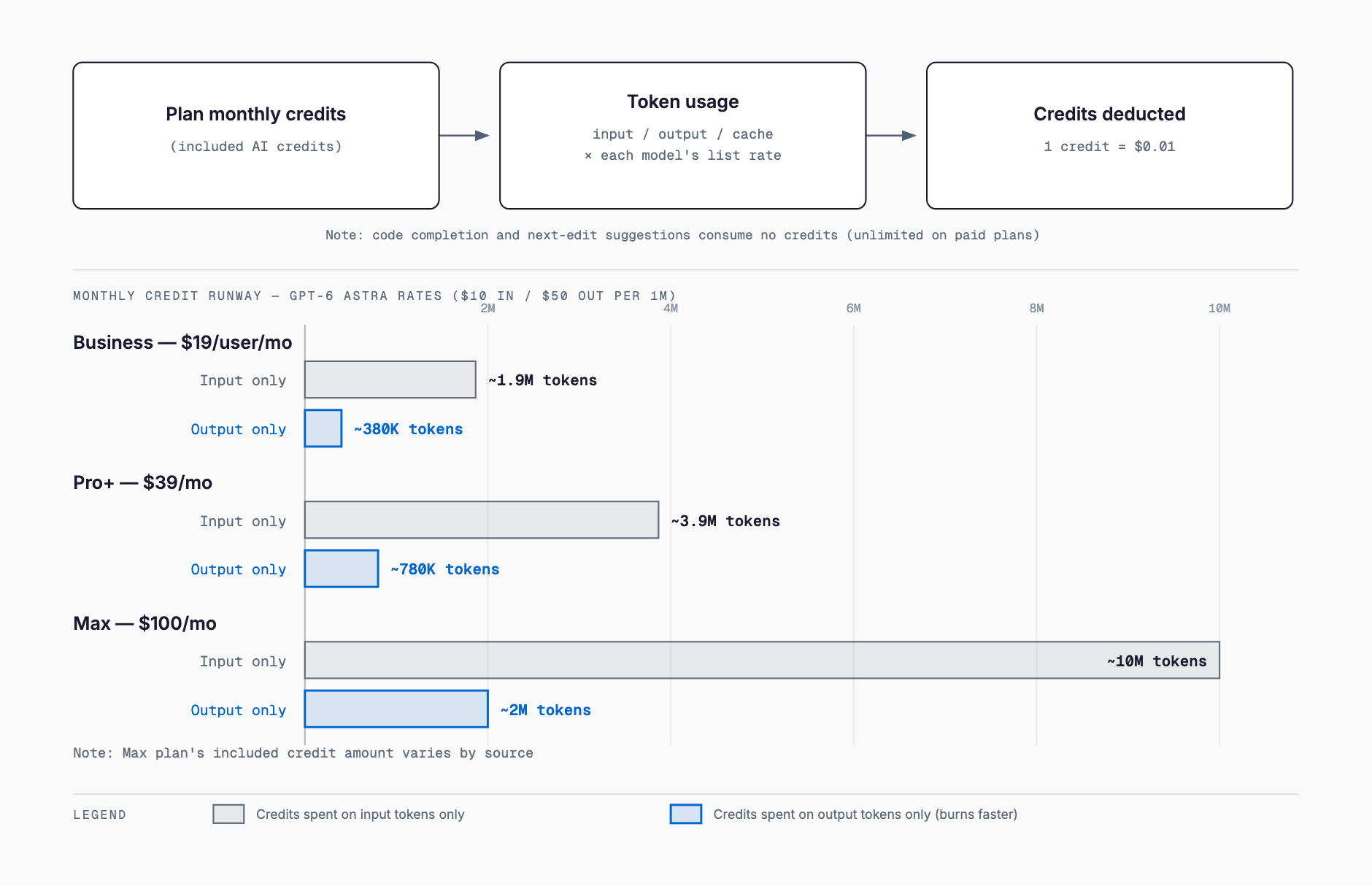
GitHub moved off the old premium-request model on June 1, 2026, switching to usage-based billing through GitHub AI Credits. One AI credit equals $0.01, and charges are calculated by applying each model's API list rate to the actual input, output, and cached tokens consumed. GPT-6 Astra is billed the same way, under provider list pricing. Code completions and next edit suggestions remain unlimited on paid plans and do not consume AI credits at all.
| Plan | Monthly price | Credits included | Notes |
|---|---|---|---|
| Pro+ | $39/mo | $39 worth | Individual, higher tier |
| Business | $19/user/mo | $19 worth | Standard org plan |
| Max | $100/mo | ~$100 worth (sources vary) | Exact allocation details differ across sources |
For Max, some sources describe the credit allocation as roughly $100 worth, while others describe an additional flex-spend allowance on top of the base $100 — the public record varies here, so confirm the actual figure in your own admin console before relying on it.
The friction point is that GPT-6 Astra's API list rate — $10 per million input tokens and $50 per million output tokens — runs higher than many existing models. A simple calculation: a Business plan's $19 monthly credit allotment covers roughly 1.9 million input-only tokens, or as little as roughly 380,000 output-only tokens. Real usage mixes input and output, so actual mileage lands somewhere between those figures, but agentic workflows that generate long outputs can burn through a month's credits quickly.
What admins should check: default enablement and model policy
- Enabled by default: New models become selectable for users automatically unless an admin has disabled the global default or explicitly turned that specific model off
- Check model policy settings: Business and Enterprise admins can control individual model availability through Copilot's model policy settings in the admin console
- Watch credit consumption: Because higher-priced models can burn through an org's credit pool faster than expected if left unchecked, periodic review of usage dashboards becomes a practical necessity
- Expect a gradual rollout: Since the model won't appear for every user at once, internal reports of "I don't see it in the model picker" are expected rather than a bug
- Update internal policy docs: Documenting which high-cost models are approved for use, alongside existing security and cost-control policies, reduces after-the-fact explanation overhead
What tasks GPT-6 Astra is suited for
GitHub describes GPT-6 Astra as built for long-horizon, autonomous, agentic coding tasks. Rather than answering single-shot questions, it's positioned to plan while verifying, batch diagnosis and validation together, and check its own results before declaring a task complete — behavior suited to multi-step agent workflows. That maps well onto scenarios like the Copilot coding agent taking an issue through to a pull request with minimal hand-holding.
For simpler use cases — short completions, quick review comments, high-volume small requests — the $50-per-million-output-token rate becomes a heavier cost burden. Matching the model to the task's complexity is a practical way to keep credit burn under control.
Choosing between models
Copilot supports multiple models, and picking between them on a cost/capability basis is the default operating mode. Here's how GPT-6 Astra compares with Claude Fable 5.1 (Mythos 5.1), announced around the same time, and cheaper existing models. For a broader cross-tool comparison, see our Codex vs. Claude Code vs. Cursor vs. Copilot comparison.
| Model | Best fit | Cost profile |
|---|---|---|
| GPT-6 Astra | Long-horizon autonomous agent tasks, large refactors | Higher ($50/M output tokens) |
| Claude Fable 5.1 | Interactive design discussion, code review, complex context handling | Mid-to-high depending on variant |
| Cheaper/lightweight models | Simple completions, routine Q&A, high request volume | Lower, easier on credit budgets |
Reserving the highest-capability model for genuinely agentic, high-stakes work, and routing routine small interactions to lighter models, is the practical way to stretch a monthly credit allotment.
Things to watch out for
- Rollout is gradual, so not seeing the model in the picker right after the announcement isn't unusual
- Max plan's exact credit allocation varies by source — confirm the real figure through your own contract and admin console
- Code completions and next edit suggestions don't consume credits, but Chat and agentic task usage does
- Because the model is enabled by default, some organizations may already be using it without having made a deliberate decision to do so
- The effective context window limit inside Copilot itself is not stated in this Changelog entry
FAQ
Which Copilot plans can use GPT-6 Astra?
Copilot Pro+, Max, Business, and Enterprise. The free tier and the base Copilot Pro plan are not included in this GA.
Does using GPT-6 Astra cost extra?
There's no separate contract required, but it's billed through usage-based AI credits under provider list pricing. At $10 input / $50 output per million tokens, its rate runs higher than many existing models, so watch consumption closely.
What should admins check first?
Business and Enterprise admins should review Copilot's model policy settings in the admin console and, if needed, explicitly disable GPT-6 Astra — it's enabled by default otherwise.
What if the model doesn't show up yet?
GitHub states the rollout is gradual. Not seeing it immediately after the announcement is expected; check back after a few days.
Do code completions consume AI credits?
No. Code completions and next edit suggestions remain unlimited on paid plans and don't consume credits. Credit usage applies to Chat and agentic task usage.
How should I choose between GPT-6 Astra and other models?
GPT-6 Astra fits long-horizon, autonomous agent tasks well. For simple completions or routine interactions, a cheaper, lighter model conserves credits more effectively. Match the model to the task's complexity.
Summary
GPT-6 Astra's GA in GitHub Copilot gives eligible teams a new option, but two operational details deserve attention: it's enabled by default, and its credit rate runs higher than many existing models. Admins should review model policy settings, and developers should match model choice to task complexity to avoid unexpected credit burn. Since the rollout is gradual, it's also worth checking whether the model has reached your account yet.
Feel free to contact us
Contact Us