Groupware Cost Guide: Cybozu, kintone, Workspace, M365
A groupware cost guide for SMBs: Cybozu Office, kintone, Google Workspace, Microsoft 365 pricing, scheduling, room booking, workflows, and mistakes to avoid.
Groupware costs typically run from a few hundred to a few thousand yen per user per month, depending on headcount and how much functionality you need. Tools like Cybozu Office, kintone, desknet's NEO, Google Workspace, and Microsoft 365 differ from business chat apps: they handle the operational backbone of a company — shared schedules, meeting room and vehicle bookings, digital circulars and approval workflows, and internal bulletin boards. Based on each vendor's published pricing as of August 2026, here is a rough guide to costs and how to choose.
How groupware differs from chat tools
Groupware and business chat serve different purposes. Chat tools such as Slack, Teams, and Chatwork are built for immediacy — getting a message across right now. Groupware, by contrast, is the foundation for information an organization needs to accumulate and share over time: schedules, equipment availability, approval history for internal requests, and company-wide notices. Most companies run both side by side. For a cost breakdown of chat tools specifically, see our guide to business chat costs; this article focuses purely on groupware's core functions.
The four core functions of groupware
Groupware's core functionality breaks down into four areas. First, shared scheduling that lets you see availability across employees, departments, and meeting rooms in one view. Second, equipment booking, so meeting rooms, vehicles, and shared gear like projectors don't get double-booked. Third, digital circulars and approval workflows for things like internal notices, safety confirmations, leave requests, and expense or purchase approvals. Fourth, a bulletin board for company-wide or department-wide announcements. Standalone scheduling apps or SaaS tools can cover some of these individually, but spreading them across multiple disconnected tools tends to cause double data entry and missed information.
Pricing for five major products (as of August 2026)
The figures below are rough estimates based on each vendor's published pricing, and actual costs vary by contract type, user count, and ongoing promotions. Always check each vendor's official site for current plans before signing a contract.
| Product | Deployment | Roughly per user/month | Typical setup cost | Notes |
|---|---|---|---|---|
| Cybozu Office | Cloud or on-premise (package) | Cloud version roughly ¥500–¥1,000 | Package version from several hundred thousand yen; cloud typically has no setup fee | Focused specifically on core groupware functions: scheduling, circulars, and equipment booking |
| kintone | Cloud | Roughly ¥1,500, plus per-app usage fees in some cases | Usually none, though initial app design work may add cost | Leans toward custom business-app building; groupware features are added as needed |
| desknet's NEO | Cloud or on-premise (package) | Cloud version roughly ¥500–¥900 | Package version from several hundred thousand yen | Scheduling, workflows, and bulletin boards ship together as standard from the start |
| Google Workspace | Cloud | Roughly ¥800–¥3,000, depending on plan | Usually none | Calendar-centric; circulars and approval workflows are thin out of the box and usually need extra setup |
| Microsoft 365 | Cloud | Roughly ¥900–¥3,000, depending on plan | Usually none | Integrates well with Outlook calendar and Teams, but approval workflows and circulars typically require a separate tool |
Cloud vs. on-premise: which should you choose?
Some products, such as Cybozu Office and desknet's NEO, offer both a cloud version and an on-premise (package) version. Cloud versions keep upfront costs low and remove the burden of managing a server, which makes them the default choice for small businesses without a dedicated IT department. On-premise becomes an option when a company needs to keep certain data off external networks, or wants everything centrally managed on an internal server. Keep in mind that on-premise carries ongoing costs beyond the initial setup fee — server maintenance, backups, and OS updates all become recurring work.
How to decide
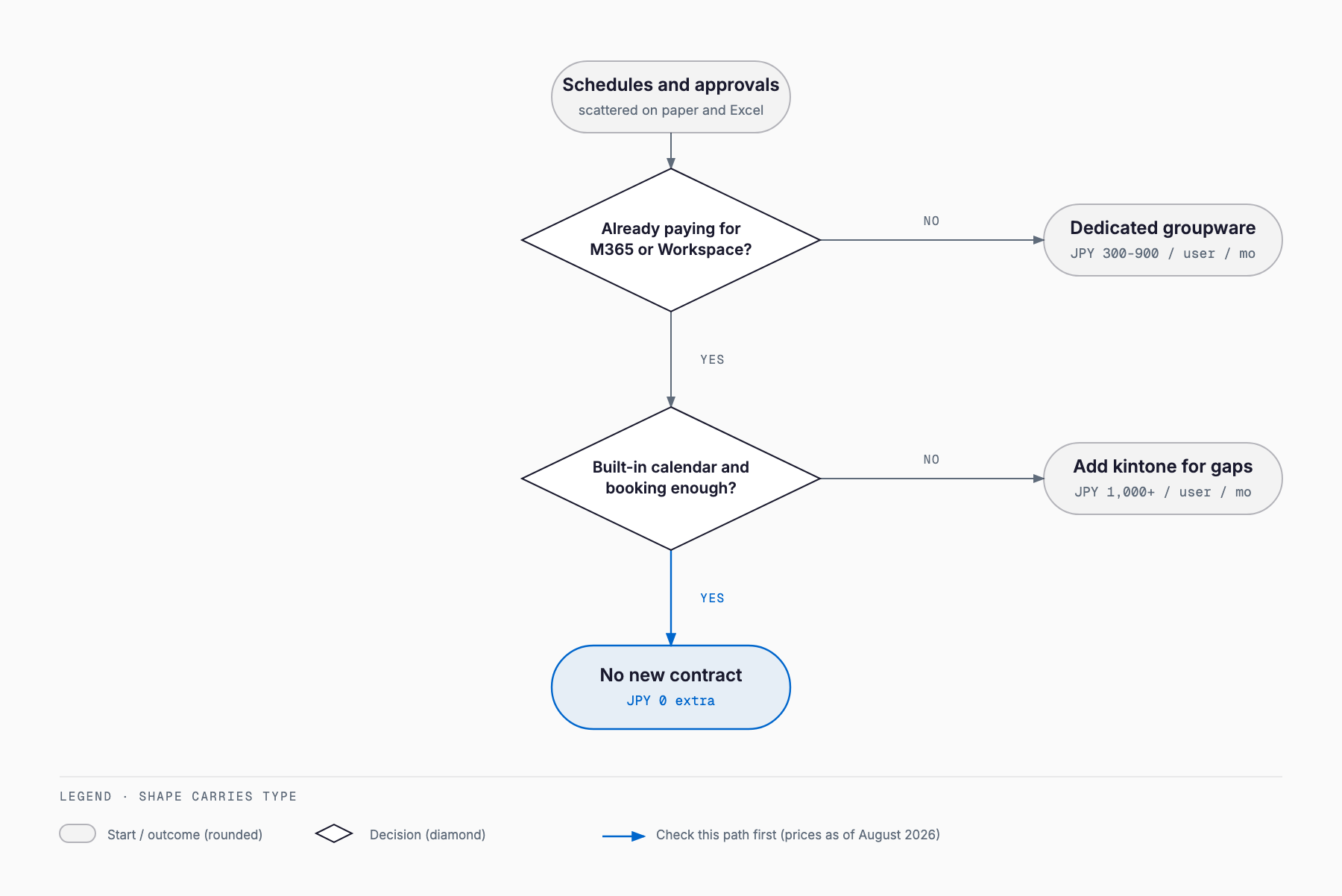
The first factor is compatibility with the office software and email environment you already use. If you're already paying for Microsoft 365 or Google Workspace, it's worth checking how far their standard calendar and shared-drive features can get you before adding a separate groupware contract — see our comparison of Google Workspace and Microsoft 365 for more detail. The second factor is how far you want to digitize approval workflows. Companies still relying heavily on paper approval forms or verbal confirmations tend to have an easier rollout with products like Cybozu Office or desknet's NEO, where circulars and workflow features come standard. If you need more sophisticated approval routing or integration with external systems, it's worth comparing against a dedicated product in our guide to workflow system costs. The third factor is headcount and organizational structure — a company with a few dozen employees and few departments usually gets more traction from a simpler, focused product, while a multi-site company with layered approval chains should prioritize workflow flexibility.
A rollout checklist
- Have you mapped out where scheduling, equipment booking, approvals, and notices are currently scattered?
- Have you checked whether Microsoft 365 or Google Workspace's standard features already cover what you need?
- Have you decided whether cloud or on-premise fits your operational setup?
- Have you mapped out your approval routes for requests and workflows in advance?
- Have you assigned who issues and revokes accounts when someone joins, transfers, or leaves?
- Are you ready to communicate a company-wide rule that everyone enters their own schedule?
- Have you planned how to phase out existing paper circulars and bulletin boards?
- Have you tested the tool against your actual workflow during a free trial?
Common failure patterns
The most common failure is that only some employees actually enter their schedules, so shared scheduling never becomes reliable. Without a company-wide rule that everyone enters their own schedule, teams often end up running the new tool alongside paper bulletin boards or verbal check-ins — a form of double management that defeats the purpose. The second common failure is forgetting to disable accounts for employees who leave or transfer, leaving their approval permissions and access to internal information intact; a periodic account audit is essential. A third pattern is skipping the equipment booking feature and continuing to reserve rooms verbally or on a whiteboard, so meeting room double-bookings never actually go away. Finally, some companies pick an overly feature-rich product that staff never fully learn to use, leaving most of it dormant — choosing a product whose scope matches your actual workload is usually the faster path to a good return on the investment.
Frequently asked questions
Do we need to pay for both groupware and a chat tool?
Not strictly, but since they serve different purposes, most small businesses end up running both. A common split is chat for immediate messages and groupware for schedules, equipment bookings, approvals, and notices. Many companies start with whichever area — chat or groupware — is causing the most confusion today.
Is there a free groupware option?
Some products offer a free plan or trial period, though usually with limits on user count or features. A practical approach is to test your actual workflow on the free plan or trial first, confirm the features you need are covered, then move to a paid plan.
Do small companies need groupware at all?
If you have just a few employees all working in the same location, there's no need to force it. It becomes worth considering once you have multiple sites or projects running in parallel and it gets harder to see who is doing what and when.
Can we switch products later?
Yes, but migrating accumulated schedule history, approval records, and bulletin board posts takes real effort and cost. Before signing a contract, it's worth checking how easily you'd be able to export your data down the line.
Related free tools (no sign-up, instant results)
Feel free to contact us
Contact Us