HR Performance Evaluation System Costs for SMBs (2026)
HR evaluation system costs run from a few hundred yen per employee for SaaS to millions for custom builds, covering MBO, OKR, and 360-degree fit for SMBs.
An HR evaluation system centralizes goal setting, evaluation forms, feedback, and the aggregation of results into raises and bonuses, digitizing performance review work that used to run on Excel or paper. Typical 2026 costs run 300-1,000 yen per employee per month for cloud SaaS (plus a small setup fee), 500,000-3,000,000 yen upfront for packaged on-premise software, 1,000,000-5,000,000 yen for a kintone-style low-code build, and 5,000,000 yen or more for full custom development (these are general 2026 market ranges, not individual quotes). Companies that still distribute and collect evaluation sheets in Excel often struggle with chasing down missing submissions, evaluation history scattered across individual PCs, and inconsistent standards between evaluators. This guide breaks down HR evaluation system costs and how to choose the right approach for your company's evaluation framework. For the broader picture including payroll, it helps to review this alongside the cost range for payroll and HR systems.
What Is an HR Evaluation System?
An HR evaluation system is not just a tool for entering scores. It typically combines goal management that sets and tracks individual targets; multi-rater evaluation that collects input from a manager, the employee, and peers; result aggregation and visualization that ties scores to grades and pay tables; feedback management that stores review-meeting notes and comments; day-to-day logging for 1-on-1s and observations during the review period; and integration with a talent database so evaluation data can inform transfers and promotion decisions. Not every feature is needed from day one — simply moving a paper or Excel evaluation sheet online already improves visibility into submission status and cuts aggregation work.
Cost Ranges by Approach
| Approach | Overview | Typical initial cost | Typical monthly cost |
|---|---|---|---|
| 1. Cloud SaaS (per-employee billing) | Contract an evaluation-focused SaaS and run it on standard features | 0-100,000 yen | 300-1,000 yen per employee |
| 2. Packaged software (on-premise) | Deploy an evaluation/appraisal package on your own server | 500,000-3,000,000 yen | 100,000-200,000 yen/year in maintenance |
| 3. Low-code customization (e.g. kintone) | Build evaluation forms and aggregation flows on a no-code/low-code platform | 1,000,000-5,000,000 yen | 20,000-150,000 yen for platform fees and maintenance |
| 4. Full custom development | Built with a unique evaluation model and pay/grade table integration | 5,000,000-15,000,000 yen, sometimes more | Maintenance around 10-15% of initial cost per year |
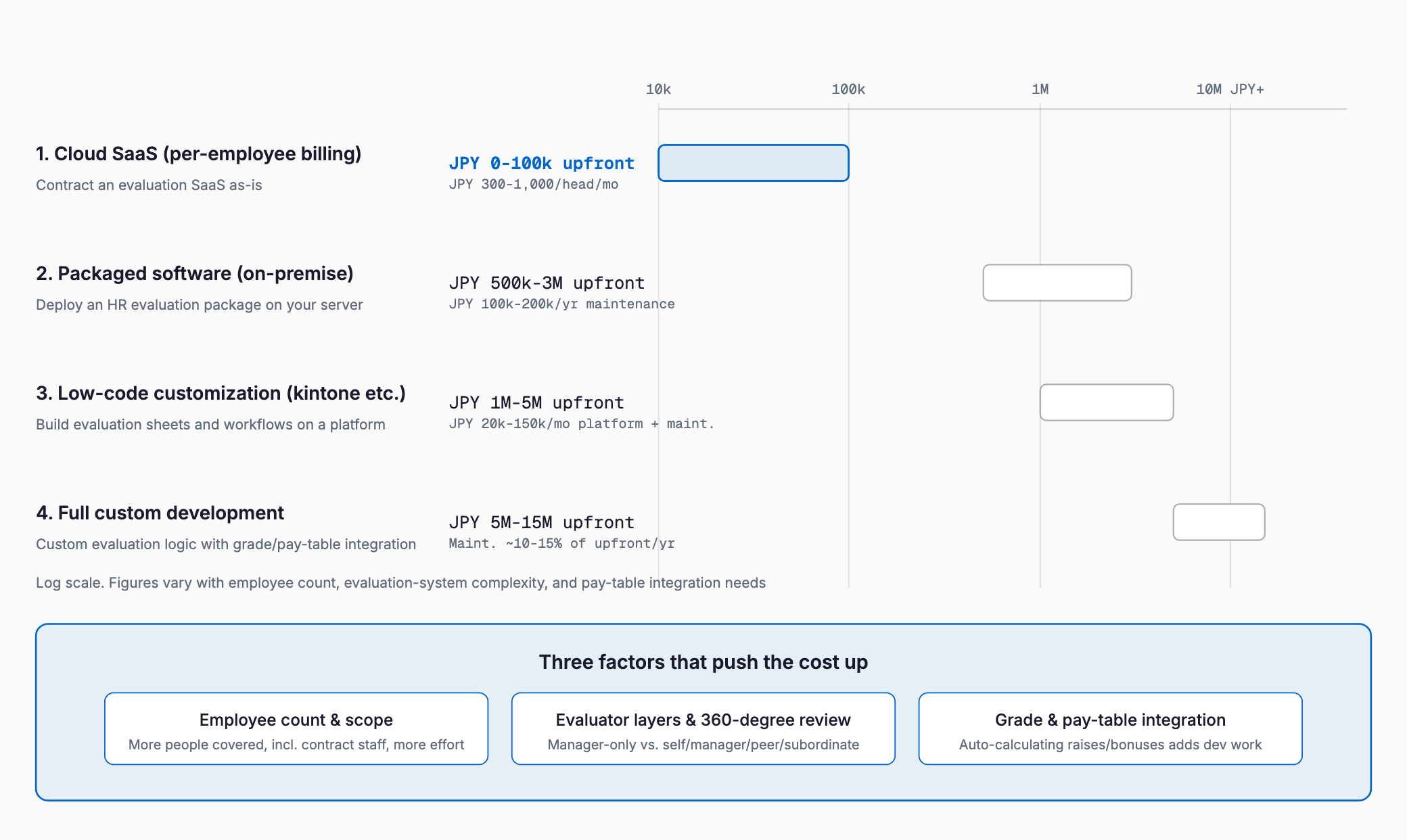
If headcount is in the dozens and evaluation items and flows are relatively simple, cloud SaaS is usually sufficient. The more complex the linkage to pay and grade tables, or the more often the evaluation framework itself changes, the more customization or custom development becomes necessary. For a broader comparison of these implementation approaches, see SaaS vs. package vs. custom development.
What Drives the Cost
- Headcount and evaluation scope: More evaluated employees, and including contract or part-time staff, increases license count and design effort
- Evaluator layers and multi-rater scope: Whether it's a simple manager-only review or a full 360-degree review involving self, manager, peers, and reports changes screen design and aggregation complexity
- Number of evaluation forms: More role- or grade-specific templates add work
- Integration with grade and pay tables: Automatically reflecting evaluation results into raise and bonus calculations adds integration work with the payroll system
- Frequency of framework changes: Companies that revise their evaluation framework often, such as moving from MBO to OKR, need a more flexible platform, which raises selection difficulty
- Integration with existing systems: Connecting to a payroll and HR system or attendance system adds effort per connected system
Fit with MBO, OKR, 360-Degree, and Competency Frameworks
Before selecting an HR evaluation system, it helps to clarify which framework the company currently uses, or plans to move toward. MBO (Management by Objectives) measures achievement against individual numeric or behavioral goals, and most SaaS products support it as a standard feature, making it relatively inexpensive to adopt. OKR (Objectives and Key Results) requires visualizing how company-wide and individual goals link together across levels, so the product must support cross-level goal linkage displays. 360-degree review needs a mechanism to aggregate input from self, manager, peers, and reports; as the number of raters grows, the strength of operational features like response reminders and anonymity protection becomes the deciding factor. Competency-based evaluation manages behavioral traits defined per role and grade as evaluation items, so it is hard to operate without a product that allows highly flexible form customization. Many companies run more than one framework at once, in which case it is worth confirming how freely evaluation-form templates can be added.
Migrating from Excel and Paper
1. Inventory the evaluation forms, workflow, and past evaluation history currently kept in Excel or on paper, and decide the scope to digitize
2. Map out your evaluation framework (MBO, OKR, 360-degree, competency, etc.) and finalize how many form templates you need
3. Run a pilot (PoC) in one department for one review period to check the input burden for both evaluators and employees
4. Adjust items and reminder workflows based on gaps found during the pilot
5. Roll out company-wide, phasing out Excel-based distribution and collection of evaluation sheets
6. Use accumulated evaluation data to flag rating inconsistencies and support promotion decisions as an ongoing operating cycle
Checklist Before Choosing a System
- How are evaluations currently conducted (paper, Excel), and how many employees and evaluator layers are involved?
- Which evaluation framework does the company use — MBO, OKR, 360-degree, competency, or a combination?
- Do you want evaluation results to automatically flow into grade/pay tables and bonus calculations?
- How much customization freedom do you need for evaluation-form templates?
- What is the IT comfort level of evaluators and employees, and what devices will they use?
- What is the scope of integration with a payroll and HR system or attendance system?
- Might the evaluation framework itself change in the future, and how easily can the system's settings adapt?
- For 360-degree review requiring anonymity, how granular is the access control over response data?
Common Failure Patterns
A few patterns recur in HR evaluation system rollouts. First, selecting a system to fit the current framework, then finding it cannot accommodate settings changes when the framework itself is revised the following year, forcing a re-selection — since frameworks often change every few years, it pays to confirm template flexibility up front. Second, neglecting to explain form entry and deadlines to evaluators, which leaves the system running alongside Excel drafts as a duplicate process. Third, underestimating the effort of migrating past evaluation history, leading to complaints right after go-live that past reviews cannot be referenced for promotion decisions. Fourth, evaluating the system in isolation from a payroll and HR system plan, which leaves reflecting evaluation results into pay tables a manual task and cuts the benefit of going digital in half.
Choosing Between SaaS and Custom Development
| Factor | Cloud SaaS fits when | Customization or custom development fits when |
|---|---|---|
| Evaluation framework | Mainly MBO, fitting within standard features | A complex mix of OKR, 360-degree, and competency evaluation |
| Pay table integration | Not needed, or manual CSV reflection is acceptable | Results should auto-calculate raises and bonuses |
| Form flexibility | Standard templates suffice | Detailed, role- and grade-specific items are needed |
| Headcount | Tens to a few hundred employees | Hundreds to thousands of employees, or frameworks differ by division |
| Budget | Want to keep it to tens of thousands of yen a month | Can allocate millions of yen upfront |
Using Subsidies
Introducing an HR evaluation system may qualify for Japan's IT Introduction Subsidy (IT導入補助金), which supports adopting IT tools. Eligible tools, expense categories, and applicant requirements change every fiscal year, so always check the latest official application guidelines before applying. For an overview of the subsidy programs available to SMBs, see IT subsidies for SMBs.
Frequently Asked Questions
How much better is an HR evaluation system compared to managing reviews in Excel?
Expected benefits include less time spent chasing missing submissions, faster search of evaluation history, and better visibility into rating inconsistencies between evaluators. Companies with more employees tend to see the biggest reduction in aggregation and progress-tracking effort.
What does it typically cost to build an HR evaluation system on kintone?
A simple form-entry and aggregation setup typically costs 1,000,000-2,500,000 yen, while adding multi-rater review and pay-table integration typically runs 2,500,000-5,000,000 yen. Costs vary with requirements, so get an individual quote to confirm.
What should we watch out for when introducing 360-degree review?
With more raters involved, operational features like response reminders and anonymity protection become more important. Response burden also tends to rise, so a practical approach is to pilot with a limited group and set of items first, then expand scope based on the results.
How long does implementation usually take?
For a cloud SaaS, selection through a pilot in one department typically takes one to two months. A company-wide rollout or integration with pay tables typically takes a few months, and full custom development typically takes around six months.
Summary
HR evaluation system costs range from a few hundred yen a month per employee for cloud SaaS to several million yen for custom development with complex frameworks and pay-table integration, with the right choice depending heavily on the approach. A practical way to control cost is to first map out your evaluation framework (MBO, OKR, 360-degree, competency), headcount, and whether pay-table integration is needed, confirm what standard features already cover, and limit customization or development to the gaps that remain.
Related free tools (no sign-up, instant results)
Feel free to contact us
Contact Us